The Wiert Corner – irregular stream of stuff

Jeroen W. Pluimers on .NET, C#, Delphi, databases, and personal interests

  • My badges

  • Twitter Updates

  • My Flickr Stream

  • Pages

  • All categories

  • Enter your email address to subscribe to this blog and receive notifications of new posts by email.

    Join 1,854 other subscribers

Archive for 2023

PostgreSQL Exercises

Posted by jpluimers on 2023/01/11

[Wayback/Archive] PostgreSQL Exercises

This site was born when I noticed that there’s a load of material out there to help people learn about SQL, but not a great deal to make it easy to learn by doing. PGExercises provides a series of questions and explanations built on a single, simple dataset.

It was funny, as I bummped into right after writing the article Enabling GitHub pages to a HTML or markdown GitHub project is dead easy: Delphi deadlockempire is now hosted on github.io (which reached the top of the blog queue yesterday).

After reading the [Wayback/Archive] PostgreSQL Exercises: Getting Started, start the exercises at [Wayback/Archive] PostgreSQL exercises: basic exercises.

There is no login needed, which I really like.

Note that some of the assignments are hard, and can have multiple results, see for instance [Archive] Fahru on Twitter: “this: … I FINALLY completed it, and any win is worth telling🥳 took me like one hour on and off. The “more than 30$” requirement is bizarre 😂 a bit different than the official answer so I’m digging up more about this learned a heck ton, worth the time! ” / Twitter

Via: [Archive] Steve Polito on Twitter: “If you’re like me and want to level up your SQL game, give PostgreSQL Exercises a try. …” / Twitter

–jeroen

Posted in Database Development, Development, PostgreSQL, Software Development, SQL | 2 Comments »

Enabling GitHub pages to a HTML or markdown GitHub project is dead easy: Delphi deadlockempire is now hosted on github.io

Posted by jpluimers on 2023/01/10

A while ago I wrote about Setting up a GitHub project so it is served over https as a github.io and a custom subdomain.

Doing the full “host on your custom domain” route was a big tougher than I hoped for, so I totally forgot how easy it is to convert an existing HTML or markdown documentation repository to use GitHub pages without a custom domain.

I needed it for the Delphi version of the DeadLockEmpire (see links below, originally it was an interactive tutorial game focusing on the C# language and .NET runtime), as I am trying to get as much as my stuff published and hosted in a manner that will outlive me (I still have a pretty high chance of the rectum cancer metastases returning).

Enabling GitHub Pages on your repository is almost as easy as hosting a page through raw.githack.com (where I already hosted raw.githack.com/jpluimers/deadlockempire.github.io/feature/Delphi-language-and-Delphi-RTL/index.html as raw.githack.com/jpluimers/deadlockempire.github.io/feature/Delphi-language-and-Delphi-RTL/index.html and rawcdn.githack.com/jpluimers/deadlockempire.github.io/feature/Delphi-language-and-Delphi-RTL/index.html).

This is how easy it was to get it hosted as [Wayback/Archive] jpluimers.github.io/deadlockempire.github.io:

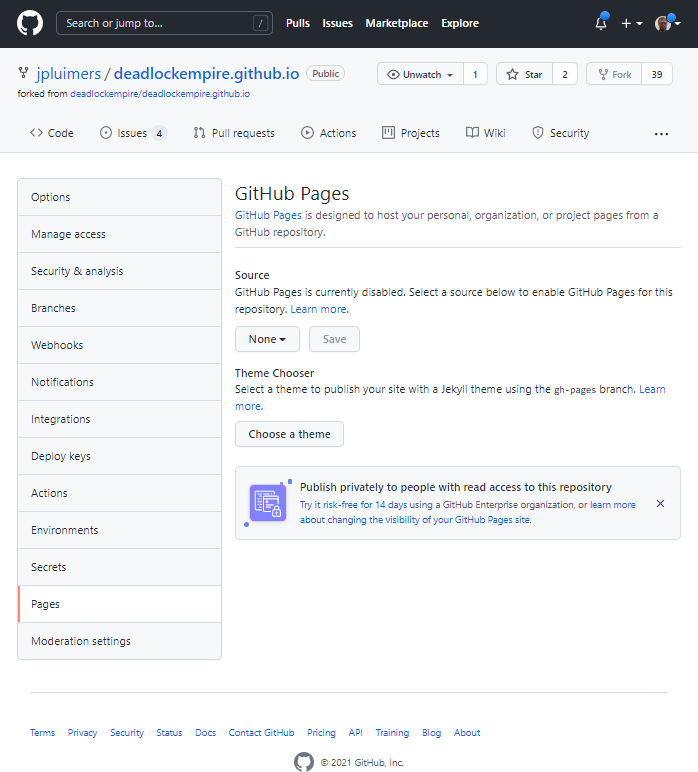
  1. In my [Wayback/Archive] jpluimers/deadlockempire.github.io: The Deadlock Empire: Slay dragons, learn concurrency! repository, go to the Settings tab, then click on Pages:
    DeadLockEmpire Settings tab, Pages configuration None

    DeadLockEmpire Settings tab, Pages configuration None.

    Here you see “None” as value for the branch to be published as GitHub Pages.

  2. Here I have chosen the Branch “feature/Delphi-language-and-Delphi-RTL” to be published, and am about to press “Save” (full screenshot below):
    DeadLockEmpire Pages selecting the correct branch

    DeadLockEmpire Pages selecting the correct branch

  3. After pressing “Save“, the site gets published (it takes about a minute for that to complete) at [Wayback/Archive] jpluimers.github.io/deadlockempire.github.io:
    DeadLockEmpire Pages the correct branch has been saved

    DeadLockEmpire Pages the correct branch has been saved which will automagically publish it.

That was it. No more steps.

Each new commit in the selected branch will auto-publish as well.

Related DeadLockEmpire posts

  1. 2016 – If you thought you could do multi-threading, then play “The Deadlock Empire” games.
  2. 2017 – ThreadBarrier/ThreadBarrier.pas at master · lordcrc/ThreadBarrier
  3. 2020 – Davidlohr Bueso on Twitter: A programmer had a problem. He thought to himself, “I know, I’ll solve it with threads!”. has Now problems. two he
  4. [WayBack] One second code: Do YOU know how much your computer can do in a second? is a quiz version of the [WayBack] Numbers Every Programmer Should Know By Year. [WayBack] About this game revealed…Source: One second code: Do YOU know how much your computer can do in a second? « The Wiert Corner – irregular stream of stuff

Read the rest of this entry »

Posted in .NET, About, C#, Conference Topics, Conferences, Delphi, Development, Event, Personal, Software Development, Web Development | 1 Comment »

Some notes on changing and checking bind DNS entries

Posted by jpluimers on 2023/01/09

DNS isn’t based on propagation, but on (cache) expiry. Which means it is all about TTL (Time to Live), and since humans are bad at coping with caching (remember the post There are 2 hard problems in computer science: cache invalidation, naming things, and off-by-1 errors?), I needed some DNS refresh.

The time values in seconds of SOA (Start of Authority) and TTL record entries are always a pain, so hopefully this helps some:

Some TTL recommendations of the DNS SOA record via [Wayback/Archive] dns soa ttl best practice – Google Search and [Wayback/Archive] dns recommended ttl values – Google Search:

I’d rather have a good route for unplanned DNS changes (as in the past, quite a few were about those), so I settled for 3600 seconds (1 hour), but might go down to 600 seconds (10 minutes).

Checking DNS entries

Changing DNS entries

Some information on the DNS “master” files (which contain the RR or “resource records”) from [Wayback/Archive.is] RFC1035: domain names – implementation and specification and [Wayback/Archive] RFC2308: Negative Caching of DNS Queries (DNS NCACHE), as keep forgetting them.

Both RFCs together specify that these line entries are defined (i.e. can be valid):

    <blank>[<comment>]
    $ORIGIN <domain-name> [<comment>]
    $INCLUDE <file-name> [<domain-name>] [<comment>]
    <domain-name><rr> [<comment>]
    <blank><rr> [<comment>]

and that these are the valid <rr> or resource record formats:

    [<TTL>] [<class>] <type> <RDATA>
    [<class>] [<TTL>] <type> <RDATA>

If you do a DNS zone transfer – Wikipedia (often abbreviated to the DNS query type AXFR), then these entries always are single line with fields expanded, with each always having an absolute <domain name> entry ending in a dot (.), and read like this:

<domain name> TTL <class> <type> <RDATA>

From the specific RFCs:

  • RFC 1035 section 3.2.4: CLASS values
  • RFC 1035 section 5.1: master files – format
    • White space to separate items on a line can be spaces or tabs
    • Comments start with semi-colon (;), which means that hashes (#) or double-slashes (//) won’t work and are syntax errors (the above mentioned tool named-checkzone can help you figure out those syntax errors).
    • There are line entries for blank, $ORIGIN, $INCLUDE, and resource record.
    • A line entry starting with $ORIGIN defines the current origin to be used from then on. Without such entry, he default origin can be defined through a parameter when loading the master file (see the Zone file: localhost example file)
    • Resource record line entries can start with:
      • @ to use the current origin as domain name.
      • a specified <domain-name> to denote the domain name to be used
      • no <domain-name> indicating the previous domain name to be used
    • A <domain-name> can be absolute ending in a dot (.)), or relative (in which case the origin is appended).
    • No <TTL> or  no <class> value means to use the previous TTL or class values to be used.
    • One resource record entry per line, unless you put parenthesis, then you can wrap it over multiple lines, which can be convenient for SOA record like this:
      @               IN      SOA     ns1.4delphi.com.        hostmaster.4delphi.com. (
                              2021112201 ; serial
                              3600 ; refresh every 1 hour
                              120 ; retry every 2 minutes
                              1209600 ; expire in 2 weeks
                              10800 ; now is 3 hours (see RFC2308) used to be 2 days: 172800 ; default_ttl
                              )
  • RFC2308 section 4: SOA Minimum Field
    • The $TTL line entry defining the default TTL to be used from then on (similar to $ORIGIN )

There is more (like encoding of domain names, more resource record types, and domain name length limitations), but those go beyond this blog post.

Examples on Wikipedia

Zone file: Example file is great:

$ORIGIN example.com.     ; designates the start of this zone file in the namespace
$TTL 3600                ; default expiration time (in seconds) of all RRs without their own TTL value
example.com.  IN  SOA   ns.example.com. username.example.com. ( 2020091025 7200 3600 1209600 3600 )
example.com.  IN  NS    ns                    ; ns.example.com is a nameserver for example.com
example.com.  IN  NS    ns.somewhere.example. ; ns.somewhere.example is a backup nameserver for example.com
example.com.  IN  MX    10 mail.example.com.  ; mail.example.com is the mailserver for example.com
@             IN  MX    20 mail2.example.com. ; equivalent to above line, "@" represents zone origin
@             IN  MX    50 mail3              ; equivalent to above line, but using a relative host name
example.com.  IN  A     192.0.2.1             ; IPv4 address for example.com
              IN  AAAA  2001:db8:10::1        ; IPv6 address for example.com
ns            IN  A     192.0.2.2             ; IPv4 address for ns.example.com
              IN  AAAA  2001:db8:10::2        ; IPv6 address for ns.example.com
www           IN  CNAME example.com.          ; www.example.com is an alias for example.com
wwwtest       IN  CNAME www                   ; wwwtest.example.com is another alias for www.example.com
mail          IN  A     192.0.2.3             ; IPv4 address for mail.example.com
mail2         IN  A     192.0.2.4             ; IPv4 address for mail2.example.com
mail3         IN  A     192.0.2.5             ; IPv4 address for mail3.example.com

as well as the examples at Zone file: Localhost:

An example for manual configuration of the forward zone for localhost is the following:

$ORIGIN localhost.
@  86400  IN  SOA   @  root (
                  1999010100 ; serial
                       10800 ; refresh (3 hours)
                         900 ; retry (15 minutes)
                      604800 ; expire (1 week)
                       86400 ; minimum (1 day)
                    )
@  86400  IN  NS    @
@  86400  IN  A     127.0.0.1
@  86400  IN  AAAA  ::1

The corresponding reverse zone definition is:

;; reverse zone file for 127.0.0.1 and ::1
$TTL 1814400 ; 3 weeks
@  1814400  IN  SOA     localhost. root.localhost.  (
                      1999010100 ; serial
                           10800 ; refresh (3 hours)
                             900 ; retry (15 minutes)
                          604800 ; expire (1 week)
                           86400 ; minimum (1 day)
                        )
@  1814400  IN  NS      localhost.
1  1814400  IN  PTR     localhost.

This file does not specify the origin so that it may be used for both IPv4 and IPv6 with this configuration:

zone "0.0.127.in-addr.arpa"  IN {
                                type master;
                                file "r.local";
                                };
zone "0.0.0.0.0.0.0.0.0.0.0.0.0.0.0.0.0.0.0.0.0.0.0.0.0.0.0.0.0.0.0.ip6.arpa"  IN {
                                type master;
                                file "r.local";
                                };

Similar zone master files may be created for the reverse resolution of the broadcast address and the null address. Such zone files prevent a DNS server from referring to other, possibly external DNS servers.

Related

OpenSuSE: the relation between /etc/var/named.d and /var/lib/named

jeroen

Posted in DNS, Internet, Power User | Leave a Comment »

How to create android and ios keyboard shortcuts | PCWorld

Posted by jpluimers on 2023/01/06

[Wayback/Archive] How to create android and ios keyboard shortcuts | PCWorld android bits, numbering mine:

(Note: These steps work only with the stock Android keyboard. Tap Settings, Language & input, and make sure Google Keyboard is selected under the Keyboard & Input Methods heading.)
  1. Tap SettingsLanguage & input, then Personal dictionary. Next, tap the language option of your choice.
  2. Tap the + button in the top-right corner of the screen, then type the word or text string that’ll trigger the shortcut. You’re best off picking something other than a common word; for example, “addr” rather than “address.”
  3. In the next line, type in the actual phrase you want to appear when you type the shortcut, such as “1234 Main Street, Anytown USA.” Unfortunately, the phrase is limited to about 50 characters.
  4. Tap the Back button, and you should see your shortcut appear as an entry on the Personal dictionary screen. Tap + to add another shortcut.

I tried it with SwiftKey, but that does not allow dictionaries.

Thanks [Archive] Murdock (@Generic42) | Twitter for pointing me to this, and showing me this PokeMon Go shortcut: !4*&!3*&!shiny&!legendary&!mythical&!traded&!costume.

–jeroen

Posted in Android Devices, LifeHacker, Power User | Leave a Comment »

OV-chipkaart – OV-reishistorie anonieme kaart

Posted by jpluimers on 2023/01/05

Interesting: this did not work about 5 years ago, but does since at least 2019: [WayBack] OV-chipkaart – OV-reishistorie anonieme kaart.

It allows you to see which trips you made on your anonymous Dutch public-traffic card (OV-chipkaart).

You can also see the stations, but then you need to have an account which makes you give up at least part of anonymity.

Via:

–jeroen

Read the rest of this entry »

Posted in LifeHacker, Power User | Leave a Comment »

2021 Hackaday Remoticon – links to conference, playbacks and some slide decks

Posted by jpluimers on 2023/01/04

Another remote conference I missed while recovering from rectum cancer treatment, but luckily the playbacks are on YouTube and some slide decks are at Google Drive.

Via: [Archive] Uri Shaked on Twitter: “My talk on @hackaday Remoticon starting now Reverse Engineering the ESP32 WiFi Live stream: … “ / [Archive] Jeroen Wiert Pluimers on Twitter: “Dang. I copied that one out of the description. All the timestamps there are corrupted as YouTube measures them in minutes:seconds but @hackaday posted them as hours:minutes (which are off by minutes anyway) starting at 01:56:30. This is the correct one: … “

Links:

  • Web site at [Wayback/Archive] 2021 Hackaday Remoticon
  • Videos at [Wayback/Archive] HACKADAY – YouTube:
    • Day 1: [Wayback/Archive] 2021 Hackaday Remoticon: Friday – YouTube

      Approximate hour:minute time stamps as published for Friday

      They are usually at least minutes off; substract 11:00 to get the rough hour:minute index into the video, then scroll from there.

      • 11:00 Opening Remarks
      • 11:10 Keynote – Elecia White: Map Files and Other Buried Treasures
      • 12:10 Maurits Fennis: Hack for the Planet: Reverse Engineering Embedded Systems to Reduce E-Waste
      • 13:00 Matt Venn: Open Source ASICs – A Year in Perspective
      • 13:35 Hal Rodriguez and Sahrye Cohen: Conductive Melody: a Tech Couture Instrument
      • 14:10 Jay Bowles: A Dip Into The Plasmaverse
      • 15:00 Voja Antonic: Become a Hardware Expert in 40 Minutes
      • 15:50 Sergiy Nesterenko: Don’t Flip My Bits: Electronics in Spaaaace
      • 16:25 Jeroen Domburg: Rickrolling Buddha: A Deep Dive in Reverse Engineering and Thoroughly Pwning an Unknown Chip
      • 17:15 Lewin Day: Hacker Trivia (Stream will automatically redirect to this one: [Wayback/Archive] youtu.be/uRpUdQi31tg )
      • 18:00 Bring-a-Hack on Gather Town platform (details on joining sent to ticket holders and on the Discord server)
    • Day 2: [Wayback/Archive] 2021 Hackaday Remoticon: Saturday – YouTube

      Approximate hour:minute time stamps as published for Saturday

      They are usually at least minutes off; substract 10:00 to get the rough hour:minute index into the video, then scroll from there.

      • 10:00 Opening Remarks
      • 10:10 Keynote – Keith Thorne: LIGO: The Most Sensitive Instrument Humans Ever Created Will Unfold the Mysteries of Gravitational Waves
      • 11:10 Arsenijs Picugins: Laptop-Be-Done
      • 12:00 Uri Shaked: Reverse Engineering the ESP32 WiFi
      • 12:35 Hash Salehi: Smart Meter Hacking
      • 13:10 Jay Doscher: Getting Started With and Outgrowing Tinkercad
      • 14:00 Joey Castillo: Teaching An Old LCD New Tricks
      • 14:35 Colin O’Flynn: Upskilling your Hardware Security Work
      • 15:10 Rob Weinstein: Patently Obvious – Reverse Engineering a 45 Year Old Patent into a Fully-Functional HP-35 Replica
      • 16:00 Debra Ansell: Form is Function: Modular PCB Building Blocks
      • 16:35 Vaibhav Chhabra: M19 Initiative – A Case of Open Innovation & Distributed Manufacturing at Scale
      • 17:25 Keynote – Jeremy Fielding: Building Hardware that Moves: the Fundamentals that Everyone Should Know
      • 18:25 Hackaday Prize Ceremony
      • 19:25 Closing Remarks
      • 19:35 DJ Jackalope: Live Set (listen/watch on Twitch, chat with everyone on discord)

–jeroen

Posted in Conferences, Development, ESP32, Event, Hardware Development, Remoticon, Software Development | Leave a Comment »

Some QR code generators on github.io

Posted by jpluimers on 2023/01/03

QR codes often are the quickest way to copy/paste some data to a smartphone.

So, via [Wayback/Archive] generate qr code site:github.io – Google Search, I found these two (the first is based on the JavaScript source in second, but has QR codes with larger blocks and is therefore easier to scan):

  1. [Wayback/Archive] QR Code Generator
  2. [Wayback/Archive] QR Code Generator

–jeroen

Posted in Development, HTML, JavaScript/ECMAScript, Scripting, Software Development, Web Development | Leave a Comment »

Salvaging maxtor/seagate SATA drives from their USB external counterparts

Posted by jpluimers on 2023/01/02

Interesting idea from [WayBack] Western Digital toont prototype van compacte externe 8TB-ssd – Computer – Nieuws – Tweakers:

Voor harde schijven moet je altijd bij de externe drives kijken, die zijn goedkoper (even open schroeven).

– 5 TB 2.5″ HDD: 0.018 EUR/GB
– 6 TB 3.5″ HDD: 0.017 EUR/GB
– 2 TB M.2 SSD 0.103 EUR/GB
– 1 TB 2.5″ SSD 0.096 EUR/GB

Grofweg zit er een factor 5x tussen. Probleem met SSD’s is vooral de schaling, de sweet spot qua prijs zit daar bij 1-2 TB, wat je niet veel helpt als je bijvoorbeeld 10 TB nodig hebt.

[Reactie gewijzigd door Dreamvoid op 7 januari 2020 19:22]

Dat is voor het eerst dat ik zie dat externe schijven goedkoper zijn… Hoe kan dat in hemelsnaam?

Losse harde schijven (vooral 2.5″, die dingen gaan in rack servers) gaan allemaal naar de enterprise markt, waar de klanten merkentrouw zijn en niet op een cent kijken. De concurrentie voor consumenten (externe) drives is daarentegen moordend.

Het is ook een soort ‘overschot markt’ voor de fabrikanten, loopt de HDD productie goed en is de enterprise markt niet heel hot, dan duwen ze wat extra goedkope externe drives de consumentenmarkt in en wordt het prijsverschil groter. Neemt de enterprise sector wel veel af of zijn er productieproblemen, dan verdwijnt het prijsverschil weer grotendeels.

Let wel: Western Digital soldeert de USB interface vast bij hun externe 2.5″ drives, Seagate/Maxtor doet dat (nog) niet.

–jeroen

Posted in Hardware, HDD, Power User, SSD | Leave a Comment »