


⊞ Win+? shortcut: PowerToys Shortcut Guide utility for Windows | Microsoft Docs
Posted by jpluimers on 2024/01/15
About a year and a half ago, JenMsft (Jen Gentleman) pointed me to the cool “Shortcut Guide” part of the Windows PowerToys: [Wayback/Archive] microsoft/PowerToys: Windows system utilities to maximize productivity.
The PowerToys install is an all or nothing approach which will elevate you as admin during installation:
winget install Microsoft.PowerToys --source winget
From the [Wayback/Archive] PowerToys Shortcut Guide utility for Windows | Microsoft Docs:
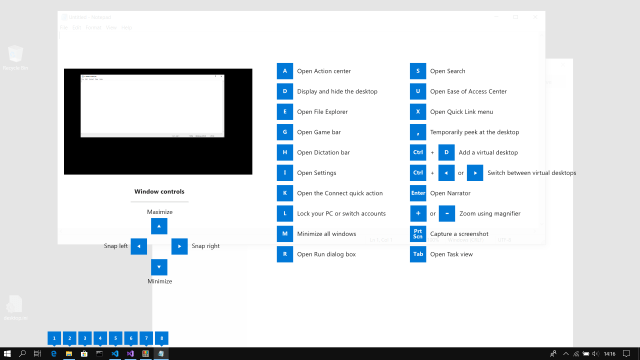
Open the shortcut guide with the shortcut key combination: ⊞ Win+Shift+/ (or as we like to think, ⊞ Win+?) or hold down the ⊞ Win for the time as set in the Settings. An overlay will appear showing keyboard shortcuts that use the Windows key, including:
- common Windows shortcuts
- shortcuts for changing the position of the active window
- taskbar shortcuts
Keyboard shortcuts using the Windows key ⊞ Win can be used while the guide is displayed. The result of those shortcuts (active window moved, arrow shortcut behavior changes etc.) will be displayed in the guide.
Pressing the shortcut key combination again will dismiss the overlay.
Tapping the Windows key will display the Windows Start menu.
Related tweets:
- [Wayback/Archive] Jen Gentleman 🌺 on Twitter: “Did you know WIN + Shift + ⬅️/➡️ will move a window between monitors? 👀”
- [Wayback/Archive] Jeroen Wiert Pluimers on Twitter: “@JenMsft It has been for so long, I think since Vista or 7. is there something like Win + ❓that shows all Windows provided keyboard shortcuts, as so many have been added since the very first Win shortcuts were introduced in the NT4/95 era.”
- [Wayback/Archive] Jen Gentleman 🌺 on Twitter: “@jpluimers PowerToys has a windows key keyboard shortcut guide that you can pull up on command”
–jeroen

 The Wiert Corner - irregular stream of stuff
Leave a comment