In a world where it becomes increasingly important to think and act on situations where for various communication via traditional means is not that easy any more, then LoRa (Long Range) wireless networks have been steadily gaining ground: they use open frequencies and for some of these networks, their repeater structure is largely ran by communities of volunteers.
Both communities and devices have evolved so far that its not just for early adopters any more: mere mortals can use it too.
The core difference between these two LoRa networks is explained in the Wikipedia article on MeshCore:
MeshCore is often compared with other LoRa-based mesh networking systems such as Meshtastic. While Meshtastic primarily relies on broadcast-style message flooding, MeshCore emphasizes structured routing roles and store-and-forward mechanisms, resulting in different scalability and energy-consumption characteristics.
Communication over the MeshCore network reminds me a lot of three things, in this chronological order:
MeshCore is fairly young which means it will have growth pains, and some hardware pains (like a node being limited to about 500 messages/hour because of physical bandwidth limitations – smaller cells work better than the FidoNet hub/spoke model – see the Dutch section below) but it also cool to see it evolving.
This blog post is going to be long, as a lot of MeshCore information is spread around the interwebz, so there is a lot to link to.
MeshCore is more than just sending messages over radio. The “mesh” in the name is because MeshCore users form a mesh network. If Alice wants to send a message to her friend Charlie, but Charlie’s out of range of her radio, she can route her message through Bob, another MeshCore user in her area, and Bob will forward the message to Charlie.
The cells surrounding Alice, Bob and Charlie
If Alice is within radio range of Bob but not Charlie, she can tell Bob’s MeshCore radio to forward her message to Charlie.
More in depth
Be careful powering your MeshCore devices over USB. In practice it is better to use a USB-A to USB-C cable. The reason is that these devices draw very little power, but USB-C chargers can provide a lot of power. That combination can potentially blow up parts of your MeshCore devices, as some parts of the boards cannot handle that much power.
Most MeshCore devices have limited memory. Room servers are the exception to this, and solve the problem for channels but not for DMs. So for DMs to have a larger chance of arriving, be sure your companion stays on-line and preferably connected to your mobile phone.
A companion device is personalised (i.e. specific to a user); room servers and repeaters are shared (not specific to a user).
There are maps where you are free to register your MeshCore devices, neither if which need specific device registration to MQTT or the map, just an advert announcement from the device to the network:
[Wayback/Archive] MC in NL is a regional map which – despite the Valleirug domain name – focuses on Dutch devices, including a few dozen in Belgium and a few in Germany. It also shows a live path of recent messages and adverts. It can also be parameterised, see [Wayback/Archive] MC in NL – parameterised, but somehow location isn’t updated when moving around on the map: you get the full parameterised URL by clicking on the share icon ( which still has no Unicode code point).
The source repository of the Valeirug map also pointed me to these regional maps based on the same repository:
Compare these for instance with the [Wayback/Archive] Meshtastic Map – way less Meshtastic than MeshChore devices and works via MQTT.
In a sense this feels a lot like FidoNet from 25-40 years ago, but with automatic routing discovery and configuration. More on my associations further down.
The rest of the post has a lot of text based information, but towards the bottom you also will find some videos.
Bots
Don’t be a bot without a really really good reason and don’t be a spammer (neither on MeshCore itself, nor on the forums or chat channels).
Some of the below resources have added stringent measures because bots and spammers spoiled the fun for a lot of people.
What if the internet goes down?
Be prepared in advance, as this is where MeshCore could play a role!
Jones says the Meshtastic system was successfully deployed in North Carolina and Tennessee after Hurricane Helene wiped out first responder communication systems. The goal is to ensure emergency crews can stay connected when it matters most.
After Hurricane Helene hit the Southern Appalachians in late September 2024, many towns lost power and phones. Western North Carolina saw washed-out highways, closed passes, and long stretches with no service. In the weeks that followed, local groups began adding off-grid radio options, including Meshtastic, to their playbooks.
“No electricity (still none now), and for a long time we had zero cell reception — even now it’s patchy and unreliable.
The Meshtastic community absolutely came through for us: people shared real-time updates, advice, and positive vibes. It made a HUGE difference for our safety and peace of mind. Honestly, we felt connected even when everything else was down.“
MeshCore comes from the radio amateure community which traditionally is more about broadcasting and in a far lesser extend about security.
Private channels and DM are somewhat secure, but the local storage on your device likely is not. For instance the companion PIN code is 6 digits long.
If you really need security, you need to go outside the MeshCore network and use something like Briar (which uses Bluetooth, Wi-Fi or Tor as communication layers for its peer-to-peer network).
Ik ben me een beetje aan het oriënteren op meshcore. Het is een netwerk dat werkt zonder dat je gsm-masten nodig hebt. Ik ga vandaag wat nieuw speelgoed bestellen om ermee te experimenteren.
The Android App, iOS App and Web App are basically the same as they are written on top of Flutter, so they share the changelog. The Web App is always released first as it takes time the mobile apps to pass through the Android and iOS store queues. The changelog is one big log with no separate release pages for each release and no Markdown rendering.
Denk goed na voordat je een antenne koopt met een hoge dBi.
Bijna altijd is er een cavityfilter nodig en vrij zicht is ook belangrijk.
Het stralings diagram is ook ‘platter’ waardoor de antenne snel over dichtbij zijnde nodes heen kijkt.
Als je niet aan de voorwaarden kunt voldoen, voldoet een 6.5 of 8 dBi antenne vaak beter.
Tip van flip :
Niks moet, maar kan handig zijn :
Zit je in een nieuw gebied en je weet niet of er dekking is, ga naar tools en druk op discover nearby nodes.
Of kijk op de kaart of je kans hebt om iets te vinden.
Uitschakelen van automatisch contacten toevoegen, scheelt geheugen en je krijgt geen enorme lijst.
Open de MeshCore-app en ga naar het instellingenmenu (meestal te bereiken via het tandwielpictogram).
Zoek in het instellingenmenu naar een optie die betrekking heeft op contacten, bijvoorbeeld “Auto add contacts” of “Contacten automatisch toevoegen”.
Zet deze optie uit. Na het uitschakelen van deze functie worden nieuwe ontdekte gebruikers niet meer automatisch als contact toegevoegd.
Heb je een “nieuwe” repeater opgezet, doe een clock sync en stuur daarna een advert.
Zet je repeater op de internet map, dmv in contactlist op 3 puntjes achter repeater te klikken.
Firmware update van een repeater kan soms een uitdaging zijn omdat die hoog in de nok of paal staat.
Bij een heltec v3/4 kan je via command magement “start ota” type en via wifi kan je dan flashen [link].
Een nRF52 devices kunnen via bluetooth en nRF DFU app geupdate worden [link].
Heb je een smarthome spullen die ook rond de 868 frequentie zitten, zet je inhuis MeshCore devices iets minderhard met brullen,
transmit power ipv 22 naar 5 of 10 zodat je lichten, rolluiken of ander device(s) wel te schakelen zijn.
Heb je een antenne gekocht met kabel. Bestel er gelijk een rp-sma naar sma koppeling bij!
Meestal is de connector die eraan zit een rp-sma, deze past wel maar mist middenkern en kan schade veroorzaken als je dat aansluit.
Buiten antenne’s hebben meestal een n connector, hieronder een plaatje.
MC hardware is niet aan de orde eigenlijk , mqtt kan op verschillende manieren verkregen worden en dan doorgestuurd worden naar mijn mqtt broker voor data voor de site. Ik zelf gebruik een heltec v3 met wifi om https://github.com/agessaman/meshcore-bot te voeden en die heeft een mqtt plugin, andere is een Xiao S3 wio met https://analyzer.letsmesh.net/observer/onboard native firmware. Andere mqtt leveranciers gebruiken bv ook https://github.com/Cisien/meshcoretomqtt , wat voor MC hardware weet ik niet. De Servers waar live op draait is een dell in datacenter van BIT met NGINX (reverse http proxy) en Mosquitto (mqtt broker) , de “live” docker software is https://github.com/yellowcooln/meshcore-mqtt-live-map dat draait op mijn mini PC thuis, waar ik ook een mqtt broker draai voor interne mqtt connectie zonder tls.
Je mag je repeater zelf een naam geven. Het is jouw apparaat, dus jij beslist. Toch is het aan te raden om er even goed over na te denken, zodat je ook andere mensen in je regio (en erbuiten) helpt. Het gebruik van de plaatsnaam is een optie. Zo weten anderen waar de repeater ongeveer is en hoe ver berichten reiken.
Zelf gebruik ik een naamgeving die land, plaats, rol en volgnummer gebruikt. Het land toevoegen lijkt overbodig, maar we zien nu al dat ook onze zuiderburen onderdeel van onze mesh hier in Nederland zijn. De plaats zelf wordt vaak afgekort tot drie letters. De rol is een repeater, dus RP zou dan een logische afkorting zijn. Met deze naam kun je al snel zien dat het om een Nederlandse repeater gaat die in Amsterdam staat. Om te voorkomen dat meerdere nodes hetzelfde heten, is een volgnummer handig. In de app kun je wellicht al de rol van een node zien, maar in een log of lijst niet. Daarom zou het handig kunnen zijn om toch die ‘RP’ erin te zetten.
Hoe kort je jouw plaatsnaam af? Daar kun je de UN/LOCODE als inspiratie voor gebruiken.
Voorbeeld: als je in Amsterdam woont, dan zou je NL-AMS-RP01 kunnen hanteren.
Aangezien het ook mogelijk is om emoji’s toe te voegen aan de naam. Enkele voorbeelden:
Icoon
Betekenis
⚡
repeater is gevoed door netstroom, zou weg kunnen vallen bij stroomstoring (dus niet geschikt voor noodnetwerk)
🔋
heeft een accu (geschikt voor noodnetwerk)
☀️
kan opgeladen worden door de zon
📟
mobiel apparaat (meestal dus geen repeater)
🏠
vaste lokatie is thuis (vaak voor een client)
Heb je een repeater, dan kun je met bovenstaande iconen duidelijk maken wat voor apparaat het is en vooral hoe hij wordt gevoed. Zo weten anderen of ze op jouw repeater kunnen vertrouwen bij stroomuitval.
Moet je deze tips opvolgen? Absoluut niet. Batman 🦇 is een prima naam voor een repeater.
FidoNet achtig hub model lijkt niet handig, zie deze Signal berichten:
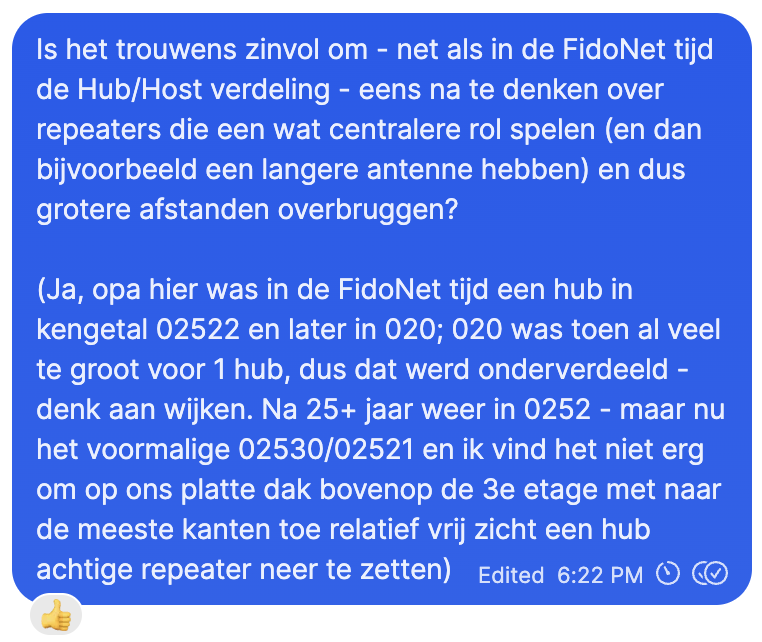
Is FidoNet hub model handig voor MeshCore
Is het trouwens zinvol om – net als in de FidoNet tijd de Hub/Host verdeling – eens na te denken over repeaters die een wat centralere rol spelen (en dan bijvoorbeeld een langere antenne hebben) en dus grotere afstanden overbruggen?
(Ja, opa hier was in de FidoNet tijd een hub in kengetal 02522 en later in 020; 020 was toen al veel te groot voor 1 hub, dus dat werd onderverdeeld denk aan wijken. Na 25+ jaar weer in 0252 – maar nu het voormalige 02530/02521 en ik vind het niet erg om op ons platte dak bovenop de 3e etage met naar de meeste kanten toe relatief vrij zicht een hub
achtige repeater neer te zetten)
Edited 6:22 PM
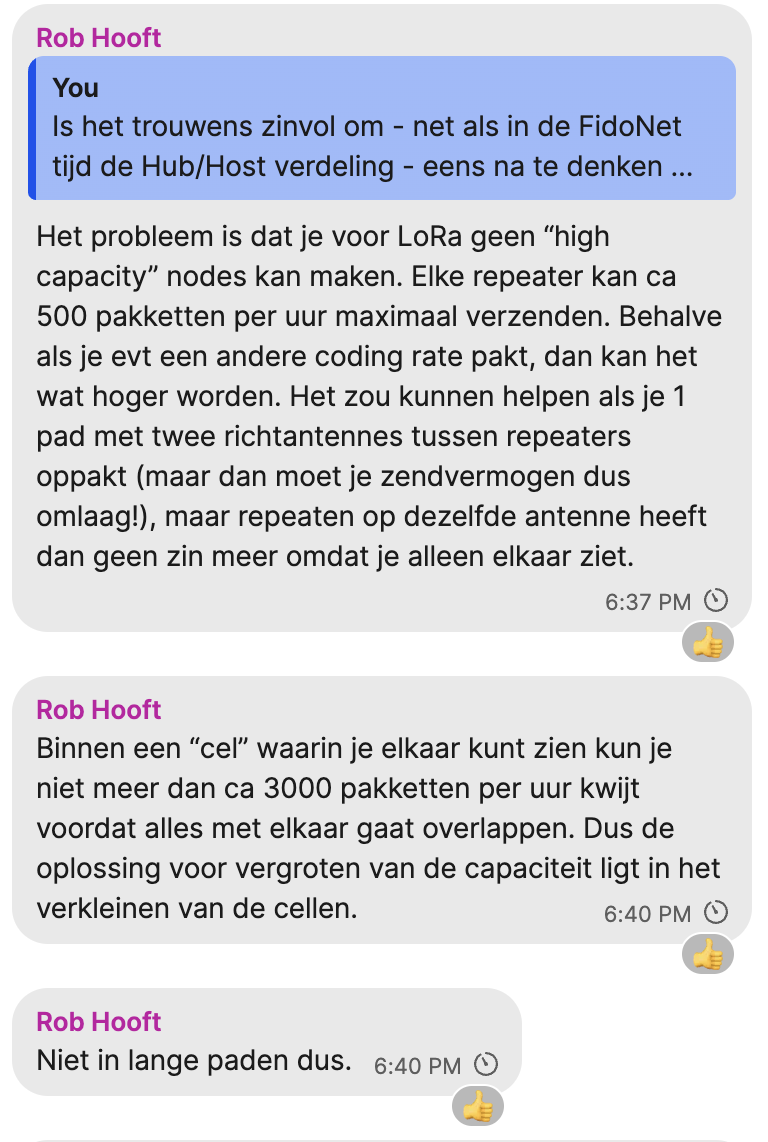
Beperkingen MeshCore voor hub model
Rob Hooft
> You
> Is het trouwens zinvol om- net als in de FidoNet tijd de Hub/Host verdeling – eens na te denken
Het probleem is dat je voor LoRa geen “high capacity” nodes kan maken. Elke repeater kan ca 500 pakketten per uur maximaal verzenden. Behalve als je evt een andere coding rate pakt, dan kan het wat hoger worden. Het zou kunnen helpen als je 1 pad met twee richtantennes tussen repeaters oppakt (maar dan moet je zendvermogen dus omlaag!), maar repeaten op dezelfde antenne heeft dan geen zin meer omdat je alleen elkaar ziet.
6:37 PM
Rob Hooft
Binnen een “cel” waarin je elkaar kunt zien kun je niet meer dan ca 3000 pakketten per uur kwijt voordat alles met elkaar gaat overlappen. Dus de oplossing voor vergroten van de capaciteit ligt in het verkleinen van de cellen.
6:40 PM
Rob Hooft
Niet in lange paden dus.
6:40 PM
Voor de mensen die net als ik het niet voor elkaar kregen hun Sensecap Solar OTA te flashen. Zojuist is het mij gelukt met de DFU app.
In de DFU app eerst de settings “Packets receipt notification” aanzetten en
de “number of Packets” naar 5 aanpassen.
Vervolgens zet je de Sensecap Solar in OTA Modus.
Via de DFU app kan je nu via Bluetooth verbinding maken met de SenseCap solar en de update uitvoeren.
Let op: firmware in zipform aanbieden (SenseCap_Solar_repeater-v1.12.0-evo_0.1.6-f34a1f8.zip in mijn geval)
Region scopes zijn een functie om flood berichten te beperken tot een bepaald gebied.
Je kan standaard regio’s gebruiken zoals die voor Zuid-Holland of Den Haag, en je kan zelf namen bedenken voor bijvoorbeeld een evenement.
Voor die standaard regio’s gebruiken we UN/LOCODE.
Maakt de lengte van een code uit?
Nee, de naam wordt gehashed en komt uiteindelijk als 16 bit getal in de transport codes terecht.
Wel zit er een maximale lengte aan van 29 tekens (exclusief # dus in totaal 30).
Zijn de codes hoofdlettergevoelig?
Ja, let dus op dat je kleine letters gebruikt. De repeater CLI staat wel hoofdletters toe, maar de app alleen kleine letters. Als je op de repeater dus hoofdletters gebruikt zit je in een andere regio!
Moet je # ervoor plaatsen?
In oudere firmware versies wel. Nu wordt dit automatisch ervoor gezet als je dat niet doet.
Hoe zit het met de home regio?
Op dit moment doet de home regio nog niets. Instellen daarvan is niet nodig.
Hoe zit het met parent-children relaties?
Op dit moment doet de hiërarchie van regions niets nuttigs. Instellen daarvan is niet nodig.
Heb een tweede meshcore companion voor mezelf gebouwd. Deze is wat geavanceerder. Hij heeft twee accu’s en een GPS. En blijkbaar kun je de accu’s behalve met zonne-energie ook met de USB C opladen. Dat wist ik nog niet van de Heltec 4.
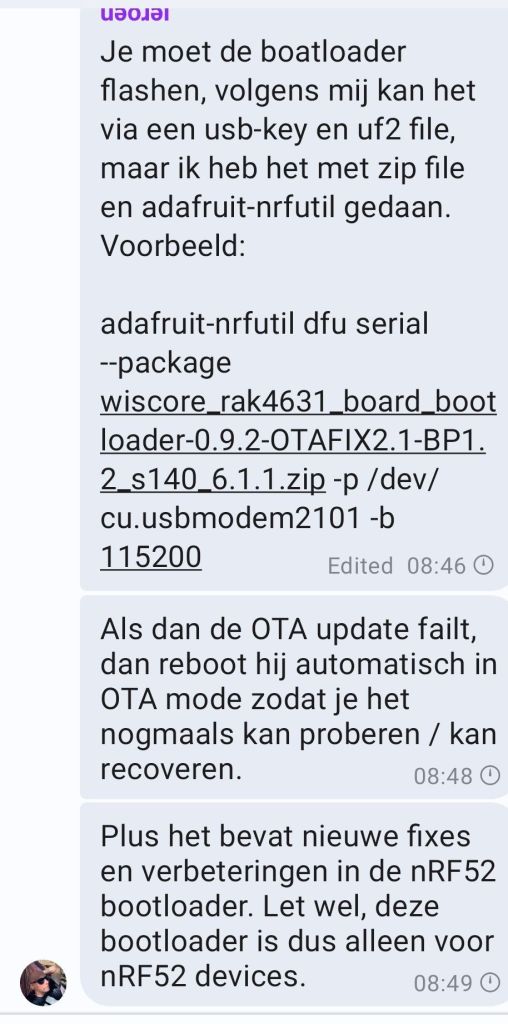
De OTAFIX bootloader zorgt ervoor dat je repeater bij OTA failure reboot in BLE DFU zodat je het nogmaals kan proberen.Het normale gedrag is dat hij bij OTA failure reboot in USB DFU. Dus dan moet je t dak op.Let wel, bij succesvolle OTA maar corrupte firmware zal de bootloader toch proberen te booten, wat mislukt. In dat geval zal je hoe dan ook t dak op moeten. Gelukkig gebeurt dit laatste niet zo vaak.nRF52 heeft weinig flash, en heeft een single bank. Bij OTA schrijft de bootloader de nieuwe firmware direct naar flash en overschrijft dus de oude firmware. Er bestaat ook dual bank waarbij de bootloader naar de andere bank schrijft, dan CRC checks uitvoert en indien succesvol de bank markeert als active en boot. Dat is beter want dan heb je altijd de oude goede versie nog op flash staan. Soort dual boot voor LoRa.Ik heb de OTAFIX bootloader op mijn drie RAK4631 repeaters staan.
Right now, I’m using a Heltec V3, which works well but drains the battery quite fast. With the cloudy winter months coming up, I think keeping it charged via solar might be challenging.
…
I personally like the Heltec T114, there is also the Seeed Studio XIAO for a really compact device. But basically anything with an nRF CPU is much more power efficient than an ESP32.
…
So far my RAK with a small solar cell has kept the battery above half full even in the recent rather rainy days here in Amsterdam.
…
Regarding low power, if your solar panel has a usb output the Seeed XIAO nrf52840 a.aliexpress.com/_EuU5bR0 with the sx1262 a.aliexpress.com/_EyNp5pM is probably the cheapest option
Note: the XIAO needs some soldering for the battery, and the part you need to solder is very small, if you’re not comfortable soldering the battery I would suggest instead the T114 without the screen – a.aliexpress.com/_EH8JIZC
…
Pd3ron Hi, a lot has changed since my last post. I now also run a RAK4631 with solar. My panel is 5W, and I have one node with two batteries and another with four batteries. The node with two batteries turns out to be more than enough.
I’ve also connected the node to an 11.8 dBi omni antenna, which gives it excellent range
If you’re building low-power, solar-charged IoT systems for cold climates, charging below freezing may not be as risky as you’ve been led to believe—as long as you:
Use high-quality batteries with low internal resistance
Keep charge currents low
Design for extra capacity buffer
Enclose and orient your node for thermal gain
Use nRF52-class microcontrollers (not ESP32)
And for ultra-cautious builders? Add total battery capacity, or use LTO chemistry.
The table lacks a few device makes/models, but gives a good indication where to go for longevity of your batteries (which matters in emergency situations). Also the table will be updated because of a solved firmware issue that made GPS off use more battery than GPS on:
Besides ________________________ which is mentioned in the menu structure above and has closed source client applications for the MeshCore clients, these open source client applications exist:
MeshCore is designed with scale in mind from the start, and is architected to support it. It can send messages up to 64 hops, it avoids being too chatty, it uses airtime for effectively delivering messages, and it encourages good network design giving repeater owners the tools to understand their effectiveness and debug it. All of this makes for good network effects, encourages investment in the working mesh, and makes it fun rather than frustrating.
…
Meshcore – more reliable, closed source
Meshtastic – less reliable, open source
…
Although the “closed source” bit of MeshCore is only partially true: these bits are closed source, the rest (including the protocol and base radio firmware!) is open source:
They’re great until you know better. Then NRF52 is life.
To me ESP32 has a place as a home node on a stick and extension cord but definitely not for walking around with.
I just got 24 days on a RAK in client mute running on a 21700. the same cell lasts about 42 hours on a heltec v3!
The nRF52 chip is much more power efficient than the ESP32 chip and easier to update, but is only equipped with Bluetooth. Supported nRF52 devices include:
RAK4631 Core module for RAK WisBlock modular boards
Both feature a solar panel, XIAO nRF52840 Plus and Wio-SX1262 modules, but the SenseCAP Solar Node P1-Pro adds GPS, GLONASS, and Galileo support with the XIAO L76K and four 18650 batteries for backup power..
Hi all, I’ve been working on a custom MeshCore firmware because I wanted a more standalone experience on the Wio Tracker L1 Pro, and I wanted to share it with the community.
Defaults to OTA DFU mode
When no valid application is present, the bootloader defaults to OTA DFU mode.
This prevents devices from becoming stuck in UF2 mode after a failed OTA update.
…
Automatic application boot after OTA over USB
When connected to a USB host, devices now automatically reboot into the application after a successful OTA update, instead of requiring a manual reset.
The core source is public, but I haven’t shared my UI changes yet.
I’m still adjusting and cleaning them up. I may publish them later once they’re ready.


 which still has no Unicode code point).


[Wayback/Archive] Heltec MeshPocket – MeshCore Powerbank Apparaat | LocalMesh


 The Wiert Corner - irregular stream of stuff

Leave a comment