The Wiert Corner – irregular stream of stuff

Jeroen W. Pluimers on .NET, C#, Delphi, databases, and personal interests

  • My badges

  • Twitter Updates

  • My Flickr Stream

  • Pages

  • All categories

  • Enter your email address to subscribe to this blog and receive notifications of new posts by email.

    Join 1,839 other subscribers

Archive for the ‘Development’ Category

InfoWorker Solutions: SharePoint ACLs: RoleDefinitions, RoleAssignments, Inheritance

Posted by jpluimers on 2011/04/18

SharePoint security can be tricky business.

Here are a few URLs that helped me going:

–jeroen

Posted in Development, SharePoint, Web Development | Leave a Comment »

Visual Studio 2010: you should run the Remote Debugging Monitor from a local drive to avoid 0x8007000E E_OUTOFMEMORY

Posted by jpluimers on 2011/04/14

Setting up remote debugging is always a precarious thing, no matter what kind of development platform: the online documentation tells you the standard steps, but usually they don’t suffice.

This case is Visual Studio 2010 remote debugging, where the development environment is on a workstation running Windows 7, and the debug target is on Windows Server 2008 R2.
Both are x64 versions.

There is a remote desktop connection to the server, and the server can see the workstation files on the \\TSCLIENT\C share.

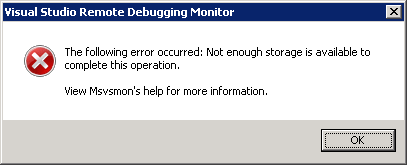
This is the error when running msvsmon.exe from \\tsclient\C\Program Files (x86)\Microsoft Visual Studio 10.0\Common7\IDE\Remote Debugger\x64:

[Visual Studio Remote Debugging Monitor]
The following error occurred: Not enough storage is available to complete this operation.

View Msvsmon's help for more information.
[OK]

(Funny BTW that the x64 Remote Debugging Monitor is in fact in an x86 path).

The solution is simple: copy the x64 directory local, then start it from there.

The reason in that the user credentials on the server don’t have enough rights on the \\TSCLIENT\C directory tree, so Windows barfs on it.

This pointed me into the right direction when I started Process Monitor from the same \\TSCLIENT\C share: Read the rest of this entry »

Posted in .NET, Debugging, Development, Remote Debugging, Software Development, Visual Studio 2010, Visual Studio and tools | Leave a Comment »

Entity Framework 4 – security warning popup workaround: Do you trust all the T4 “text templates” on your system, even future ones?

Posted by jpluimers on 2011/04/13

When using Entity Framework 4, your transofmrations (model to classes, DB to model, etc) are performed by T4 Text Templates.

Those templates are executed all over the place (when saving your project, building your project, changing your model, etc).

Since anyone can insert a T4 Text Template into Visual Studio, and those are scripts, it is a potential vulnerability.

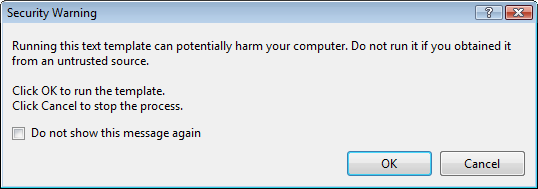
The default Visual Studio behaviour is to show you a dialog like this:

[Security Warning]

Running this text template can potentially harm your computer. Do not run it if you
obtain if rtom an untrusted source.

Click OK. to run the template.
Click Cancel top stop the process.

[X] Do not show this message again

[OK]  [Cancel]

Some blogs mention Just click OK and feel free to check “do not show this message again.”

I’m not sure I want that: it would indicate I always trust T4 Text Templates, even the ones added in the future (T4 Text Templates are executable content, malicious software could find it’s way into your development environment; anyone remember the virus that hooked itself into the run-time library sources of a development system so it would spread through anything compiled on that system?).

But I also don’t want to click OK on that dialog.

It would be so nice if the dialog:

  1. Showed which template is about to be executed
  2. Allowed me to skip only for that particular template

Anyone better thoughts on this?

–jeroen

via Customizing EDM Code Gen in EF4 : Don’t Be Iffy.

Posted in .NET, C#, Delphi, Development, EF Entity Framework, Prism, Software Development | 4 Comments »

c# – List of new features in C#2.0, 3.0 and 4.0 – Stack Overflow

Posted by jpluimers on 2011/04/12

When maintaining software, you can’t always use the latest versions of your tools and languages.

Since C# has added a lot since version 1, it is handy to know what changed in which version.

Of course nothing beets the (paper and electronic!) editions of C# in Depth (covering C# 1, 2 and 3) and C# in Depth second edition (covering C# 2, 3 and 4).

Those books are thick (they need to, there is a truckload to cover!).
(The publisher (Manning) actually did a very good job on the e-book versions. Highly recommended, as it makes searching stuff so much easier).

The answers to the c# – List of new features in C#2.0, 3.0 and 4.0 Stack Overflow question contains a few concise lists of major changes in the language.

I really like the Bluffer’s Guide to C# 2, and the Bluffer’s Guide to C# 3 that Jon Skeet mentioned in his answer (and wish he wrote a Bluffer’s Guide to C# 4 as well), as they focus on some essential stuff in a very concise way.

If you want more detailed info, start with these stackoverflow questions:

Since stackoverflow wasn’t there when C# 2 was introduced in 2005, start with this nice C# 2 overview article on CSharpCorner.

Note: contrary to popular belief, there is no C# 3.5. There is .NET 3.5 (adding LINQ) and .NET 3.0 (adding WPF, WCF and WF) all based on the C# 3.0 and CLR 2 SP1 features.
(Yes, some expression tree features don’t work on CLR2 RTM, as that one has a few bugs, see Jared’s comment on this answer).

--jeroen

via: c# – List of new features in C#2.0, 3.0 and 4.0 – Stack Overflow.

Posted in .NET, C#, C# 2.0, C# 3.0, C# 4.0, Development, Jon Skeet, Software Development | Leave a Comment »

SharePoint 2010 error: Retrieving the COM class factory for component with CLSID {BDEADF26-C265-11D0-BCED-00A0C90AB50F} failed due to the following error: 800703fa – SharePointWiz

Posted by jpluimers on 2011/04/11

Somehow in a production environment I did get this error too:

System.Runtime.InteropServices.COMException (0x80040154): Retrieving the COM class factory for component with CLSID {BDEADF26-C265-11D0-BCED-00A0C90AB50F} failed due to the following error: 80040154.

These two posts helped me to solve it:

SharePoint 2010 beta error: Retrieving the COM class factory for component with CLSID {BDEADF26-C265-11D0-BCED-00A0C90AB50F} failed due to the following error: 800703fa – SharePointWiz – Site Home – MSDN Blogs.

Rhythmic Coding: Retrieving the COM class factory for component with CLSID {BDEADF26-C265-11D0-BCED-00A0C90AB50F} failed due to the following error: 80040154.

The solution is deceptively simple:

Resolution: It is because you are trying to build a x86 application. Go to project properties and set type to x64 everywhere. Then rebuild and debug. The Error Vanishes!

The SharePoint 2010 dll’s are all x64, and Visual Studio 2010 by default still starts .NET projects in x86 mode for both Release and Debug settings.

–jeroen

Posted in .NET, .NET 4.0, C#, C# 4.0, Development, SharePoint, Software Development, Visual Studio 2010, Visual Studio and tools, Web Development | 8 Comments »

Mono for Android 1.0 released: develop .NET software that runs on Android

Posted by jpluimers on 2011/04/07

Just released: Mono for Android.

This – like MonoTouch for iOS – allows you to develop, debug and deploy Android applications using .NET

Mono for Anroid includes Visual Studio 2010 integration.

If you have a MonoTouch license, you temporarily get a discount on Mono for Android.

Now you can use .NET for the major mobile platforms: iOS, Android and Windows Phone 7 sharing major portions of your code across those platforms.

–jeroen

Posted in .NET, Development, Mono for Android, MonoTouch, Software Development | Leave a Comment »

Visual Studio 2010 “Solution Explorer Tools” addin: Collapse all, Select current item, Collapse all except current item. Highly recommended.

Posted by jpluimers on 2011/04/07

When you have lots of projects in a solution, quickly the tree in the Solution Explorer gets a mess, especially if you have “Track Active Item in Solution Explorer” enabled.

“Solution Explorer Tools” addin for Visual Studio 2010 helps with that.

It adds three buttons to solution explorer

  1. Select current item
  2. Collapse all
  3. Collapse all except current item

The first one basically means you will never need to enable “Track Active Item in the Solution Explorer” again.

The second and third quickly get rid of the mess in the Solution Explorer.

Highly recommended!

–jeroen

via: Solution Explorer Tools.

Posted in .NET, Development, Software Development, Visual Studio and tools | Leave a Comment »

Visual Studio 2010: some entries in the Error List are not Errors, Warnings or Messages, but are still indicating a problem

Posted by jpluimers on 2011/04/06

The below message in my Error List is not an error: it has a red exclamation mark, which falls outside the category Error (Red bullit with white cross), Warning (Yellow triangle with black exclamation mark) or Message (White bullet with blue lowercase i).

Bit it is still indicatint something was wrong:

1 Failed to copy project output to file C:\tfs.root\MyServiceApplication\ClientBin\MySilverlight.Client.Test.xap. Access to the path ‘C:\tfs.root\MyServiceApplication\ClientBin\MySilverlight.Client.Test.xap’ is denied. 0 0 MyServices

What it indicates is that the .xap file is readonly, and cannot be overwritten.

The reason is that during checkin in TFS, by accident all the .XAP files were added (by default, .XAP files are not on the binary exclusion list), and I found the answer in this thread.

At the end of the build process, the above message disappeared, but the .XAP file was not replaced, so the project output was not up-to-date.

Ergo: the build should have failed.

The solution was simple:

  1. Remove the .XAP files from TFS
  2. Delete the read-only .XAP files from disk
  3. Rebuild

Now Visual Studio 2010 can regenerate the .XAP files and your project output is correct again.

NB: .XAP files can be in two places, be sure to check both:

  1. The bin\debug or bin\release folder of a SilverLight project
  2. The ClientBin folder of an ASP.NET web project

–jeroen


Posted in .NET, ASP.NET, Development, SilverLight, Software Development | Leave a Comment »

Recommended blog post: Favorite C# Idioms | Blue Onion Software

Posted by jpluimers on 2011/04/05

While browsing for some less used but useful C# features, I came across a great post by Michael (Mike) Ward from Blue Onion Software on Favorite C# Idioms based on the great Hidden Features of C# thread on StackOverflow.

Mike starts with

There’s a great post on Stackoverflow about hidden features in C#. I prefer to think of these as idioms rather than hidden features since most are actually documented. Here are my favorites.

Then he continues with some nice examples of C# idioms.

Recommended reading!

–jeroen

via Favorite C# Idioms | Blue Onion Software.

Posted in .NET, C#, C# 2.0, C# 3.0, C# 4.0, Development, Software Development | Leave a Comment »

Entity Framework 4 “Error 3004: Problem in mapping fragments starting at line” means you must generate your DB from your model first (Stack Overflow)

Posted by jpluimers on 2011/04/05

Entity Framework 4 is nice, but has very confusing  error messages.

Maybe it is just me, but getting a feel for what each error message means, and how to cure the underlying mistake(s) is time consuming.

For instance, it took me quite a while to find out why this error occurred during a project build:

Error 3004: Problem in mapping fragments starting at line 569: No mapping specified for properties MyEntity.MyValue in Set MyEntities. An Entity with Key (PK) will not round-trip when: Entity is type [MyEntities.MyEntity]

The solution was simple, I had forgotten to manually perform the “Generate Database from Model…” step before building my solution and was glad I found it in this Stack Overflow answer:

Have since discovered that after I add/change/delete properties on my entities I must “Generate Database from Model” before I compile otherwise I get 3004 mapping errors.

Note that this generation is always a manual step; I haven’t found a way to automate that (if you have found a way: please add a comment below).

–jeroen

via: .net – Entity Framework 4 mapping fragment error when adding new entity scalar – Stack Overflow.

Posted in .NET, Development, EF Entity Framework, Software Development | 5 Comments »