The Wiert Corner – irregular stream of stuff

Jeroen W. Pluimers on .NET, C#, Delphi, databases, and personal interests

  • My badges

  • Twitter Updates

  • My Flickr Stream

  • Pages

  • All categories

  • Enter your email address to subscribe to this blog and receive notifications of new posts by email.

    Join 1,860 other subscribers

Archive for the ‘msbuild’ Category

“Documented” the import order of the common msbuild extension points. · Issue #2767 · dotnet/msbuild

Posted by jpluimers on 2025/04/08

As a start a comment some 5 years ago in [Wayback/Archive] Document the import order of the common msbuild extension points. · Issue #2767 · dotnet/msbuild, though informal, made this a lot more clear.

Via: [Wayback/Archive] Nick Craver on Twitter: “Possibly the single most useful issue comment I’ve ever come across: …”

--jeroen

Posted in .NET, Continuous Integration, Development, msbuild, Software Development | Tagged: | Leave a Comment »

GitHub – KirillOsenkov/LargeAddressAware: A build tools package that adds support for making 32-bit exes LARGEADDRESSAWARE (and some words on a 64-bit Delphi product)

Posted by jpluimers on 2024/06/26

[Wayback/Archive] GitHub – KirillOsenkov/LargeAddressAware: A build tools package that adds support for making 32-bit exes LARGEADDRESSAWARE

Hopefully this can be applied to Delphi projects as well. If not then in Delphi you can manually call this in an post-build task.

Addition late 20240626

[Wayback/Archive] Kirill Osenkov: “@wiert I also found that you can…” – Mastodon

@wiert I also found that you can target AnyCPU 32-bit preferred and it will give you the same address space. So that tool is only for x86.

Via [Wayback/Archive] Meik Tranel on X: “Please for the love of all that is holy. Do not build #dotnet tools to serve a non interactive task that is supposed to be run during a build – use an #MSBuild task package. Also #JS/#NPM devs should not be allowed to write tooling. Thanks for coming to my ted talk…”.

The Delphi bit inspired a few months ago by: [Wayback/Archive] Andreas on X: “Will there ever be a 64bit Delphi IDE or at least a LargeAddressAware version. Our Projekt crashes the IDE between 14-18 compilations because it runs out of memory. Maybe I have to patch the IDE myself by moving all .NET and Compiler memory allocations above the 2 GB address.”

Read the rest of this entry »

Posted in .NET, Conference Topics, Conferences, Continuous Integration, Delphi, Development, Event, msbuild, Software Development | Leave a Comment »

msbuild build events can inherit, but not add in addition to inherited build events (so projects in Visual Studio, Delphi and others cannot do that either)

Posted by jpluimers on 2021/05/26

Bummer: I tried to inherit the build events from a base configuration, then add some extra steps for some of the inheriting configurations.

Those configurations just executed the extra steps, not the inherited steps.

This affects Visual Studio, Delphi and any other tool based on msbuild, as this is an ms-build thing:

–jeroen

Posted in .NET, Continuous Integration, Delphi, Development, msbuild, Software Development, Visual Studio and tools | Leave a Comment »

msbuild verbosity is not passed to the Delphi command-line compiler any more, but for found units, you can use /p:DCC_OutputDependencies and for dfm/resource files /p:DCC_OutputDependencies

Posted by jpluimers on 2021/04/06

Last week, I wrote about msbuild verbosity levels. The post was both for my own documentation, but also out of need as I wanted to have way more verbose logging for a Delphi build process involving search path configurations.

When using my Delphi build script you can both pass msbuild options and Delphi compiler options:

Run-Dependend-rsvars-From-Path.bat 5 msbuild -verbosity:detailed "/p:DCC_OutputDependencies=true" MyProject.dproj

The bold one is the msbuild parameter, the italic one the Delphi compiler parameter for unit dependencies. They are directly passed to msbuild:

...\msbuild.exe /target:build /p:DCC_BuildAllUnits=true /p:config=Debug -verbosity:detailed "/p:DCC_OutputDependencies=true" MyProject.dproj

You can multiple options too:

Run-Dependend-rsvars-From-Path.bat 5 msbuild -verbosity:detailed "/p:DCC_OutputDependencies=true" "/p:DCC_Quiet=false" MyProject.dproj

In addition to unit dependencies, you can also get an overview of .dfm and other resource file dependencies by passing /p:DCC_OutputDRCFile=true on the command-line this will generate a DRC file that not just has all the resource string constants in it, but also a comment section specifying all resource files including these file types:

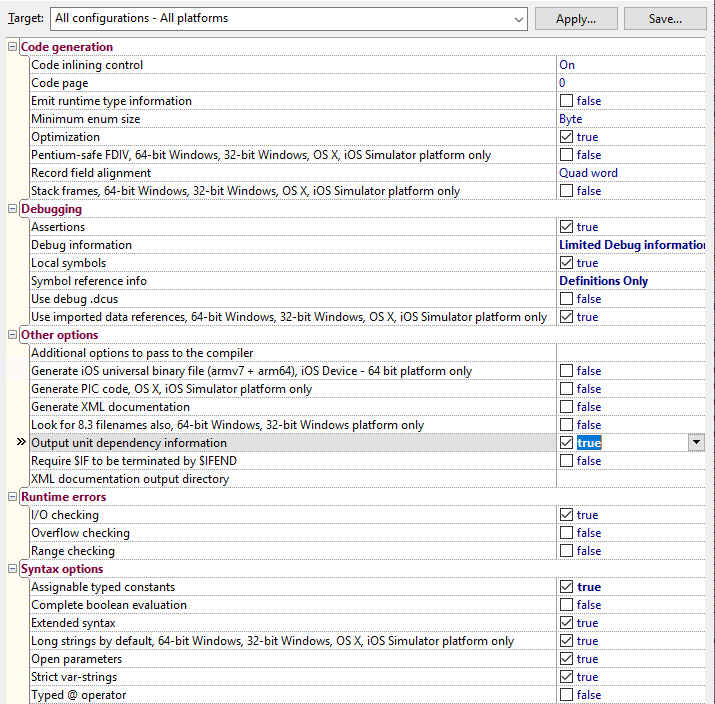
Both DCC_OutputDependencies and DCC_OutputDRCFile can also be set to true in a .dproj file and are configurable under two different project option paths:

  • DCC_OutputDependencies: “Project Options” -> “Delphi Compiler” -> “Compiling” -> “Output unit dependency information”
  • DCC_OutputDRCFile: “Project Options” -> “” -> “Delphi Compiler” -> “Linking” -> “Ouput resource string .drc file”

The -verbosity:detailed however, is not passed to the various Delphi DCC compilers, as somewhere along the line, the CodeGear.Delphi.Targets got changed to Quiet="true" somewhere in-between Delphi 2007 and Delphi 2010.

Delphi 2007 had from Borland.Delphi.Targets files containing from Quiet="$(DCC_Quiet)"; the file got renamed and changes likely in Delphi 2009. See these related posts:

This means as of then on, the DCC commandline compilers will always output non-verbose logging. Even specifying "/p:DCC_AdditionalSwitches=-Q-" will not help: you will just get blank lines.

In the past, one of the things the verbose DCC logging would help you to see which files where accessed using the actual build. This was a tremendous help when figuring out search path problems that kick in every now and then.

For units, there is a little trick you can use here: it’s the /p:DCC_OutputDependencies=true" option you see above.

It will output an additional file with the .d extension that:

  • on the first two lines are an empty line followed by lining having the the .dpr filenamea space and a backslash
  • continues with units in reverse order of dependency:
    • optional lines having two tabs, a full .dcu filename (even if the file was actually a .pas file), a space and a backslash
    • a final line having two tabs, a full .dcu filename (even if the file was actually a .pas file) but no space or backslash

That file is relatively easy to scan or parse for path problems.

Project settings

I am not sure at which Delphi version the depends feature became a project setting, but it is. The odd thing: it does not always work, at least not in the Delphi 102. Tokyo installations I have used.

In a .dproj file, it is inside this element: <DCC_OutputDependencies>true</DCC_OutputDependencies> just like the msbuild name.

In the UI, you can find it here:

Related

–jeroen

Posted in Continuous Integration, Delphi, Development, msbuild, Software Development | Leave a Comment »

msbuild verbosity levels

Posted by jpluimers on 2021/03/31

Passing verbosity levels to msbuild on the one hand can help to quickly locate issues that go otherwise unnoticed, but also make your output so large that it is hard to search through.

Some build targets (Delphi!) do not pass the verbosity to their underlying tools, so for those cases you have to find other means to increase underlying verbosity.

You can always pass msbuild options by using the commandline (even abbreviate them as described in [WayBack] MSBuild Command-Line Reference – Visual Studio | Microsoft Docs: You can specify the following verbosity levels: q[uiet]m[inimal]n[ormal]d[etailed], and diag[nostic]).

Often you also can use your IDE can also specify verbosity levels, for instance:

The currently specified verbosity values in ascending order according to [WayBack] LoggerVerbosity Enum (Microsoft.Build.Framework) | Microsoft Docs:

Quiet 0 Quiet verbosity, which displays a build summary.
Minimal 1 Minimal verbosity, which displays errors, warnings, messages with MessageImportance values of High, and a build summary.
Normal 2 Normal verbosity, which displays errors, warnings, messages with MessageImportance values of High, some status events, and a build summary.
Detailed 3 Detailed verbosity, which displays errors, warnings, messages with MessageImportance values of High or Normal, all status events, and a build summary.
Diagnostic 4 Diagnostic verbosity, which displays all errors, warnings, messages, status events, and a build summary.

Note that in the past, Detailed was called Details:

[WayBack] visual studio 2010 – What is output at the different MSBuild output verbosity levels? – Stack Overflow:

  • Quiet: only shows the result of your build.
  • Minimal: shows some configurations of your msbuild, and the CSC task.
  • Normal: This will show all the targets and its mainly steps.
  • Details: In addition to normal, this flag shows the task and it’s implementation within the each target.
  • Diagnostic: Contains all the information that a MSBuild need and produce, it’s switches, parameteres, prerequisites and etc. The input parameter of the target and task, and also contains the value of the input and output parameter, the detail steps of the task execution. The time execution for each task.

In matrix form, as per [WayBack] Obtaining Build Logs with MSBuild – Visual Studio | Microsoft Docs:

The following table shows how the log verbosity (column values) affects which types of message (row values) are logged.

Quiet Minimal Normal Detailed Diagnostic
Errors
Warnings
High-importance Messages
Normal-importance Messages
Low-importance Messages
Additional MSBuild-engine information

–jeroen

Posted in Continuous Integration, Delphi, Development, msbuild, Software Development | 1 Comment »

Obtaining Build Logs with MSBuild – Visual Studio | Microsoft Docs

Posted by jpluimers on 2020/09/08

Via [WayBack] Obtaining Build Logs with MSBuild – Visual Studio | Microsoft Docs:

If you need full debug output from msbuild, then append the -verbosity diagnostic parameter.

–jeroen


Posted in Continuous Integration, Development, msbuild, Software Development | Leave a Comment »

Microsoft Visual Studio – Wikipedia

Posted by jpluimers on 2019/05/09

Like there was never an Office 13.0, there was no Visual Studio 13.0: see the below table from Microsoft Visual Studio – Wikipedia: History

This influences tooling that searches for specific versions of Visual Studio or MSBuild (which has been available since Visual Studio 8.0 and up: MSBuild – Wikipedia: History).

Product name Codename Version
number
Supported .NET
Framework versions
Supported .NET
Core versions
Release date
Visual Studio 2019 Unknown 16.0 To be announced To be announced To be announced
Visual Studio 2017 Dev15 15.0 3.5 – 4.7 1.0-1.1, 2.0 March 7, 2017
Visual Studio 2015 Dev14 14.0 2.0 – 4.6 1.0 July 20, 2015
Visual Studio 2013 Dev12 12.0 2.0 – 4.5.2 N/A October 17, 2013
Visual Studio 2012 Dev11 11.0 2.0 – 4.5.2 N/A September 12, 2012
Visual Studio 2010 Dev10Rosario 10.0 2.0 – 4.0 N/A April 12, 2010
Visual Studio 2008 Orcas 9.0 2.0, 3.0, 3.5 N/A November 19, 2007
Visual Studio 2005 Whidbey 8.0 2.0, 3.0 N/A November 7, 2005
Visual Studio .NET 2003 Everett 7.1 1.1 N/A April 24, 2003
Visual Studio .NET (2002) Rainier 7.0 1.0 N/A February 13, 2002
Visual Studio 6.0 Aspen 6.0 N/A N/A June 1998
Visual Studio 97 Boston 5.0 N/A N/A February 1997

–jeroen

Posted in .NET, Continuous Integration, Development, msbuild, Software Development, Visual Studio and tools | Leave a Comment »

msbuild: /p: or /property: but be ware of the equals sign

Posted by jpluimers on 2019/02/27

From [WayBackHow do I pass this common property to MSBuild using TeamCity? – Stack Overflow, I learned you can pass properties to msbuild using the /p:propertyname=value or /property:propertyname=value syntax (where you can quote "value" when needed):

I am using the TeamCity Visual Studio runner. I want to add a setting that is not accessible from Visual Studio./Property:FileAlignment=4096I typed that directly into the build step “Command line

However, when passing these parameters to batch files first, be aware that they can strip equals signs from parameters: [WayBack] windows – Preserving “=” (equal) characters in batch file parameters – Stack Overflow

I bumped into this when passing properties to https://bitbucket.org/jeroenp/wiert.me/src/tip/Run-Dependend-rsvars-From-Path.bat

–jeroen

Posted in Batch-Files, Continuous Integration, Development, msbuild, Scripting, Software Development | Leave a Comment »

Reminder to self: make a start for an XSD that validates Delphi dproj files

Posted by jpluimers on 2018/11/07

Below are a few interesting things from this thread [WayBack] Any idea why Delphi (At least since Seattle) does this to Dproj filesand… – Tommi Prami – Google+.

It’s likely that the WordPress system deleted parts between angle brackets because it thinks it’s invalid HTML and WordPress is PHP.

Anyhow: maybe by now I’ve found time for creating an XSD for .dproj files in addition to the one I mentioned yesterday for the .groupproj files: Validating a nested XML element with an empty namespace using XSD – Stack Overflow.

Oh and in the mean time for various Delphi versions, there is a (binary, because it uses some commercially licensed parts) [WayBackDproj changed or not changed? Normalize it! | The Art of Delphi Programming.

Files and directories I need to research:

In the mean time, QualityPortal indicates that:

Achim Kalwa:
That is a long living bug: https://quality.embarcadero.com/browse/RSP-11308
Still exists in Berlin Update 2.

Jeroen Wiert Pluimers
For more than a decade, the IDE rewriting dproj files in different order/indentation/spacing, properties appearing/disappearing in DFM files and writing DFM files despite no changes have driven me even more nuts than I was.

Walter Prins
+Jeroen Wiert Pluimers Yes. Given that .dproj is XML I’ve been almost annoyed enough to look at making some kind of pre-checkin script to force sort things to try and avoid the issue. Almost… Edit: Ah, just checked that RSP, which references this: https://github.com/joshkel/RadCli Seems someone has already done it.

Lübbe Onken
Did you try tidy_proj +Walter Prins? For me it fails with a “Unicode Encode Error” when I try to write an output file. In my case this is caused by German umlauts in the excluded bpl section descriptions. Changing the umlauts to something low-ascii allows tidy_proj to finish.

Walter Prins
+Lübbe Onken No, but I have just done so. Unicode bites again. To fix that error, change line 125 from:

print(proj.toxml())

to:

print(proj.toxml().encode(‘utf-8’))

Note: This will likely not display correctly if you allow the output to go to the console but will ensure it is correct if redirected back to file.

Edit: Ha, I was about to go report this issue ad suggest this fix, but I see you’ve already suggested essentially the same fix. ;)

Jeroen Wiert Pluimers’s profile photo
Jeroen Wiert Pluimers
+Walter Prins interesting tool! Do you know of a tool that can downgrade .dproj files so you can use them with older Delphi versions? (the opposite of what the IDE does)?

Or someone that has written more than my XSD on .dproj files? My one is so small that’s hardly a real attempt. https://wiert.me/2013/08/31/delphi-first-try-on-an-xsd-for-groupproj-files/

Walter Prins
+Jeroen Wiert Pluimers No, but interesting idea. I suppose you’re probably aware that the JEDI JCL/JVCL takes a somewhat similar (ish) related approach, in that it generates project and package files that are compatible with every desired version of Delphi from minimalist (XML) template files. Every so often I think it might be worth looking whether one can re-use the code from there easily but haven’t gotten around to it. Always something else to do first. :/

Jeroen Wiert Pluimers
+Walter Prins no I didn’t. Where should I start reading on that minimalist template approach?

Walter Prins
+Jeroen Wiert Pluimers Sorry I see I missed out the word installer in my comment: It’s the Jedi JCL/JVCL installers that uses xml templates etc.

But the point stands: I guess it should be (perhaps) possible to reuse its infrastructure for ones own projects, though as I say I keep meaning to look into this but haven’t really done so.

(BTW I’m assuming you are familiar with the JCL/JVCL and in in particular their installers that bootstrap from source code? If not then perhaps my comments may not be that useful?)

Anyway, not sure if or where there’s particular documentation about this (kind of doubt it), but if you have the JCL/JVCL installed somewhere, then first of all have a look at the “xml” folders e.g. “<jclroot>\jcl\packages\xmls” and “<jvclroot>\jvcl\packages\xml”.

These files appear to define projects and packages in a seemingly abstract/somewhat minimal way using XML. This seemingly is then used to automatically produce .dproj and .dpk files which are placed in e.g. “<jclroot>\jcl\packages\dXX” and “<jvclroot>\jvcl\packages\dXX” where dXX corresponds to a folder for each of the supported Delphi versions and compiled/used during installation.

Having just looked into this briefly a bit further as a result of this conversation: Key units here (in the case of JVCL) seems to be “<jvclroot>\devtools\PackagesGenerator\PackageGenerator.pas”, “<jvclroot>\install\JVCLInstall\PackageUtils.pas” and “<jvclroot>\devtools\common\PackageInformation.pas” (used predictably by <jvclroot>\JVCLInstall.dproj)

(Additionally, having looked at this a bit more closely, it also appears that the JCL does not actually replace all or even most of its .dproj and .dpk files after all, but ships version specific .dproj and .dpk files in most cases, though the JVCL does appear to mostly do so. )

Edit: The JCL also has this interesting sounding unit “jclroot>\source\windows\JclMsBuild.pas” which appears to be an MSBuild project file parser…

–jeroen

Posted in Conference Topics, Conferences, Continuous Integration, Delphi, Development, Event, msbuild, Software Development, XML, XML/XSD, XSD | Leave a Comment »

How to do a Debug, Release or both builds with MSBuild – code.dblock.org | tech blog

Posted by jpluimers on 2018/01/24

For my link archive:

In addition I need to put some time in checking out the differences between Clean + Build and Rebuild:

–jeroen

Posted in Continuous Integration, Development, msbuild, Software Development | Leave a Comment »