The Wiert Corner – irregular stream of stuff

Jeroen W. Pluimers on .NET, C#, Delphi, databases, and personal interests

  • My badges

  • Twitter Updates

  • My Flickr Stream

  • Pages

  • All categories

  • Enter your email address to subscribe to this blog and receive notifications of new posts by email.

    Join 1,854 other subscribers

Archive for the ‘C#’ Category

KB2251481 update issues (via: MS11-049: Description of the security update for Visual Studio 2005 SP1: June 14, 2011)

Posted by jpluimers on 2012/03/29

August 2011, Microsoft re-issued KB2251481. They should not have done that, because if you have the original KB2251481 installed (also known as KB2251481.T369_32ToU865_32) you need to go through the hoopla below to uninstall it.

In stead, they should have released a new version that automatically uninstalls a previously installed one, then installs itself.

It is not the first patch that Microsoft did wrong, but this one is the “Microsoft Visual Studio 2005 Service Pack 1 XML Editor Security Update”. Every now and then I come across it when doing work on some archived virtual machines that contain Visual Studio 2005 (which I used a lot in the past, and occasionally still use for doing some maintenance work for clients that long ago ditched stuff they thought they’d never need to use again).

The really stupid thing is the error message you get when it cannot get installed: John Doe user will never find out why it failed, let alone figure out how to get it install properly.

This is the message you will see:
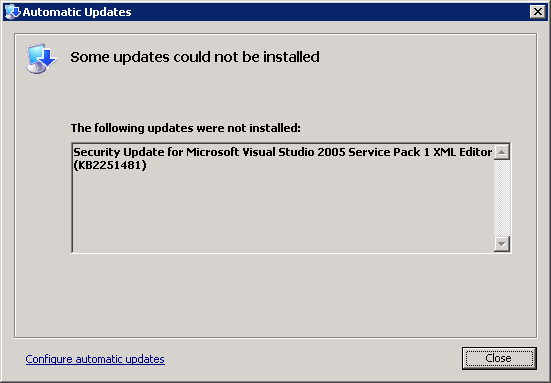
[Automatic Updates]
Some updates could not be installed
The following updates were note installed:
Security Update for Microsoft Visual Studio 2005 Service Pack 1 XML Editor (KB2251481)
[Close]

The message doesn’t even include that it is trying to install the August 2011 version (hinting that there might be an earlier version you need to uninstall). Read the rest of this entry »

Posted in .NET, C#, C# 2.0, Development, Software Development, Visual Studio 2005, Visual Studio and tools | Leave a Comment »

naming – What’s the use/meaning of the @ character in variable names in C#? – Stack Overflow

Posted by jpluimers on 2012/03/28

Duh, I always thought @ could only be used for strings.

Not so: just like with the & in Delphi is used to escape keywords, the additional use of @ in C# is to escape identifiers:

The prefix “@” enables the use of keywords as identifiers, which is useful when interfacing with other programming languages. The character @ is not actually part of the identifier, so the identifier might be seen in other languages as a normal identifier, without the prefix. An identifier with an @ prefix is called a verbatim identifier.

–jeroen

via: naming – What’s the use/meaning of the @ character in variable names in C#? – Stack Overflow.

Posted in .NET, C#, C# 2.0, C# 3.0, C# 4.0, Delphi, Development, Software Development | Leave a Comment »

reflection – C# – Resolving a parameter name at runtime – Stack Overflow

Posted by jpluimers on 2012/03/27

So I won’t forget: a GetName method returning the name of a parameter, local or field.

Tags: C#, reflection, IL parsing, argument name, anonymous type, generic type cachegeneric type caching.

–jeroen

via: reflection – C# – Resolving a parameter name at runtime – Stack Overflow.

Posted in .NET, C#, C# 2.0, C# 3.0, C# 4.0, Development, Software Development | 4 Comments »

.NET/C#: Resolved errors “The type ‘NameSpace.TypeNameClass’ has no constructors defined” and “Interop type ‘NameSpace.TypeNameClass’ cannot be embedded. Use the applicable interface instead.” (via Stack Overflow: Interop type cannot be embedded)

Posted by jpluimers on 2012/03/20

When moving the Microsoft Scripting Runtime interop code from .NET 1.x to 4.x, I got these errors:

Error1: The type 'Scripting.FileSystemObjectClass' has no constructors defined
Error21: Interop type 'Scripting.FileSystemObjectClass' cannot be embedded. Use the applicable interface instead.

Though the first answers on the question seem to adequately resolve the problem, they merely cure the symptom: turning off the embedding of the PIA (Primary Interop Assembly).

The below answer by Michael Gustus (which only has a few votes, so please vote it up) actually explains what is going on, and solves the cause:

In most cases this error is the result of code which tries to instantiate a COM object e.g. here piece of code starting up Excel:

Excel.ApplicationClass xlapp = new Excel.ApplicationClass();

Typically, in .Net 4 you just need to remove the ‘Class’ suffix and compile the code:

Excel.Application xlapp = new Excel.Application();

MSDN explanation here.

Hence I like the comment by Tyrsius on this answer as well:

This was more useful than the marked answer, as I needed the functionality of the embedded Interop. This solved both problems, thank you!

The above answer tells you to not use the class type, but the interface type, just like the error states. And the answer implicitly tells you the class type is ApplicatoinClass, and the interface is Application.

These are the declarations for the PIA interface: Read the rest of this entry »

Posted in .NET, C#, C# 4.0, Development, Software Development | Leave a Comment »

A few reminders to self for AMP in VS11: debugging, writing, etc

Posted by jpluimers on 2012/03/15

Reminders to self:

–jeroen

via: The Moth – GPU Debugging with VS 11.

Posted in .NET, C#, Development, Software Development, Visual Studio 11, Visual Studio and tools | Leave a Comment »

WTF C# code of the month

Posted by jpluimers on 2012/03/14

When I come across code like this, I’m always astonished:

			catch(Exception ex)
			{
				string strMess = ex.Message;
			}

What was the person thinking when he wrote this? Did he get distracted and nobody else notice this before checking it into their version control system?

In the same module:

		private string ToString(object myVal)
		{
			try
			{
				if (myVal != System.DBNull.Value)
					return myVal.ToString().Trim();
			}
			catch{}

			return "";
		}

–jeroen

Posted in .NET, C#, C# 1.0, C# 2.0, C# 3.0, C# 4.0, C# 5.0, Development, Software Development | Leave a Comment »

How to install Windows 7 on a virtual hard disk (VHD) in 10 steps (via: Guides & Tutorials)

Posted by jpluimers on 2012/03/12

Handy when working with Microsoft Surface: install your development environment on a separate VHD that you can boot as your physical machine (Microsoft Surface SDK does not like being run in a Virtual Machine):

If you accept the constraints described above, I propose the following procedure, which I think is the easiest way to install Windows 7 on a virtual disk in multi-boot

Note: Within the VHD you can still access all the files on your physical HD.

–jeroen

via: How to install Windows 7 on a virtual hard disk (VHD) in 10 steps – Guides & Tutorials.

Posted in .NET, C#, Development, Microsoft Surface, Microsoft Surface on Windows 7, Power User, Software Development, Windows, Windows 7, WPF, XNA | 1 Comment »

Eric Lippert’s comment and answer explaining nullable operator lifting (c# – Why does the == operator work for Nullable when == is not defined? – Stack Overflow)

Posted by jpluimers on 2012/03/07

It seems I’m not the ony one who watches what Eric Lippert writes closely.

Eric works at the C# team at Microsoft (since 1996, which is about the time Anders Hejlsberg joined Microsoft).

Unlike Anders, Eric is much more visible. I regularly read his blog, and watch his StackOverflow.com contributions (RSS feed) on a regular base.

Recently, he posted a awesome comment “Nullable is nothing but magic” on a the question “C# – Why does the == operator work for Nullable when == is not defined?“, together with a very concise answer explaining that in C# most operators are ‘lifted to nullable’.

Note his tiny – but important – mention that for == VB.net behaves different than C#.

Note that Eric is very productive, he usually contributes to StackOverflow.com multiple times a day, sometimes with material that (at least for me <g>) need a while before I really get the point.

Recommended reading :)

–jeroen

via: c# – Why does the == operator work for Nullable when == is not defined? – Stack Overflow.

Posted in .NET, C#, C# 2.0, C# 3.0, C# 4.0, Development, Software Development, VB.NET | Leave a Comment »

Anyone with a C#, Delphi or FreePascal implementation of the PRESENT Ultra-Lightweight Block Cipher encryption?

Posted by jpluimers on 2012/03/06

A short while ago a paper got published on PRESENT: An Ultra-Lightweight Block Cipher by Andrey Bogdanov et al becoming ISO standard 29192-2:2012.

Is there anyone that has a C#, Delphi or FreePascal implementation with unit tests?

–jeroen

Posted in .NET, C#, C# 2.0, C# 3.0, C# 4.0, C# 5.0, Delphi, Development, Software Development | 13 Comments »

P/Invoke: usually you need CharSet.Auto (via: .NET Column: Calling Win32 DLLs in C# with P/Invoke)

Posted by jpluimers on 2012/02/28

I don’t do P/Invoke often, and somehow I have trouble remembering the value of CharSet to pass with DllImport.

In short, pass CharSet.Auto unless you P/Invoke a function that is specific to CharSet.Ansi or CharSet.Unicode. The default is CharSet.Ansi, which you usually don’t want:

when Char or String data is part of the equation, set the CharSet property to CharSet.Auto. This causes the CLR to use the appropriate character set based on the host OS. If you don’t explicitly set the CharSet property, then its default is CharSet.Ansi. This default is unfortunate because it negatively affects the performance of text parameter marshaling for interop calls made on Windows 2000, Windows XP, and Windows NT®.

The only time you should explicitly select a CharSet value of CharSet.Ansi or CharSet.Unicode, rather than going with CharSet.Auto, is when you are explicitly naming an exported function that is specific to one or the other of the two flavors of Win32 OS. An example of this is the ReadDirectoryChangesW API function, which exists only in Windows NT-based operating systems and supports Unicode only; in this case you should use CharSet.Unicode explicitly.

–jeroen

via: .NET Column: Calling Win32 DLLs in C# with P/Invoke.

Posted in .NET, Ansi, C#, Delphi, Development, Encoding, Prism, Software Development, Unicode | 3 Comments »