


Need to find/create a Delphi compatible version of Messagepack or BSON.
–jeroen
Posted by jpluimers on 2013/07/25
Need to find/create a Delphi compatible version of Messagepack or BSON.
–jeroen

Posted in .NET, .NET 2.0, .NET 3.0, .NET 3.5, .NET 4.0, .NET 4.5, C#, C# 2.0, C# 3.0, C# 4.0, C# 5.0, Delphi, Delphi XE2, Delphi XE3, Development, Software Development | 4 Comments »
Posted by jpluimers on 2013/07/23
Ever since I started .NET programming after .NET Beta 1 Arrived in 2001, I found that many people struggle with the relation between assemblies and namespaces.
So I was glad that I posted this answer about 2.5 years ago on StackOverflow. Below is the slightly edited form:
People are easily confused by the namespace/assembly thing, as it decouples the concept of where your code is physically located (the assembly) and how you reference it:
- logically reference is by using the namespace
- physical reference is by referencing the assembly
I usually explain the relation using the word contribute:
- An assembly can contribute to multiple namespaces.
For instance, theSystem.Data.dllassembly contributes to namespaces likeSystem.Data(e.g. the classSystem.Data.DataTable) andMicrosoft.SqlServer.Server(e.g. the classMicrosoft.SqlServer.Server.SqlContext).- Multiple assemblies can contribute to a single namespace.
For instance both theSystem.Data.dllassembly and theSystem.Xml.dllassembly contribute to theSystem.Xmlnamespace.
Which means that if you use theSystem.Xml.XmlDataDocumentclass from your project, you need to reference theSystem.Data.dllassembly.
And if you use theSystem.Xml.XmlDocumentclass, you need to reference theSystem.Xml.dllfrom your project.(the above examples are .NET 4.0, but likely hold for previous .NET versions as well).
Danny Thorpe explained the concept of namespace and internal really well, so I won’t go into detail about those.
Ever since I started .NET courses 10 years ago, I draw a table explaining assemblies and namespaces like this:
| Assembly | Namespaces it contributes to | ||
|---|---|---|---|
| ↓ | System.Data | Microsoft.SQLServer.Server | System.Xml |
| ↑ Example classes | |||
| System.Data.dll | DataTable | SqlContext | XmlDataDocument |
| System.Xml.dll | — | — | XmlDocument |
–jeroen
via: C# assemblies, whats in an assembly? – Stack Overflow.
Posted in .NET, .NET 1.x, .NET 2.0, .NET 3.0, .NET 3.5, .NET 4.0, .NET 4.5, .NET CF, C#, C# 1.0, C# 2.0, C# 3.0, C# 4.0, C# 5.0, Development, Software Development | Leave a Comment »
Posted by jpluimers on 2013/07/16
Just found out that Igor Ostrovsky wrote two really nice articles on .NET memory management as part of his great series of other .NET articles there:
–jeroen
Posted in .NET, .NET 1.x, .NET 2.0, .NET 3.0, .NET 3.5, .NET 4.0, .NET 4.5, Development, Software Development | Leave a Comment »
Posted by jpluimers on 2013/07/11
Josh Stodola wrote a nice answer on the Determine .NET Framework version for dll – Stack Overflow question for using ILDASM to show the required .NET Framework/CLR version for an assembly.
From that, I wrote this tiny batch file:
ildasm.exe %1 /metadata[=MDHEADER] /text /noil | find "Metadata section:"
It gives output like this:
ildasm.exe C:\Windows\Microsoft.NET\Framework\v4.0.30319\System.XML.dll /metadata[=MDHEADER] /text /noil | find "Metadata section:"

// Metadata section: 0x424a5342, version: 1.1, extra: 0, version len: 12, version: v4.0.30319
The cool thing is that older ILDASM versions work on assemblies requiring newer .NET Frameworks/CLRs.
So it is relatively future proof.
–jeroen
Posted in .NET, .NET 1.x, .NET 2.0, .NET 3.0, .NET 3.5, .NET 4.0, .NET 4.5, C#, C# 1.0, C# 2.0, C# 3.0, C# 4.0, C# 5.0, Development, Software Development | Leave a Comment »
Posted by jpluimers on 2013/06/27
log4net configuration can be a tad intimidating at first.
When you do not want to log all levels, and the levels you want to log are not noncontinuous, then you can combine the LevelMatchFilter with a DenyAllFilter.
The filter classes in the log4net do not provide much help on this, but the filters section in the log4net manual is better.
This StackOverflow question has a very nice answer explaining it: Discarding several log levels within a range with log4net.
–jeroen
via: Discarding several log levels within a range with log4net – Stack Overflow.
Posted in .NET, .NET 2.0, .NET 3.0, .NET 3.5, .NET 4.0, .NET 4.5, C#, C# 2.0, C# 3.0, C# 4.0, C# 5.0, Development, Software Development | Leave a Comment »
Posted by jpluimers on 2013/06/18
A lot of people have written .NET equivalents of netstat code. Basically there are two starting points:
I adapted the first, made the output very much like the built-in Windows netstat, and added some LINQ code to demonstrate grouping and ordering.
Now you get grouped output like this:
Distinct Remote Address:Port pairs by Remote Address:
107.20.249.140   443
107.20.249.78    443
127.0.0.1        6421, 19872
192.168.1.81     17500, 61678
199.47.218.159   443
199.47.219.148   80
199.47.219.160   443
23.21.220.140    443
23.23.127.94     443
The code below is part of the DotNetStat example.
It demonstrates a few important LINQ aspects beyond the LINQ Query Expressions (C# Programming Guide) intro and 101 LINQ Samples in C#.:
Posted in .NET, .NET 2.0, .NET 3.0, .NET 3.5, .NET 4.0, .NET 4.5, C#, C# 2.0, C# 3.0, C# 4.0, C# 5.0, Development, Jon Skeet, Software Development | Leave a Comment »
Posted by jpluimers on 2013/06/13
A while ago I needed unique temporary directories. This appears not to be standard functionality in the .NET System.IO.Path or System.IO.Directory class.
Josh Kelley asked a question about it before, and I adapted the example by Scott-Dorman based on GetTempPath and GetRandomFileName and comments by Chris into a more robust CreateTemporaryRandomDirectory one that works in .NET 2.0 and higher:
using System.IO;

namespace BeSharp.IO
{
    public class DirectoryHelper
    {
        public static string GetTemporaryDirectory()
        {
            do
            {
                try
                {
                    string tempPath = Path.GetTempPath();
                    string randomFileName = Path.GetRandomFileName();
                    string tempDirectory = Path.Combine(tempPath, randomFileName);
                    Directory.CreateDirectory(tempDirectory);
                    return tempDirectory;
                }
                catch (IOException /* ex */)
                {
                    // continue
                }
            } while (true);
        }
    }
}
You can call it like this: Read the rest of this entry »
Posted in .NET, .NET 2.0, .NET 3.0, .NET 3.5, .NET 4.0, .NET 4.5, C#, C# 1.0, C# 2.0, C# 3.0, C# 4.0, C# 5.0, Development, Software Development | 2 Comments »
Posted by jpluimers on 2013/06/11
A while ago, I needed to export pure ASCII text from a .NET app.
An important step there is to convert the diacritics to “normal” ASCII characters. That turned out to be enough for this case.
This is the code I used which is based on Extension Methods and this trick from Blair Conrad:
The approach uses String.Normalize to split the input string into constituent glyphs (basically separating the “base” characters from the diacritics) and then scans the result and retains only the base characters. It’s just a little complicated, but really you’re looking at a complicated problem.
Example code:
using System;
using System.Text;
using System.Globalization;

namespace StringToAsciiConsoleApplication
{
    class Program
    {
        static void Main(string[] args)
        {
            string unicode = "áìôüç";
            string ascii = unicode.ToAscii();
            Console.WriteLine("Unicode\t{0}", unicode);
            Console.WriteLine("ASCII\t{0}", ascii);
        }
    }

    public static class StringExtensions
    {
        public static string ToAscii(this string value)
        {
            return RemoveDiacritics(value);
        }

        // http://stackoverflow.com/questions/249087/how-do-i-remove-diacritics-accents-from-a-string-in-net
        private static string RemoveDiacritics(this string value)
        {
            string valueFormD = value.Normalize(NormalizationForm.FormD);
            StringBuilder stringBuilder = new StringBuilder();

            foreach (System.Char item in valueFormD)
            {
                UnicodeCategory unicodeCategory = CharUnicodeInfo.GetUnicodeCategory(item);
                if (unicodeCategory != UnicodeCategory.NonSpacingMark)
                {
                    stringBuilder.Append(item);
                }
            }

            return (stringBuilder.ToString().Normalize(NormalizationForm.FormC));
        }
    }
}
–jeroen
Posted in .NET, .NET 3.5, .NET 4.0, .NET 4.5, ASCII, C#, C# 3.0, C# 4.0, C# 5.0, Development, Encoding, Software Development, Unicode | Leave a Comment »
Posted by jpluimers on 2013/05/15
It is unwise to pass objects allocated in one framework over a DLL boundary to a different framework.
In the case of Using C dll in delphi return nothing, someone tries to pass an Interface to some memory in the C side over to Delphi.
Unless that interface is COM based, don’t do that!
In a more general way: don’t pass memory allocated on the DLL side over to the client side, no matter what kind of client you have.
From the DLL, either pass simple types, or fill buffers allocated at the client side.
Edit:
There was a nice Delphi DLL return string from C# … .NET 4.5 Heap Corruption but .NET 4.0 works? Explain please? – Stack Overflow question explaining in detail what to do for strings in a specific case: use the COM heap on the Delphi side using CoTaskMemAlloc (actually it uses the OLE task memory allocator as the Old New Thing explains).
–jeroen
via: Using C dll in delphi return nothing – Stack Overflow.
Posted in .NET, .NET 2.0, .NET 3.0, .NET 3.5, .NET 4.0, .NET 4.5, Delphi, Delphi 1, Delphi 2005, Delphi 2006, Delphi 2007, Delphi 2009, Delphi 2010, Delphi 3, Delphi 4, Delphi 5, Delphi 6, Delphi 7, Delphi 8, Delphi x64, Delphi XE, Delphi XE2, Delphi XE3, Development, Software Development | 5 Comments »
Posted by jpluimers on 2013/04/02
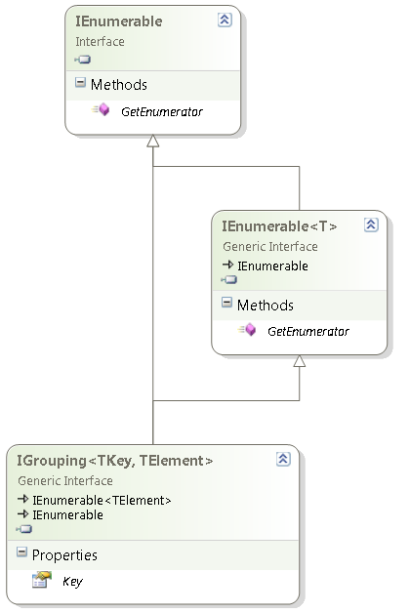
IGrouping interface diagram (click to enlarge)
One of the things most people find hard to use in LINQ is GroupBy or the LINQ expression group … by (they are mostly equivalent).
When starting to use that, I was also confused, mainly because of two reasons:
TElement members for the current group inside the grouping.Most people don’t see the IGrouping<TKey, TElement> because they use the var keyword to implicitly the LINQ result.
Often – when using any anonymous type – var is the only way of using that result.
That is fine, but has the consequence that it hides the actual type, which – when not anonymous – is a good way of seeing what happens behind the scenes.
David Klein gave an example for the multi column grouping and also shows that if you use LINQPad, you can actually see the IGrouping<TKey, TElement> in action.
Mike Taulty skipped the Group By Syntax for Grouping on Multiple Columns in his Grouping in LINQ is weird (IGrouping is your friend). So my examples include that.
Note that I don’t cover all the LINQ group by stuff, here, for instance, I skipped the into part.
There are some nice examples on MSDN covering exactly that both using Method based and Expression based LINQ.
The examples are based on these two classes, similar to what Mike did. Read the rest of this entry »

Posted in .NET, .NET 3.5, .NET 4.0, .NET 4.5, C#, C# 3.0, C# 4.0, C# 5.0, Development, LINQ, Software Development | Leave a Comment »
 The Wiert Corner - irregular stream of stuff