The Wiert Corner – irregular stream of stuff

Jeroen W. Pluimers on .NET, C#, Delphi, databases, and personal interests

  • My badges

  • Twitter Updates

  • My Flickr Stream

  • Pages

  • All categories

  • Enter your email address to subscribe to this blog and receive notifications of new posts by email.

    Join 1,862 other subscribers

Archive for the ‘Visual Studio and tools’ Category

MacOS: starting Visual Studio Code from the finder

Posted by jpluimers on 2020/03/26

On MacOS, a long standing wish from many developers has been to open a folder with Visual Studio Code: [WayBack] Mac OS X :: “Open Folder With” VS Code · Issue #1223 · Microsoft/vscode · GitHub.

There are many reasons for wanting this, and other tools can do this too (like Terminal, TextWrangler, Source Tree, Beyond Compare), so I was a bit surprised Visual Studio Code does not have it by default.

After initially being closed, the issue has been open for a while, so I started digging a bit for solutions that are easy to configure or install.

The last one is currently on the top of my list, so I copied and installation instructions, and added a few screenshots to explain the already included video below.

Read the rest of this entry »

Posted in .NET, Development, Software Development, Visual Studio and tools, vscode Visual Studio Code | Leave a Comment »

How to Integrate ILMerge into Visual Studio Build Process to Merge Assemblies? – Stack Overflow

Posted by jpluimers on 2020/03/19

On my research list for Visual Studio 2017 and up: [WayBack] How to Integrate ILMerge into Visual Studio Build Process to Merge Assemblies? – Stack Overflow

–jeroen

Posted in .NET, Development, Software Development, Visual Studio and tools | Leave a Comment »

emulation – How to safely remove/uninstall Android Virtual Device .img files added by Visual Studio Emulator for Android – Stack Overflow

Posted by jpluimers on 2020/02/26

Me at [WayBack] emulation – How to safely remove/uninstall Android Virtual Device .img files added by Visual Studio Emulator for Android – Stack Overflow:

Since after uninstalling the “Visual Studio Emulator for Android” component, you cannot get to the “AVD Manager” any more, you have to manually delete this directory:

%LocalAppData%\Microsoft\VisualStudioEmulator

This works for both Visual Studio 2017 and Visual Studio 2015.

In addition, you might want to run “AppWiz.cpl“, then remove “Android SDK Tools”, which is also not automatically removed by the Visual Studio installer (at least not in Visual Studio 2015).

This will get rid of the multi-gigabyte folder %ProgramFiles(x86)%\Android\android-sdk\

If you still need Android emulation, read these:

–jeroen

Posted in .NET, Development, Software Development, Visual Studio 2015, Visual Studio 2017, Visual Studio and tools | Leave a Comment »

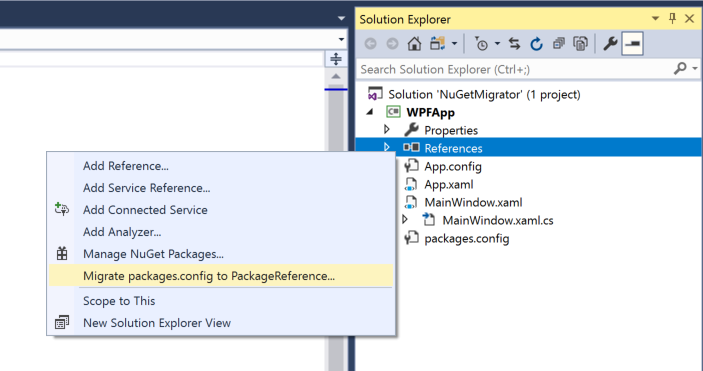
NuGet: migrate from packages.config to PackageReference with 3 clicks

Posted by jpluimers on 2020/02/19

Since I often forget to cleanup some bits of a migration: [WayBack] Migrate to PackageReference with 3 clicks:

Related:

–jeroen

Posted in .NET, Development, Software Development, Visual Studio 2015, Visual Studio 2017, Visual Studio and tools | Leave a Comment »

Use the Visual Studio Code mssql extension for SQL Server | Microsoft Docs

Posted by jpluimers on 2020/02/13

Since I really want to switch most of my SSMS usage to a tool being less resource intensive, as a truckload of my work is just running scripts, not browsing through data: [WayBackUse the Visual Studio Code mssql extension for SQL Server | Microsoft Docs

This tutorial shows how to use the mssql extension for VS Code. This extension allows you to edit and run Transact-SQL scripts in VS Code.

This will also make it a lot easier to run my code from a Mac.

–jeroen

Posted in .NET, Database Development, Development, Software Development, SQL Server, Visual Studio and tools, vscode Visual Studio Code | Leave a Comment »

visual studio code – Does the “editorWhitespace.foreground” workbench.colorCustomizations setting in VSCode actually work? – Stack Overflow

Posted by jpluimers on 2020/01/16

[WayBack] visual studio code – Does the “editorWhitespace.foreground” workbench.colorCustomizations setting in VSCode actually work? – Stack Overflow

Yes, it does. But after reading [WayBack] vscode-docs/theme-color-reference.md at master · Microsoft/vscode-docs · GitHub: Editor Colors or [WayBack] Visual Studio Code Theme Color Reference you might want to put it in the config straight like this:

see the editor white spaces, enable Toggle Render Whitespace.

  • editorWhitespace.foreground: Color of whitespace characters in the editor.

However, you need to embed it like this:

"workbench.colorCustomizations": {
    "editorWhitespace.foreground": "#333",
    "editorIndentGuide.background": "#333"
  }

The embedding makes it work.

References:

–jeroen

Posted in .NET, Color (software development), Development, Software Development, Visual Studio and tools, vscode Visual Studio Code | Leave a Comment »

Mads Kristensen on Twitter: “Visual Studio Tip: A blue dot in the margin indicates a switch of threads while stepping through debugging. #vstip… “

Posted by jpluimers on 2020/01/07

[WayBack] Mads Kristensen on Twitter: “Visual Studio Tip: A blue dot in the margin indicates a switch of threads while stepping through debugging. #vstip… “

–jeroen

Read the rest of this entry »

Posted in .NET, Development, Software Development, Visual Studio and tools | Leave a Comment »

Visual Studio: show whitespace and configure spaces instead of tabs

Posted by jpluimers on 2019/07/11

As I always forgets this and fresh Visual Studio installations favour tabs over spaces, here is how to get it into sane mode:

Related: [WayBackWhitespace: The Silent Killer

–jeroen

Read the rest of this entry »

Posted in .NET, Development, Software Development, Visual Studio 2012, Visual Studio 2013, Visual Studio 2014, Visual Studio 2015, Visual Studio and tools | Leave a Comment »

Microsoft Visual Studio – Wikipedia

Posted by jpluimers on 2019/05/09

Like there was never an Office 13.0, there was no Visual Studio 13.0: see the below table from Microsoft Visual Studio – Wikipedia: History

This influences tooling that searches for specific versions of Visual Studio or MSBuild (which has been available since Visual Studio 8.0 and up: MSBuild – Wikipedia: History).

Product name Codename Version
number
Supported .NET
Framework versions
Supported .NET
Core versions
Release date
Visual Studio 2019 Unknown 16.0 To be announced To be announced To be announced
Visual Studio 2017 Dev15 15.0 3.5 – 4.7 1.0-1.1, 2.0 March 7, 2017
Visual Studio 2015 Dev14 14.0 2.0 – 4.6 1.0 July 20, 2015
Visual Studio 2013 Dev12 12.0 2.0 – 4.5.2 N/A October 17, 2013
Visual Studio 2012 Dev11 11.0 2.0 – 4.5.2 N/A September 12, 2012
Visual Studio 2010 Dev10Rosario 10.0 2.0 – 4.0 N/A April 12, 2010
Visual Studio 2008 Orcas 9.0 2.0, 3.0, 3.5 N/A November 19, 2007
Visual Studio 2005 Whidbey 8.0 2.0, 3.0 N/A November 7, 2005
Visual Studio .NET 2003 Everett 7.1 1.1 N/A April 24, 2003
Visual Studio .NET (2002) Rainier 7.0 1.0 N/A February 13, 2002
Visual Studio 6.0 Aspen 6.0 N/A N/A June 1998
Visual Studio 97 Boston 5.0 N/A N/A February 1997

–jeroen

Posted in .NET, Continuous Integration, Development, msbuild, Software Development, Visual Studio and tools | Leave a Comment »

Visual Studio direct download links

Posted by jpluimers on 2019/05/07

For my link archive:

–jeroen

Posted in .NET, Development, Software Development, Visual Studio and tools, vscode Visual Studio Code | Leave a Comment »