Archive for the ‘Visual Studio and tools’ Category
Posted by jpluimers on 2016/06/20
Boy, don’t you dislike how hard it is to find direct download links…
Well, thanks to kenorb and jjlin (slightly edited):
Check: IE6, IE7, IE8, IE9, IE10, IE11 Offline Installers Download Links – kenorb Mar 20 ’15 at 13:39 – http://www.itechtics.com/download-internet-explorer-all-versions/ – note this does not provide hashes.
jjlin:
Try these Microsoft offline installer links:
These may refuse to work if you already have IE 11 installed, though. If it is refused, try this: http://stackoverflow.com/questions/20043971/how-to-downgrade-from-internet-explorer-11-to-internet-explorer-10
And in case these links ever stop working and you must obtain a copy from a non-Microsoft source, here are the SHA-512 hashes for posterity:
- 32-bit: d89ba3f9978be428ac05b182481198ab0f7b0c0651e4716e63cd0cf907d739cbc30f44ec9c444da683869473a548cd99e5c396467b2898f7c382b6345b3e70d2
- 64-bit: f1752bb6517fe15071e5f7a4fee4b8680da1bdad1df7054ab22bab78fe0f46aee177787f60ea2cfc86a2db2b08429e2cba3cfdd20ba6a2ab69e091c7784dfdae
Source: internet explorer 10 – Does Microsoft still have a link to download IE10 for Windows 7? – Super User
–jeroen
Posted in .NET, Development, Internet Explorer, Power User, Software Development, Visual Studio 2015, Visual Studio and tools, Web Browsers, Windows, Windows 7 | Leave a Comment »
Posted by jpluimers on 2016/06/15
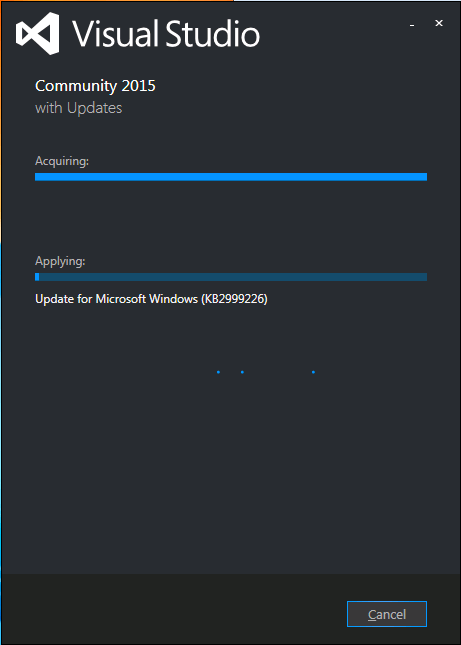
Visual Studio 2015 install stuck on “acquiring” KB2999226
I had exactly the same when installing Visual Studio 2015 on a Windows 7 x64 system: stuck on “Acquiring” the “Update for Microsoft Windows (KB2999226)”.
So as mentioned in the StackOverflow answers for the below question, I manually downloaded “Update for Windows 7 for x64-based Systems (KB2999226)” which you can get directly at https://download.microsoft.com/download/1/1/5/11565A9A-EA09-4F0A-A57E-520D5D138140/Windows6.1-KB2999226-x64.msu.
Be sure to quit both the Visual Studio 2015 installation as well as any (“automagically interfering” background Windows Updates), as otherwise you get this error:
If you still get that error, then
- try to stop/start the
wuauserv service: usually it gets rid of the error.
- When it still occurs, try a clean boot, then re-apply the KB.
Applying the KB can take a long while, even on fast hardware.
–jeroen
Source: Stuck while installing Visual Studio 2015 (Update for Microsoft Windows (KB2999226)) – Stack Overflow
Posted in .NET, Development, Software Development, Visual Studio 2015, Visual Studio and tools | Leave a Comment »
Posted by jpluimers on 2016/06/08
Boy I wish I had known this earlier. Like years ago…
In the Solution Explorer:
- Right Click Project
- Project Build Oder.
- Use the dialog to change the build order
It is next to the “Project Dependencies” in this image from Sara Ford:

Sara Ford: change “Project Build Order”
In the resulting dialog, you can change the build order within your solution.
This can be very useful when – for various reasons – you cannot have Project Level dependencies for an assembly, but have to have Assembly Reference dependencies for individual assemblies.
At a client I bumped into this, and this dialog was a life saver for us.
Others have used it because some Visual Studio versions miscalculate the dependencies.
–jeroen
Did you know… How to change the build order for your solution? – #333 – Sara Ford’s Weblog – Site Home – MSDN Blogs.
Posted in .NET, C#, C# 2.0, C# 3.0, C# 4.0, C# 5.0, C# 6 (Roslyn), Development, Software Development, Visual Studio 11, Visual Studio 2008, Visual Studio 2010, Visual Studio 2012, Visual Studio 2013, Visual Studio and tools | Leave a Comment »
Posted by jpluimers on 2016/06/03
Do NOT delete the folder "C:\ProgramData\Package Cache".
But you can move it to another storage and link to it so when you change/update/remove Visual Studio 2012, you still have access to it.
More details at windows – Can I delete the the folder C:\ProgramData\Package Cache\? – Super User.
–jeroen
Posted in .NET, Development, Software Development, Visual Studio 2012, Visual Studio and tools | Leave a Comment »
Posted by jpluimers on 2016/06/02
Since they’re hard to find on-line, and sometimes I need them when not having access to my collective browser or email history:
Notes:
- The AQTimeDemo.exe is the same as the latest AQTime###.exe (functionality depends in license).
- The installation from Windows Explorer sometimes fails with the below message. Installation from the command-prompt works, but you need to run it from an Administrator command-prompt:
---------------------------

E:\TEMP\AQtime824.exe

---------------------------

Windows cannot access the specified device, path, or file. You may not have the appropriate permissions to access the item.

---------------------------

OK

---------------------------
To get going for my special case, I watched some sample videos (which I did get to work in Internet Explorer but not in Chrome forty-something):
I needed it to do some profiling comparisons of services running under different configurations.
Read the rest of this entry »
Posted in .NET, Debugging, Delphi, Development, MAP Symbol Information, Profiling-Performance-Measurement, Software Development, TD32/TDS Symbol information, Visual Studio and tools | Leave a Comment »
Posted by jpluimers on 2016/04/19
The good news: Delphi 10.1 Berlin is out and released in Berlin (note: you might want to rename Delphi 10 Seattle into Delphi 10.0 Seattle).
Some links:
The not so good thing: I won’t be using it for a while as now for like 6 weeks or so, all the embarcadero HTTPS sites have been vulnerable to the DROWN man-in-the-middle attack that has been discovered 20160301.
Which means that even without going around the non-HTTPS partner site, I won’t be able to make a secure connection and install it.
Which gives me more time to play with the Xamarin Visual Studio 2015 integration, the cool stuff that MvvmCross offers and some of the other .NET Goodness at BUILD 2016 – .NET ALL THE THINGS! | Beth Massi
Read the rest of this entry »
Posted in Delphi, Delphi 10 Seattle, Delphi 10.1 Berlin (BigBen), Development, QC, Software Development, Visual Studio 2015, Visual Studio and tools | 6 Comments »
Posted by jpluimers on 2016/04/14
Visual Studio is a pretty big product and will take over 30GB of disk space after installation
Source: Visual Studio Frequently Asked Questions
LOL. It’s about half the size of recent Delphi versions.
–jeroen
Posted in .NET, .NET 4.0, .NET 4.5, C#, C# 5.0, C# 6 (Roslyn), Delphi, Delphi 10 Seattle, Delphi XE8, Development, Software Development, VB.NET, Visual Studio 2015, Visual Studio and tools, Xamarin Studio | 4 Comments »
Posted by jpluimers on 2016/04/14
It is pretty easy to switch from the XSD Designer to the Code view: c# – Viewing XSD as code – Stack Overflow.
But I got a bit fed up of doing this each and every time after opening an XSD file in Visual Studio.
It turns out there is a default for that which is a bit hidden away: in the File Open dialog. There,
right click on an XSD file, choose “Open with…” and select the appropriate option – then click on “Set as Default” before you actually open it.
via Stop Visual Studio 2010 opening XSDs in design mode – Stack Overflow.
–jeroen
Posted in Development, Software Development, Visual Studio 11, Visual Studio 2010, Visual Studio 2013, Visual Studio 2014, Visual Studio 2015, Visual Studio and tools, XML/XSD, XSD | 1 Comment »


 The Wiert Corner - irregular stream of stuff