The Wiert Corner – irregular stream of stuff

Jeroen W. Pluimers on .NET, C#, Delphi, databases, and personal interests

  • My badges

  • Twitter Updates

  • My Flickr Stream

  • Pages

  • All categories

  • Enter your email address to subscribe to this blog and receive notifications of new posts by email.

    Join 1,860 other subscribers

Archive for the ‘Visual Studio 2010’ Category

.NET/C#: Using IDisposable to restore temporary settrings example: TemporaryCursor class

Posted by jpluimers on 2012/01/26

This is WinForms code from a long time ago, but the concept of using an IDisposable interface to do resource cleanup and restore a temporary setting is very valid.

You use the code below like this:

        private void myMethod()
        {
            // set busy cursor
            using (IDisposable waitCursor = new TemporaryCursor(this, System.Windows.Forms.Cursors.WaitCursor))
            {
                // logic that takes a long while
            }
        }

The code below implements the TemporaryCursor class; you can assign any System.Windows.Forms.Cursors item you want.

It restores the cursor upon these three “events”:

Most often the IDispose pattern is being used to make sure that resources get cleaned up. If you think of a wait cursor as a temporary resource, this example becomes much easier to remember.

Of course this is not limited to the System.Windows.Forms realm, you can just as well use this for non-visual temporaries, and other kinds of UIs like ASP.NET, WPF or SilverLight.

using System.Windows.Forms;

namespace bo.Windows.Forms
{
    public class TemporaryCursor : IDisposable
    {
        private Control targetControl;
        private Cursor savedCursor;
        private Cursor temporaryCursor;
        private bool disposed = false;

        public TemporaryCursor(Control targetControl, Cursor temporaryCursor)
        {
            if (null == targetControl)
                throw new ArgumentNullException("targetControl");
            if (null == temporaryCursor)
                throw new ArgumentNullException("temporaryCursor");
            this.targetControl = targetControl;
            this.temporaryCursor = temporaryCursor;
            savedCursor = targetControl.Cursor;
            targetControl.Cursor = temporaryCursor;
            targetControl.HandleDestroyed += new EventHandler(targetControl_HandleDestroyed);
        }

        void targetControl_HandleDestroyed(object sender, EventArgs e)
        {
            if (null != targetControl)
                if (!targetControl.RecreatingHandle)
                    targetControl = null;
        }

        // public so you can call it on the class instance as well as through IDisposable
        public void Dispose()
        {
            Dispose(true);
            GC.SuppressFinalize(this);
        }

        protected virtual void Dispose(bool disposing)
        {
            if (!disposed)
            {
                if (null != targetControl)
                {
                    targetControl.HandleDestroyed -= new EventHandler(targetControl_HandleDestroyed);
                    if (temporaryCursor == targetControl.Cursor)
                        targetControl.Cursor = savedCursor;
                    targetControl = null;
                }
                disposed = true;
            }
        }

        // Finalizer
        ~TemporaryCursor()
        {
            Dispose(false);
        }
    }
}

–jeroen

Posted in .NET, C#, C# 2.0, C# 3.0, C# 4.0, Development, Software Development, Visual Studio 2005, Visual Studio 2008, Visual Studio 2010, Visual Studio and tools, WinForms | 4 Comments »

Added a few links to my “Tools” page, @WordPress bug spuriously inserting div tags still present.

Posted by jpluimers on 2011/12/28

While re-designing a Visual Studio 2010 plus Delphi XE2 install for a specific client, I updated some of my Tools page links:

And found out that the WordPress still wrongly inserts div tags when you step out a list by pressing Enter twice is still present. Annoying, as it has been there for at least 2 years, so I’m still interesting in people having a workaround for it.

–jeroen

Posted in .NET, C#, Delphi, Development, Software Development, TFS (Team Foundation System), Visual Studio 2008, Visual Studio 2010, Visual Studio and tools | 1 Comment »

WinForms UserControl and Visual Studio 2010 debugging – The process cannot access the file … because it is being used by another process – Stack Overflow

Posted by jpluimers on 2011/12/13

When doing WinForms development in Visual Studio 2010 (including SP1), be aware of a bug with UserControls that hamper debugging; sometimes you get an error like this:

Error 9 Unable to copy file "obj\x86\Debug\MyProject.exe" to "bin\Debug\MyProject.exe". The process cannot access the file 'bin\Debug\MyProject.exe' because it is being used by another process.

When using SysInternals’ Process Explorer to see which process has handles open to MyProject, you will see that devenv.exe (The Visual Studio IDE) is the culprit: sometimes it has a lot of handles open.

The workaround is simple: close all UserControls before debugging your WinForms application.

A real pity, as UserControls are a very useful feature when developing software (many platforms use the same paradigm, .NET certainly wasn’t the first to introduce it, and it is available in for instance WPF as well).

Note that there are other causes of the same error message, but for me this was the issue.

–jeroen

Via: visual studio 2010 – VisualStudio2010 Debugging – The process cannot access the file … because it is being used by another process – Stack Overflow.

Posted in .NET, C#, Development, Software Development, VB.NET, Visual Studio 2010, Visual Studio and tools | 2 Comments »

Cleanup: IntelliTrace Log ( .iTrace ) files and Visual Studio 2010 SP 1

Posted by jpluimers on 2011/09/08

While cleaning up my system, I found a while bunch of .iTrace files in “C:\Documents and Settings\All Users\Application Data\Microsoft Visual Studio\10.0\TraceDebugging” on a Windows XP system at a client that yet has to upgrade to newer Windows versions that store them under “C:\Users\All Users\Microsoft Visual Studio\10.0\TraceDebugging”.

Contrary to what IntelliTrace iTrace files and IntelliTrace Log ( .iTrace ) files and Visual Studio 2010 SP 1– Some Hidden Stuff « Abhijit’s World of .NET explains, these files are not always automatically removed.

And they are big, since Visual Studio 2010 Ultimate will automatically generate them.

So it is important to once in a while cleanup the “C:\Documents and Settings\All Users\Application Data\Microsoft Visual Studio\10.0\TraceDebugging” directory manually.

–jeroen

Posted in .NET, Development, Software Development, Visual Studio 2010, Visual Studio and tools | Leave a Comment »

Visual Studio 2010/2008/2005 – how can i check who has a specific file checked out in tfs? (via: Stack Overflow)

Posted by jpluimers on 2011/05/26

When you are using Team Foundation System (TFS) for version control, the project manager sometimes shows a file as being checked out by someone else, but it doesn’t show who that someone else is.

The reason is that the Project Manager only has generic knowledge about version control systems. However, the Source Control Explorer has specific knowledge about TFS.

So when you look in the Properties Window for the path of the file you are interested in, then you can use the Source Control Explorer to locate the file, and find out who has checked out that file.

There are other tools that can even give your more information than the Source Control Explorer:

  • the TF command-line application (on your PATH when you start the Visual Studio Command Prompt shortcut) to obtain extra information.
  • the Team Foundation Sidekicks (free; version 3.0 is for Team Foundation Server 2010; 2.4 is for Team Foundation Server 2008/2005) even produce most of that info from a GUI.
These two Stack Overflow questions were relevant in answering the above:

Posted in .NET, Development, Software Development, Source Code Management, TFS (Team Foundation System), Visual Studio 2005, Visual Studio 2008, Visual Studio 2010, Visual Studio and tools | Leave a Comment »

Visual Studio 2010: you should run the Remote Debugging Monitor from a local drive to avoid 0x8007000E E_OUTOFMEMORY

Posted by jpluimers on 2011/04/14

Setting up remote debugging is always a precarious thing, no matter what kind of development platform: the online documentation tells you the standard steps, but usually they don’t suffice.

This case is Visual Studio 2010 remote debugging, where the development environment is on a workstation running Windows 7, and the debug target is on Windows Server 2008 R2.
Both are x64 versions.

There is a remote desktop connection to the server, and the server can see the workstation files on the \\TSCLIENT\C share.

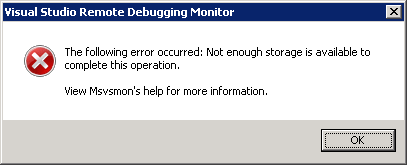
This is the error when running msvsmon.exe from \\tsclient\C\Program Files (x86)\Microsoft Visual Studio 10.0\Common7\IDE\Remote Debugger\x64:

[Visual Studio Remote Debugging Monitor]
The following error occurred: Not enough storage is available to complete this operation.

View Msvsmon's help for more information.
[OK]

(Funny BTW that the x64 Remote Debugging Monitor is in fact in an x86 path).

The solution is simple: copy the x64 directory local, then start it from there.

The reason in that the user credentials on the server don’t have enough rights on the \\TSCLIENT\C directory tree, so Windows barfs on it.

This pointed me into the right direction when I started Process Monitor from the same \\TSCLIENT\C share: Read the rest of this entry »

Posted in .NET, Debugging, Development, Remote Debugging, Software Development, Visual Studio 2010, Visual Studio and tools | Leave a Comment »

SharePoint 2010 error: Retrieving the COM class factory for component with CLSID {BDEADF26-C265-11D0-BCED-00A0C90AB50F} failed due to the following error: 800703fa – SharePointWiz

Posted by jpluimers on 2011/04/11

Somehow in a production environment I did get this error too:

System.Runtime.InteropServices.COMException (0x80040154): Retrieving the COM class factory for component with CLSID {BDEADF26-C265-11D0-BCED-00A0C90AB50F} failed due to the following error: 80040154.

These two posts helped me to solve it:

SharePoint 2010 beta error: Retrieving the COM class factory for component with CLSID {BDEADF26-C265-11D0-BCED-00A0C90AB50F} failed due to the following error: 800703fa – SharePointWiz – Site Home – MSDN Blogs.

Rhythmic Coding: Retrieving the COM class factory for component with CLSID {BDEADF26-C265-11D0-BCED-00A0C90AB50F} failed due to the following error: 80040154.

The solution is deceptively simple:

Resolution: It is because you are trying to build a x86 application. Go to project properties and set type to x64 everywhere. Then rebuild and debug. The Error Vanishes!

The SharePoint 2010 dll’s are all x64, and Visual Studio 2010 by default still starts .NET projects in x86 mode for both Release and Debug settings.

–jeroen

Posted in .NET, .NET 4.0, C#, C# 4.0, Development, SharePoint, Software Development, Visual Studio 2010, Visual Studio and tools, Web Development | 8 Comments »

Bootstrap and DVD ISO Download details: Microsoft Visual Studio 2010 Service Pack 1

Posted by jpluimers on 2011/03/30

The Download details: Microsoft Visual Studio 2010 Service Pack 1 (Installer) initially lets you download a bootstrap installer that only downloads the Service Pack 1 parts you actually need.

A bit further down on that page is the link to the full ISO DVD image with the anything you might need when updating multiple systems.

–jeroen

Posted in .NET, Development, Software Development, Visual Studio 2010, Visual Studio and tools | Leave a Comment »

Visual Studio 2010 Ux #fail: finding the Macro Recorder and Context Menus toolbars #VS2010 #Ux

Posted by jpluimers on 2011/03/16

When you want to enable (or disable) a toolbar in Visual Studio 2010, there are three options to go, of which the last two are equivalent:

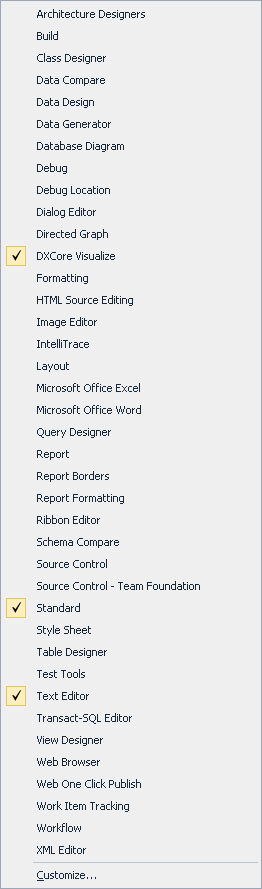
  1. Right click in the toolbar area to get a Context Menu, then check/unckeck the toolbar
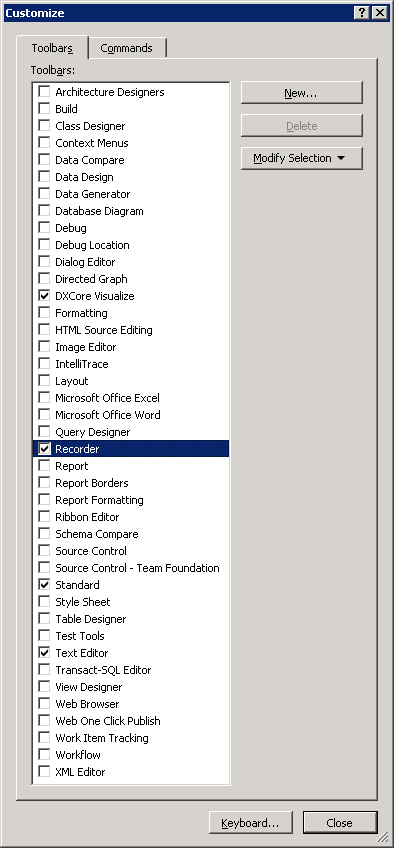
  2. Right click in the toolbar area to get a Context Menu, choose Customize and check/uncheck the toolbar(s) in the dialog.
  3. In the Tools Menu, choose Customize and check/uncheck the toolbar(s) in the dialog.

The first one is the easiest; you can see the resulting Context Menu in the left picture (click on it to enlarge).
The last two require an extra step; you can see the resulting dialog in the right most picture (click on it to enlarge).

Given the size of those lists, you’d think all toolbars are in both.

Wrong!

These are missing from the Context Menu:

  • Context Menus
  • Recorder

I consider this a serious Ux problem; if the Context Menu was much shorter (like 10 entries or so), it would be pretty obvious they are not.

It took me more than 10 minutes to find the Recorder toolbar which would have been vastly shorter if both lists were the same.

(Another Ux failure that caused my search to be this long is that I was looking for ‘Macro Recorder’ since all entries in the menu contain the word ‘Macro’; Recorder could as well point to a Toolbar for screen, video or audio recording).

–jeroen

Posted in .NET, Development, Software Development, Usability, User Experience (ux), Visual Studio 2010, Visual Studio and tools | Leave a Comment »

Why does Recording the TemporaryMacro sometimes fail in Visual Studio 2010? #durftevragen #dtv #daretoask

Posted by jpluimers on 2011/03/16

Every now and then, while recording a TemporaryMacro in Visual Studio 2010, I get this error message:


---------------------------
Microsoft Visual Studio
---------------------------
No TemporaryMacro in designated Recording Project
---------------------------
OK
---------------------------

The Recording a macro topic on MSDN suggest this solution:

Sounds like your macros directory is messed up.  Open Macro Explorer (View\Other Windows\Macro Explorer) and make sure you get the MyMacros element.

However, that works.

And if I check that, the next time I record a TemporaryMacro it just works.

I never had this in Visual Studio 2008, 2005 or older.

Anyone seen this behaviour too?

Anyone who knows why this happens?

–jeroen

via: Recording a macro.

Posted in .NET, Development, Software Development, Visual Studio 2010, Visual Studio and tools | Leave a Comment »