


Interesting talk:
Published on Oct 8, 2017
Via [WayBack] The Other Async (Threads + Async = ❤️) – screencast of David Beazley’s keynote at PyGotham 2017 – ThisIsWhyICode – Google+
–jeroen
Posted by jpluimers on 2019/09/18
Interesting talk:
Published on Oct 8, 2017
Via [WayBack] The Other Async (Threads + Async = ❤️) – screencast of David Beazley’s keynote at PyGotham 2017 – ThisIsWhyICode – Google+
–jeroen

Posted in Development, Python, Scripting, Software Development | Leave a Comment »
Posted by jpluimers on 2019/09/10
[WayBack] GitHub – slikts/js-equality-game: The Worst Minesweeper 💣 Ever:
It’s in response to claims like this one by the well-known author getify:
However, implicit coercion is a mechanism that can be learned, and moreover should be learned by anyone wishing to take JavaScript programming seriously. Not only is it not confusing once you learn the rules, it can actually make your programs better! The effort is well worth it.
You can play it on [WayBack] JavaScript Equality Table Game: Find out how well you know (or don’t know) the JavaScript == operator rules
It reminds me of the hilarious video on Wat – Destroy All Software Lightning Talk : Gary Bernhardt : Free Download, Borrow, and Streaming : Internet Archive
Based on:
Via:
–jeroen
Posted in Development, JavaScript/ECMAScript, Scripting, Software Development | Leave a Comment »
Posted by jpluimers on 2019/09/10
When starting to work with Python, a lot of examples contain the >>> characters on the first line often followed by ... characters on continuing lines.
They are about two things:
The answers in [WayBack] What do the three arrow (“>>>”) signs mean in python? give insight in the various Python versions and how they prompt.
References from them:
–jeroen
Posted in Development, Python, Scripting, Software Development | Leave a Comment »
Posted by jpluimers on 2019/09/05
I forgot how I originally bumped into the book series, but every time I try to program in JavaScript I’m reminded of them: You Don’ t Know JavaScript.
Originally a KickStarter project, they are now on GitHub and there is a Twitter account irregularly posting about them:
- Read online (free!): “Up & Going”, Published: Buy Now in print, but the ebook format is free!
- Read online (free!): “Scope & Closures”, Published: Buy Now
- Read online (free!): “this & Object Prototypes”, Published: Buy Now
- Read online (free!): “Types & Grammar”, Published: Buy Now
- Read online (free!): “Async & Performance”, Published: Buy Now
- Read online (free!): “ES6 & Beyond”, Published: Buy Now
–jeroen
Posted in Development, JavaScript/ECMAScript, Scripting, Software Development | Leave a Comment »
Posted by jpluimers on 2019/09/05
I bumped into this a while ago, but could not find back the code example showing it, so below is the SO question to solve it:
NameError: name 'socket' is not defined
[WayBack] How to refer to a standard library in a logging configuration file?
Related: [WayBack] [Tutor] Socket error in class
–jeroen
Posted in Development, Python, Scripting, Software Development | Leave a Comment »
Posted by jpluimers on 2019/09/04
A great tip from [WayBack] python multithreading wait till all threads finished:
ou need to use join method of
Threadobject in the end of the script.t1 = Thread(target=call_script, args=(scriptA + argumentsA)) t2 = Thread(target=call_script, args=(scriptA + argumentsB)) t3 = Thread(target=call_script, args=(scriptA + argumentsC)) t1.start() t2.start() t3.start() t1.join() t2.join() t3.join()Thus the main thread will wait till
t1,t2andt3finish execution.
I’ve used a similar construct that’s used by the multi-threading code I posted a few ways ago (on Passing multiple parameters to a Python method: the * tag) in the ThreadManager class below.
But first some of the other links that helped me getting that code as it is now:
start() and join())Thread.start ; [WayBack] Thread.joinThread.start ; [WayBack] Thread.join
class ThreadManager:
    def __init__(self):
        self.threads = []

    def append(self, *threads):
        for thread in threads:
            self.threads.append(thread)

    def runAllToCompletion(self):
        ## The loops are the easiest way to run one methods on all entries in a list; see https://stackoverflow.com/questions/2682012/how-to-call-same-method-for-a-list-of-objects
        # First ensure everything runs in parallel:
        for thread in self.threads:
            thread.start()
        # Then wait until all monitoring work has finished:
        for thread in self.threads:
            thread.join()
        # here all threads have finished

def main():
    ## ...
    threadManager.append(
        UrlMonitorThread(monitor, "http://%s" % targetHost),
        SmtpMonitorThread(monitor, targetHost, 25),
        SmtpMonitorThread(monitor, targetHost, 587),
        SshMonitorThread(monitor, targetHost, 22),
        SshMonitorThread(monitor, targetHost, 10022),
        SshMonitorThread(monitor, targetHost, 20022))

    threadManager.runAllToCompletion()
–jeroen
Posted in Development, Python, Scripting, Software Development | Leave a Comment »
Posted by jpluimers on 2019/09/03
A very concise way for [WayBack] how to filter name/value pairs under a registry key by name and value in PowerShell?:
$path = 'hkcu:\Software\Microsoft\Windows\CurrentVersion\Extensions'
(Get-ItemProperty $path).PSObject.Properties |
  Where-Object { $_.Name -match '^xls' ` -or $_.Value -match 'msaccess.exe$' } |
  Select-Object Name, Value
Thanks montonero for getting me on that path and pointing me to the hidden PSObject property which by itself has Properties, and making me find these links with background information:
PSObject being hiddenPSObject is revealed when calling Get-Member with the -Force parameter.More in-depth information:
Get-Member cmdlet gets the members, the properties and methods, of objects. To specify the object, use the InputObject parameter or pipe an object to Get-Member. To get information about static members, the members of the class, not of the instance, use the Static parameter. To get only certain types of members, such as NoteProperties, use the MemberType parameter.-ForceAdds the intrinsic members (PSBase, PSAdapted, PSObject, PSTypeNames) and the compiler-generated get_ and set_ methods to the display. By default, Get-Member gets these properties in all views other than Base and Adapted, but it does not display them.
The following list describes the properties that are added when you use the Force parameter:
Property collection, or the members that are actually properties.PSMemberInfoCollection<PSPropertyInfo>PSObject or MemberSet–jeroen
Posted in CommandLine, Development, PowerShell, PowerShell, Scripting, Software Development | Leave a Comment »
Posted by jpluimers on 2019/09/03
A very subtle thing that keeps biting me as my background is from languages where by default, identifiers on the class scope are instance level, not class level:
In Python, variables on class level are class variables.
If you need instance variables, initialise them in your constructor with a
self.variable = value.
The example in the Python 3 docs [WayBack] Classes – A First Look at Classes – Class and Instance Variables is the same as in the Python 2 docs [WayBack] Classes – A First Look at Classes – Class and Instance Variables:
Generally speaking, instance variables are for data unique to each instance and class variables are for attributes and methods shared by all instances of the class:
class Dog:

    kind = 'canine'         # class variable shared by all instances

    def __init__(self, name):
        self.name = name    # instance variable unique to each instance

>>> d = Dog('Fido')
>>> e = Dog('Buddy')
>>> d.kind                  # shared by all dogs
'canine'
>>> e.kind                  # shared by all dogs
'canine'
>>> d.name                  # unique to d
'Fido'
>>> e.name                  # unique to e
'Buddy'
For people new at Python: the __init__ is a constructor; see these links for more explanation:
Of course, the
__init__()method may have arguments for greater flexibility. In that case, arguments given to the class instantiation operator are passed on to__init__(). For example,>>> class Complex: ... def __init__(self, realpart, imagpart): ... self.r = realpart ... self.i = imagpart ... >>> x = Complex(3.0, -4.5) >>> x.r, x.i (3.0, -4.5)
–jeroen
Posted in Development, Python, Scripting, Software Development | Leave a Comment »
Posted by jpluimers on 2019/09/02
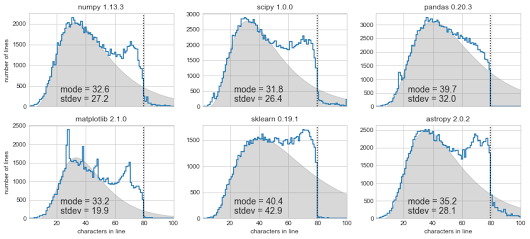 [Archive.is] Exploring Line Lengths in Python Packages is an interesting read.
It explores the relation between actual and “maximum” line lengths in Python in related to the prior 140 Twitter character limit.
via [Archive.is] Exploring Line Lengths in Python Packages – ThisIsWhyICode – Google+
–jeroen

Posted in Development, Python, Scripting, Software Development, Static Code Analysis | Leave a Comment »
Posted by jpluimers on 2019/08/28
I had to pass parameters to a method so they became a list:
    threadManager.append(
        UrlMonitorThread(monitor, "http://%s" % targetHost),
        SmtpMonitorThread(monitor, targetHost, 25),
        SmtpMonitorThread(monitor, targetHost, 587),
        SshMonitorThread(monitor, targetHost, 22))
This appeared much easier than I anticipated:
    def append(self, *threads):
        for thread in threads:
            self.threads.append(thread)
It uses the * tag which is explained here:
–jeroen
Posted in Development, Python, Scripting, Software Development | Leave a Comment »


 The Wiert Corner - irregular stream of stuff