The Wiert Corner – irregular stream of stuff

Jeroen W. Pluimers on .NET, C#, Delphi, databases, and personal interests

  • My badges

  • Twitter Updates

  • My Flickr Stream

  • Pages

  • All categories

  • Enter your email address to subscribe to this blog and receive notifications of new posts by email.

    Join 1,860 other subscribers

Archive for the ‘Python’ Category

python – How do I install pip on macOS or OS X? – Stack Overflow

Posted by jpluimers on 2020/03/25

On Mac OS X with stock Python:

All you need to do is

sudo easy_install pip

After this, you might want to upgrade pip:

sudo pip install --upgrade pip

Source: [WayBackpython – How do I install pip on macOS or OS X? – Stack Overflow

You could go the homebrew way, but that means your system will have two Python installations usually causing a nightmare of path dependency orders. In addition, homebrew puts you on the wrong foot, so:

DO NOT DO THIS!

# brew install pip
Error: No available formula with the name "pip" 
Homebrew provides pip via: `brew install python`. However you will then
have two Pythons installed on your Mac, so alternatively you can install
pip via the instructions at:
  https://pip.readthedocs.io/en/stable/installing/

–jeroen

Posted in Apple, Development, Mac OS X / OS X / MacOS, macOS 10.12 Sierra, macOS 10.13 High Sierra, Power User, Python, Scripting, Software Development | Leave a Comment »

Practical Deep Learning for Coders 2018 · fast.ai

Posted by jpluimers on 2020/03/11

I’ve read this twice and need to re-read this a few times, so from my reading list then need to follow the course one day: Practical Deep Learning for Coders 2018 · fast.ai [WayBack].

… deep learning course based on Pytorch (and a new library we have built, called fastai), with the goal of allowing more students to be able to achieve world-class results with deep learning. … this course, Practical Deep Learning for Coders 2018 [WayBack], … The only prerequisites are a year of coding experience, and high school math (math required for understanding the material is introduced as required during the course).

Related: [WayBackThe Matrix Calculus You Need For Deep Learning – Terence Parr and Jeremy Howard

Via:

–jeroen

Posted in Development, Python, Scripting, Software Development | Leave a Comment »

GitHub – mgedmin/check-manifest: Tool to check the completeness of MANIFEST.in for Python packages

Posted by jpluimers on 2020/02/27

I will need thi sone day: [WayBack] GitHub – mgedmin/check-manifest: Tool to check the completeness of MANIFEST.in for Python packages

Are you a Python developer? Have you uploaded packages to the Python Package Index? Have you accidentally uploaded broken packages with some files missing? If so, check-manifest is for you.

Via: [WayBack] check-manifest: a tool to check the completeness of MANIFEST.in for Python packages  – ThisIsWhyICode – Google+

–jeroen

Posted in Development, Python, Scripting, Software Development | Leave a Comment »

More great free Python books

Posted by jpluimers on 2020/02/20

A while ago I wrote about Until 20171201 you can get free access to “Automate the Boring Stuff with Python”?.

That book is still free. And these great books are too:

Via: [WayBack] Cracking Codes with Python by @AlSweigart teaches complete beginners how to program in Python. The book features the source code to several ciphers and … – ThisIsWhyICode – Google+

–jeroen

Posted in Development, Python, Scripting, Software Development | Leave a Comment »

Python – list transformation; string formatting – Stack Overflow

Posted by jpluimers on 2020/01/08

Sometimes simple examples are the best: [WayBack] Python – list transformation – Stack Overflow.

Interactive example (note you can run and save at repl.it in either [WayBack] Repl.it – Python 3 or [WayBack] Repl.it – Python 2; you can run but not save it at [WayBack] Welcome to Python.org: interactive Python shell):

# Links the documentation are Python 2, though everything works in Python 3 as well.

x = [1,2,3,4,5,11]
print("x: ", repr(x))

y = ['01','02','03','04','05','11']
print("y: ", repr(y))

# List comprehension https://docs.python.org/2/tutorial/datastructures.html#list-comprehensions
# ... using `str.format()` (Python >= 2.6): https://docs.python.org/2/library/stdtypes.html#str.format and https://docs.python.org/2/library/string.html#formatstrings
y = ["{0:0>2}".format(v) for v in x]
print("y: ", repr(y))

# ... using the traditional `%` formatting operator (Python < 2.6): https://docs.python.org/2/library/stdtypes.html#string-formatting y = ["%02d" % v for v in x] print("y: ", repr(y)) # ... using the format()` function (Python >= 2.6): https://docs.python.org/2/library/functions.html#format and https://docs.python.org/2/library/string.html#formatstrings
# this omits the "{0:...}" ceremony from the positional #0 parameter
y = [format(v, "0>2") for v in x]
print("y: ", repr(y))

# Note that for new style format strings, the positional argument (to specify argument #0) is optional (Python >= 2.7) https://docs.python.org/2/library/string.html#formatstrings
y = ["{:0>2}".format(v) for v in x]
print("y: ", repr(y))

# Using `lambda`
# ... Python < 3 return a list y = map(lambda v: "%02d" %v, x) print("y: ", repr(y)) # ... Python >= 3 return a map object to iterate over https://stackoverflow.com/questions/1303347/getting-a-map-to-return-a-list-in-python-3-x/1303354#1303354
y = list(map(lambda v: "%02d" %v, x))
print("y: ", repr(y))

Output:

Python 3 Python 2
Python 3.6.1 (default, Dec 2015, 13:05:11)
[GCC 4.8.2] on linux
   
x:  [1, 2, 3, 4, 5, 11]
y:  ['01', '02', '03', '04', '05', '11']
y:  <map object at 0x7fe1218200b8>
y:  ['01', '02', '03', '04', '05', '11']
Python 2.7.10 (default, Jul 14 2015, 19:46:27)
[GCC 4.8.2] on linux
   
('x: ', '[1, 2, 3, 4, 5, 11]')
('y: ', "['01', '02', '03', '04', '05', '11']")

–jeroen

Read the rest of this entry »

Posted in Conference Topics, Conferences, Development, Event, Python, Scripting, Software Development | Leave a Comment »

python – Why does “return list.sort()” return None, not the list? – Stack Overflow

Posted by jpluimers on 2020/01/02

list.sort sorts the list in place, i.e. it doesn’t return a new list. Just write

newList.sort()
return newList

The above answer is goden as performing return list.sort() bytes me often, because Python is usually an environment using the functional approach.

Answer from [WayBack] python – Why does “return list.sort()” return None, not the list? – Stack Overflow

Background information:

–jeroen

Posted in Development, Python, Scripting, Software Development | Leave a Comment »

Using a main check __main__ to call a main function in Python

Posted by jpluimers on 2020/01/01

[WayBack] __main__ — Top-level script environment — Python 3 documentation recommends code like this:

if __name__ == "__main__":
    # execute only if run as a script
    main()

This has many cool possibilities, including these that I like most as a beginning Python developer:

  • having your def main(): function in a separate source file
  • allowing to return prematurely from your main function (you cannot do this from the main block)
  • allowing a file to distinguish if it is being loaded as a module, or as a main program

Related:

–jeroen

Posted in Conference Topics, Conferences, Development, Event, Python, Scripting, Software Development | Leave a Comment »

Delphi, decoding files to strings and finding line endings: some links, some history on Windows NT and UTF/UCS encodings

Posted by jpluimers on 2019/12/31

A while back there were a few G+ threads sprouted by David Heffernan on decoding big files into line-ending splitted strings:

Code comparison:

Python:

with open(filename, 'r', encoding='utf-16-le') as f:
  for line in f:
    pass

Delphi:

for Line in TLineReader.FromFile(filename, TEncoding.Unicode) do
  ;

This spurred some nice observations and unfounded statements on which encodings should be used, so I posted a bit of history that is included below.

Some tips and observations from the links:

  • Good old text files are not “good” with Unicode support, neither are TextFile Device Drivers; nobody has written a driver supporting a wide range of encodings as of yet.
  • Good old text files are slow as well, even with a changed SetTextBuffer
  • When using the TStreamReader, the decoding takes much more time than the actual reading, which means that [WayBack] Faster FileStream with TBufferedFileStream • DelphiABall does not help much
  • TStringList.LoadFromFile, though fast, is a memory allocation dork and has limits on string size
  • Delphi RTL code is not what it used to be: pre-Delphi Unicode RTL code is of far better quality than Delphi 2009 and up RTL code
  • Supporting various encodings is important
  • EBCDIC days: three kinds of spaces, two kinds of hyphens, multiple codepages
  • Strings are just that: strings. It’s about the encoding from/to the file that needs to be optimal.
  • When processing large files, caching only makes sense when the file fits in memory. Otherwise caching just adds overhead.
  • On Windows, if you read a big text file into memory, open the file in “sequential read” mode, to disable caching. Use the FILE_FLAG_SEQUENTIAL_SCAN flag under Windows, as stated at [WayBack] How do FILE_FLAG_SEQUENTIAL_SCAN and FILE_FLAG_RANDOM_ACCESS affect how the operating system treats my file? – The Old New Thing
  • Python string reading depends on the way you read files (ASCII or Unicode); see [WayBack] unicode – Python codecs line ending – Stack Overflow

Though TLineReader is not part of the RTL, I think it is from [WayBack] For-in Enumeration – ADUG.

Encodings in use

It doesn’t help that on the Windows Console, various encodings are used:

Good reading here is [WayBack] c++ – What unicode encoding (UTF-8, UTF-16, other) does Windows use for its Unicode data types? – Stack Overflow

Encoding history

+A. Bouchez I’m with +David Heffernan here:

At its release in 1993, Windows NT was very early in supporting Unicode. Development of Windows NT started in 1990 where they opted for UCS-2 having 2 bytes per character and had a non-required annex on UTF-1.

UTF-1 – that later evolved into UTF-8 – did not even exist at that time. Even UCS-2 was still young: it got designed in 1989. UTF-8 was outlined late 1992 and became a standard in 1993

Some references:

–jeroen

Read the rest of this entry »

Posted in Delphi, Development, Encoding, PowerShell, PowerShell, Python, Scripting, Software Development, The Old New Thing, Unicode, UTF-16, UTF-8, Windows Development | Leave a Comment »

Pythonic

Posted by jpluimers on 2019/12/24

When learning Python, one of the terms to get used to is Pythonic, basically shorthand for a loosely defined idiomatic Python way of writing code.

Some links to help you get a feel for this:

Sometime, I am going to dig into learning how to write Pythonic code for merging and joining dictionaries (preferably those of namedtuple entities). Hopefully these links will help me with that:

–jeroen

Posted in Development, Python, Software Development | Leave a Comment »

Visual Studio Code: enable Python debugging and selecting the Python version used

Posted by jpluimers on 2019/12/18

A few links and screenshots for my archive (assuming development on MacOS):

Enable Python Debugging

  1. Start the debugger: key combination Shift-Command-D, or click the debug icon 
  2. Click on the wheel with the red dot in the debugger pane: , which will generate and open a launch.json file in the current workspace, remote the red dot and fill the drop down with debug configurations
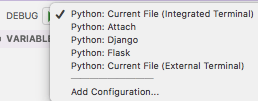

Via:

Selecting the Python version

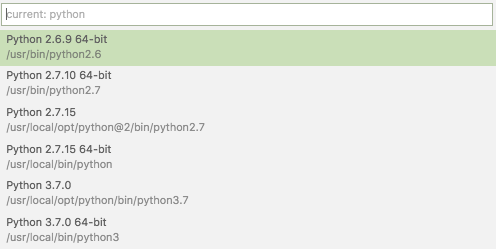
  1. Key combination Ctrl-Shift-P
  2. Type Select Interpreter
  3. Select the Python version you want; on my system they were at the time of writing:

Via:

Setting command-line arguments

Commandline arguments are set in the same .vscode/launch.json file:

"args": [
    "--quiet", "--norepeat"
],

Though [WayBack] Python debugging configurations in Visual Studio Code: args could have been more clear that you should put that under the Python configuration section you are debugging with, for instance:

{
    // Use IntelliSense to learn about possible attributes.
    // Hover to view descriptions of existing attributes.
    // For more information, visit: https://go.microsoft.com/fwlink/?linkid=830387
    "version": "0.2.0",
    "configurations": [
        {
            "name": "Python: Current File (Integrated Terminal)",
            "type": "python",
            "request": "launch",
            "program": "${file}",
            "console": "integratedTerminal",
            "args": [
                "--quiet", "--norepeat"
            ]
        },

Setting the startup python program

The page above also has a section on [WayBack] Python debugging configurations in Visual Studio Code: _troubleshooting that you can use to start the same script each time you debug, for instance your integration tests:

{
    // Use IntelliSense to learn about possible attributes.
    // Hover to view descriptions of existing attributes.
    // For more information, visit: https://go.microsoft.com/fwlink/?linkid=830387
    "version": "0.2.0",
    "configurations": [
        {
            "name": "Python: Current File (Integrated Terminal)",
            "type": "python",
            "request": "launch",
            // "program": "${file}",
            "program": "${workspaceFolder}/snapperListDeleteFailures.FileTests.py",

Fazit

I should have read [WayBack] Get Started Tutorial for Python in Visual Studio Code first.

–jeroen

Posted in Development, Python, Scripting, Software Development | Leave a Comment »