Archive for the ‘RouterOS’ Category
Posted by jpluimers on 2017/10/27
Maybe for my LoT (LAN of Things): having multiple (even many) local LANs some each with their section of LoT equipment nicely separated and partially being able to talk to some of the other LANs or part of the outside world.
Some links that might help me getting this set up:
The basic plan:
- Configure each port or grouped (with ethernet master-port or maybe bridged) of ports having their own address pool and DHCP server so each of them are in a separate private network
- Routes between the networks so they can be accessed
- NAT mangling so the networks can reach the other networks or outside world without exposing their private network addresses
- Firewall rules to permit/limit which networks can see each other or the outside world
WinBox displays routes in various colors [WayBack]:
- Black – active
- Blue – inactive
- interface not up or disconnected
- other route with higher precedence already covers this route
- Red – invalid
- interface does not exist
- interface is disabled
- IP address not on that interface any more
Sometimes they show as blue while still being legitimate. Not sure why yet.
–jeroen
Posted in Development, MikroTik, RouterOS, routers, Scripting, Software Development | Leave a Comment »
Posted by jpluimers on 2017/10/24
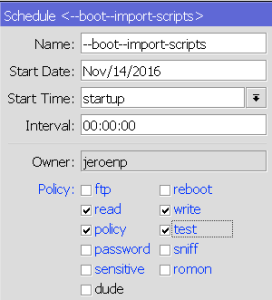
Start Time special value `startup`
There is a special startup value for “Start Time” you can enter which makes it runs once 3 seconds after reboot.
If by then your router isn’t fully “up” yet (i.e. waiting for PPPoE or DHCP network settings), then inside the script you can perform a delay global command as shown in the code fragment from the below forum post.
Don’t you love how people still tend to both repeat themselves and abbreviate stuff even though they have code completion at their disposal?:
{:delay 10};

/log print file=([/system identity get name] . "Log-" . [:pick [/system clock get date] 7 11] . [:pick [/system clock get date] 0 3] . [:pick [/system clock get date] 4 6]); \

/tool e-mail send to="xxx@xxx.com" subject=([/system identity get name] . " Log " . \

[/system clock get date]) file=([/system identity get name] . "Log-" . [:pick [/system clock get date] 7 11] . \

[:pick [/system clock get date] 0 3] . [:pick [/system clock get date] 4 6] . ".txt"); :delay 10; \

/file rem [/file find name=([/system identity get name] . "Log-" . [:pick [/system clock get date] 7 11] . \

[:pick [/system clock get date] 0 3] . [:pick [/system clock get date] 4 6] . ".txt")]; \

:log info ("System Log emailed at " . [/sys cl get time] . " " . [/sys cl get date])
Read the rest of this entry »
Posted in Development, Internet, MikroTik, Power User, RouterOS, routers, Scripting, Software Development | Leave a Comment »
Posted by jpluimers on 2017/10/19

minimum schedule and script policies: read/write/policy/test
A year later, Mikrotik still needs to update their documentation, so from my question at [WayBack] [Mikrotik follow-up needed] Router OS 6.37.1 – scheduled script cannot execute script – MikroTik RouterOS.
TL;DR:
- use the same policies for scripts and schedules
- use these policies as a minimum for scripts and schedules:
Forum post:
I found out two things:
- the
testFunctionScript needs at least these policies to call a function: read, write, policy, test
- a
schedule needs at least the same permissions as a script in order to run the script at all
This is how the various permissions affect the testFunctionScript script:
- no policies only allow
:log info "testFunctionScript"; .
read allows the above and :local testFunctionJobs [/system script job print as-value detail]; which then is be logged with :log info "testFunctionJobs=$testFunctionJobs";- only
write seems equivalent to no policies as it will only allow :log info "testFunctionScript";
read and write is equivalent to read- a lone
policy or test policy (talk about confusion!) do not add functionality, so any combinations of just policy or testwith read and/or write get the same functionality as above
policy and test without any other seem equivalent to no policies as they result in only :log info "testFunctionScript"; to execute- the combined policies
read, write, policy, test allow full script functionality including the function call and using the function call result
The above findings show that more logging is needed: the scheduler should log when (and why!) it does not have enough permissions to run a script. Right now you’re in the dark on when (and why!) a script isn’t ran by the scheduler.
The above findings show that these parts of the documentation need updating:
– http://wiki.mikrotik.com/wiki/Manual:Sc … repository (update with info about the above policy combinations)
– http://wiki.mikrotik.com/wiki/Manual:Ro … Properties (update with info about the above policy combinations)
– http://wiki.mikrotik.com/wiki/Manual:System/Scheduler (does not document anything about policies at all)
The various scripts (apply your mix of policies that you need)
## logon as user jeroenp

/system script environment remove [ /system script environment find where name="testFunction" ];
:global testFunction do={
  :local result [/system resource get uptime];
  :return $result;
}

/system script environment print detail where name=testFunction
# 0 name="testFunction" value=";(eval /system scheduler  (eval /localname=$result;value=(eval (eval /system resource getvalue-name=uptime))) (eval /returnvalue=$result))"

:log info "direct execution of testFunction"

{
:global testFunction;
:local testFunctionType [:typeof testFunction];
:local testFunctionResult [$testFunction];
:log info "testFunctionScript";
:log info "testFunctionType=$testFunctionType";
:log info "testFunctionResult=$testFunctionResult";
:log info "testFunction=$testFunction";
}

/log print where buffer=memory && (message~"testFunction" || topics~"info")

/system script remove [ /system script find where name="testFunctionScript" ];
/system script add name=testFunctionScript owner=jeroenp policy=ftp,reboot,read,write,policy,test,password,sniff,sensitive,romon source=":global testFunction;\r\
    \n:log info \"testFunctionScript\";\r\
    \n:local testFunctionType [:typeof testFunction];\r\
    \n:local testFunctionResult [\$testFunction];\r\
    \n:log info \"testFunctionType=\$testFunctionType\";\r\
    \n:log info \"testFunctionResult=\$testFunctionResult\";\r\
    \n:log info \"testFunction=\$testFunction\";\r\
    \n"

:log info "execution of testFunction via testFunctionScript"

/system script run testFunctionScript

/log print where buffer=memory && (message~"testFunction" || topics~"info")

/system scheduler remove [ /system scheduler find where name="testFunctionScriptSchedule" ];
/system scheduler add interval=10s name=testFunctionScriptSchedule on-event=testFunctionScript policy=ftp,reboot,read,write,policy,test,password,sniff,sensitive start-date=sep/22/2015 start-time=12:02:37

:log info "execution of testFunction via testFunctionScriptSchedule calling testFunctionScript"
:delay 20s
/system scheduler disable testFunctionScriptSchedule

/log print where buffer=memory && (message~"testFunction" || topics~"info")

/system scheduler print detail where name="testFunctionScriptSchedule"
–jeroen
Posted in Development, Internet, MikroTik, Power User, RouterOS, routers, Scripting, Software Development | Leave a Comment »
Posted by jpluimers on 2017/09/27
When logging on a Mikrotik is high-volume, then you need to have either:
- separate logging actions (they end up in logging buffers each having the same name as the action) and logging rules for specific information that you want to retain
- log to file in stead of memory
Since my devices have plenty memory, I made a separate accountAction with a rule sending the topic account to accountAction which I then can query like either of these:
/log print detail where message~"logged"
/log print detail where message~"logged" && buffer=accountAction
Here is the /system logging export condensed result:
/system logging action add name=accountAction target=memory

/system logging add action=accountAction topics=account
–jeroen
Posted in Development, Internet, MikroTik, Power User, RouterOS, routers, Scripting, Software Development | Leave a Comment »
Posted by jpluimers on 2017/09/08
Some blacklist filters you can use on Mikrotik RouterOS devices:
You might consider to use these instead of action=drop:
–jeroen
Read the rest of this entry »
Posted in Development, Internet, MikroTik, Power User, RouterOS, routers, Scripting, Software Development | 2 Comments »
Posted by jpluimers on 2017/08/29
Some ideas for date and time calculation:
It should get better (and verifyable) implementations in stead of these Julian (not Gregorian!) date conversions:
Notes:
–jeroen
Posted in Algorithms, Development, Internet, MikroTik, Power User, RouterOS, routers, Scripting, Software Development | Leave a Comment »
Posted by jpluimers on 2017/08/28
Example:
/ip firewall filter export file=ip-firewall-filter.rsc
This exports the Filters parts of the IP Firewall into a file named ip-firewall-filter.rsc in the user-space root of the Mikrotik router file system that you can access through the Files menu entry in WinBox or by external access through FTP or SFTP (SSH File Transfer Protocol).
–jeroen
via: exporting firewall config – MikroTik RouterOS
Posted in Development, Internet, MikroTik, Power User, RouterOS, routers, Scripting, Software Development | Leave a Comment »
Posted by jpluimers on 2017/08/22
The Cloud Router Switches support three types of mirroring. Port based mirroring can be applied to any of switch-chip ports, VLAN based mirroring works for all specified VLANs regardless switch-chip ports and MAC based mirroring copies traffic sent or received from specific device reachable from the port configured in Unicast Forwarding Database.
Port Based Mirroring
The first configuration sets ether5 port as a mirror0 analyzer port for both ingress and egress mirroring, mirrored traffic will be sent to this port. Port based ingress and egress mirroring is enabled from ether6 port.
/interface ethernet switch
set ingress-mirror0=ether5 egress-mirror0=ether5

/interface ethernet switch port
set ether6 ingress-mirror-to=mirror0 egress-mirror-to=mirror0
Source: Manual:CRS examples – MikroTik Wiki [WayBack]
This allows you to torch traffic from a specific port despite that port being grouped to a master-port.
Via: Torch not working with CRS226-24G-2S+ – MikroTik RouterOS [WayBack]
But, when using Bridge, all ports share a single 1 gbps link to the CPU, so your layer 2 performance will suffer horribly.
If you need to see all the traffic from a single port when using Master/slave port configuration, use port mirroring.
–jeroen
Posted in Development, Internet, MikroTik, Power User, RouterOS, routers, Scripting, Software Development | Leave a Comment »
Posted by jpluimers on 2017/07/27
Some links that were useful getting the SMS sending stuff to work.
The documentation is clear on what to do to send/receive SMS:
But it is unclear what USB hardware does work, so here are some links:
You can also do it the other way around:
–jeroen
Posted in Development, Internet, MikroTik, Power User, RouterOS, routers, Scripting, Software Development | Leave a Comment »
Posted by jpluimers on 2017/07/26
Though the Mikrotik people seem reluctant to make the font size in Winbox configurable, if you run it through WineBottler on OS X, you can scale the individual app. It’s not very pretty but makes it easier to use.
The trick is based on the Windows DPI font settings explained for instance at DPI Display Size Settings – Change – Windows 7 Help Forums and Large Fonts in Registry: Where Exactly? | PC Review but then in Wine.
For Windows, this is a system wide setting, but on a WineBottler application there is one “Windows environment” per application, so it’s application specific and should work for other applications than WinBox as well.
It makes it much easier to do script editing now.
Steps I performed:
- Quit all WinBox instances
- Open a Terminal
- Open this file
/Applications/Winbox4Mac.app/Contents/Resources/system.reg
- Find this key and name=value:
- key
[System\\CurrentControlSet\\Hardware Profiles\\Current\\Software\\Fonts] 1460991918
- name=value
"LogPixels"=dword:00000060
- Change the name=value to be like this (scales to 133.3333333%)
"LogPixels"=dword:00000080
- Save the file
- Start WinBox
The value increases the DPI from 0x60 (96 DPI) to 0x80 (128 DPI) , but the WinBox software isn’t smart enough to scale a lot of other UI properties based on it (like controls dialogs, grid cell sizes and script editors).
So it takes a bit of experimenting what works well (on my system, dword:00000090 – or 144 DPI) which scales to 150% cuts off too much of the descenders).
Values I tried:
- dword:00000060
- dword:00000078
- dword:00000080
- dword:00000084
- dword:00000090
I got at this trick through [Wine] Screen font size then wading my way to find where system.reg was stored on my system.
TODO: dive into Fixing Windows font scaling without restarting | Marc Durdin’s Blog and see if other registry settings need to be applied as well.
–jeroen
Posted in Development, Internet, MikroTik, Power User, RouterOS, routers, Scripting, Software Development | Leave a Comment »


 The Wiert Corner - irregular stream of stuff