The Wiert Corner – irregular stream of stuff

Jeroen W. Pluimers on .NET, C#, Delphi, databases, and personal interests

  • My badges

  • Twitter Updates

  • My Flickr Stream

  • Pages

  • All categories

  • Enter your email address to subscribe to this blog and receive notifications of new posts by email.

    Join 1,861 other subscribers

Archive for the ‘Windows Development’ Category

OutputDebugStringA limitation used to be close to 4K, but with OutputDebugStringW, what is the limitation?

Posted by jpluimers on 2020/12/31

I wonder what the limitation of OutputDebugStringW is, as OutputDebugStringA had a limit imposed by the DBWIN_BUFFER which was 4K (minus a bit overhead):

–jeroen

Posted in Development, Software Development, Windows Development | Leave a Comment »

Some odd Windows Messages for my research list (Windows 10 with a very basic Delphi application)

Posted by jpluimers on 2020/12/22

The bold messages below inside the main message loop are on my research list because:

  • they seem to be undocumented in WinUser.h and other header files
  • they are sent to Window handles that have no corresponding VCL TWinControl bound to them
  • they are WM_TIMER messages sending to a null hwnd, without the Delphi code registering a window-less timer (note the lParam indicates they have different call back procedures attached to them)

Being inside the message loop, they are either posted or created by Windows.

The hexadecimal value for WM_TIMER is documented: [Archive.is] 0x0113 site:https://docs.microsoft.com/en-us/windows/desktop/winmsg – Google Search.

Neither of the below messages are documented in either of the Undocumented Windows books (yes, there are two; the first – though rare to get – was a slightly earlier published one-person effort; the second was a tiny bit later three-person effort, but much thicker and included a diskette with tools; both books complement each other well; I am listed in both):

Messages I am looking for:

Yes, I know that Windows Messages are usually noted as 4 hexadecimal digits, but since they are UINT, the logging framework logs them as 32-bit hexadecimal values as this was a 32-bit application, see these WM_* constants and message ranges:

  • 0x0400: [WayBack] WM_USER – Windows applications | Microsoft Docs
  • 0x8000: [WayBack] WM_APP – Windows applications | Microsoft Docs

    The WM_APP constant is used to distinguish between message values that are reserved for use by the system and values that can be used by an application to send messages within a private window class. The following are the ranges of message numbers available.

    Start End Meaning Note
    0 WM_USER–1 Messages reserved for use by the system.
    WM_USER 0x7FFF Integer messages for use by private window classes. Depends on the one that called RegisterClass, see below.
    WM_APP 0xBFFF Messages available for use by applications. Depends on the one that called CreateWindow, see below.
    0xC000 0xFFFF String messages for use by applications.
    0x10000 0xFFFFFFFF Reserved by the system.

Note that [WayBack] Which message numbers belong to whom? – The Old New Thing explains more about CreateWindow and RegisterClass, which are important for the above subranges.

Similarly, the sharing of the ID space for Windows Messages, Atom Names and Clipboard Formats:

It might be that two of the messages are related to an undocumented UserAdapterWindowClass: [WayBack] Windows Creators Update Crashes old C++ Apps – Stack Overflow.

On message handling in general:

Related (as my WM_TIMER knowledge was rusty when scheduling this blog post):

Read the rest of this entry »

Posted in Development, Software Development, The Old New Thing, Windows Development | Leave a Comment »

winapi – What format is the time member of a MSG structure? – Stack Overflow

Posted by jpluimers on 2020/12/22

Found it. GetMessageTime defines it as the number of milliseconds since the system was started.

Source: [WayBack] winapi – What format is the time member of a MSG structure? – Stack Overflow.

It is not documented in the MSG/tagMSG documentation: [WayBack] tagMSG | Microsoft Docs Contains message information from a thread’s message queue.

Luckily, The Old New Thing does: [WayBack] What clock do MSG.time and GetMessageTime use? – The Old New Thing

The unit is documented in [WayBack] GetMessageTime function | Microsoft Docs: Retrieves the message time for the last message retrieved by the GetMessage function.

–jeroen

Posted in Development, Software Development, The Old New Thing, Windows Development | Leave a Comment »

Old New Thing IAccessible examples

Posted by jpluimers on 2020/12/17

The blog examples are only two:

The book has more: The Old New Thing: Practical Development Throughout the Evolution of Windows – Raymond Chen – Google Books

jeroen

Posted in COM/DCOM/COM+, Development, Software Development, The Old New Thing, Windows Development | Leave a Comment »

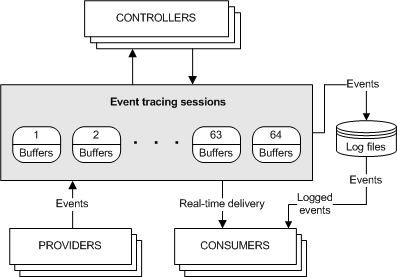
About Event Tracing – Windows applications | Microsoft Docs

Posted by jpluimers on 2020/11/24

On my list of things to look into: [WayBack] About Event Tracing – Windows applications | Microsoft Docs.

It is so much better than OutputDebugString!

Via Kent Morwath commenting at Never ever put OutpugDebugString in code that is meant to run on production systems « The Wiert Corner – irregular stream of stuff

–jeroen

Posted in Development, Software Development, Windows Development | Leave a Comment »

FeaturesShim: using ShimGen for creating a shim to a program either console or GUI so you need only one bin directory

Posted by jpluimers on 2020/11/17

[WayBack] FeaturesShim is a cool Chocolatey feature that uses ShimGen.

This allows Chocolatey to take only one directory in your search PATH, with a lot of small files, that link to the much larger actual executable files.

ShimGen (like many other parts of Windows and some other parts of Chocolatey) is not open source, but the mechanism is documented.

More information:

–jeroen

Posted in .NET, Development, Power User, Software Development, Windows, Windows Development | Leave a Comment »

performance – How can I produce high CPU load on Windows? – Super User

Posted by jpluimers on 2020/10/28

Reminder to self: [WayBack] performance – How can I produce high CPU load on Windows? – Super User

Poor-mans-solution is a batch file filling one core:

@echo off
:loop
goto loop

To stop, press Ctrl+C in the console.

Far easier is [WayBack] Tools To Simulate CPU / Memory / Disk Load – The Way I See It:

There is an old SysInternals tool from 1996 called “CPU Stress” that still works. (I just tried it on my Windows 10 laptop.)

Custom CPU load

It’s GUI based and allows you to run up to four threads at custom intensities. This allows you to tune the desired CPU load. As a rule of thumb: One thread with Activity set to Maximum will consume about 25% CPU. So as an example: If you run three threads at Maximum, your CPU load goes to about 75%.

Portable

CPUSTRES.EXE is a portable download and does not require installation.

–jeroen

Posted in Development, Software Development, Windows Development | Leave a Comment »

My toolkit – Roald’s blog

Posted by jpluimers on 2020/10/22

Always interesting to see what others put on their Windows development systems, for instance: [WayBack] My toolkit – Roald’s blog

Everytime I (re)install my development computer I need to think about all the tools I need and use on a regular basis. For that reason, and maybe to inspire others, here’s my list of essentia…

–jeroen

Posted in .NET, Delphi, Development, Software Development, Windows Development | Leave a Comment »

Automated testing Windows applications using Katalon and WinAppDriver

Posted by jpluimers on 2020/10/21

[WayBack] Top 45 Best Automation Testing Tools Ultimate List • Test Automation Made Easy: Tools, Tips & Training Awesomeness A few notes, partially related to Enable your device for development – UWP app developer | Microsoft Docs.

One research project I had a while ago, was to see how it was possible to use a generic testing tool like Katalon Studio (that can test many platforms), for testing Windows applications.

Katalon uses a Selenium interface that normally is used for web applications through the [WayBack] WebDriver protocol (formerly [WayBack] JsonWireProtocol) that continues to be updated: [WayBack] draft upcoming WebDriver protocol, which is more generic than just web applications:

Read the rest of this entry »

Posted in .NET, Conference Topics, Conferences, Delphi, Development, Event, Software Development, Windows Development, WinForms, WPF | Leave a Comment »

RDP logon while other user is logged on: no way to automate automatic disconnect/logoff

Posted by jpluimers on 2020/10/21

One of the dreaded things when logging on using RDP is that if another user is logged on, you have to first indicate you want to indeed logon (if you don’t, the RDP connection will close after some 15-30 seconds), then wait for their approval time-out before you can logon.

As of writing there is no way around this.

Some links that helped me conclude this:

–jeroen

Posted in Development, Power User, Software Development, Windows, Windows 10, Windows 7, Windows 8, Windows 8.1, Windows Development | Leave a Comment »