The Wiert Corner – irregular stream of stuff

Jeroen W. Pluimers on .NET, C#, Delphi, databases, and personal interests

  • My badges

  • Twitter Updates

  • My Flickr Stream

  • Pages

  • All categories

  • Enter your email address to subscribe to this blog and receive notifications of new posts by email.

    Join 1,860 other subscribers

Archive for the ‘PlasticSCM’ Category

PlasticSCM: delete a changeset

Posted by jpluimers on 2021/06/15

Every now and then you really goof up the final changeset in a series of changesets that are in a branch.

I have yet to figure out how to delete that changeset, other than keeping the branch stale and merge from the last good changeset to a new branch.

This seems hard to do given these from [Archive.is] plasticscm delete changeset – Google Search:

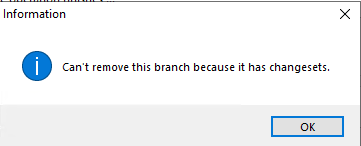
Deleting the branch fails because there is still a changeset on it:
Deleting the changeset fails because the option is greyed out:

It does not happen that often, though there are now about a few % of the branches stale because of this.

–jeroen

Posted in Development, PlasticSCM, Source Code Management | Leave a Comment »

PlasticSCM ignore.conf: globally ignoring certain file types, but allowing them recursively in a subdirectory

Posted by jpluimers on 2021/05/19

I needed this for a project there 3rdParty libraries could have .dcu and .obj files (to either speed up building, or because not all source code was supplied), but those files should not be present nowhere else in the repository.

This is an ignore.conf template for that:

*.obj
*.dcu

!/3rdParty/**/*.dcu
!/3rdParty/**/*.obj

The ! exclamation mark undoes the ignore according to the pattern following it.

Note the starting slashes after the !: they indicate the root directory of the repository and are mandatory.

Based on (warning, the JavaScript on these pages are extremely CPU intensive!):

–jeroen

Posted in Development, PlasticSCM, Software Development, Source Code Management | Leave a Comment »

Plastic SCM: add the current directory recursively

Posted by jpluimers on 2021/05/18

Since I always forget the command (I do not use it often enough) [WayBack] Plastic SCM – Branch per task guide:

cm add -R .

That adds the current directory (.) recursively, taking into account the ignore.conf file.

–jeroen

Posted in Development, PlasticSCM, Software Development, Source Code Management | Leave a Comment »

Plastic SCM: show the current changeset abstract (without files) on the commandline

Posted by jpluimers on 2021/04/14

I could not find a syntax for “current changeset”, but since cm log accepts the output of cm status as changeset identifier:

for /F "tokens=*" %l in ('call cm status --nochanges') do (call cm log %l --itemformat )

Or in batch file form:

for /F "tokens=*" %%l in ('call cm status --nochanges') do (call cm log %%l --itemformat )

Two important parts of the trick that ensure each command only outputs what is needed:

  1. The empty --itemformat specification for cm log indicates that no details about files should be logged.Without it, cm log will list both the changeset information and information about each item in the changeset.
  2. The other trick is --nochanges for cm status: it only shows the status line, and no other changes.Without it, cm status will emit one line per changed file.

–jeroen

Read the rest of this entry »

Posted in Development, Encoding, PlasticSCM, Software Development, Source Code Management | Leave a Comment »

Undocumented Plastic “cm status –hiddenchanged” to show hidden changes like the Plastic SCM GUI does by default

Posted by jpluimers on 2021/03/16

[WayBack] Undo changes to a hidden changes item from CLI – General – Plastic SCM Community.

Maybe I should start an undocumented Plastic SCM series just like I did for Delphi. (:

As soon as you have entries in your hidden_changes.conf, then entries matching will show up in your Plastic SCM GUI, but not included in the cm status --all command.

Luckily there is an the --hiddenchanged switch (maybe to keep naming inconsistent with the hidden_changes.conf file) which is only documented in cm changed --help, not on-line).

So my new cm-show-status.bat file contains this line:

cm status --all --hiddenchanged %*

Maybe more switches can be deducted from [WayBack] Plastic SCM version control · The Plastic SCM API: GET PENDING CHANGES IN WORKSPACE:

GET PENDING CHANGES IN WORKSPACE

GET /api/v1/wkspaces/:wkname/changes

Parameters

Name Type Description
types string A comma-separated list detailing the desired change types to display in the response. Available types: addedcheckoutchangedcopiedreplaceddeletedlocaldeletedmovedlocalmovedprivateignoredhiddenchangedcontrolledchangedall

Read the rest of this entry »

Posted in Development, Encoding, PlasticSCM, Power User, Software Development, Source Code Management | Leave a Comment »

PlasticSCM memories

Posted by jpluimers on 2020/12/23

Spending most of your career as an independent contractor, you bump into a lot of toolchains.

Part of those toolchains usually involved (and by now surely should involve) version control for both development and infrastructure configuration management.

I remember PlasticSCM quite well.

The really good part is the branch overview (called Branch Explorer) in the PlasticSCM UI, as it is:

They also have frequent updates, which however are hard to discover because there is no built-in update mechanism that notifies you of them.

Those updates are badly needed, because I kept bumping into bugs. Which is odd, because I bumped into far less issues when using UI layers for SVN, TFS, Mercurial and git (SourceTree being a major exception, but they seem to have recovered from a long period of bad versions a few years back).

So here are some of my gripes, that might have been fixed by now.

Read the rest of this entry »

Posted in Delphi, Development, PlasticSCM, Software Development, Source Code Management, Versioning | Leave a Comment »

Plastic SCM blog: Unified diff of a branch

Posted by jpluimers on 2020/11/03

Too bad I bumped into this a long time after having been a regular PlasticSCM user: [Archive.is] Plastic SCM blog: Unified diff of a branch:

Learn how to create a custom action to run a unified diff operation for a Plastic SCM branch.

It is an open source tool called unifiedbranchdiff.exe at github, and seems based on a cm path for getting paths, and cm patch for generating the actual patch, and needing external GNU tools diff and patch (hopefully it also works with more recent versions than the woefully outdated 2007 Win32 versions of [WayBack] DiffUtils 2.8.7 for Windows and [WayBack] Patch 2.5.9 for Windows).

Related:

–jeroen


Posted in Development, DVCS - Distributed Version Control, PlasticSCM, Software Development, Source Code Management | Leave a Comment »

Configuration files – Installation and configuration – Plastic SCM Community

Posted by jpluimers on 2020/06/09

The PlasticSCM GUI does not allow you to edit the paths of Workspaces (you can either rename a workspace or delete edit; no other editing options are available).

Luckily you can do this by hand editing the configuration files in %LocalAppData%\plastic4, though this is largely undocumented

Some of those configuration files are explained in [WayBack] Configuration files – Installation and configuration – Plastic SCM Community, but plastic.workspaces is not, so here are the steps:

Read the rest of this entry »

Posted in Development, PlasticSCM, Software Development, Source Code Management | Leave a Comment »

How can I view a file in the @plasticscm webUI? I tried from changeset view, but clicking on a file does nothing. When looking in the Chrome developer tools, I see an error 500 which is not surfaced to the UI.…

Posted by jpluimers on 2019/11/04

For my history: [WayBack] Jeroen Pluimers on Twitter: “How can I view a file in the @plasticscm webUI? I tried from changeset view, but clicking on a file does nothing. When looking in the Chrome developer tools, I see an error 500 which is not surfaced to the UI.…

Images:

–jeroen

Read the rest of this entry »

Posted in Development, PlasticSCM, Source Code Management | Leave a Comment »

PlasticSCM console

Posted by jpluimers on 2019/08/09

The cm.exe by default is not on the path, even though it is a useful tool.

Some links on it:

Slow

One drawback: the cm.exe is slow in startup, likely because it is a .NET executable needing quite a few assemblies to load:

"C:\Program Files (x86)\Microsoft SDKs\Windows\v10.0A\bin\NETFX 4.7.1 Tools\CorFlags.exe" "C:\Program Files\PlasticSCM5\client\cm.exe"
Microsoft (R) .NET Framework CorFlags Conversion Tool. Version 4.7.2558.0
Copyright (c) Microsoft Corporation. All rights reserved.

Version : v4.0.30319
CLR Header: 2.5
PE : PE32
CorFlags : 0x1
ILONLY : 1
32BITREQ : 0
32BITPREF : 0
Signed : 0

Finding stuff

I get a feeling that there is quite a bit of cm functionality either undocumented, or hardly documented.

For instance, copying a title from the PlasticSCM GUI does not mean it will work as a cm command.

Despite the documentation indicating

When you run queries using comparison operators (>, <, >=, <=) from the command line, remember that the shell considers these operators as IO redirections, so you will need to enclose the queries with quotation marks:
cm find "branches where owner='pablo' and changesets >= '2013/03/01'"

you have to be really careful where to put the starting double quote: it has to be after the find command:

  1. Example 1
    • Title
      User query: find changeset where branch='/main/test/My Branch Name' on repository 'Projects@ssl://plastic.example.org:8088' (22 Items - 0 selected)
    • Failure
      "C:\Program Files\PlasticSCM5\client\cm.exe" "find changeset where branch='/main/test/My Branch Name' on repository 'Projects@ssl://plastic.example.org:8088'"
      Command 'find changeset where branch='/main/test/My Branch Name' on repository 'Projects@ssl://plastic.example.org:8088'' not found. Type cm showcommands to get a command list.
    • Success
      "C:\Program Files\PlasticSCM5\client\cm.exe" find "changeset where branch='/main/test/My Branch Name' on repository 'Projects@ssl://plastic.example.org:8088'"
  2. Example 2
    • Title
      Changesets /main/test/My Branch Name@Projects@ssl://plastic.example.org:8088 (4 Items - 1 selected)
    • Failure
      "C:\Program Files\PlasticSCM5\client\cm.exe" find "Changesets /main/test/My Branch Name@Projects@ssl://plastic.example.org:8088"
      Error: unexpected char: '@'
    • Success
      "C:\Program Files\PlasticSCM5\client\cm.exe" find "Changesets where branch='/main/test/My Branch Name' on repository 'Projects@ssl://plastic.example.org:8088'"

This means that changeset can be Changesets: it is case insensitive and has multiple aliases. It looks similar to commands I used in my days of using Rational ClearCase – Wikipedia

I need to find out how to translate a non-query title into a query one. That will make it a lot easier to go from PlasticSCM GUI to the cm.

No XML documentation

The cm find command has a cool parameter --xml, which dumps the output in an XML tree.

My original goal was to see if I could turn the XML into something like Markdown or RST, using an XSLT transform like these:

For those transforms, you have to know how the input XML is structured. However, this information is undocumented.

When asked, PlasticSCM indicated there is no XSD for it claiming it was “super simple export to XML”:

[WayBack] Plastic SCM on Twitter: “No XSD, I’m afraid. Just super simple export to XML.… “

https://twitter.com/plasticscm/status/1039842761304940544

I hoped the elements were just uppercase versions of the output below, but they are not. Bummer.

–jeroen

Read the rest of this entry »

Posted in Development, PlasticSCM, Power User, Source Code Management | Leave a Comment »