The Wiert Corner – irregular stream of stuff

Jeroen W. Pluimers on .NET, C#, Delphi, databases, and personal interests

  • My badges

  • Twitter Updates

  • My Flickr Stream

  • Pages

  • All categories

  • Enter your email address to subscribe to this blog and receive notifications of new posts by email.

    Join 1,862 other subscribers

Archive for the ‘Conferences’ Category

Property/event differences between Delphi forms and frames

Posted by jpluimers on 2018/08/22

From a while back, but still interesting especially because there some differences similar to base/inherited designer objects: [WayBackvcl – How to do bulk -transformation of form to frame- in Delphi? – Stack Overflow:

Observe the differences of a Form and a Frame in your project.

First the project.dpr source:

program Project1;

uses
  Forms,
  Unit1 in 'Unit1.pas' {Form1},
  Unit3 in 'Unit3.pas' {Frame3: TFrame};

{$R *.res}

begin
  Application.Initialize;
  Application.MainFormOnTaskbar := True;
  Application.CreateForm(TForm1, Form1);
  Application.Run;
end.

Differences:

  1. Frame as a more elaborated comment to tell the IDE which designer it should use
  2. Form can be autocreate

Dfm files:

object Form1: TForm1
  Left = 0
  Top = 0
  Caption = 'Form1'
  ClientHeight = 348
  ClientWidth = 643
  Color = clBtnFace
  Font.Charset = DEFAULT_CHARSET
  Font.Color = clWindowText
  Font.Height = -11
  Font.Name = 'Tahoma'
  Font.Style = []
  OldCreateOrder = False
  PixelsPerInch = 96
  TextHeight = 13
end

and

object Frame3: TFrame3
  Left = 0
  Top = 0
  Width = 320
  Height = 240
  TabOrder = 0
end

Frame does not have these properties:

  • Caption
  • ClientHeight
  • ClientWidth
  • Color
  • Font.Charset
  • Font.Color
  • Font.Height
  • Font.Name
  • Font.Style
  • OldCreateOrder
  • PixelsPerInch
  • TextHeight

Sidenote: Frame does not have these events:

  • OnCreate
  • OnDestroy

A Frame has not global variable like this:

var
  Form1: TForm1;

And a Frame descends from TFrame, whereas a form descends from TForm.

Note: with Frame/Form inheritence, your steps become a bit longer.

–jeroen

Some of these are similar to the differences you see here:

–jeroen

PS: Idea: make a wizard or conversion tool for this.

Posted in Conference Topics, Conferences, Delphi, Development, Event, Software Development | Leave a Comment »

Delphi SOAP service: only publish WSDL in RELEASE mode

Posted by jpluimers on 2018/08/21

If you want to restrict the WSDL publishing so it only is published in DEBUG mode, then add a [WayBack] TWSDLHTMLPublish to your [WayBackTWebModule descendant, then add this in the [WayBack] OnCreate event handler of that TWebModule descendant:

// Enable/disable handling of "/wsdl*" requests during DEBUG/RELEASE mode. Enabling sends them via
//  Handled := WSDLHTMLPublish1.DispatchRequest(Sender, Request, Response);
{$ifdef DEBUG}
  WSDLHTMLPublish1.WebDispatch.Enabled := True;
{$endif DEBUG}
{$ifdef RELEASE}
  WSDLHTMLPublish1.WebDispatch.Enabled := False;
{$endif DEBUG}
end;

I have limited this because there are so many hard coded strings in the TWSDLHTMLPublish, see the thread by [WayBack] Marjan Venema at [WayBack] Hide WSDL document in SOAP app – delphi

–jeroen

Posted in Conference Topics, Conferences, Delphi, Development, Event, Software Development | Leave a Comment »

Work around for running out of memory when building multiple projects in Delphi < 10.2

Posted by jpluimers on 2018/08/16

I found out this is a problem until at least Delphi 10.1 Berlin, but my original question was for XE8:

Is there any tool that clears the Delphi memory overhead when a “build all” switches to the next project in a project group?

XE8 constantly runs out of memory with large project groups as the memory usage keeps increasing for each project it builds in the group.

There are actually two answers:

Uwe Raabe:  Have you tried with Use MSBuild checked for each project?

Jeroen Wiert Pluimers: +Uwe Raabe Much better. Much slower too (:

and:

Torbjörn Olsson: Have you tried DDevExtensions?
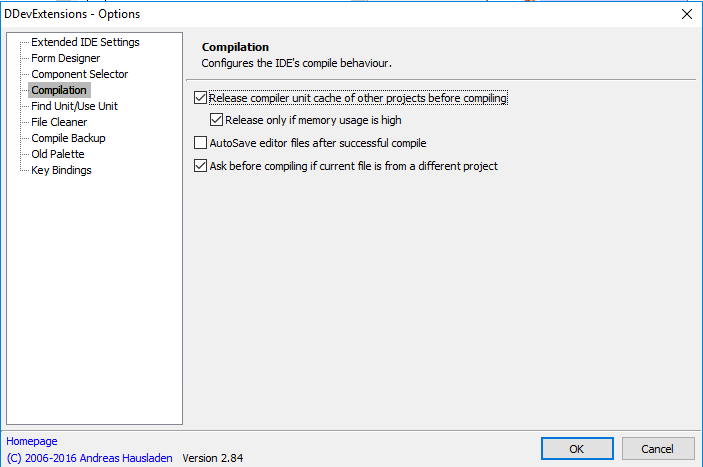
There is a setting named “Release compiler unit cache before compiling”

I’ve opted for the [Archive.is] DDevExtensions; I thought this VM had it installed, but apparently I forgot installing it as [Archive.is] IDE FixPack by the same author was installed.

This is how you configure DDevExtensions:

  1. Run Delphi
  2. Choose menu “Tools”, submenu “DDevExtensions Options…”
  3. In the dialog, select “Compilation” in the list on the left
  4. Ensure “Release compiler unit cache of other projects before compiling” is checked
  5. Confirm any changes

Source: [WayBackIs there any tool that clears the Delphi memory overhead when a “build all” s…

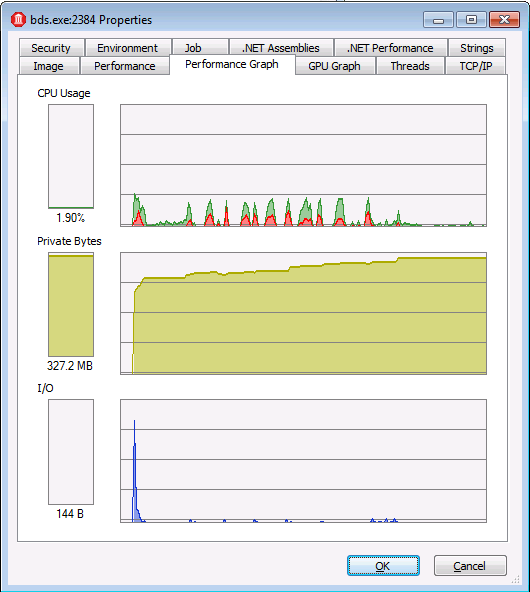
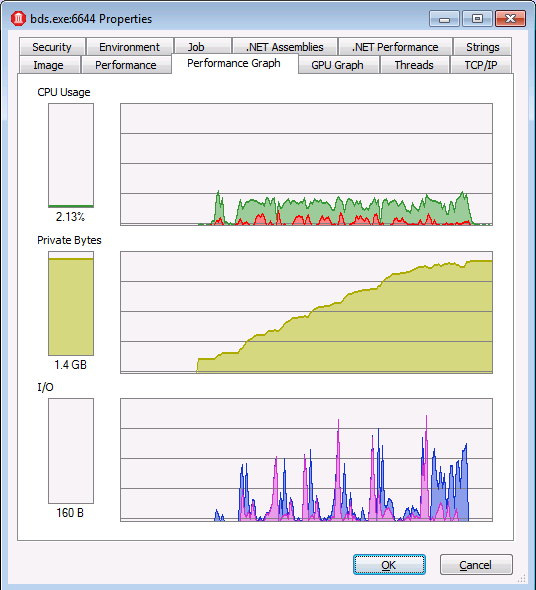
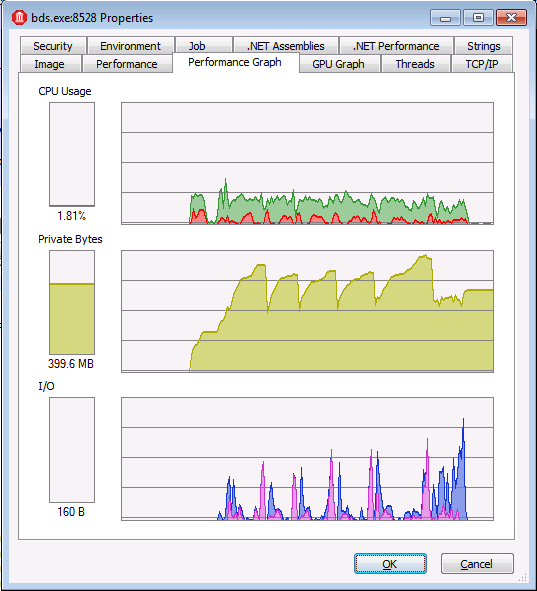
In the comparison below:

  • watch the scale of the graphs
  • observe that DDevExtensions uses about the same memory as msbuild, but builds much faster
With "Use MSBuild externally to compile"

With “Use MSBuild externally to compile”

Regular "Build all"

Regular “Build all”

With DDevExtensions

With DDevExtensions


Posted in Conference Topics, Conferences, Delphi, Development, Event, Software Development | Leave a Comment »

Delphi Build Groups: building all the Configuration/Target permutations of projects in your project group from inside the IDE

Posted by jpluimers on 2018/08/14

An automated build system for your Delphi applications is gold, and straightforward to setup using the Delphi support for msbuild.

Sometimes however, it is convenient to build any or all Configuration/Target permutations of all your projects from inside the Delphi IDE.

This has been possible since Delphi XE introduced the [Archive.is] Build Groups – RAD Studio XE. It is a really nifty feature which you can activate by clicking on the “people” icon in the project manager: .

Uwe Raabe has witten an excellent blog post on this a few years ago: [WayBack] Do you know Build Groups? | The Art of Delphi Programming

Since you can add multiple Build Groups, you can select which one contains what Configuration/Target permutations of any number of projects.

This for instance allows you to:

  • build all your server projects at once
  • only build debug versions of all projects

The Build Groups settings are saved as part of your groupproj settings and are a pretty stable feature.

Two extra tips:

–jeroen

Related:

Posted in Conference Topics, Conferences, Delphi, Development, Event, Software Development | Leave a Comment »

Some tips for your Delphi project options hierarchy

Posted by jpluimers on 2018/08/08

Over the years, various Delphi versions have cluttered the Project Options hierarchy quite a bit. This means that when you walk this hierarchy in the Project Options dialog, you will see many bold entries, indicating they have been changed for that level in the hierarchy.

The most important tip is to keep as much as possible at the top level, preferably using relative paths or paths containing $(...) macros.

I usually fill these entries there:

  • “All configurations – All platforms”
    • “Conditional defines” having the base conditional defines
    • “Output directory” (usually including a relative path that includes .\$(Platform)\$(Config)
    • “Search path” with .\$(Platform) when you nave libraries containing DCU files per platform
      • You can even do $(Platform)\$(Config) here if these DCU files are different for configurations (DEBUG/RELEASE) as well.
    • “Unit output directory” so each application gets a unique path (so I include .\$(SanitizedProjectName)\$(Platform)\$(Config) or .\$(Platform)\$(Config)\$(SanitizedProjectName) in the path)
    • Unit scope names (based onSource: Delphi unit prefixes for VCL applications)
  •  “Debug configuration – All platforms”
    • “Conditional defines”: add DEBUG
  • “Release configuration – All platforms”
    • “Conditional defines”: add RELEASE

I include the $(SanitizedProjectName) because it has the name of your project, which I documented at Source: Delphi XE8 does not adhere the $(PROJECTNAME) in a “Unit Output Directory”, but does recognise $(SanitizedProjectName) including many other macros.

Note:

A long time ago, +Uwe Raabe explained that you can use $(SanitizedProjectName) in your project settings to include the actual project name in https://plus.google.com/+DavidNottageDelphiExpert/posts/PcW8CwMQGmH

This works great for DCU output, but not so well for EXE output: when using for instance C:\Binaries\$(SanitizedProjectName) as target, the debugger cannot find the executable as the compiler puts it in the wrong place.

Example with a fresh console project:

0. Ensure C:\Binaries exists and you have write access to it
1. Set Output directory to C:\Binaries\$(SanitizedProjectName)
2. Set Unit output directory to .\$(SanitizedProjectName)\$(Platform)\$(Config)
3. Run:

---------------------------
Error
---------------------------
Could not find program, 'C:\Binaries\%SanitizedProjectName%\Project1.exe'.
---------------------------
OK
---------------------------

The executable is actually at C:\Binaries\Project1.exe, so the compiler does not take the “\$(SanitizedProjectName)” bit into account.

Anyone with a fix for that?

Via [WayBack] A long time ago, +Uwe Raabe explained that you can use $(SanitizedProjectName) in your project settings to include the actual project name in https://pl… – Jeroen Wiert Pluimers – Google+

Uwe Raabe

To make the compiler use the correct path the SanitizedProjectName item must be located before its use in the dproj file. DprojNormalizer assures that since version 2.2.1 and ProjectMagician does so, too. Thus my Project1.exe is written correctly to C:\Binaries\Project1\Project1.exe here on my system.
Unfortunately that won’t fix the main problem, which is that the call to the debugger doesn’t resolve this variable in the first place. Currently I don’t know how this could be fixed.
You may try
$(MSBuildProjectName)

It looks like the .dproj is this using itself too, for instance as this part:

    <Import Project="$(MSBuildProjectName).deployproj" Condition="Exists('$(MSBuildProjectName).deployproj')"/>

–jeroen

Posted in Conference Topics, Conferences, Delphi, Development, Event, Software Development | Leave a Comment »

E2026 or W1023 – take your pick (:

Posted by jpluimers on 2018/08/08

[WayBack] A compiler curiosity I’ve learned today … – David Berneda – Google+: depending on if TEST is defined or not, you get E1026 or W1023.

// This works:
{$IF Declared(Test) and (Test>=100)}
{$ENDIF}

// This not:
{$IF Declared(Test)}
{$IF Test>=100} // "E2026 Constant expression expected"
{$ENDIF}
{$ENDIF}

The W1023 can be alleviated by replacing 100 with +100.

Note that both errors have been documented since at least Delphi 2007:

–jeroen

Source: A compiler curiosity I’ve learned today: // This works: {$IF Declared(Test) …

Posted in Conference Topics, Conferences, Delphi, Development, Software Development | 2 Comments »

How I use Wireshark – Julia Evans

Posted by jpluimers on 2018/08/03

Cool set of steps on [WayBackHow I use Wireshark – Julia Evans who uses the combination of tcpdump to dump traffic in pcap files and Wireshark to analyse the pcap files after copying them using scp. On many platforms, Wireshark can also capture the ptrace files for you.

Via: [WayBack] 🔎Julia Evans🔍 on Twitter: “how I use Wireshark https://t.co/j699JXrjaH” which has some nice comments including:

  • adding ptrace to your tool-kit
  • not needing scp for copying, as you can do [WayBack] dumpcap over an existing ssh connection:
    • You might like this snippet, saves you the need to do the scp dance: wireshark -k -i <(ssh <IP> "sudo dumpcap -P -w - -f 'not tcp port 22'")

–jeroen

Posted in *nix, *nix-tools, Conference Topics, Conferences, Event, Power User, Wireshark | Leave a Comment »

From the bragging “Did you know the IDE starts almost twice as fast in 10.2.2 as it did in 10.1?”

Posted by jpluimers on 2018/07/17

An interesting discussion sprouted from the bragging [WayBack] Did you know the IDE starts almost twice as fast in 10.2.2 as it did in 10.1? https://community.embarcadero.com/blogs/entry/new-in-10-2-2-welcome-page-… – David Millington – Google+.

I do not care very much about IDE start times (Visual Studio starts faster, others like Android Studio start slower than Delphi), more about productivity.

Which means loading projects, opening files and forms, switching projects, etcetera need to be fast and stable.

For me this is when on Delphi projects, I start about half a dozen copies of Delphi about 10 seconds apart (otherwise you get exceptions in any Galileo version), make some tea, then come back.

Each time an IDE crashes, I kill it, start a new one, switch to an existing one, load the projects I need and continue. On a full day working with Delphi, this happens about a dozen times a day.

After that I want to be productive.

Here is where I was so surprised by the great tip from Yusuf Zorlu

+Asbjørn Heid you should try to disable all “livebinding” packages + rename dclbindcomp250.bpl . If i opened a form before i had to wait 20 to 40 seconds … now it is superfast and opens forms under 5 seconds. I don’t need LiveBindings …

and the response by Asbjørn Heid

+Yusuf Zorlu Thank you! Holy cow that’s a difference! As you say, even our most complex forms are down to 4 seconds now.

I never use LiveBindings as they are way to convoluted, unstable and result in logic being in designers as opposed to tool-manageable code.

In addition, LiveBindings have never been really optimised since their inception in Delphi XE2.

This saves a lot of time!

So one day, I need to update Source: Delphi packages I have disabled by prefixing their description with an underscore (and why) and create a batch file with the various [WayBack] reg add commands modifying the package loads.

Related:

–jeroen

Posted in Conference Topics, Conferences, Delphi, Development, Event, Software Development | 2 Comments »

Delphi: formatting uses lists to each unit is on a separate line

Posted by jpluimers on 2018/06/29

Delphi formatter setting, so I can manually arrange uses lists:

–jeroen

Uwe Raabe commented on G+:

Also available in MMX Code Explorer in the settings dialog: Pascal -Sorting – Format unit uses clauses – “Each unit on a new line”.
If you prefer the standard setting and spare the other for special purpose, there is “Format Uses – Alternate” in the context menu. Perhaps give it a decent shortcut for quick access.

Bernd Ott in the same thread:

Important because scm. Less merge trouble. Only the last semicolon in last row is always stupid.

https://plus.google.com/+JeroenPluimers/posts/RfrCkDAd95G

Posted in Conference Topics, Conferences, Delphi, Development, Event, Software Development | 4 Comments »

Two cool features of the TestInsight treeview – navigate and copy

Posted by jpluimers on 2018/06/20

TestInsight is a great tool for automatically running your unit tests and seeing the results to make you more productive.

Two of the results treeview features you might not know make you even more productive:

  • After selecting a node, pressing Ctrl-C will copy the content as text to the clipboard
  • Double clicking will bring you to the unit test in your source code

You can get TestInsight at sglienke / TestInsight — Bitbucket

–jeroen

Posted in Conference Topics, Conferences, Delphi, Development, Event, Software Development | 1 Comment »