The Wiert Corner – irregular stream of stuff

Jeroen W. Pluimers on .NET, C#, Delphi, databases, and personal interests

  • My badges

  • Twitter Updates

  • My Flickr Stream

  • Pages

  • All categories

  • Enter your email address to subscribe to this blog and receive notifications of new posts by email.

    Join 1,860 other subscribers

Archive for the ‘Android Devices’ Category

OpenVPN somehow failed when tethering on the Android mobile hotspot from a new phone

Posted by jpluimers on 2023/04/07

A while after I got a new smartphone, I noticed that when my MacBook was connected over Wi-Fi to the mobile hotspot of my Android phone, the Tunnelblick connections over OpenVPN to my family members would not work. A telnet from the Android phone to the OpenVPN TCP port 1194 woud succeed, but not from the MacBook. Connecting from the phone using JuiceSSH to the OpenSSH endpoints at those family members would work too, so I was a bit flabbergasted.

In the end this seems to be a set of coincidences that fails in this particular setup, but I am not totally aware why.

The solution was to both re-configure the APN (Access Point Name) the smartphone uses to connect to the internet from ipv4/ipv6 to ipv4, and to reboot the phone.

For Dutch provider KPN Mobile, the APN is named internet and apparently changed default to ipv4/ipv6 without properly supporting ipv4. Note the configuration parameters are all lowercase, although they should be written IPv4 and IPv6.

Here are a few posts that got me on the right track (all via [Wayback/Archive] openvpn fails over android hotspot – Google Search):

Note that sometimes the MTU can cause similar failures:

Note too: some links to check for OpenVPN responding are below.

Various sites with (often different) APNs that KPN mobile supports:

There are quite a few APNs, some with firewall and/or proxy and/or compression, some with external IP address (which means your smartphone really needs a firewall).

–jeroen

Posted in Android Devices, Hardware, Network-and-equipment, OpenVPN, Power User, VPN | Leave a Comment »

How to create android and ios keyboard shortcuts | PCWorld

Posted by jpluimers on 2023/01/06

[Wayback/Archive] How to create android and ios keyboard shortcuts | PCWorld android bits, numbering mine:

(Note: These steps work only with the stock Android keyboard. Tap Settings, Language & input, and make sure Google Keyboard is selected under the Keyboard & Input Methods heading.)
  1. Tap SettingsLanguage & input, then Personal dictionary. Next, tap the language option of your choice.
  2. Tap the + button in the top-right corner of the screen, then type the word or text string that’ll trigger the shortcut. You’re best off picking something other than a common word; for example, “addr” rather than “address.”
  3. In the next line, type in the actual phrase you want to appear when you type the shortcut, such as “1234 Main Street, Anytown USA.” Unfortunately, the phrase is limited to about 50 characters.
  4. Tap the Back button, and you should see your shortcut appear as an entry on the Personal dictionary screen. Tap + to add another shortcut.

I tried it with SwiftKey, but that does not allow dictionaries.

Thanks [Archive] Murdock (@Generic42) | Twitter for pointing me to this, and showing me this PokeMon Go shortcut: !4*&!3*&!shiny&!legendary&!mythical&!traded&!costume.

–jeroen

Posted in Android Devices, LifeHacker, Power User | Leave a Comment »

Fix for when ExDialer does not show history or contacts any more

Posted by jpluimers on 2022/10/21

From [Wayback/Archive.is] [APP][2.1+] ExDialer – Dialer & Contacts | Page 134 | XDA Forums:

I installed exDialer 1.98 and set all asked permissions. The contacts were not visible but after rebooting the device they show up. Now the problem still was with call history. I Install plugin for missing calls from exDialer’s settings. Then I went into device settings and under all applications found exDialer, go to permission settings to check if everything is enabled and then under call history permission tap on “Show all apps with this permission”. Then I disable this permission for the default call dialer (also if you have some other installed) and boom…call history’s back. I suppose this method can be used also on Android 10 or 9 if you have the same problem.
Note: Leave contacts premission for default dialer active.

All you got to do, after going through all steps I describe before is, go to phone Settings, then manage applications. There you will find default apps, open it and under Phone App change default to exDialer. I instantly get back call history, without reboot or any other action.

I must also say that “True Phone” is a great replacement I could not find any thing that I miss from exDailer.
It have both call recording and swipe to call/text. (you need to dig deep in the settings).
And True Phone is active active app with last update from Mar 13 2021

For me the only step to get the history visible was to make the find the settings for default “Phone App change default to exDialer”.

–jeroen

Posted in Android Devices, OnePlus Six, Power User | Leave a Comment »

Why does the Gotcha fail to connect after a while? : TheSilphRoad

Posted by jpluimers on 2022/10/07

So I won’t forget the steps: [Wayback/Archive.is] Why does the Gotcha fail to connect after a while? : TheSilphRoad

the usual tricks, including:
  • Unpair the device in bluetooth settings.
  • Pair the device in bluetooth settings, and then unpair it immediately after.
  • Disconnect the device in PoGo settings.
  • Restart Pokemon Go.
  • Quickly plug the Gotcha into the charger 10x.
  • Hold down the red circle on the device for 10 seconds whilst on the ‘Connection’ screen.
  • Restart mobile device.
  • Connect to Gotcha app and erase stats (not sure this actually does anything, but connecting to the app at least ensures the firmware is up to date).

User DJTernan advised clearing the game cache (Phone settings > Apps > Pokemon GO > Storage > Clear Cache (and also Clear Data)).

Gotcha is fully charged. I have reinstalled the app, restarted my phone, force closed app, cleared cache, unpaired / repaired / unpaired again, disconnected from PoGo settings, the lot.

[Wayback/Archive.is] Go-tcha – Apps on Google Play

Via [Wayback/Archive.is] android 11 pokemon go gotcha failed to connect – Google Search

Related:

“If you have connected your Go-tcha please ensure that you eject the Go-tcha from within the Pokémon Go application and ensure that it is forgotten within the Bluetooth setting (from all phones and devices).
Once the device has been disconnected please reset your Go-tcha by inserting and removing the Go-tcha from the charge cable in quick succession (10 times).
Once the device has reset please try to pair the Go-tcha within the Pokémon Go application.”

–jeroen

Posted in Android Devices, LifeHacker, OnePlus Six, Power User | Leave a Comment »

How To Fix “Google Photos Not Uploading” On Android & iPhone

Posted by jpluimers on 2022/08/22

For my link archive, as sometimes uploading does not proceed, and I want to figure out the cause: [Wayback/Archive.is] How To Fix “Google Photos Not Uploading” On Android & iPhone

Before you start: Check your Back up Status

  1. Diagnose your Internet Connection
  2. Ensure you’re using the right backup settings
  3. Enable Backup Device Folders
  4. Disable Battery Optimization for Google Photos
  5. Enable Background Data Usage
  6. Keep Google Photos updated
  7. Reset/Reinstall the Google Photos app

I had to revert to 7. as 5. was already set, and 4. was not available in the settings.

That solved my issues.

–jeroen

Posted in Android Devices, Google, Google Photos, OnePlus Six, Power User | Leave a Comment »

Alexander Klöpping. Juist nu. on Twitter: “Is er een voice recorder app waarbij je met een druk op de knop tijdcodes kunt markeren omdat vlak voordat moment iets belangrijks gezegd werd? Zodat je achteraf makkelijk de belangrijke momenten kunt terugzoeken?” / Twitter

Posted by jpluimers on 2022/01/07

[Archive.is1/Archive.is2] Alexander Klöpping. Juist nu. on Twitter: “Is er een voice recorder app waarbij je met een druk op de knop tijdcodes kunt markeren omdat vlak voordat moment iets belangrijks gezegd werd? Zodat je achteraf makkelijk de belangrijke momenten kunt terugzoeken?” / Twitter

https://twitter.com/AlexanderNL/status/1277519084117164032

Selectie voor Android / Windows / MacOS:

Read the rest of this entry »

Posted in Android Devices, Audacity, Audio, Media, Power User, Windows | Leave a Comment »

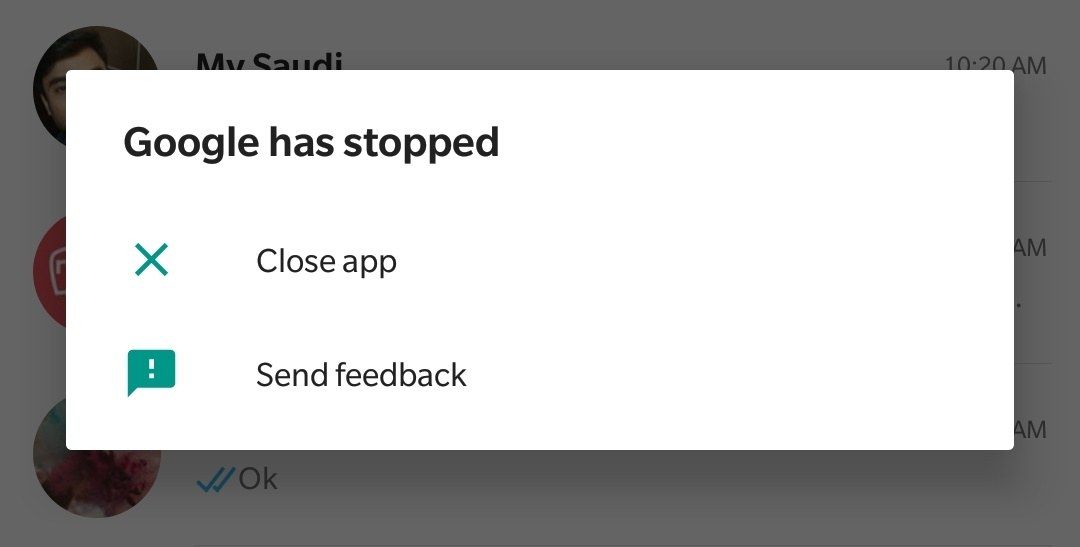
Google has stopped (Dutch: Google is gestopt) on older Anrdoid devices

Posted by jpluimers on 2021/11/12

I got the Dutch message “Google is gestopt” on an older Android device which translates to the below English error message “Google has stopped”.

Below is the solution based on [WayBack] Google is stopped – OnePlus Community

  1. Go to “Settings”
  2. In “Settings” go to “Apps”
  3. In the application list, browse to “Google”
  4. Uninstall all updates (sometimes this is under the hamburger or 3-dot icon)
  5. Confirm
  6. Start the Google Play Store
  7. Update the “Google” application

Related:

–jeroen

Read the rest of this entry »

Posted in Android, Android Devices, Development, Google, Mobile Development, OnePlus One, OnePlus Two, Power User | Leave a Comment »

Fail: The OnePlus Messages App requires Android 11 even though that has not been rolled out to all compatible devices yet (might become a security issue)

Posted by jpluimers on 2021/10/11

Too bad: if your OnePlus device is on the list of obtaining Android 11, the OnePlus Messages App already requires it, so it won’t upgrade which means you are missing out on any potential security issues.

App: [Wayback/Archive.is] OnePlus Messages – Apps on Google Play

Device: OnePlus 6 – Wikipedia

Android 11 is in a staged rollout since mid August 2021:

You can force update to Android 11:

Twitter thread:


–jeroen

Read the rest of this entry »

Posted in Android Devices, OnePlus Six, Power User | Leave a Comment »

Android: Island – app freezing, privacy protection, parallel accounts

Posted by jpluimers on 2021/07/23

Requires admin privileges, but can be worth your effort: [WayBack] [APP][5.0+][BETA] Island – app freezing, pri… | Android Development and Hacking

“Island” is a sandbox environment to clone selected apps and isolate them from accessing your personal data outside the sandbox (including call logs, contacts, photos and etc) even if related permissions are granted. Device-bound data is still accessible (SMS, IMEI and etc).
Isolated app can be frozen on demand, with launcher icon vanish and its background behaviors completely blocked.

Via:

–jeroen

Posted in Android, Android Devices, Development, Mobile Development, Power User | Leave a Comment »

From Yahoo closing Answers tonight to blocking ads on YouTube

Posted by jpluimers on 2021/05/04

The discussion on Yahoo closing Answers tonight quickly went from alternative text based question/answer sites to long YouTube videos having hardly any content but ads, to blocking these ads: [Wayback] Yahoo sluit Answers-dienst na vijftien jaar en verwijdert inhoud – IT Pro – Nieuws – Tweakers

So here are some links where I can learn a bit of browser plugin and Android development technology as well:

(What I dislike most about ads is that they start at unnatural positions in the stream and cover topics I’m totally not interested in).

–jeroen

Posted in Android, Android Devices, Development, Mobile Development, Power User, SocialMedia, Software Development, Web Development, YouTube | Leave a Comment »