Archive for the ‘GoogleHangouts’ Category
Posted by jpluimers on 2024/11/11
About 2 years after Google switched every Google Hangouts user over to Google Chat, I still wonder about [Wayback/Archive] Will the new Google Chat PWA for Chrome ever have system tray support? : gsuite:
Chrome _right now_ can be sustained as a background process with the Chrome-ball in the system tray. This is the vehicle with which Hangouts remains open at all time, so why not Chat, too?
I’m left with no option but to have Chat running on a mobile device so I have always on access. Perhaps this is the angle. I nunno.
Your support page link I’ve seen already and it doesn’t answer the Why question.
It is absolutely a bizzarotown implementation.
Read the rest of this entry »
Posted in Chat, Google, GoogleChat, GoogleHangouts, Power User, SocialMedia | Leave a Comment »
Posted by jpluimers on 2022/07/28
Easiest way to video call from your PC via WhatsApp is to use [Wayback/Archive] WhatsApp: Download – Mac or Windows PC.
This should be an alternative for Hangouts Video Calling as Hangouts is yet another product killed by Google as mentioned in many places for instance:
Read the rest of this entry »
Posted in About, Conference Topics, Conferences, Event, Google, GoogleHangouts, LifeHacker, Personal, Power User, SocialMedia, WhatsApp | Leave a Comment »
Posted by jpluimers on 2022/04/18
Now that Google Hangouts on a PC keeps nagging that it will be replaced with Google Chat, and the main use case for my mentally retarded brother is video calls from behind his PC, I am going to investigate if Google Duo is any better (he loses mobile phones, which means no WhatsApp; Google Meet is to difficult for his mental abilities).
Some links to get me started:
Related:
–jeroen
Read the rest of this entry »
Posted in Google, GoogleDuo, GoogleHangouts, Power User | Leave a Comment »
Posted by jpluimers on 2021/06/25

Hangouts is being replaced by Google Chat
Oh boy, this is probably a prelude to Google Hangouts, as it originates from Google+, following the Google+ feat: death for personal users.
[Wayback] Learn about the switch from classic Hangouts to Google Chat – Computer – Hangouts Help started with
Google Chat launched to Google Workspace accounts in 2017 and is now available for free on personal accounts. When you switch from classic Hangouts to Google Chat on your personal account, you
but then came this in the list of limitations:
- Video call ringing isn’t available on Google Chat. If you use classic Hangouts for direct video calls that ring, don’t switch to Google Chat. To start a video call in Google Chat, you can drop a Google Meet chip into the conversation and dial in.
Now looking for an integrated chat and video call option that my mentally retarded brother understands, as the non-straightforward integration of Google Chat and Google Meet features won’t cut it for his mental abilities.
Via: [Archive.is] Jeroen Wiert Pluimers on Twitter: “Oh dang: how long will Google Hangouts last? It is the easiest (and currently only well known) way for my mentally retarded brother to have video calls with his caretakers and us.”
–jeroen
PS: Blocks also do not transfer to Google Chats. At myaccount.google.com/blocklist you can find who you blocked.
Posted in Google, GoogleHangouts, Power User | Leave a Comment »
Posted by jpluimers on 2021/05/11
I wonder how you can programmatically open a Hangouts link from Chrome?
These dit not help:
So did some more digging.
TL;DR: did not find a solution; so any help is appreciated.
I found the IDs of then in [WayBack] extensions/common/constants.cc – chromium/src.git – Git at Google
namespace extension_misc {
const char kPdfExtensionId[] = "mhjfbmdgcfjbbpaeojofohoefgiehjai";
const char kQuickOfficeComponentExtensionId[] =
    "bpmcpldpdmajfigpchkicefoigmkfalc";
const char kQuickOfficeInternalExtensionId[] =
    "ehibbfinohgbchlgdbfpikodjaojhccn";
const char kQuickOfficeExtensionId[] = "gbkeegbaiigmenfmjfclcdgdpimamgkj";
const char kMimeHandlerPrivateTestExtensionId[] =
    "oickdpebdnfbgkcaoklfcdhjniefkcji";
const char kProdHangoutsExtensionId[] = "nckgahadagoaajjgafhacjanaoiihapd";
const char* const kHangoutsExtensionIds[6] = {
    kProdHangoutsExtensionId,
    "ljclpkphhpbpinifbeabbhlfddcpfdde",  // Debug.
    "ppleadejekpmccmnpjdimmlfljlkdfej",  // Alpha.
    "eggnbpckecmjlblplehfpjjdhhidfdoj",  // Beta.
    "jfjjdfefebklmdbmenmlehlopoocnoeh",  // Packaged App Debug.
    "knipolnnllmklapflnccelgolnpehhpl"   // Packaged App Prod.
    // Keep in sync with _api_features.json and _manifest_features.json.
};
// Error returned when scripting of a page is denied due to enterprise policy.
const char kPolicyBlockedScripting[] =
    "This page cannot be scripted due to an ExtensionsSettings policy.";
}  // namespace extension_misc
The odd thing is that the source does not match the Chrome web store designation:
You can not start the extensions in a tab; they need to start their view through the extension.
So these links do not work:
chrome-extension://nckgahadagoaajjgafhacjanaoiihapd/mainapp.html?uv_main_windowchrome-extension://ljclpkphhpbpinifbeabbhlfddcpfdde/mainapp.html?uv_main_windowchrome-extension://ppleadejekpmccmnpjdimmlfljlkdfej/mainapp.html?uv_main_windowchrome-extension://eggnbpckecmjlblplehfpjjdhhidfdoj/mainapp.html?uv_main_windowchrome-extension://jfjjdfefebklmdbmenmlehlopoocnoeh/mainapp.html?uv_main_windowchrome-extension://knipolnnllmklapflnccelgolnpehhpl/mainapp.html?uv_main_window
–jeroen
Read the rest of this entry »
Posted in Chrome, Development, Google, GoogleHangouts, Power User, Software Development, Web Development | Leave a Comment »
Posted by jpluimers on 2020/08/17
Blocking persons (for instance for sending you materials that in G+ would be a T.O.S. violation) is only possible by blocking them, not by reporting them.
Most hangouts users however do have a G+ account, so you can request a block there.
Relevant links:
–jeroen
Posted in G+: GooglePlus, Google, GoogleHangouts, Power User, SocialMedia | Leave a Comment »
Posted by jpluimers on 2019/02/08
After March 7, 2019, notifications for Google web products will no longer be accessible from the navigation bar.
[WayBack] Manage your notifications – Google Account Help has more details, but it does not look good.
More Google stuff is dying, almost every month now. For a list of dying products see: [WayBack] didgoogleshutdown.com
Given more is dying, and the increased lack of confidence many people have in Google, more people are abandoning Google. More on that in a future post.
For now: [WayBack] “Manage your Notifications”: After March 7, 2019, notifications for Google web products will no longer be accessible from the navigation bar. If you’d l… – Edward Morbius – Google+
“Manage your Notifications”: After March 7, 2019, notifications for Google web products will no longer be accessible from the navigation bar. If you’d like to receive similar notifications in the future, you can update the notification settings for your individual Google products.
As usual, it’s not clear whether or not this will affect the notifications widget on G+ itself. Google’s standards for clarity in exposition remain uncorrupted. Which is to say: entirely inadequate.
Otherwise, the article addresses Google Photos, Hangouts Chat, and Google+ (G Suite users).
Update: Further close reading suggests that Consumer Google+ will lose Notifications on March 7:
Note: Google+ notifications are available for G Suite users only.
https://support.google.com/accounts/answer/9231049
Via: [WayBack] “Manage your Notifications”: After March 7, 2019, … – Lars Fosdal – Google+
–jeroen
Posted in G+: GooglePlus, Google, Google Photos, GoogleHangouts, Power User, SocialMedia | Leave a Comment »
Posted by jpluimers on 2018/04/20
For a long time, this was hard: [Archive.is] How to switch off the sound on the desktop Hangout? – Google Product Forums.
A lot of people complained, often in a not so nice way.
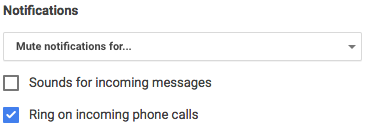
The solution – that took years to appear – however now is very simple:
Click the options hamburger on the top left, then remove the checkmark for “Sounds for incoming messages”
Posted in Google, GoogleHangouts, Hangouts, Power User | Leave a Comment »
Posted by jpluimers on 2016/10/31
A few months ago was my first ever presence on IRC wich started like this:
[13:45]  bear with me: after BITNET relay chat, I've totally skipped the IRC thing, so
[13:46] * jeroenp_ is IRC n00b and wonders if netiquette is roughly the same as in the mid 1990s (:
[13:46]  jeroenp_: I don't think it changed a lot...
[13:46]  Cool: /me works on IRC too (:
[13:47]  Anyone having time to help me with `zypper dup` on Tumbleweed indicating `python3-urllib3-1.16-1.1.noarch requires python(abi) = 3.5` ?
I will post later on my own chat history (including BITNET Relay conference system on BITNET/EARN).
This post is just to mention a few keywords of Let’s have a chat – a taxonomy and some context(This is a text I wrote for work, but it contains nothing work specific and I might as well drop it here.… – Kristian Köhntopp – Google+
Kristian Köhntopp now basically uses his G+ as a blog (blog.koehntopp.de is now defunct) with a great set of collections.
I’ve kept my blog as I find G+ very hard to search for content and a “bla bla site:wiert.me” for me often is the fastest way to find something back that interests me.
Hence the keywords below on his post Let’s have a chat – a taxonomy and some context.
- Chat, IRC, ICQ, Jabber, Skype, Google Hangouts, Facebook Messenger, WhatsApp, Slack and RocketChat
- Google Wave, Apache Wave, Google Documents and Google Spaces.
- Managing presence in adverse circumstances: status, /away, nickname renaming
- Deliverables
- One identity, many clients: a common history (federation, standards, XML, SIP, extensions, incompatibilities)
- Many-to-Many conversations: Groups versus Places (rooms, channels, discoverability)
- Media, bots (hello Eliza) and API
- emoji, giphy and meme references
–jeroen
Posted in Chat, Google, GoogleHangouts, History, IRC, Power User, SocialMedia | Leave a Comment »
Posted by jpluimers on 2016/08/26
Cool:
Did you know that you could share a link to let people chat with you in Hangouts?
We use these links for certain invites, but they work if you hand build them and share them too.
https://hangouts.google.com/chat/person/ 111111111111
Where the number is your profile id
With vanity urls it’s harder to find that, but the easiest way is to use the public api call here https://developers.google.com/+/web/api/rest/latest/people/get#try-it.
Put “me” into the userId field and it will output your numerical id in the response.

Enter `id` in the `fields` to limit the JSON
By constructing such an invitation URL you can get people to directly start a Google Hangouts chat with you.
The above steps will give you a lot of JSON output which includes an id field somewhere in the middle. With one more trick you can get just the id field.
You can limit the output by putting id in the fields to request as the image on the right shows.
Sometimes clicking on G+ posts, you even get the id for free, I’m just not sure under what circumstances G+ builds a G+ URL with username or with id.
–jeroen
Source: We have made a number of changes internally to Hangouts…
via:
Posted in Google, GoogleHangouts, Power User | Leave a Comment »


 The Wiert Corner - irregular stream of stuff