The Wiert Corner – irregular stream of stuff

Jeroen W. Pluimers on .NET, C#, Delphi, databases, and personal interests

  • My badges

  • Twitter Updates

  • My Flickr Stream

  • Pages

  • All categories

  • Enter your email address to subscribe to this blog and receive notifications of new posts by email.

    Join 1,861 other subscribers

Archive for the ‘Hardware’ Category

Some links on Tailscale / Wiregard

Posted by jpluimers on 2022/03/29

For my link archive:

Related: [Wayback] Using Tailscale on Windows to network more easily with WSL2 and Visual Studio Code – Scott Hanselman’s Blog

–jeroen

Posted in Hardware, Network-and-equipment, Power User, Tailscale, VPN, Wireguard | Leave a Comment »

MSI Z77A-G43 support and downloads

Posted by jpluimers on 2022/03/24

For my link archive: [Wayback] MSI Z77A-G43 support and downloads

Note that Windows 10 does not seem to need additional drivers, even Wake-on-LAN works with the stock Windows 10 drivers (but does require two BIOS settings and three Windows driver settings, see [Wayback] Wake-on-LAN (WoL) | MSI HQ User-to-User FAQ.

Max processor information based on the below links.

  • Max processor that supports VT-d (for virtualisation), but no manual overclocking: i7 3770.
  • Max processor that supports manual overclocking, but not VT-d: i7 3770K

From:

Via: [Wayback] MSI Z77A-G43 – Kenmerken – Tweakers

–jeroen

Posted in Hardware, Mainboards, MSI, Power User, Z77A-G43 | Leave a Comment »

Wake-on-LAN (WoL) | MSI HQ User-to-User FAQ

Posted by jpluimers on 2022/03/23

[Wayback] msi hq user-to-user faq: wake on lan (wol) by Author Ruudt Swaanen on 3 May, 2017, paraphrased by me:

  1. In the BIOS:
    1. Under “Settings -> Advanced -> Power Management Setup”, disable the option “EuP 2013” (my mainboard) or “ERP Ready”.

      Disabling this function will keep the LAN port enabled when the system is put to Sleep (S3) or in Shutdown (S5) mode.

      Enabling this function will use less power (see [Wayback] What is EuP 2013? | Overclock.net)

    2. Under  “Settings -> Wake Up Event Setup”, enable the option “Resume By PCI or PCI-E Device” (my mainboard) or “Resume by LAN”.
  2. In the Windows 10 Control Panel, (control.exe) with an Administrator elevation token):
    1. In the “Power Options” Control Panel applet (powercfg.cpl), under “Choose what the power buttons do”, disable the option “Turn on fast startup (recommended)”.

      On many MSI based machines, the option “Turn on fast startup (recommended)” interferes with Wake-on-LAN.

    2. In the “Device Manager” (devmgmt.msc), under your network adapter change these options (the naming slightly differs per vendor/model; below is for generic Realtek PCIe GBE):
      1. On the “Power Management” tab, enable these options:
        • “Allow this device to wake the computer”
        • “Only allow a magic packet to wake the computer”
      2. On the “Advanced” tab, enable these options:
        • “Wake on Magic Packet”
        • “Wake on pattern match”
      3. On the “Advanced” tab, set this value:
        • “WOL & Shutdown Link Speed” is “10 Mbps First”

Now test in these global Power States:

  • S5 “soft off” (the state where there is a power cord connected, but none of the fans spin)
  • S4 “hibernating” (if you have turned that on in the power options)
  • S3 “sleeping”

This worked well for S3 and S5 (but not S4) on my MSI Z77A-G43 based Windows 10 PC and only required stock network driver for the “Realtek PCIe GBE Family Controller” shown in the Device Manager (devmgmt.msc) and you can find on [Wayback] Microsoft Update Catalog: Realtek PCIe GBE Family Controller Driver.

For more Wake on LAN blog posts, including how to initiate a Wake-on-LAN request, see the category Wake-on-LAN (WoL).

–jeroen

Posted in Hardware, Mainboards, MSI, Power User | Leave a Comment »

“Using Tailscale on Windows to network more easily with WSL2 and Visual Studio Code”

Posted by jpluimers on 2022/03/23

“Using Tailscale on Windows to network more easily with WSL2 and Visual Studio Code”

Points to [Wayback] Using Tailscale on Windows to network more easily with WSL2 and Visual Studio Code – Scott Hanselman’s Blog


Related:

–jeroen

Posted in Hardware, Network-and-equipment, Power User, Tailscale, VPN, Wireguard | Leave a Comment »

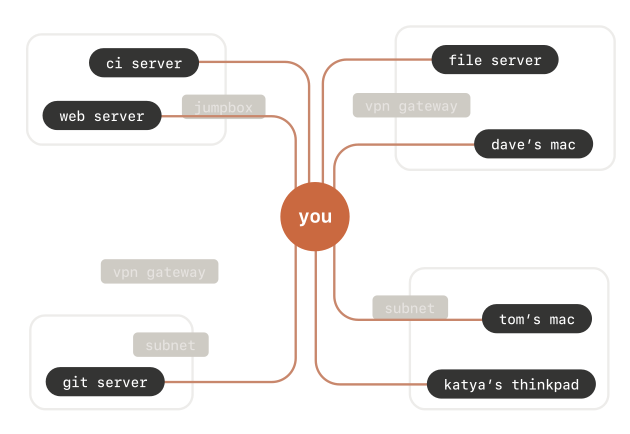
Wake-on LAN over tailscale VPN

Posted by jpluimers on 2022/03/22

Hey macOS desktop in the basement, thanks for going to sleep while I was in the middle of typing at you via SSH.

Maybe that should be a signal not to sleep, eh?

$ sudo wakeonlan ac:87:a3:19:7e:81
Sending magic packet to 255.255.255.255:9 with

Well, at least that works.

Related:

–jeroen


Posted in Hardware, Network-and-equipment, Power User, Tailscale, VPN, Wireguard | Leave a Comment »

Download pfSense Community Edition: pfSense-CE-2.5.1-RELEASE-amd64.iso.gz

Posted by jpluimers on 2022/03/08

Since this is what I use to VPN home:

pfSense is a free and open source firewall and router that also features unified threat management, load balancing, multi WAN, and more

[Wayback] Download pfSense Community Edition: [Wayback] pfSense-CE-2.5.1-RELEASE-amd64.iso.gz

–jeren

Posted in Internet, pfSense, Power User, routers | Leave a Comment »

PCIe bifurcation to split an x16 or x8 slot into multiple x4 channels: allows PCIe adapters with multiple NVMe cars

Posted by jpluimers on 2022/03/07

It looks like some X9 and X10 Supermicro boards already support PCIe bifurcation (splitting of PCIe slots into multiple channels), which might be worth a try to upgrade some of my older rigs to use NVMe instead of SATA storage as it will allow me to use adapters that support multiple NVMe devices into a single PCIe slot.

The X9 motherboards uses an LGA 2011-R socket, and the X10 motherboards an LGA 2011-R3 sockets.

Both use chipsets not being that different: the X9 uses the C600 series (which are similar to the X79 consumer series), and the X10 uses the C610 series (which are similar to the X99 consumer series).

This is what I found out about the bifurcation support for my boards:

References:

–jeroen

Posted in Hardware, Mainboards, Power User, SuperMicro, X10SRH-CF, X9SRi-3F, X9SRi-F | Leave a Comment »

MemTest86 for MBR booting systems: use the really old version 4.3

Posted by jpluimers on 2022/03/02

Sometimes you come across old systems that do not support UEFI booting, so for memory testing you need tools that either are embedded on something like a Linux image that os in MBR, or the plain ISO download of older versions.

I opted for the latest “older” version 4.3 of MemTest86 [Wayback]:

As MemTest86 V9 supports only the newer UEFI platform, older PCs without UEFI support would be unable to boot MemTest86. In order to run MemTest86, PCs with legacy BIOS platform must use the older V4 release of MemTest86. The download links for the V4 downloads are still provided for those that prefer to work with the V4 bootable images.

V4 Windows Downloads: Download
Image for creating bootable CD [Wayback] Download
Image for creating bootable USB Drive [Wayback] Download
Image for creating bootable Floppy Drive [Wayback] Download
V4 Linux/Mac Downloads: Download
Image for creating bootable CD [Wayback] Download
Image for creating bootable USB Drive [Wayback] Download
Image for creating bootable Floppy Drive [Wayback] Download

–jeroen

Posted in DELL-9200, Hardware, HP XW6600, Memory, Power User | Leave a Comment »

A few ways to reset a Samsung MU6100 55″ TV

Posted by jpluimers on 2022/02/18

Some interesting tidbits to reset a UE55MU6100 or similar TV from [Wayback/Archive.is] We have a 2 week old Samsung mu6100 55″ tv which up until an:

  • Soft reset: Unplug the TV from the wall, hold down the power button on the rear of the TV for 10 seconds, then plug it back in and turn it on.
    • The power button is on the backside : it’s the middle part of the 4-arrow-button.
  • Factory reset: power off the TV, and hold down up, down and power buttons together for about 10 seconds, then releasing them when the Samsung Logo shows up.
  • Reset to engineer menu: put the TV in standby, then press the info, menu, mute and power buttons on the remote

–jeroen

Posted in 4K Monitor, Displays, Hardware, Home Audio/Video, LifeHacker, MU6100, Power User, Samsung TV | Leave a Comment »

Foam and foil for your keyboard switches

Posted by jpluimers on 2022/02/11

You can still get foam and foil for your old keyboard switches:

Via:

–jeroen

Posted in Keyboards and Keyboard Shortcuts, LifeHacker, Power User | Leave a Comment »