Archive for the ‘Hardware’ Category
Posted by jpluimers on 2017/07/14
TomatoUSB recommends a NVRAM reset (or 30/30/30 reset) before and after upgrades.
This means you loose all your settings which causes a lot of people to not upgrade at all.
The steps to export/import are a bit vague as they depend on what you want to save.
It basically comes down to do this on the old configuration
nvram export --set
Save that output to a local file and then use a search tool searching for specific sections you want to restore.
After you restored the sections ensure you persist them:
nvram commit
This is what the TomatoUSB author usually searches for:
Read the rest of this entry »
Posted in Internet, Power User, routers, TomatoUSB | Leave a Comment »
Posted by jpluimers on 2017/07/10
Don’t abuse: 3.6 GIG – Public-Mikrotik-Bandwidth-Test-Server – MikroTik RouterOS [WayBack]
Primary btest server (for short high speed bursts):
- IP address: 207.32.195.2
- User: btest
- Passowrd: btest
- Max connection time: 10 minutes
- No winbox access, only bandwidth test
Secondary btest server (for longer less high speed traffic) [WayBack]:
- IP address: 207.32.195.10
- User: btest
- Passowrd: btest
- Local Tx Speed: 25k
- Remote Tx Speed: 25k
- No winbox access, only bandwidth test
–jeroen
Posted in Internet, MikroTik, Power User, routers | 6 Comments »
Posted by jpluimers on 2017/07/05
Thanks to ZeroByte answering at [Answered] Where are ip firewall address-list timeout values documented – MikroTik RouterOS [WayBack] which I edited a bit here:
I haven’t seen anything specific to the format of these time tokens, but the firewall add-to-address-list timeout is documented here:
http://wiki.mikrotik.com/wiki/Manual:IP … Properties…It seems to take the same format as any other similar duration-related input I’ve encountered:
- a raw number is interpreted as seconds
You can specify a number as another duration with tokens:
- s = seconds (default)
- m = minutes
- h = hours
- d = days
- w = weeks
A few aspects:
- Tokens can combine be in any order
- Whitespace is ignored
So these are all valid:
2s 2h 2w

1w2d3h4m5s

5s4m3h2d1w
- Days and weeks just get added together. If you specify 1w8d, this is the same as 2w1d
- The last value specified may be in h:m:s format or in h:m (omit seconds)
- Interestingly, if you mix and match, they just get added:
- “1d 2h 12:30” -> “1d 14:30:00”
- Values larger than 536870911 seconds are stored and tracked but when displayed show as 0sec.
(248 days, 13:13:55)
- The maximum value is 4294967295 seconds (which is the maximum 32-bit value)
This decodes to: 7101w3d6h28m15s as the largest value….
(7101 weeks is ~136 years counting for leap years, by the way)
–jeroen
Posted in Development, Internet, MikroTik, Power User, RouterOS, routers, Scripting, Software Development | Leave a Comment »
Posted by jpluimers on 2017/07/04
Just found out about these interesting links I had loved to use years ago, but alas, now I know (:
It looks similar to SSL VPN sometimes also called WebVPN:
Then there are non-VPN tunnels through WebSockets:
Since WebSockets can run over a proxy server you could route any kind of binary traffic through them even in places that disallow non-web protocols or layer-7 inspect https traffic.
Although ops might restrict stuff even further:
–jeroen
Posted in Internet, Network-and-equipment, Power User, VPN | Leave a Comment »
Posted by jpluimers on 2017/06/26
Interesting: middelink/mikrotik-fwban: Use your Mikrotik firewall to do fail2ban like blocking of unwanted IPs. Written in Go.
It might beat these (that just count SSH connections, not failed connection attempts):
Another alternative is to parse one of the logs:
Of course you should have this installed by default as part of your hardening process:
–jeroen
Posted in Development, Internet, MikroTik, Power User, RouterOS, routers, Scripting, Software Development | Leave a Comment »
Posted by jpluimers on 2017/06/23
This was too funny to let go unnoticed: [WayBack] How to turn on the light at home, Philips Version – Kristian Köhntopp – Google+.
It was shown during [Archive.is] Google Cloud Next 2017 in Amsterdam and immediately reminded me of The Big Bang Theory – How to turn on a lamp below.
A few notable entries from the comments:
- Wie viele Server braucht man bei Philips, um eine Glühbirne zu wechseln?
- Apple macht das wohl ähnlich, hier dient ein AppleTV oder ein iPad als “Bridge zur Bridge”.
- They’re at least honest — the icon of the cloud in the upper left prominently displays a “waiting” circle animation. I also notice the use of the word “looks” rather than “works” in the title, which is probably also accurate.
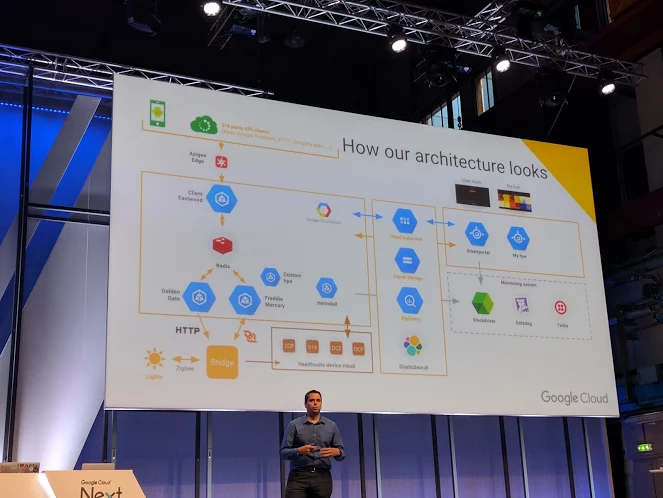
–jeroen
Read the rest of this entry »
Posted in Cloud, Fun, Infrastructure, IoT Internet of Things, Network-and-equipment, Power User | Leave a Comment »
Posted by jpluimers on 2017/06/23
For my blog archive as I already shared it on G+
[WayBack] With so many vulnerabilities out there, here is how to find out of if a fixed is applied to vulnerabilities on Debian/Ubuntu Linux using CVE. – Jeroen Wiert Pluimers – Google+
[WayBack] Debian/Ubuntu Linux: Find If Installed APT Package Includes a Fix/Patch Via CVE Number – nixCraft
Explains how to view the changelog of an installed package on a Debian or Ubuntu Linux server to find out if a fix/patch applied via CVE number.
Hans Wolters:
And find all packages that belong to one cve :-)
zgrep -i cve /usr/share/doc/*/changelog.Debian.gz|grep 1000364
–jeroen

Posted in OpenVPN, Power User, Security | Leave a Comment »
Posted by jpluimers on 2017/06/23
WHAT IS A BOGON, AND WHY SHOULD I FILTER IT?
A bogon prefix is a route that should never appear in the Internet routing table. A packet routed over the public Internet (not including over VPNs or other tunnels) should never have a source address in a bogon range. These are commonly found as the source addresses of DDoS attacks.
Source: The Bogon Reference – Team Cymru
The regular Bogon list is pretty static (last change in 2012), so I’ve listed the text version below. But the full Bogon list (including unused IPv4 space) is dynamic.
0.0.0.0/8
10.0.0.0/8
100.64.0.0/10
127.0.0.0/8
169.254.0.0/16
172.16.0.0/12
192.0.0.0/24
192.0.2.0/24
192.168.0.0/16
198.18.0.0/15
198.51.100.0/24
203.0.113.0/24
224.0.0.0/4
240.0.0.0/4
–jeroen
Posted in Internet, Power User, routers, Security | Leave a Comment »
Posted by jpluimers on 2017/06/19
Paraphrased from MikroTik SFP module compatibility table – MikroTik Wiki [WayBack]:
SFP+ interface compatibility settings with 1G links
For MikroTik devices with SFP+ interface that support both 10G and 1G link rate following settings are needed to be set on both linked devices for required interfaces. In order to get them working in 1G link rate.
- auto-negotiation disabled
- port speed 1G
- FD
Devices which SFP+ ports support 1G links:
- All SFP+ interfaces can be used in 1G mode if required:
- Only SFP+1 supports 1G link speed, SFP+2 is for 10G links only:
Devices which SFP+ interfaces can be used only for 10G links:
Some caveats leading to the above info: CCR1036-8G-2S+ SFP Problems – MikroTik RouterOS [WayBack]
–jeroen
Posted in Internet, MikroTik, Power User, routers | Leave a Comment »


 The Wiert Corner - irregular stream of stuff