The Wiert Corner – irregular stream of stuff

Jeroen W. Pluimers on .NET, C#, Delphi, databases, and personal interests

  • My badges

  • Twitter Updates

  • My Flickr Stream

  • Pages

  • All categories

  • Enter your email address to subscribe to this blog and receive notifications of new posts by email.

    Join 1,861 other subscribers

Archive for the ‘draw.io’ Category

A few diagrams.net (formerly draw.io, see below why) that made me more productive with it

Posted by jpluimers on 2026/02/09

Diagram.net is a wonderful on-line and off-line drawing tool that saves drawings in XML format and provides a rich set of shapes libraries.

It used to start out as draw.io (well, actually diagram.ly when some parts were still Java applets), but then in 2020 started migrating to migrate to diagrams.net, both for domain and name, because, well a [Wayback/Archive] wonderful piece of modern day British Imperialism. See [Wayback/Archive] Blog – Open source diagramming is moving to diagrams.net, slowly for details.

Oh yes, this is one of the tools where Java and JavaScript actually are related (:

The tool is still open source at [Wayback/Archive] GitHub – jgraph/drawio: Source to app.diagrams.net.

These were helpful links:

Read the rest of this entry »

Posted in Cloud Apps, draw.io, Internet, LifeHacker, Power User | Leave a Comment »

Upgrading drawio throug brew functions slightly different than one expects

Posted by jpluimers on 2021/12/31

TL;DR

This fails:

brew update drawio
brew upgrade drawio

This works:

brew cask upgrade drawio

Read the rest of this entry »

Posted in Apple, Cloud Apps, draw.io, Home brew / homebrew, Internet, Power User | Leave a Comment »

draw.io Floorplan stencils – draw.io

Posted by jpluimers on 2021/12/20

I needed a way to draw floor plans.

PowerPoint solutions were to cumbersome, but then I remembered draw.io: it has [WayBack] draw.io Floorplan stencils – draw.io

Have you tried the floorplan stencils in draw.io? You can open the library directly by using the libs parameter, www.draw.io/?libs=floorplan. Or, you can enable them in your library section by clicking “more shapes” (bottom right) and ticking “floorplans”, then apply:

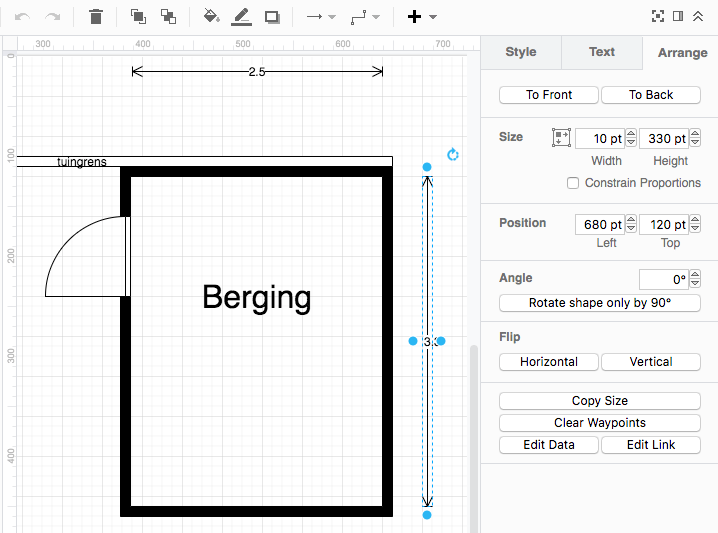
I configured draw.io to show measurements in points, then took 100 points per meter as scale.

At first I most of my measurements were wrong because the I thought the “fat” grid lines were every 50 points. They are not:

  • Light grid lines are 10 points
  • Fat grid lines are 40 points
  • Ruler has small marks every 10 points
  • Ruler has large marks every 50 points
  • Ruler has numbers every 100 points

How confusing!

–jeroen

Read the rest of this entry »

Posted in Cloud Apps, draw.io, Internet, Power User | Leave a Comment »

draw.io: the only way to remove shape waypoints is all of them via the context menu (via Tutorial 3 … draw.io Support)

Posted by jpluimers on 2020/05/22

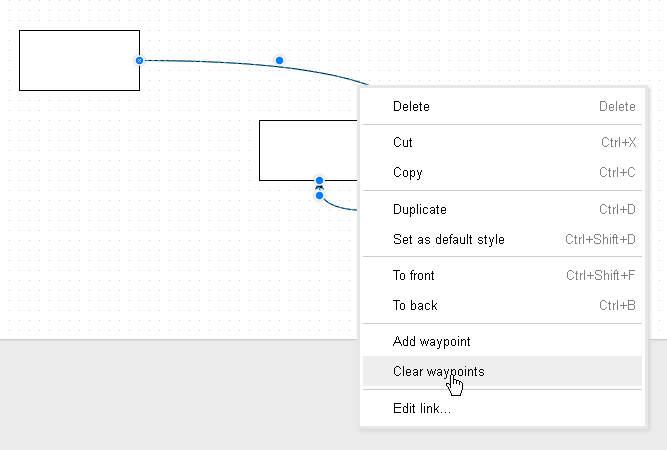
Via [WayBack] Tutorial 3 – Connectors, Waypoints, and Altering Shapes – draw.io Online – draw.io Support: this is the only way to remove waypoints on a shape:

  1. context menu
  2. clear all

–jeroen

Posted in Cloud Apps, draw.io, Internet, Power User | Leave a Comment »

Getting rid of trailing line-endings in the draw.io web interface

Posted by jpluimers on 2018/12/03

One of the things that bugged me for a long time is that every now and then for some shapes, when editing their text, the draw.io web interface puts in trailing line feeds after the text, messing up layout.

The easiest way to work around it is by searching inside the diagram XML for
"
, then replacing that with a ".

(the above code got screwed by WordPress.com saving it, so the search is in this small gist below)

This behaviour is intermittent on the drawio MacOS desktop app.


"

–jeroen


Posted in Cloud Apps, Development, draw.io, Encoding, Internet, Power User, Software Development, Unicode | Leave a Comment »