Posted by jpluimers on 2021/09/17
[WayBack] User Manual – Joe’s Own Editor: Command Line Options
These options can also be specified in the joerc file. Local options can be set depending on the file-name extension. Programs (.c, .h or .p extension) usually have autoindent enabled. Wordwrap is enabled on other files, but rc files have it disabled.
An option is enabled when it’s given like this:
-wordwrap
An option is disabled when it’s given like this:
--wordwrap
…
[WayBack] User Manual – Joe’s Own Editor: Word wrap and formatting
Read the rest of this entry »
Posted in *nix, *nix-tools, joe, Power User | Leave a Comment »
Posted by jpluimers on 2020/06/26
The built-in help of the Joe’s Own Editor – Wikipedia shows only a limited set of keyboard shortcuts:
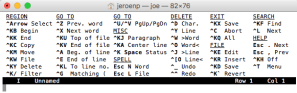
What it misses is how to navigate through Windows. You use the ^KN (for Next) and ^KP (for Previous) navigation shortcuts for that.
You can even use that to navigate out of the Find or Replace line: The Find and Replace lines are single line prompts without a status line (but with a caption).
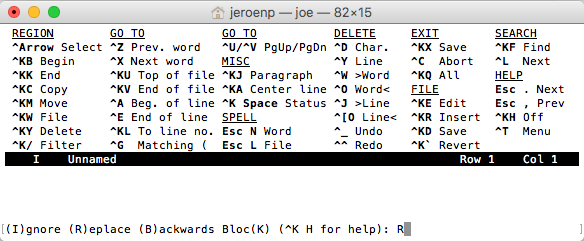
Read the rest of this entry »
Posted in *nix, *nix-tools, joe, Power User | Leave a Comment »
Posted by jpluimers on 2016/10/07
The most recent versions of Joe don’t even build from stock in OS X any more and there are no direct installers for them.
But there are two most recent older versions that have installers, and a formula recent brew based HomeBrew installation:
- joe-3.7-0.pkg – rudix-snowleopard – JOE – Rudix: The hassle-free way to get Unix programs on Mac OS X – Google Project Hosting.
- PROJECT DETAIL for Joe’s Own Editor.
- Homebrew Formulas – Joe.
After experimenting for a while without brew preferring the first over second, I’ve installed the the third as:
- The first actually installs version 3.6, but has the syntax highlighting files installed in the correct place, so you get syntax highlighting.
- The second does install version 3.7, but since the syntax highlighting files are in the wrong place: you get no syntax highlighting.
- The brew formula has an up to date joe version 4.0 and installs the syntax highlighting in the right place: you get syntax highlighting.
Before making a choice, you might want to consider reading about joe versions in JOE – Joe’s own editor / … /NEWS.md.
Having a background partially in the Linux world, I tried building joe from source on my Mac following the steps at JOE – Joe’s own editor / Discussion / joe-editor-general:Mac binary for 3.3 does not run on OS/X 10.8. It failed because the Mercurial 3.8 branch required automake and autoconf which are not available on just a Mac + Xcode. So I’m happy that others have bit the bullet and make a good HomeBrew build.
What makes HomeBrew so great is that it is based on a fully versioned git/ruby combination, allows for multiple Python versions, allows for binaries through bintray served bottles and has zillions (well, thousands) of installable formulae, all versioned.
–jeroen
Posted in *nix, *nix-tools, Apple, joe, Mac OS X / OS X / MacOS, Mac OS X 10.4 Tiger, Mac OS X 10.5 Leopard, Mac OS X 10.6 Snow Leopard, Mac OS X 10.7 Lion, MacBook, MacBook Retina, MacBook-Air, MacBook-Pro, MacMini, OS X 10.10 Yosemite, OS X 10.8 Mountain Lion, OS X 10.9 Mavericks, Power User | Leave a Comment »


 The Wiert Corner - irregular stream of stuff