The Wiert Corner – irregular stream of stuff

Jeroen W. Pluimers on .NET, C#, Delphi, databases, and personal interests

  • My badges

  • Twitter Updates

  • My Flickr Stream

  • Pages

  • All categories

  • Enter your email address to subscribe to this blog and receive notifications of new posts by email.

    Join 1,860 other subscribers

Archive for the ‘ssh/sshd’ Category

Busybox sh (actually ash derivative dash): checking exit codes

Posted by jpluimers on 2021/04/20

Even if you include a double quotes "sh" in a Google search to force only sh (in the early days this was the Thompson shell, but nowadays usually a Bourne shell or derivative) results, almost all unix like scripting examples you find are based on bash (the Bourne again shell), so I was glad I dug a bit deeper into what the actual Busybox shell is.

I wanted to know which shell Busybox uses and what capabilities it has, as ESXi ships with this very slimmed down set of tools (called applets in Busybox speak).

It does not even include ssh: that gap is often filled by [Wayback] Dropbear SSH, which was used by ESXi and named dbclient (I think with ESXi 6.0 it was replaced with a more regular ssh implementation): [Wayback] How to compile a statically linked rsync binary for ESXi.

Busybox shell source code is at [Wayback] ash.c\shell – busybox – BusyBox: The Swiss Army Knife of Embedded Linux and indicates the shell is the ash (the Almquist shell) derivative dash (yes, you guessed it right: the Debian Almquist shell), ported from NetBSD and debianized:

 * Copyright (c) 1997-2005 Herbert Xu <herbert@gondor.apana.org.au>
 * was re-ported from NetBSD and debianized.
...
//config:   The most complete and most pedantically correct shell included with
//config:   busybox. This shell is actually a derivative of the Debian 'dash'
//config:   shell (by Herbert Xu), which was created by porting the 'ash' shell
//config:   (written by Kenneth Almquist) from NetBSD.

nx like systems have a shell hell similar to Windows DLL hell: there are too many, and their differences and be both subtle and frustrating. To get a feel, browse through Source: Comparison of command shells – Wikipedia (yes, some shells from other operating environments like DOS, OS/2, VMS and Windows, but the majority is nx).

Since ash is sufficiently different from bash (for example [Wayback] ash – exit code for a piped process), I always want to know what shell code (which often comes from bash as it is so ubiquitous) will work.

There is hardly any shell documentation at the Busybox site. There is [Wayback] BusyBox – The Swiss Army Knife of Embedded Linux, the source code at [Wayback] ash.c\shell – busybox – BusyBox: The Swiss Army Knife of Embedded Linux does not offer much either,

A manual page of it is at [Archive.is] ash(1) [minix man page]. There you see the age: back then, “exit status” is used where nowadays many people would use “exit code”. It does not explain how to check for specific exit codes.

Because ash is derived from the Bourne shell, this page was of great help for me to grasp exit code handing: [Wayback] Exit Codes – Shell Scripting Tutorial

A Bourne Shell Programming / Scripting Tutorial for learning about using the Unix shell.

Here two examples from that page to get me going:

#!/bin/sh
# Second attempt at checking return codes
grep "^${1}:" /etc/passwd > /dev/null 2>&1
if [ "$?" -ne "0" ]; then
  echo "Sorry, cannot find user ${1} in /etc/passwd"
  exit 1
fi
USERNAME=`grep "^${1}:" /etc/passwd|cut -d":" -f1`
NAME=`grep "^${1}:" /etc/passwd|cut -d":" -f5`
HOMEDIR=`grep "^${1}:" /etc/passwd|cut -d":" -f6`

echo "USERNAME: $USERNAME"
echo "NAME: $NAME"
echo "HOMEDIR: $HOMEDIR"

and

#!/bin/sh
# A Tidier approach

check_errs()
{
  # Function. Parameter 1 is the return code
  # Para. 2 is text to display on failure.
  if [ "${1}" -ne "0" ]; then
    echo "ERROR # ${1} : ${2}"
    # as a bonus, make our script exit with the right error code.
    exit ${1}
  fi
}

### main script starts here ###

grep "^${1}:" /etc/passwd > /dev/null 2>&1
check_errs $? "User ${1} not found in /etc/passwd"
USERNAME=`grep "^${1}:" /etc/passwd|cut -d":" -f1`
check_errs $? "Cut returned an error"
echo "USERNAME: $USERNAME"
check_errs $? "echo returned an error - very strange!"

This basically means that status code handling is the same as in bash, so constructs can be used like [Wayback] bash – How to check the exit status using an if statement – Stack Overflow:

$? is a parameter like any other. You can save its value to use before ultimately calling exit.

exit_status=$?
if [ $exit_status -eq 1 ]; then
    echo "blah blah blah"
fi
exit $exit_status

Read the rest of this entry »

Posted in *nix, *nix-tools, ash/dash, ash/dash development, bash, bash, BusyBox, Development, Power User, Scripting, Software Development, ssh/sshd | 1 Comment »

56 Linux Networking commands and scripts

Posted by jpluimers on 2021/01/25

Back in 2019, there were 56 commands and scripts covered. I wonder how many there are now.

An ongoing list of Linux Networking Commands and Scripts. These commands and scripts can be used to configure or troubleshoot your Linux network.

Source: [WayBack55 Linux Networking commands and scripts

List back then (which goes beyond just built-in commands: many commands from optional packages are here as well):

  1. arpwatch – Ethernet Activity Monitor.
  2. bmon – bandwidth monitor and rate estimator.
  3. bwm-ng – live network bandwidth monitor.
  4. curl – transferring data with URLs. (or try httpie)
  5. darkstat – captures network traffic, usage statistics.
  6. dhclient – Dynamic Host Configuration Protocol Client
  7. dig – query DNS servers for information.
  8. dstat – replacement for vmstat, iostat, mpstat, netstat and ifstat.
  9. ethtool – utility for controlling network drivers and hardware.
  10. gated – gateway routing daemon.
  11. host – DNS lookup utility.
  12. hping – TCP/IP packet assembler/analyzer.
  13. ibmonitor – shows bandwidth and total data transferred.
  14. ifstat –  report network interfaces bandwidth.
  15. iftop – display bandwidth usage.
  16. ip (PDF file) – a command with more features that ifconfig (net-tools).
  17. iperf3 – network bandwidth measurement tool. (above screenshot Stacklinux VPS)
  18. iproute2 – collection of utilities for controlling TCP/IP.
  19. iptables – take control of network traffic.
  20. IPTraf – An IP Network Monitor.
  21. iputils – set of small useful utilities for Linux networking.
  22. jwhois (whois) – client for the whois service.
  23. “lsof -i” – reveal information about your network sockets.
  24. mtr – network diagnostic tool.
  25. net-tools – utilities include: arp, hostname, ifconfig, netstat, rarp, route, plipconfig, slattach, mii-tool, iptunnel and ipmaddr.
  26. ncat – improved re-implementation of the venerable netcat.
  27. netcat – networking utility for reading/writing network connections.
  28. nethogs – a small ‘net top’ tool.
  29. Netperf – Network bandwidth Testing.
  30. netsniff-ng – Swiss army knife for daily Linux network plumbing.
  31. netstat – Print network connections, routing tables, statistics, etc.
  32. netwatch – monitoring Network Connections.
  33. ngrep – grep applied to the network layer.
  34. nload – display network usage.
  35. nmap – network discovery and security auditing.
  36. nslookup – query Internet name servers interactively.
  37. ping – send icmp echo_request to network hosts.
  38. route – show / manipulate the IP routing table.
  39. slurm – network load monitor.
  40. snort – Network Intrusion Detection and Prevention System.
  41. smokeping –  keeps track of your network latency.
  42. socat – establishes two bidirectional byte streams and transfers data between them.
  43. speedometer – Measure and display the rate of data across a network.
  44. speedtest-cli – test internet bandwidth using speedtest.net
  45. ss – utility to investigate sockets.
  46. ssh –  secure system administration and file transfers over insecure networks.
  47. tcpdump – command-line packet analyzer.
  48. tcptrack – Displays information about tcp connections on a network interface.
  49. telnet – user interface to the TELNET protocol.
  50. tracepath – very similar function to traceroute.
  51. traceroute – print the route packets trace to network host.
  52. vnStat – network traffic monitor.
  53. wget –  retrieving files using HTTP, HTTPS, FTP and FTPS.
  54. Wireless Tools for Linux – includes iwconfig, iwlist, iwspy, iwpriv and ifrename.
  55. Wireshark – network protocol analyzer.

Via:

–jeroen

Posted in *nix, *nix-tools, cURL, dig, Internet, nmap, Power User, SpeedTest, ssh/sshd, tcpdump, Wireshark | Leave a Comment »

🔎Julia Evans🔍 on Twitter: “ssh tips… “

Posted by jpluimers on 2021/01/08

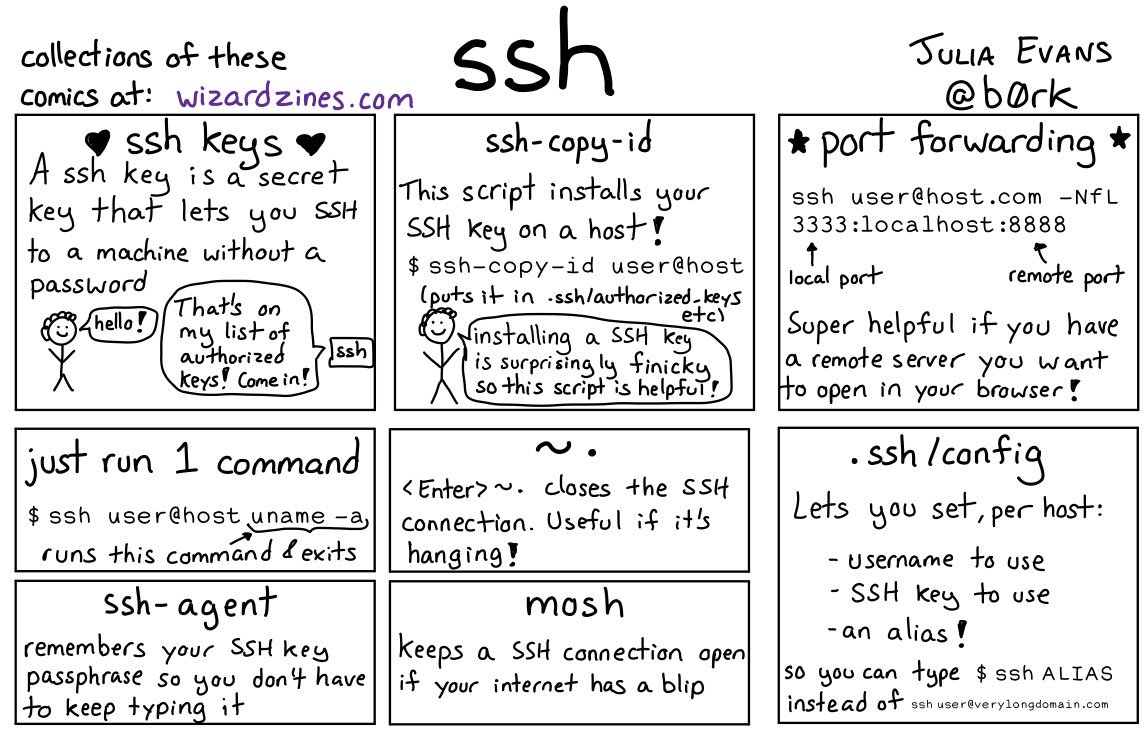
Great work by [WayBack]  🔎Julia Evans🔍 on Twitter: “ssh tips… “

[WayBackssh tips JPG

Via:

Some more tips:

Read the rest of this entry »

Posted in *nix, *nix-tools, Communications Development, Development, Internet protocol suite, Power User, SSH, ssh/sshd | Leave a Comment »

Remote access to the Embarcadero License Center via SSH tunnel – twm’s blog

Posted by jpluimers on 2020/08/10

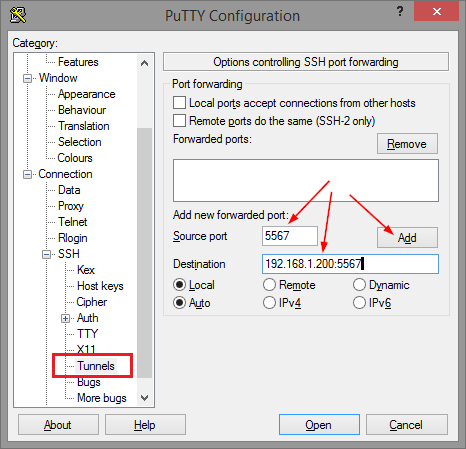
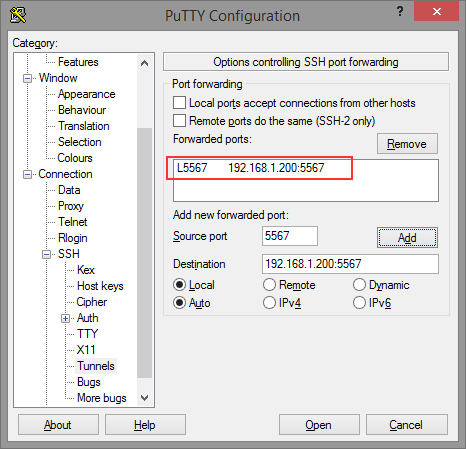
Thomas basically did all the research on the forwarding needed for ELC (formerly Belise/Elise), then showed the PuTTY equivalent to ssh user@remote -L5567:192.168.1.200:5567:

[WayBackRemote access to the Embarcadero License Center via SSH tunnel – twm’s blog

Via: [WayBack] Once you have set up an Embarcadero License Center (ELC) for your company (with network named user or concurrent licenses) you will need network access … – Thomas Mueller (dummzeuch) – Google+

Related: [WayBack] Introducing the Embarcadero License Center – ELC

–jeroen


Posted in *nix, Communications Development, Delphi, Development, Internet protocol suite, Licensing, Power User, Software Development, SSH, ssh/sshd | Leave a Comment »

linux – ssh_exchange_identification: Connection closed by remote host (not using hosts.deny) – Unix & Linux Stack Exchange

Posted by jpluimers on 2020/07/17

I had this one day connecting to a guest:

debug3: send packet: type 20
debug1: SSH2_MSG_KEXINIT sent
Connection closed by 192.168.71.81 port 22

The cause was indeed a heavily overloaded box that would not respond in time to any actual data sent over network requests, but would accept the initial TCP connection.

Logging on the console also failed, but the memory and CPU usage on the wrapping host was out of the roof.

The only solution was to soft power-cycle the guest.

Very similar to:

You can also have a host who’s memory is so badly fragmented that it can’t allocate a page a contiguous memory to fork the process for hosting an SSH session.

In such a case, you can get either of the messages:

ssh_exchange_identification: read: Connection reset by peer

or:

Connection closed by aaa.bbb.ccc.ddd

depending on how far the host gets before it bails out.

If memory fragmenting is the apparent cause, the solution is to access the server via other means and to restart some of the pertinent services. I have found Apache and MySQL to be the culprit on VM’s since VM’s don’t have a swap partition. Failing that, reboot the host.

Via: [WayBacklinux – ssh_exchange_identification: Connection closed by remote host (not using hosts.deny) – Unix & Linux Stack Exchange

–jeroen

Posted in *nix, *nix-tools, Power User, ssh/sshd | Leave a Comment »

shell – List open SSH tunnels – via: Super User

Posted by jpluimers on 2020/06/29

I put an lsof example and output in Reverse ssh tunnel between two linux boxes to allow RDP traffic over port 3389, but forgot to explain it.

Note that if you are bumping into remote tunneling issues selecting the wrong network interface, then checkout the GatewayPorts setting in the above post first!

Inactive local tunnels on the client: find the first word ssh on lsof output.

$ lsof -i -n | grep -w '^\<ssh\>'
ssh       93548 jeroenp    3u  IPv4 0x298985ab430c8aa9      0t0  TCP 192.168.71.77:50257->80.101.239.92:30022 (ESTABLISHED)
ssh       93548 jeroenp    5u  IPv6 0x298985ab22e02df9      0t0  TCP [::1]:59124 (LISTEN)
ssh       93548 jeroenp    6u  IPv4 0x298985ab272543a1      0t0  TCP 127.0.0.1:59124 (LISTEN)
ssh       93548 jeroenp    7u  IPv6 0x298985ab22e03339      0t0  TCP [::1]:ms-wbt-server (LISTEN)
ssh       93548 jeroenp    8u  IPv4 0x298985ab4306eaa9      0t0  TCP 127.0.0.1:ms-wbt-server (LISTEN)
ssh       93548 jeroenp    9u  IPv6 0x298985ab28049339      0t0  TCP [::1]:5925 (LISTEN)
ssh       93548 jeroenp   10u  IPv4 0x298985ab25cefe89      0t0  TCP 127.0.0.1:5925 (LISTEN)

The above listens two tunnels listening to ports 59124, 3389 (ms-wbt-server) and 5925.

Remote tunnels on the server: find the first word sshd on lsof output. Needs sudo if sshd runs as daemon or to listen active connections:

$ sudo lsof -i -n | grep -w '^\<sshd\>'
sshd       1664     root    3u  IPv4   21299      0t0  TCP *:ssh (LISTEN)
sshd       1664     root    4u  IPv6   21301      0t0  TCP *:ssh (LISTEN)
sshd       5026     root    3u  IPv4  350758      0t0  TCP 192.168.124.32:ssh->192.168.171.24:52417 (ESTABLISHED)
sshd       5029  jeroenp    3u  IPv4  350758      0t0  TCP 192.168.124.32:ssh->192.168.171.24:52417 (ESTABLISHED)
sshd       5120     root    3u  IPv4 6693665      0t0  TCP 192.168.124.32:ssh->80.100.143.119:11585 (ESTABLISHED)
sshd       5123  jeroenp    3u  IPv4 6693665      0t0  TCP 192.168.124.32:ssh->80.100.143.119:11585 (ESTABLISHED)
sshd      13320     root    3u  IPv4 6319692      0t0  TCP 192.168.124.32:ssh->192.168.171.24:56801 (ESTABLISHED)
sshd      13323  jeroenp    3u  IPv4 6319692      0t0  TCP 192.168.124.32:ssh->192.168.171.24:56801 (ESTABLISHED)
sshd      16505     root    3u  IPv4 6374150      0t0  TCP 192.168.124.32:ssh->192.168.171.24:21505 (ESTABLISHED)
sshd      16508  jeroenp    3u  IPv4 6374150      0t0  TCP 192.168.124.32:ssh->192.168.171.24:21505 (ESTABLISHED)

The above does not list any tunnels, just regular connections as there were no local tunnels from the client active, which lists the server side of tunnel -L 59124:192.168.124.32:5900 (which is service rfb):

$ sudo lsof -i -n | grep -w '^\<sshd\>'

sshd       1664     root    3u  IPv4   21299      0t0  TCP *:ssh (LISTEN)
sshd       1664     root    4u  IPv6   21301      0t0  TCP *:ssh (LISTEN)
sshd       5026     root    3u  IPv4  350758      0t0  TCP 192.168.124.32:ssh->192.168.171.24:52417 (ESTABLISHED)
sshd       5029  jeroenp    3u  IPv4  350758      0t0  TCP 192.168.124.32:ssh->192.168.171.24:52417 (ESTABLISHED)
sshd       5120     root    3u  IPv4 6693665      0t0  TCP 192.168.124.32:ssh->80.100.143.119:11585 (ESTABLISHED)
sshd       5123  jeroenp    3u  IPv4 6693665      0t0  TCP 192.168.124.32:ssh->80.100.143.119:11585 (ESTABLISHED)
sshd       5123  jeroenp   13u  IPv4 6698066      0t0  TCP 192.168.124.32:51494->192.168.124.32:rfb (ESTABLISHED)
sshd      13320     root    3u  IPv4 6319692      0t0  TCP 192.168.124.32:ssh->192.168.171.24:56801 (ESTABLISHED)
sshd      13323  jeroenp    3u  IPv4 6319692      0t0  TCP 192.168.124.32:ssh->192.168.171.24:56801 (ESTABLISHED)
sshd      16505     root    3u  IPv4 6374150      0t0  TCP 192.168.124.32:ssh->192.168.171.24:21505 (ESTABLISHED)
sshd      16508  jeroenp    3u  IPv4 6374150      0t0  TCP 192.168.124.32:ssh->192.168.171.24:21505 (ESTABLISHED)

For the client side of active connections you need sudo too:

$ sudo lsof -i -n | grep -w '^\<ssh\>'
Password:
ssh 93548 jeroenp 3u IPv4 0x298985ab430c8aa9 0t0 TCP 192.168.71.77:50257->80.101.239.92:30022 (ESTABLISHED)
ssh 93548 jeroenp 5u IPv6 0x298985ab22e02df9 0t0 TCP [::1]:59124 (LISTEN)
ssh 93548 jeroenp 6u IPv4 0x298985ab272543a1 0t0 TCP 127.0.0.1:59124 (LISTEN)
ssh 93548 jeroenp 7u IPv6 0x298985ab22e03339 0t0 TCP [::1]:ms-wbt-server (LISTEN)
ssh 93548 jeroenp 8u IPv4 0x298985ab4306eaa9 0t0 TCP 127.0.0.1:ms-wbt-server (LISTEN)
ssh 93548 jeroenp 9u IPv6 0x298985ab28049339 0t0 TCP [::1]:5925 (LISTEN)
ssh 93548 jeroenp 10u IPv4 0x298985ab25cefe89 0t0 TCP 127.0.0.1:5925 (LISTEN)
ssh 93548 jeroenp 15u IPv4 0x298985ab2998de89 0t0 TCP 127.0.0.1:59124->127.0.0.1:52580 (ESTABLISHED)

Based on [WayBackshell – List open SSH tunnels – Super User.

–jeroen

Posted in *nix, *nix-tools, Power User, ssh/sshd | Leave a Comment »

ssh_config section order is important: the first setting obtained from a Host/Match section applies

Posted by jpluimers on 2020/06/12

Often, configuration files work like this:

  • global settings are at the top
  • detailed settings are further on, overwriting global settings

Not for ssh_config though, so I was right writing I should read more on it in Good read for starting to intermediate ssh users is “SSH Essentials: Working with SSH Servers, Clients, and Keys | DigitalOcean” and pointers to more advanced reading material.

So here is how ssh_config does it as per man page at [WayBack] ssh_config(5) – OpenBSD manual pages and [WayBack] ssh_config — OpenSSH SSH client configuration files at Linux.org:

     For each parameter, the first obtained value will be used.  The configuration files contain sections separated
     by “Host” specifications, and that section is only applied for hosts that match one of the patterns given in the
     specification.  The matched host name is the one given on the command line.

     Since the first obtained value for each parameter is used, more host-specific declarations should be given near
     the beginning of the file, and general defaults at the end.

This means a section Host * needs to come at the end.

I got that wrong and it took me the better half of a morning to figure out the cause of a connection problem ending in this:

debug1: Authentications that can continue: publickey,password
debug3: start over, passed a different list publickey,password
debug3: preferred publickey
debug3: authmethod_lookup publickey
debug3: remaining preferred:
debug1: No more authentication methods to try.

Somehow, the identity file was never used to try public key authentication at all because of the ssh_config order in ~/.ssh/config.

I’m not the only one confused, as during the search for the cause with “remaining preferred” “No more authentication methods to try.”:

Maybe now I should step up from manually editing the ssh_config file and use [WayBack] GitHub – moul/advanced-ssh-config: make your ssh client smarter to generate it for me.

–jeroen

Posted in *nix, *nix-tools, Communications Development, Development, Internet protocol suite, Power User, SSH, ssh/sshd, TCP | Leave a Comment »

Good read for starting to intermediate ssh users is “SSH Essentials: Working with SSH Servers, Clients, and Keys | DigitalOcean” and pointers to more advanced reading material

Posted by jpluimers on 2020/06/08

For a really nice overview of most basic and intermediate usage of ssh, read [WayBackSSH Essentials: Working with SSH Servers, Clients, and Keys | DigitalOcean.

It is large (printed to PDF it is 30+ pages in either A4 or Letter format) but well worth reading as it covers a lot in manageable bits.

Does it mean I won’t write about ssh again?

I will continue, as most of my blog posts are relatively short highlighting a small thing at a time (that is how I learn best, hopefully some of you do as well).

It does not explain really advanced stuff (like ProxyCommand), so here is a start of things I want to learn more about:

–jeroen

Posted in *nix, *nix-tools, Power User, ssh/sshd | Leave a Comment »

OpenSSH keygen guidelines

Posted by jpluimers on 2020/05/01

Verify [WayBack] OpenSSH: Key generation before generating keys.

At the time of grabbing it was this (for the mozilla tag; use another tag if you prefer):

# RSA keys are favored over ECDSA keys when backward compatibility ''is required'',
# thus, newly generated keys are always either ED25519 or RSA (NOT ECDSA or DSA).
$ ssh-keygen -t rsa -b 4096 -f ~/.ssh/id_rsa_mozilla_$(date +%Y-%m-%d) -C "Mozilla key for xyz"

# ED25519 keys are favored over RSA keys when backward compatibility ''is not required''.
# This is only compatible with OpenSSH 6.5+ and fixed-size (256 bytes).
$ ssh-keygen -t ed25519 -f ~/.ssh/id_ed25519_mozilla_$(date +%Y-%m-%d) -C "Mozilla key for xyz"

This was not changed based on [WayBack] Key generation: pass-a and -o argument? · Issue #68 · mozilla/wikimo_content · GitHub: a discussion on the KDF rounds (-a parameter) and storage format (-o parameter).

This is slightly less strong than in [WayBack] Upgrade Your SSH Key to Ed25519 | Programming Journal, but seems to be OK when writing this in 2018.

For comparison, a similar discussion is at [WayBack] public key – How many KDF rounds for an SSH key? – Cryptography Stack Exchange.

In practice, I am not for one ssh ID per host, but I use different tags depending on where the ssh ID applies. More discussion on this is at [WayBack] privacy – Best Practice: ”separate ssh-key per host and user“ vs. ”one ssh-key for all hosts“ – Information Security Stack Exchange

Based on the above, I also learned about this password generator: [WayBack] GitHub – gdestuynder/pwgen

–jeroen

Posted in *nix, *nix-tools, Encryption, Hashing, Power User, Security, ssh/sshd | Leave a Comment »

KiTTY auto-reconnect ssh tunnel so you can RDP from remote machine into local one

Posted by jpluimers on 2020/04/27

I needed this equivalent in KiTTY while also keeping the connection alive:

ssh -o "ExitOnForwardFailure yes" -R :3389:127.0.0.1:3389 

Here, (via [WayBack] SSH options, Port Forwarding over SSH, Keepalives – zwilnik), -R Specifies that the given port on the remote (server) host is to be forwarded to the given host and port on the local side. This works by allocating a socket to listen to port on the remote side, and whenever a connection is made to this port, the connection is forwarded over the secure channel, and a connection is made to host port hostport from the local machine.

This is unlike most port forwarding examples which shows you how to forward a local port to a remote one (for instance [WayBack] Portforwarding with SSH (Putty)).


I wanted this on Windows, but auto connect, and not depend on OpenSSH. So I used the portable edition of [WayBack] Download KiTTY., which is a PuTTY derivative with more features.

With OpenSSH it is easier, but requires either Windows 10 (having it pre-installed) or an OpenSSH installation. How simple? This simple: [WayBack] openssh – How do I keep SSH connection alive on Windows 10? – Stack Overflow

The portable version of KiTTYensures all configuration is in configuration files (not the registry like the regular edition: [WayBack] KiTTY Session Configuration Location – Chase’s Notes)

I bumped into KiTTY because in another situation, I needed to execute a remote command and found [WayBack] ssh – How to run a remote command in PuTTY after login & keep the shell running? – Super User

Later I found other references as it can also auto-logon:

Kitty has a URL based update checker; for instance [WayBackwww.9bis.net/kitty/check_update.php?version=0.70.0.6 checks if a newer version than 0.70.0.6 is available. If you do not trust it, you can run that URL over TLS as well.

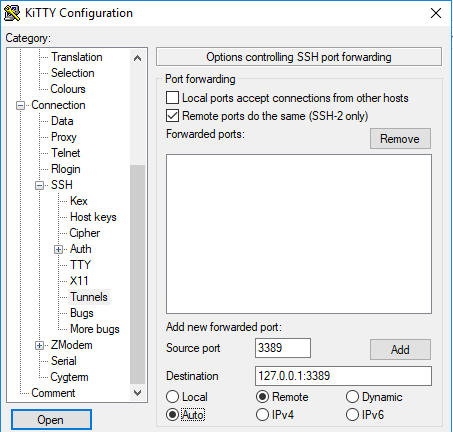
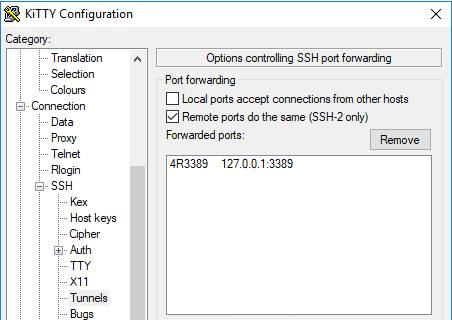
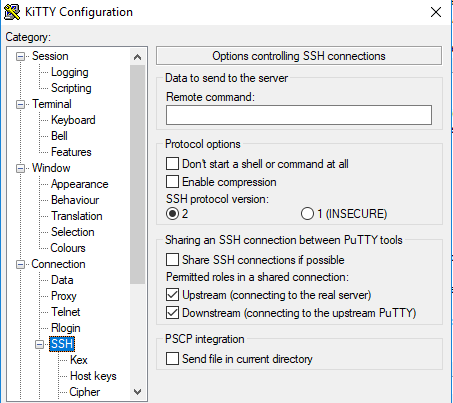
These screenshots seem to do just get the above configuration:

  1. Under “SSH”, in “Tunnels”
    • tick “Remote ports do the same (SSH-2 only)”
    • fill in a source port (that’s the remote port and will become the :3389: bit above)
    • fill in destination 127.0.0.1:3389 (that’s the local RDP port on your Windows machine)
    • tick “Remote”
    • tick “Auto”
    • click “Add” to get to the second screenshot

  2. Under connection:
    • Ensure “Seconds between keepalives” is larger than zero (I took 1)
    • Tick “Disable Nagle’s algorithm”
    • Tick “Enable TCP keepalives”
    • Tick “Attempt to reconnect on system wakup”
    • Tick “Attempt to reconnect on connection failure”
  3. On the “SSH” tab:
    • Do not enter a “Remote command” (seems unneeded on my system)

So for now, I can do without things like:

–jeroen

Posted in *nix, *nix-tools, Power User, ssh/sshd, Windows | Leave a Comment »