


Now that I got pointed to this twice (see “Via” below), I need to get one so I can play with it: [Wayback/Archive] GitHub – i-am-shodan/USBArmyKnife: USB Army Knife – the ultimate close access tool for penetration testers and red teamers.
Via:
Posted by jpluimers on 2025/09/30
Now that I got pointed to this twice (see “Via” below), I need to get one so I can play with it: [Wayback/Archive] GitHub – i-am-shodan/USBArmyKnife: USB Army Knife – the ultimate close access tool for penetration testers and red teamers.
Via:

Posted in *nix, *nix-tools, Blue team, Bluetooth, Development, Encryption, ESP32, Hardware, Hardware Development, Hardware Interfacing, Home Audio/Video, HTTPS/TLS security, Infosec (Information Security), Network-and-equipment, Power User, Red team, Software Development, WiFi, Wireshark | Tagged: USBArmyKnife | Leave a Comment »
Posted by jpluimers on 2023/12/26
Every once in a while Jan Schaumann writes a long Twitter thread and saves it in a blog post. Always good ways to learn. This time it was no different: [Wayback/Archive] DNS Response Size started with

Posted in Communications Development, Development, DNS, Internet, Internet protocol suite, IPv4, IPv6, Power User, TCP, tcpdump, UDP, Wireshark | Leave a Comment »
Posted by jpluimers on 2023/02/28
[Wayback/Archive] Wireshark Cheat Sheet – Commands, Captures, Filters, Shortcuts
It is available both a huge [Wayback/Archive] jpg (2500×2096 pixels), so it already prints well on A5 or A4 sized paper for reference and as a [Wayback/Archive] PDF (so you can print it on even larger paper sizes).
Via: [Archive] Murdock (@Generic42) / Twitter in a DM.
–jeroen

Posted in *nix, *nix-tools, Communications Development, Development, Hardware, Network-and-equipment, Power User, Software Development, Wireshark | Leave a Comment »
Posted by jpluimers on 2021/12/01
Wanting a simple way on the console to convert a .pcap file to a .wav file, I searched for [Wayback] console convert pcap to wav – Google Search.
The reason is that [Wayback] fritzcap (written in Python) sometimes crashes while doing the conversion of a phone recording, so then only the .pcap file is available. I still want to figure this out, but given my health situation, I might not be able to in time.
Posted in *nix, *nix-tools, Audio, Development, ffmpeg, Fritz!, Fritz!Box, fritzcap, Hardware, Media, Network-and-equipment, Power User, Python, Scripting, Software Development, Wireshark | Leave a Comment »
Posted by jpluimers on 2021/02/16
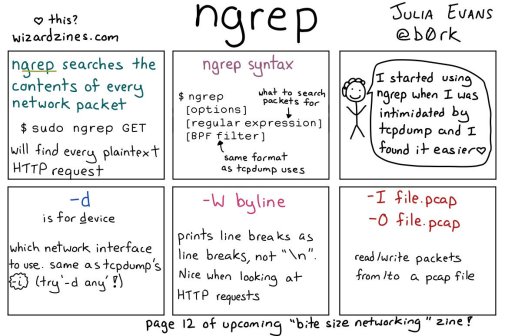
[WayBack] 🔎Julia Evans🔍 on Twitter: “ngrep: grep your network!… “
So this taught me a new tool and other new things:

Posted in *nix, *nix-tools, Communications Development, Development, Internet protocol suite, Power User, Software Development, Wireshark | Leave a Comment »
Posted by jpluimers on 2021/01/25
Back in 2019, there were 56 commands and scripts covered. I wonder how many there are now.
An ongoing list of Linux Networking Commands and Scripts. These commands and scripts can be used to configure or troubleshoot your Linux network.
Source: [WayBack] 55 Linux Networking commands and scripts
List back then (which goes beyond just built-in commands: many commands from optional packages are here as well):
- arpwatch – Ethernet Activity Monitor.
- bmon – bandwidth monitor and rate estimator.
- bwm-ng – live network bandwidth monitor.
- curl – transferring data with URLs. (or try httpie)
- darkstat – captures network traffic, usage statistics.
- dhclient – Dynamic Host Configuration Protocol Client
- dig – query DNS servers for information.
- dstat – replacement for vmstat, iostat, mpstat, netstat and ifstat.
- ethtool – utility for controlling network drivers and hardware.
- gated – gateway routing daemon.
- host – DNS lookup utility.
- hping – TCP/IP packet assembler/analyzer.
- ibmonitor – shows bandwidth and total data transferred.
- ifstat – report network interfaces bandwidth.
- iftop – display bandwidth usage.
- ip (PDF file) – a command with more features that ifconfig (net-tools).
- iperf3 – network bandwidth measurement tool. (above screenshot Stacklinux VPS)
- iproute2 – collection of utilities for controlling TCP/IP.
- iptables – take control of network traffic.
- IPTraf – An IP Network Monitor.
- iputils – set of small useful utilities for Linux networking.
- jwhois (whois) – client for the whois service.
- “lsof -i” – reveal information about your network sockets.
- mtr – network diagnostic tool.
- net-tools – utilities include: arp, hostname, ifconfig, netstat, rarp, route, plipconfig, slattach, mii-tool, iptunnel and ipmaddr.
- ncat – improved re-implementation of the venerable netcat.
- netcat – networking utility for reading/writing network connections.
- nethogs – a small ‘net top’ tool.
- Netperf – Network bandwidth Testing.
- netsniff-ng – Swiss army knife for daily Linux network plumbing.
- netstat – Print network connections, routing tables, statistics, etc.
- netwatch – monitoring Network Connections.
- ngrep – grep applied to the network layer.
- nload – display network usage.
- nmap – network discovery and security auditing.
- nslookup – query Internet name servers interactively.
- ping – send icmp echo_request to network hosts.
- route – show / manipulate the IP routing table.
- slurm – network load monitor.
- snort – Network Intrusion Detection and Prevention System.
- smokeping – keeps track of your network latency.
- socat – establishes two bidirectional byte streams and transfers data between them.
- speedometer – Measure and display the rate of data across a network.
- speedtest-cli – test internet bandwidth using speedtest.net
- ss – utility to investigate sockets.
- ssh – secure system administration and file transfers over insecure networks.
- tcpdump – command-line packet analyzer.
- tcptrack – Displays information about tcp connections on a network interface.
- telnet – user interface to the TELNET protocol.
- tracepath – very similar function to traceroute.
- traceroute – print the route packets trace to network host.
- vnStat – network traffic monitor.
- wget – retrieving files using HTTP, HTTPS, FTP and FTPS.
- Wireless Tools for Linux – includes iwconfig, iwlist, iwspy, iwpriv and ifrename.
- Wireshark – network protocol analyzer.
Via:
–jeroen
Posted in *nix, *nix-tools, cURL, dig, Internet, nmap, Power User, SpeedTest, ssh/sshd, tcpdump, Wireshark | Leave a Comment »
Posted by jpluimers on 2019/04/12
Every now and then I hear about providers that refuse to hand over the VoIP SIP credentials.
If you do have access to your modem, you can Wireshark the WAN side, then reset the modem and capture traffic until it has obtained the VoIP information:
[WayBack] Telfort SIP (getest met Glasvezel) | Het leven van Teus & Simone:
Veel mensen op het forum van Telfort vragen zich af of ze de SIP gegevens kunnen krijgen voor telefonie zodat men de ExperiaBox niet hoeven te gebruiken. Gezien dat de Telfort Support deze gegevens…
Via:
Ik heb het zelf uitgeprobeerd en je kan inderdaad je wachtwoord achterhalen, ik heb screenshots en aanvullende data toegevoegd…


–jeroen

Posted in *nix, *nix-tools, Internet, Power User, Wireshark | Leave a Comment »
Posted by jpluimers on 2018/08/03
Cool set of steps on [WayBack] How I use Wireshark – Julia Evans who uses the combination of tcpdump to dump traffic in pcap files and Wireshark to analyse the pcap files after copying them using scp. On many platforms, Wireshark can also capture the ptrace files for you.
Via: [WayBack] 🔎Julia Evans🔍 on Twitter: “how I use Wireshark https://t.co/j699JXrjaH” which has some nice comments including:
ptrace to your tool-kitscp for copying, as you can do [WayBack] dumpcap over an existing ssh connection:
wireshark -k -i <(ssh <IP> "sudo dumpcap -P -w - -f 'not tcp port 22'")–jeroen
Posted in *nix, *nix-tools, Conference Topics, Conferences, Event, Power User, Wireshark | Leave a Comment »
Posted by jpluimers on 2017/04/24
I don’t use Wireshark enough to be fluent, so here are some links and quotes that proved to be useful for me:
(ip.dst == 192.168.99.61 && ip.src == 192.168.99.38) || (ip.dst == 192.168.99.38 && ip.src == 192.168.99.61) && http(ip.addr == 192.168.99.61 && ip.src == 192.168.99.38) && httphttp contains "SOAPAction:" || http contains "HTTP"src 213.146.155.196 and tcp port 8500ether host MAC 00:21:AC:01:08:B1frame contains clause will match any binary content in the frame (you can be more specific with for instance tcp containsor data contains (which uses the data dissector). Example: (frame contains 21:00 || frame contains 00:21) && tcp.len > 0data.data matches "\xa4.\xc3...\xb2"eth.src == MAC 00:21:AC:01:08:B1GET as tcp[((tcp[12:1] & 0xf0) >> 2):4] = 0x47455420POST as tcp[((tcp[12:1] & 0xf0) >> 2):4] = 0x504f5354 && tcp[((tcp[12:1] & 0xf0) >> 2) + 4:1] = 0x20–jeroen
Posted in *nix, *nix-tools, Power User, Wireshark | Leave a Comment »
Posted by jpluimers on 2017/03/13
I hadn’t done a lot with pfSense in the past, which I regret a bit since I discovered this really cool feature: Sniffers, Packet Capture – PFSenseDocs.
The coolness isn’t so much that you can capture packets, but that it’s compatible with tcpdump and Wireshark (which has become available natively for Mac like 2 years ago).
Which means that you can download captures and open them in Wireshark.
So it’s as easy as 1,2,3:
–jeroen
Posted in *nix, *nix-tools, Internet, Monitoring, pfSense, Power User, routers, tcpdump, Wireshark | Leave a Comment »
 The Wiert Corner - irregular stream of stuff