Archive for the ‘Office 2013’ Category
Posted by jpluimers on 2018/05/11
If you use Outlook to check and manage your email, you can easily use it to check your Gmail account as well. You can set up your Gmail account to allow you to synchronize email across multiple machines using email clients instead of a browser.
Oh: you need to lower your Gmail security for Outlook 2013 as the latter isn’t up to par on security. For that, follow similar steps like in “the user name or password for imap.gmail is incorrect” – iPad, iPod or iPhone with iOS < 7.
–jeroen
Posted in GMail, Google, Office, Office 2013, Office 2016, Outlook, Power User | Leave a Comment »
Posted by jpluimers on 2017/05/05
I don’t need Skype (aka Lync) on all my VMs, for enough reasons (obnoxiously getting in the way even when not configured, downloading updates even though not used, taking up space, etc).
Removing it through appwiz.cpl is more than just a single step. The reason is that Skype can be part of Office and – despite the updates being called Skype – can be listed as the Lync component in Office.
So the removal is as follows:
- Run appwiz.cpl
- Select the Microsoft Office version you have installed
- Right click, then choose Change
- Choose “Add or Remove features” then “Continue”
- Choose the dropdown left of “Microsoft Lync” or “Microsoft Office”, then click “Not Available” and click “Continue”
- Wait for the removal to proceed, then click “Close”
–jeroen
via: Solved: Completely Uninstall Skype For Business – Skype Community
Posted in Office, Office 2010, Office 2013, Office 2016, Power User | Leave a Comment »
Posted by jpluimers on 2017/01/09
To match dd/mm/yyyy and mm/dd/yyyy column values in columns C (Date1) and N (Date2), I used these formulas in row 2:
| Meaning: |
Column: |
Formula: |
Explanation: |
| Date1Text |
I |
=TEXT(C2,”dd/mm/yyyy”) |
Interpret date text of the original text no matter the Excel settings |
| Date1Value |
J |
=DATE(RIGHT(I2,4),MID(I2,4,2),LEFT(I2,2)) |
Encode the date text to an actual date: dd#mm#yyyy format where # is any separator |
| DatesEqual |
K |
=J2=L2 |
Are the encoded dates equal? |
| Date2Value |
L |
=DATE(RIGHT(M2,4),LEFT(M2,2),MID(M2,4,2)) |
Encode the date text to an actual date: mm#dd#yyyy format where # is any separator |
| Date2Text |
M |
=TEXT(N2,”mm/dd/yyyy”) |
Interpret date text of the original text no matter the Excel settings |
Learn how to convert text values into dates in Excel. This lesson covers a range of different scenarios to help you. The comments have even more examples.
Source: Convert a text value into a date in Excel. Learn Microsoft Excel | Five Minute Lessons
Posted in Excel, Office, Office 2007, Office 2010, Office 2013, Power User | 1 Comment »
Posted by jpluimers on 2016/08/01
Oh man, why didn’t they make a line object out of this…
But if you realize it is a bottom border, then deleting is easy:
The answer is something of a trick, as the horizontal line is not a line (or a graphic), it’s a bottom border.
–jeroen
via: Deleting Horizontal Lines From Word.
Posted in Office, Office 2007, Office 2010, Office 2013, Power User | Leave a Comment »
Posted by jpluimers on 2016/07/18
Coming from an Office pre 2000 background, I’m still amazed at how will things are hidden in modern Office versions.
Take the page numbers not showing on slides – Microsoft Community.
I bumped into that recently as well on a new blank presentation:
You see the placeholders at design time, but they don’t show up at presentation time.
The obvious action for me: Right click on each to see if there is anything about special formatting or hiding. It doesn’t work.
What does work is to:
- Go to the top of the Slide Masters
- Click the Ribbon
- Choose Insert
- Choose Text
- Choose Header & Footer
- Put a check marks for the place holders you want to be visible
–jeroen
via: PowerPoint 2013: Date, Slide Number and Footer | Academic Technology @ Palomar College.
Read the rest of this entry »
Posted in Office, Office 2007, Office 2010, Office 2013, Power User | Leave a Comment »
Posted by jpluimers on 2016/05/23
Sometimes people give you .msg files saved from Outlook instead of forwarding those mails by e-mail.
Opening a .msg file requires Outlook.
You don’t need to bind Outlook to an e-mail account for this (so you can skip those steps when asked the first time Outlook opens). An Office installation that includes Outlook suffices.
After opening the message:
- Open the toolbar if it’s not open yet
- Under “Move” choose “Actions” -> “Other Actions”
- Then choose either “Message Header” or “View Source”
For some HTML messages, “View Source” is not available. I’m not yet sure why.
–jeroen
via: How can I view the entire source code of an email in Outlook 2010? – Super User
Posted in Office, Office 2010, Office 2013, Office 2016, Outlook, Power User | Leave a Comment »
Posted by jpluimers on 2016/03/25
Apart from the obvious “use less tables” and “break tables apart”, these can also help big time:
- Run %WinDir%\System32\SystemPropertiesPerformance.exe
- Choose “Ajust for best performance” (it will disable all visual enhancements)
- Re-enable “Smooth edges of screen fonts” (it will make it easier to set bold and italic apart in Word)
If it is still too slow, I might look into these:
–jeroen
Read the rest of this entry »
Posted in Microsoft Surface on Windows 7, Office, Office 2007, Office 2010, Office 2013, Power User, Windows, Windows 7, Windows 8, Windows 8.1, Windows 9, Windows Server 2008, Windows Server 2008 R2, Windows Server 2012, Windows Server 2012 R2, Windows Vista, Word | Leave a Comment »
Posted by jpluimers on 2015/12/07
Showing message headers and source used to be easy in early Outlook versions.
But as of Outlook 2007 they hid the internet message headers even further away than in Outlook 2003.
Steps for Outlook 2007+:
- Start Outlook.
- Double-click the message for which you want to view full internet headers.
- Click Options (2007) or Tags (2010/2013).
- The Message Options dialog box is displayed. You are after the Internet headers field at the bottom of the dialog box.
Same for the message source:
- Start Outlook
- Double-click the message for which you want to view full internet headers.
- In the Move section of the Ribbon, click on Actions
- Click Other Actions
- Click View Source
- Notepad (or the program associated with html source files) opens with a file email.txt containing the message source.
–jeroen
via:
Posted in Office, Office 2003, Office 2007, Office 2010, Office 2013, Outlook, Power User | Leave a Comment »
Posted by jpluimers on 2015/11/19
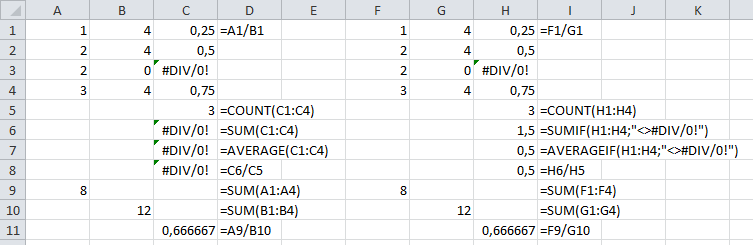
I bumped into a #DIV/0! result for average functions when processing large sets of data.
It is actually very easy to spot the error in small results, sets, but hard in big ones, as you cannot see the #DIV/0!
So there are average functions that can ignore certain outcomes. COUNT already does that (there is no COUNTIF), the others have a *IF equivalent, but not in all Excel versions:
Note there is a small SUMIF/SUMIFS/AVERAGEIF/AVERAGEIFS in Excel 2010 (not in 2007, and maybe not in 2013) glitch when the criteria are in a different sheet.
The seemingly easy workaround of summing columns A and B, then doing the division fails: it returns different results as it forgets to ignore faulty rows:
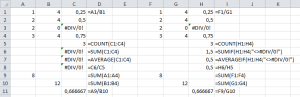
SUM/AVERAGE versus SUMIF/AVERAGEIF (click to enlarge)
Leermomentje (techable moment comes close)…
–jeroen
via:
Posted in Development, Excel, Office, Office 2003, Office 2007, Office 2010, Office 2013, Power User, Software Development | 2 Comments »



 The Wiert Corner - irregular stream of stuff