The Wiert Corner – irregular stream of stuff

Jeroen W. Pluimers on .NET, C#, Delphi, databases, and personal interests

  • My badges

  • Twitter Updates

  • My Flickr Stream

  • Pages

  • All categories

  • Enter your email address to subscribe to this blog and receive notifications of new posts by email.

    Join 1,854 other subscribers

Archive for the ‘Power User’ Category

explainshell.com: parse and explain just about any shell command

Posted by jpluimers on 2021/02/17

I bumped into the tremendously site [WayBack] explainshell.com – match command-line arguments to their help text only after documenting the relevant cURL options of yesterdays post on checking your CertBot domain expiration dates.

The site allows put in a shell command-line to see the help text that, including matches for each argument.

It works so well because it parses both the shell command-line and the man pages, then constructs a web-page linking the relevant man page content to the shell command-line in the correct shell command-line order.

The explainshell has a counterpart showthedocs (both are open source) for explaining other languages (on the one hand more extended as it goes much deeper into parsing for instance SQL, on the other hand more limited as it only supports a few languages). More on showthedocs later.

The links

The parsing results

The first bit below is just the text output, and the second bit the screenshot, of a relatively simple command like [WayBack] explainshell.com – curl -fsSL example.org:

curl(1) -fsSL example.org
transfer a URL
-f, --fail
       (HTTP)  Fail  silently  (no  output at all) on server errors. This is mostly done to better enable
       scripts etc to better deal with failed attempts. In normal cases  when  a  HTTP  server  fails  to
       deliver  a  document,  it  returns an HTML document stating so (which often also describes why and
       more). This flag will prevent curl from outputting that and return error 22.

       This method is not fail-safe and there are occasions where non-successful response codes will slip
       through, especially when authentication is involved (response codes 401 and 407).
-s, --silent
       Silent or quiet mode. Don't show progress meter or error messages.  Makes Curl mute.
-S, --show-error
       When used with -s it makes curl show an error message if it fails.
-L, --location
       (HTTP/HTTPS) If the server reports that the requested page  has  moved  to  a  different  location
       (indicated  with  a Location: header and a 3XX response code), this option will make curl redo the
       request on the new place. If used together with -i, --include or  -I,  --head,  headers  from  all
       requested pages will be shown. When authentication is used, curl only sends its credentials to the
       initial host. If a redirect takes curl to a different host, it won't  be  able  to  intercept  the
       user+password.  See  also  --location-trusted  on  how to change this. You can limit the amount of
       redirects to follow by using the --max-redirs option.

       When curl follows a redirect and the request is not a plain GET (for example POST or PUT), it will
       do  the  following  request  with a GET if the HTTP response was 301, 302, or 303. If the response
       code was any other 3xx code, curl will re-send the following request  using  the  same  unmodified
       method.
source manpages: curl

The screenshot is even more impressive:

Read the rest of this entry »

Posted in *nix, *nix-tools, bash, bash, Development, Power User, Scripting, Software Development | Leave a Comment »

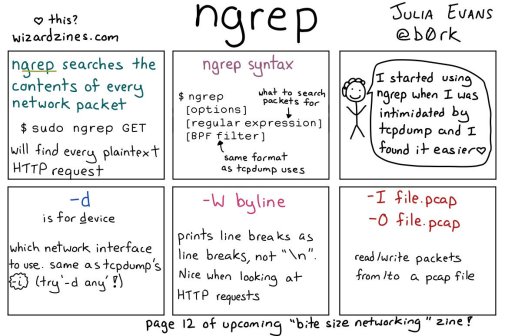
🔎Julia Evans🔍 on Twitter: “ngrep: grep your network!… “

Posted by jpluimers on 2021/02/16

[WayBack] 🔎Julia Evans🔍 on Twitter: “ngrep: grep your network!… “

So this taught me a new tool and other new things:

Read the rest of this entry »

Posted in *nix, *nix-tools, Communications Development, Development, Internet protocol suite, Power User, Software Development, Wireshark | Leave a Comment »

Eurotec 6-6 uit bedrijf nemen

Posted by jpluimers on 2021/02/15

Even wat linkjes en notities, want Eurotec 6-6 wordt al tijden niet meer gemaakt ([WayBack] Euromatec maakt andere alarmsystemen) en steeds meer worden vervangen door andere alarmapparatuur.

–jeroen

Posted in LifeHacker, Power User | Leave a Comment »

Research list: getting rid of the Windows 10 Delivery Content data and service

Posted by jpluimers on 2021/02/15

Not sure yet if this is still possible, but on my research list as it pollutes low-resource Windows 10 VMs and computers the Delivery Content:

–jeroen

Read the rest of this entry »

Posted in Power User, Windows, Windows 10 | Leave a Comment »

Deleting the WebCache database – The IE browser cache | Apttech’s Blog

Posted by jpluimers on 2021/02/15

[WayBack] Deleting the WebCache database – The IE browser cache | Apttech’s Blog quotes from WayBack: C drive space is using up on terminal server after upgrading to IE10 or IE11 – AsiaTech: Microsoft Azure & Development:

With the new cache implementation, the cache files are saved in %LocalAppData%\Microsoft\Windows\WebCache\ folder. And, the cache files will be created when a new user logs on.

Actually, the database is a file named WebCacheV01.dat in the cache folder, and its initial size could be around 20-32MB. The size of this file will keep increasing along with you browse more and more websites.

save the below contents into ClearIECache.cmd file and try to fun this file.

echo OFF
net stop COMSysApp
taskkill /F /IM dllhost.exe
taskkill /F /IM taskhost.exe
taskkill /F /IM taskhostex.exe
del /Q %LocalAppData%\Microsoft\Windows\WebCache\*.*
net start COMSysApp
echo ON

Furthermore, you’d better deploy the batch file to a logoff script of your local GPO, here are the steps.

Related:

–jeroen

Posted in Internet Explorer, Power User, Web Browsers, Windows, Windows 10 | Leave a Comment »

Badhoevedorp, T106, Amsterdamse Baan, groot onderhoud

Posted by jpluimers on 2021/02/14

Je vindt onderstaande downloads en kaart niet via de detail pagina’s [Wayback] Verkeersoverlast door werkzaamheden Amsterdamse Baan en Lijnderbrug of [Wayback] Werkzaamheden Amsterdamse Baan en Lijnderbrug | Gemeente Haarlemmermeer.

Wel via [Wayback] Wegwerkzaamheden en wegafsluitingen | Gemeente Haarlemmermeer (klik op “Bekijk de kaart met wegwerkzaamheden en wegafsluitingen”) geleend van LTC Wegwerkzaamheden & Evenementen:

LTC Wegwerkzaamheden & Evenementen. Een overzicht van alle wegwerkzaamheden in en rond Haarlemmermeer.

Daar inzoomen op de “T106” brug tussen Lijnden en Amsterdam, en dan klikken op “Badhoevedorp, T106, Amsterdamse Baan, groot onderhoud”:

Badhoevedorp, T106, Amsterdamse Baan, groot onderhoud

Wanneer

Van 1-3-2021 tot en met 19-3-2021 (Periode 1)

Betrokken straten

Amsterdamse baan / S106

Soort

Asfaltering / wegverharding

Hinderklasse

Grote hinder (10-30 minuten)

Wegbeheerder

Gemeente Haarlemmermeer

Status

Plan afstemming gestart

Omschrijving

afsluiting voor gemotoriseerd verkeer

Contact informatie

Dhr. T. Kromwijk (KWS) 0611701477

Bijlage(n)

Omleidingen

Omleiding A

Omleiding B

Streetview

Kaart

Posted in LifeHacker, Power User | Leave a Comment »

Scribbr APA Generator – Genereer je bronvermelding volgens de APA-stijl (American Psychological Association citations of references)

Posted by jpluimers on 2021/02/12

[Archive.is] Scribbr APA Generator – Genereer je bronvermelding volgens de APA-stijl:

Selecteer het type bron, vul de invoervelden in en genereer eenvoudig de bron precies volgens de officiële APA-stijl.

Gerealteerd:

–jeroen

https://www.google.com/search?q=apa%20quoting%20style&cad=h

Posted in LifeHacker, Power User | Leave a Comment »

Word Shortcuts links

Posted by jpluimers on 2021/02/12

I was trying to get the love of my life from using a mouse into keyboard shortcuts.

They come natural to me as I learned them step by step from Word for Windows 1.0 until now as I have been a keyboard person since the early 1990s.

But she has been a mouse person all her life, struggling to become faster using word. The mouse became a hindrance, especially since so much has moved around to deeper levels in the Word user interface over time.

This is what I came up with after doing a few searches on-line:

I was amazed at how scattered out and incomplete the information in these links is.

–jeroen

Posted in Office, Power User, Word | Leave a Comment »

Buzzword Bingo: the words have not changed over the years.

Posted by jpluimers on 2021/02/12

Still as relevant as when introduced at [WayBack] Play Post-CES Buzzword Bingo:

Via: [WayBack] Still vaid … play-post-ces-buzzword-bing/ – Jürgen Christoffel – Google+

–jeroen

Posted in LifeHacker, Power User | Leave a Comment »

Evil environment variables….

Posted by jpluimers on 2021/02/11

I totally agree with Nick Craver “I absolutely hate environmental variables for configuration. They’re brittle, they’re ambient, they can be changed and FUBAR any known state underneath you, they’re an attack vector, just…”.

A little event in the early 1990s made me cautious whenever I see environment variables in use.

One of my clients had a network that had to be separated into three logical areas: one for workstations communicating with a certain server and some equipment, and another for a different server and other equipment, and finally a bunch of semi-local workstations that did some peer-to-peer and specialised equipment communication.

For that era, this was a LOT of stuff to manage.

Since users always were working from the same computers, and there was very little overlap between the areas, I created a bunch of login scripts. Since this was Novell NetWare 3.x era, you only had default, system and user login scripts (see [WayBack] NetWare 3 Login Script Fundamentals), of which only system+default or system+user could be combined. No groups scripts yet (:

So I introduced an environment variable NETWORK that would hold the kind of logical network.

Boy was I surprised that a few days later, the head of administration came to me with a problem: one of his administration programs – despite no documentation mentioning anything about such a feature – suddenly asked for a license!

A few hours of phone calls and trying later, we found the culprit: that software had an undocumented feature: when the NETWORK environment variable was set, it assumed a large corporate, with a very special license feature.

That was the day, I started to be wary of environment variables.

The workaround was simple: have the program being started with a batch file, temporarily clean the NETWORK environment variable, then run the application, and finally restore the environment variable.

Inspired by two tweets I got within a few days time:

–jeroen

Read the rest of this entry »

Posted in History, Power User, Security | Leave a Comment »