The Wiert Corner – irregular stream of stuff

Jeroen W. Pluimers on .NET, C#, Delphi, databases, and personal interests

  • My badges

  • Twitter Updates

  • My Flickr Stream

  • Pages

  • All categories

  • Enter your email address to subscribe to this blog and receive notifications of new posts by email.

    Join 1,860 other subscribers

Archive for the ‘UltraNav keyboards’ Category

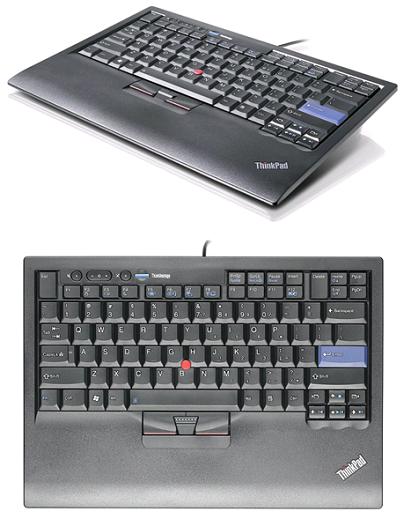
ThinkPad USB Keyboard With TrackPoint – Overview

Posted by jpluimers on 2020/07/13

I wish this keyboard was still on the market [WayBackThinkPad USB Keyboard With TrackPoint – Overview.

Known as 55Y9053, 55Y9003 and 57Y4641 (and a few others like  the English/EUR 55Y9042 if you count the various localised layouts at [WayBack] ThinkPad USB Keyboard with TrackPoint – Service parts), it was one of the best keyboards made apart from the big delete key (that was better in the predecessor, but that one lacked windows keys: [WayBack] Lenovo ThinkPad USB Keyboard Review | NotebookReview).

It is about the same as the Thinkpad25, which added a touchpad: [WayBack] The 25th-anniversary ThinkPad: Every laptop should add some retro appeal | Ars Technica Review: A seven-row keyboard? Matte screen? TrackPoint? The all-business black body? Swoon

--jeroen

Posted in History, Power User, ThinkPad, UltraNav keyboards | Leave a Comment »

I’d probably take a W520 over it, but Lenovo Thinkpad T420: Another excellent, inexpensive Linux laptop | Open-Source Routing and Network Simulation

Posted by jpluimers on 2018/05/25

Reading the below, I’d probably go for the W520. Both series are the final ones having a 7-row keyboard.

I recently purchased a used Lenovo Thinkpad T420 laptop to replace the Lenovo Thinkpad T400 I was previously using as my main platform for researching open-source network simulators and emulators. …

Source: [WayBack]Lenovo Thinkpad T420: Another excellent, inexpensive Linux laptop | Open-Source Routing and Network Simulation

Do not get the T420s as it is the slim-line version which is harder to upgrade and for some users gives thermal issues.

The T420 has only USB2, the W520 has USB3, better screen, faster processors and allows more memory (32 gigabyte for quad core processors).

Related:

Read the rest of this entry »

Posted in Power User, ThinkPad, UltraNav keyboards | Leave a Comment »

InitialKeyboardIndicators registry setting to fix NumLock in a certain state.

Posted by jpluimers on 2016/09/30

There are odd things with the InitialKeyboardIndicators registry setting. Technet only documents bitflag value 2.

According to the docs it should be a bitflag, but sometimes you encounter InitialKeyboardIndicators value 2147483648 (0x80000000) especially as part of the .DEFAULT profile at HKEY_USERS\.DEFAULT\Control Panel\Keyboard.

The problem I had was having these symptoms:

  1. while logging in locally, I manually turned of the NumLock (as I have a 46W6740 UltraNav keyboard without a numeric keypad)
  2. after logging in locally, it magically turned itself on even with InitialKeyboardIndicators=0 in my local profile at HKEY_CURRENT_USER\Control Panel\Keyboard.
  3. after logging in locally and turning it off, future local logons would keep it off
  4. after logging in remotely, it would magically turn itself on while logged in
  5. after having logged in remotely, the local logon console would have it turned on again

After reading Num Lock problem: Strange number in InitialKeyboardIndicators in Registry, I set both values to 0.

Now that it is 0 in both at HKEY_USERS\.DEFAULT\Control Panel\Keyboard and HKEY_CURRENT_USER\Control Panel\Keyboard, symptoms 4-5 still hold. Strange.

It is not the same problem as Num Lock state not retained after resume from Hybrid Shutdown in Windows 8 and Windows Server 2012.

If it persist, I might just put a script in: [Partially Solved: re-wired keyboard lol] Registry key “InitialKeyboardIndicators” NEVER keeps NumLock ON + ScrollLock ON (6) at startup and reverts back to NumLock ON (2).

–jeroen

Read the rest of this entry »

Posted in Conference Topics, Conferences, Event, Keyboards and Keyboard Shortcuts, KVM keyboard/video/mouse, Power User, ThinkPad, UltraNav keyboards, Windows | Leave a Comment »

optional Windows Update “Synaptics driver update for Synaptics Composite USB HID Device” breaks some UltraNav USB keyboards

Posted by jpluimers on 2016/06/27

About a year ago, I ran into the optional Windows Update “Synaptics driver update for Synaptics Composite USB HID Device”.

It basically breaks the UltraNav/TrackPoint functionality of some USB keyboards like my 31P9304 USB TrackPoint keyboard (also known as SK-8835)

I bumped into this on another system as well, so I was glad I found this on an asian site: 联想ThinkPad|ThinkCentre|ThinkStation服务与驱动下载常见问题.

Below is the English translation of which the most important is the workaround: Install the Windows Vista driver from the Lenovo support page.
http://www.lenovo.com/support/site.wss/document.do?sitestyle=lenovo&lndocid=MIGR-66917

Read the rest of this entry »

Posted in Keyboards and Keyboard Shortcuts, Power User, ThinkPad, UltraNav keyboards | Leave a Comment »

Reminder to self: SKU numbers for the ThinkPad UltraNav USB keyboards with horizontal Enter key and 6 rows of keys

Posted by jpluimers on 2015/12/14

IBM/Lenovo stopped producing ThinkPad UltraNav keyboards with 7 rows of keys a while ago. It stopped me from buying ThinkPad machines (together with the screen issues), but I still use the external USB UltraNav keyboards which are harder and harder to get.

So here some SKU/FRU/PN/EAN that seem to have a horizontal enter key and US layout.

Read the rest of this entry »
Posted in Keyboards and Keyboard Shortcuts, Power User, ThinkPad, UltraNav keyboards | Leave a Comment »

Since none of the pictures returned for searching 46W6740 is correct, here is…

Posted by jpluimers on 2015/10/16

Since none of the pictures returned for searching 46W6740 is correct, here is one that is. – Jeroen Wiert Pluimers – Google+

46W6740 Ultranav keyboard (not full size, no trackpad, only trackpoint, no Windows keys). Click to get a larger picture.

Read the rest of this entry »

Posted in Keyboards and Keyboard Shortcuts, Power User, ThinkPad, UltraNav keyboards | Leave a Comment »

The Lenovo re-introduction of IPS in 14-inch models after almost a decade of absence is a farce

Posted by jpluimers on 2013/07/09

A decade ago, Lenovo had top-notch IPS displays with (back then high) DPI of 133 in some of their laptops called FlexView and FFS.

The IPS ThinkPad history is this: Read the rest of this entry »

Posted in Keyboards and Keyboard Shortcuts, Opinions, Power User, ThinkPad, UltraNav keyboards | Tagged: , , | Leave a Comment »

Running OS X Lion 10.7 on VMware Workstation 7.1.4 and 8.0 (via: How to Install Retail OS X 10.6 under VMware Workstation or Player – InsanelyMac Forum)

Posted by jpluimers on 2011/10/14

This might not be strictly legal, but it is supposed to be possible to run the retail OS X Lion 10.7 under VMware Workstation 8 (or VMware Fusion 4) and VMware Workstation 7.1.4 (or VMware Player 3.1.4) on a regular PC (if that PC Supports VT) running Windows 7 x64.

Since Apple MacBook still don’t come with a TrackPoint (and having suffered from RSI, that is about the only pointing device I can use) there are only two options for me:

  1. Go the route described above
  2. Use an external USB TrackPoint keyboard with a Mac
    (traveling with a huge external USB keyboard, I’d look like my long time friend Mark Miller from DevExpress, who also suffered from RSI)
    (boy I wish there was a wireless ThinkPad TrackPoint keyboard)

–jeroen

Via: How to Install Retail OS X 10.6 under VMware Workstation or Player – InsanelyMac Forum and 
How to Install Retail OS X 10.6 “Snow” and OS X 10.7 “Lion” under VMware Workstation 8 and Fusion 4, A simple set of instructions – InsanelyMac Forum

Posted in Apple, Keyboards and Keyboard Shortcuts, Power User, RSI, UltraNav keyboards, VMware, Windows, Windows 7 | 1 Comment »

SwitchResX helped me switch my Mac machine to 1360×768 and 1888×1062

Posted by jpluimers on 2010/12/24

A while ago, I got involved in Mac programming again after more than a decade of absence.
It felt like a warm reunion.

A Mac Mini Server serves as a development machine: it is about the same price as a regular Mac Mini, but packs 2 HDDs which for me is more useful than one HDD and a DVD player.

However, living in the Windows world for a long time long, and having had RSI in the DOS era almost two decades ago, I had a few wishes for using it.

The first was keyboard wise. The second is custom resolutions. Read the rest of this entry »

Posted in Apple, Development, Keyboards and Keyboard Shortcuts, Power User, RSI, Software Development, UltraNav keyboards, xCode/Mac/iPad/iPhone/iOS/cocoa | 10 Comments »

Nick Hodges | The End of the Chow Line

Posted by jpluimers on 2010/07/30

From the comments on Nick’s excellent post (that instantly made me feel hungry <g>):

If you find your developers bringing in their own equipment to work then you know there is a problem.

That reminds me of this story: Read the rest of this entry »

Posted in About, Keyboards and Keyboard Shortcuts, Opinions, Personal, Power User, RSI, ThinkPad, UltraNav keyboards | Leave a Comment »