


For my link archive: [Wayback] VMware ESXi: How to Kill an Unresponsive (Stuck) Virtual Machine | Windows OS Hub
Commands covered:
esxcli vm process listesxcli vm process kill --type=[soft,hard,force] --world-id=WorldNumberesxtoppskill
–jeroen
Posted by jpluimers on 2022/04/21
For my link archive: [Wayback] VMware ESXi: How to Kill an Unresponsive (Stuck) Virtual Machine | Windows OS Hub
Commands covered:
esxcli vm process listesxcli vm process kill --type=[soft,hard,force] --world-id=WorldNumberesxtoppskill–jeroen

Posted in ESXi5, ESXi5.1, ESXi5.5, ESXi6, ESXi6.5, ESXi6.7, ESXi7, Power User, Virtualization, VMware, VMware ESXi | Leave a Comment »
Posted by jpluimers on 2022/04/13
Guessing the [Wayback] Run ESXi from a USB Flash Drive: A How-To-Guide by just the abstract does not show the value enough:
A USB flash drive can be used not only for installation media – you can also run ESXi from USB flash drives or SD flash cards and boot from these devices.
In fact, the article shows way more, including:
This is very important, because every now and then, these USB and SD devices fail (see for instance [Wayback] Solved: Remount boot filesystem on a running system. – VMware Technology Network VMTN), so knowing what to do then is key and helps handling errors like this one:
Lost connectivity to the device mpx.vmhba32:C0:T0:L0 backing the boot filesystem /vmfs/devices/disks/mpx.vmhba32:C0:T0:L0. As a result, host configuration changes will not be saved to persistent storage.
A every useful article for my link archive!
Related: ESXi: storing an ISO 8601 time-stamped backup tarball locally
Posted in ESXi5, ESXi5.1, ESXi5.5, ESXi6, ESXi6.5, ESXi6.7, ESXi7, Power User, Virtualization, VMware, VMware ESXi | Leave a Comment »
Posted by jpluimers on 2022/04/12
An interesting set of scripts from [Wayback/Archive.is] No Joke IT: Graceful shutdown of an ESXi 5.1 host and guest VMs (free edition) using the shell/command line/scripting (UPS friendly).
If all ESXi virtual machines support running of VMware Tools, then the solution is a plain /sbin/shutdown.sh && /sbin/poweroff (see [Wayback/Archive.is] No Joke IT: Shut down ESXi 5.1 guest VMs and the host (free edition) via SSH – the easy way!).
Code is in the repository at [Wayback/Archive.is] sixdimensionalarray/esxidown: A shell script to shutdown VMware ESXi host servers, with these two main files:
#!/bin/sh
# Runs a shell command asynchronously.

if [ "$1" != "" ]; then
    nohup sh $1 > /dev/null 2>&1 &
fi
# exit maintenance mode immediately before server has a chance to shutdown/power off
# NOTE: it is possible for this to fail, leaving the server in maintenance mode on reboot!
echo "Exiting maintenance mode..."
if [ $TEST -eq 0 ]; then
    esxcli system maintenanceMode set -e false -t 0
fi
Note: the No Joke IT web-site has vanished, so only the [Wayback] and [Archive.is] links of it still work. The github code was still there at the time of writing.
Via: [Wayback] Solved: Read only Files – VMware Technology Network VMTN
Related: Some notes on replacing parts of a text file with template text using sed on a Busybox system.
–jeroen
Posted in *nix, *nix-tools, ash/dash, ash/dash development, Development, ESXi5, ESXi5.1, ESXi5.5, ESXi6, ESXi6.5, ESXi6.7, Power User, Scripting, Software Development, Virtualization, VMware, VMware ESXi | Leave a Comment »
Posted by jpluimers on 2022/02/16
In ESXi: on the console/ssh, when a moved VM pauses during power-on: show which VMs have messages waiting, then answer them, I searched for [Wayback] “vim-cmd vmsvc/message” – Google Search in order to see which messages were available.
That search revealed a lot more links, so here are the ones I found most interesting:
–jeroen
Posted in ESXi4, ESXi5, ESXi5.1, ESXi5.5, ESXi6, ESXi6.5, ESXi6.7, ESXi7, Power User, Virtualization, VMware, VMware ESXi | Leave a Comment »
Posted by jpluimers on 2022/02/15
This post amends the post last week on rsync backup of your ESXi box: How to make a statically linked rsync binary « The Wiert Corner – irregular stream of stuff.
Two weeks ago, I posted about Source: ESXi: searching for “vim-cmd vmsvc/message” lead me to the “Managing ESXi Without VI Client” series of blog posts.
It got me looking more deeply in the VM-Help site, and I found [Wayback] Developing for VMware ESXi – Virtual Machine and VPS Tutorials, for which I have materialised the links below and checked their WayBack machine status.
Compiling Utilities for ESXi
Given that ESXi is not based on Linux you won’t find any installer which you could use to install any Linux components that you might want to add to ESXi. However, ESXi does make use of a number of Open Source packages such as OpenSSL, Python, and Openwsman (WS-Management). The key to compiling a utility for ESXi is creating a statically linked version of the tool. With a statically linked version, there are no dependencies on other libraries that may not be present on ESXi. The downside to this method of compiling is that the utility may be larger than a dynamically linked version. With a dynamically linked version the utility assumes that other libraries are present and can rely on subroutines within those libraries.
Compiling rsync – [Wayback] How to compile a statically linked rsync binary for ESXi
Compiling Busybox – [Wayback] How to compile Busybox for ESXi … kind of Part 1
Discussion of compiling UNFS – http://www.vm-help.com/forum/viewtopic.php?f=16&t=2280&p=10185&e=10185 (not archived in the WayBack machine nor available on-line)
Notes on compling binaries – [Wayback] Stjepan Groš – HomepageCompiling Drivers for ESXi
Given the common misunderstanding that ESXi is Linux based, a new user often inquires about the process of copying a Linux driver to their ESXi install. This is not possible. ESXi includes a Linux driver compatibility module. This allows for Linux source code to be used to compile drivers for ESXi, but the drivers are still specific to ESXi. The following links provides some samples and notes for compiling drivers for ESXi.
Compiling a Silicon Image 3132 driver – [Archive.is] Wayback: Adding Driver Support to VMware ESXi 4 | Tip’s Notebook
Compiling a Marvell sky2 driver – [Wayback] Using a Marvell LAN card with ESXi 4 – KernelCrash(Note: This post was initially written when ESXi 4.0 was available. As of late 2010, ESXi 4.1 has been released, and it does actually include a sky2 driver that may or may not work with various Marvell LAN chipsets. The post is still relevant (especially the comments) if your particular Marvell chipset does not work with the sky2 driver in ESXI 4.1. Also, the post is relevant if you’re interested in porting other network drivers to ESXi)
Open Virtualization Drivers development notes
Being from the ESXi 4 and 5 era, the links seem to hold up remarkably well. Despite ESXi 3 being Linux based (see [Archive.is] VMware ESX Server – Wikipedia, the free encyclopedia), as opposed to ESXi 4 and up that run a microkernel, Linux based tools still can be used to develop tooling and drivers.
–jeroen
Posted in ESXi4, ESXi5, ESXi5.1, ESXi5.5, ESXi6, ESXi6.5, ESXi6.7, ESXi7, Power User, Virtualization, VMware, VMware ESXi | Leave a Comment »
Posted by jpluimers on 2022/02/02
Last week, I wrote about ESXi: on the console/ssh, when a moved VM pauses during power-on: show which VMs have messages waiting, then answer them.
The “vim-cmd vmsvc/message” – Google Search there lead me to this very interesting series of blog posts on managing ESXi Without VI Client.
It was written in the ESXi 4 and 5 era (for a time-frame, see [Wayback] VMware ESXi Release and Build Number History | virten.net) where VIC – the [Wayback] VMware Infrastructure Client, later named VC: [Wayback] vSphere Client – ruled.
The series content holds remarkably well now that VIC/VC got first replaced by the [Wayback] vSphere Web Client (often called [Wayback] vSphere HTML 5 Client and started out of the [Wayback] ESXi Embedded Host Client fling).
Anyway, here are the posts in the series:
–jeroen
Posted in ESXi4, ESXi5, ESXi5.1, ESXi5.5, ESXi6, ESXi6.5, ESXi6.7, ESXi7, Power User, Virtualization, VMware, VMware ESXi | Leave a Comment »
Posted by jpluimers on 2022/01/11
Still a lot of people think that network speed depends on the vNIC driver and vNIC speed settings.
This is not true: it mainly depends on CPU and RAM speeds as that is where the bottleneck of virtual network processing is.
What does matter is the VM/host overhead is far less when drivers use paravirtualisation (i.e. shortcutting calls from the guest OS to the hypervisor) like PVSCSI for disk or VMXNET3 for networking. This means that VMXNET3 has even more performance than E1000.

Posted in ESXi5, ESXi5.1, ESXi5.5, ESXi6, ESXi6.5, ESXi6.7, ESXi7, Power User, Virtualization, VMware, VMware ESXi | Leave a Comment »
Posted by jpluimers on 2022/01/06
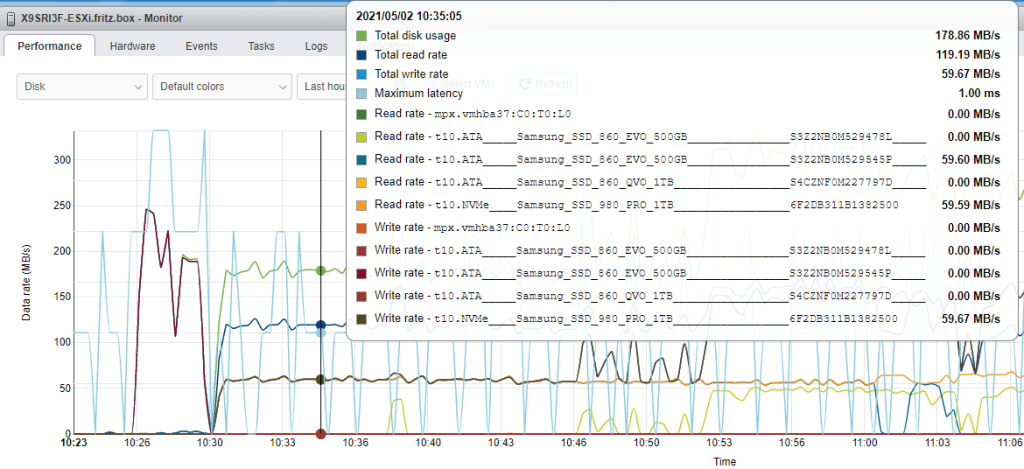
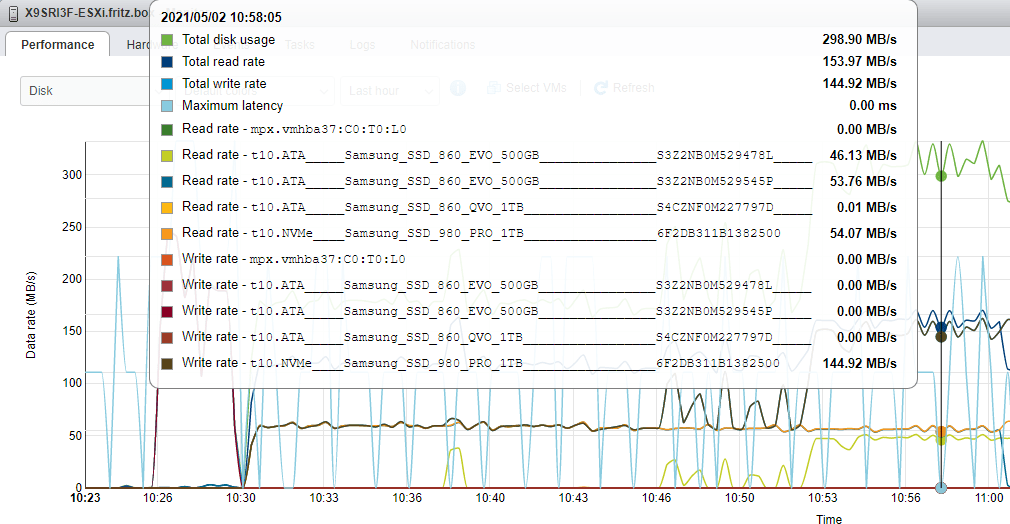
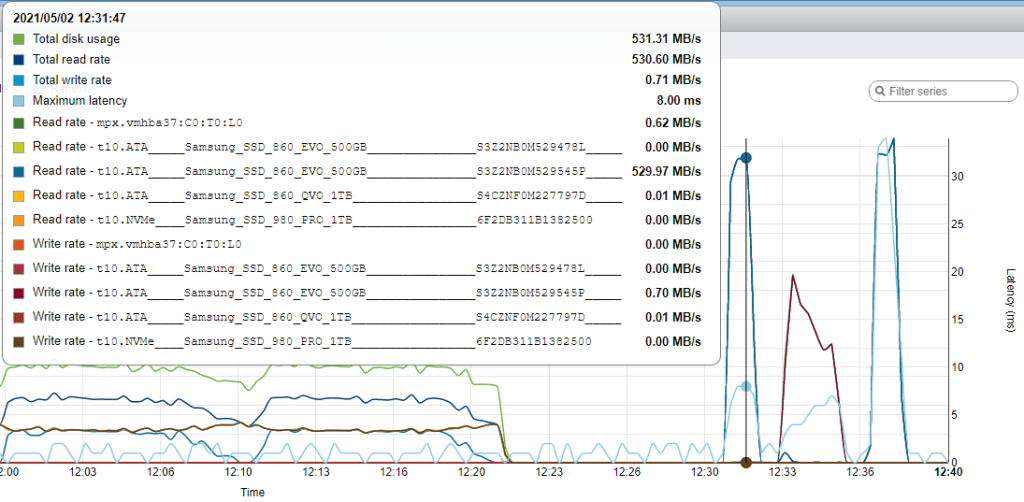
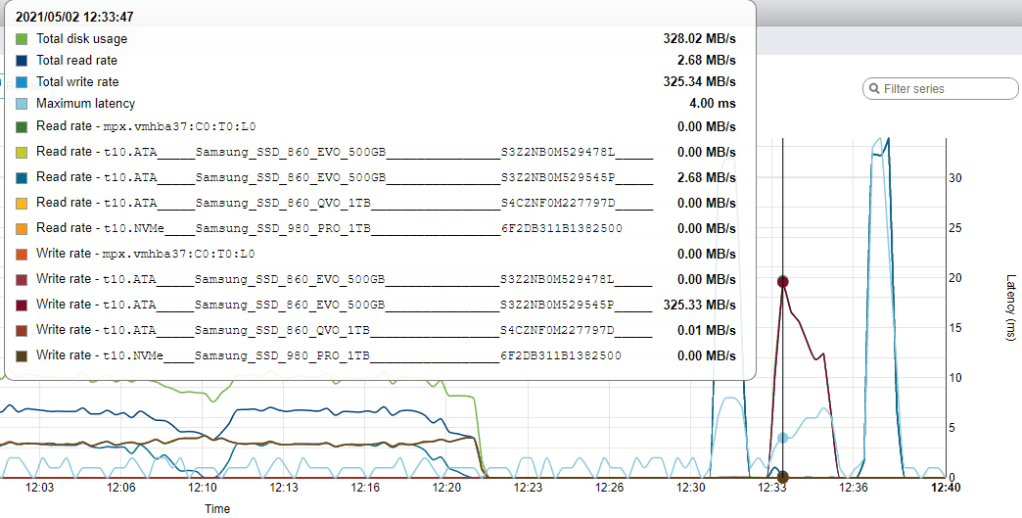
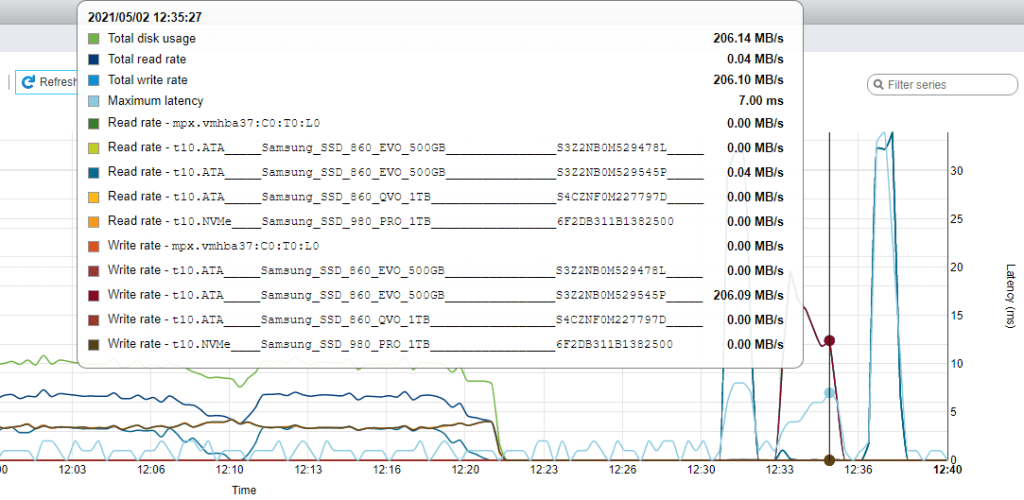
As promised in “Solution” on ESXi 6.7 smartinfo throwing error Cannot open device, here are a few links in capping throttling disk speeds by ESXi followed by a few graphs of my own:
dd: [Wayback] datastore – How can I speed up file tranfers on local storage in vSphere 5? – Server FaultI never got any official confirmation for this, but I believe the I/O is capped (or at least de-prioritized) for datastore copy/move operations from the GUI as I have seen rather similar behaviour in different ESXi environments on from version 3.5.
Question:
When I copy a 3GB ISO file from the raid set to the sata disk, the average disk transfer is 50MB/sec. This puzzles me, because the SATA disk can do 100MB/sec easy. When I start a second copy, the average disk transfer doubles to 100MB/sec.
…
Answer:
File transfer speeds are capped in the console so you will not be able to get maximum speeds
My own observations on ESXi 6.7 update 3:
1 rsync from 860 EVO SSD to 960 PRO NVMe
2 rsync from 860 EVO SSD to 960 PRO NVM
Resume action
Start of suspend action
Finish of suspend action
For each rsync operation, I had a separate SSH session going, and the speed doubled.
The resume action of all Virtual Machines was almost a flat speed curve.
The suspend action of all Virtual Machines started fast (when all machines were suspending) and finished slower (when only the largest virtual machines were still suspending)
–jeroen

Posted in ESXi5, ESXi5.1, ESXi5.5, ESXi6, ESXi6.5, ESXi6.7, ESXi7, Power User, Virtualization, VMware, VMware ESXi | Leave a Comment »
Posted by jpluimers on 2021/08/30
Reminder to self: create a static ESXi binary for a recent rsync release.
Quite a few people have bumped into rsync erroring out with “large” sets of files (where large can be as low as ~1000), like for instance Tj commenting on my post “ESXi 5.1 and rsync – damiendebin.net.”:
ERROR: out of memory in receive_sums [sender] │······
rsync error: error allocating core memory buffers (code 22) at util2.c(102) [sender=3.1.1] │······
rsync: [generator] write error: Broken pipe (32) │······
I bumped into this myself as well, even when updating from rsync 3.1.0 to 3.1.2.
There are various static
rsyncfor ESXi around. Just a few of them for completeness:
- 3.1.0: ESXi 5.1 and rsync – damiendebin.net. (how to download the build by Damien Debin from http://damiendebin.net and how to create the right XML firewall settings from his [Wayback] gist)
- 3.1.2: [Wayback] DOWNLOADS – bachmann-lan.de via [Wayback] VMware ESXi 5.1 rsync 3.0.9 statically linked binary erstellen – bachmann-lan.de
- 3.1.3: [Wayback/Archive.is] noelmartinon/vmtools: Tools for VMware ESXi to use in ESXi which pointed at the wrong binary link, so I archived the right one in the Wayback machine.
There is also 3.0.9 (via [Wayback] VMware ESXi 5.1 rsync 3.0.9 statically linked binary erstellen – bachmann-lan.de), but it has a VMFS bug ([Wayback] 8177 – Problems with big sparsed files) as per [Wayback] ESXi 5.1 and rsync – damiendebin.net.)
The good news is that it is fixed in 3.2.2 as a user-configurable setting, but since there is no ESXi build yet (see reminder above)…
Anyway: [Wayback] 12769 – error allocating core memory buffers (code 22) depending on source file system
Wayne Davison 2020-06-26 03:56:35 UTCI fixed the allocation args to be size_t values (and improved a bunch of allocation error checking while I was at it). I then added an option that lets you override this allocation sanity-check value. The default is still 1G per allocation, but you can now specify a much larger value (up to "--max-alloc=8192P-1"). If you want to make a larger value the default for your copies, export RSYNC_MAX_ALLOC in the environment with the size value of your choice. Committed for release in 3.2.2.
This is what happens with 3.1.2 and 3.1.3:
time rsync -aiv --info=progress2 --progress --partial --existing --inplace /vmfs/volumes/Samsung850-2TB-S3D4NX0HA01043L/ Samsung850-2TB-S3D4NX0HA01043L/
sending incremental file list
              0   0%    0.00kB/s    0:00:00 (xfr#0, ir-chk=1000/1259)
ERROR: out of memory in flist_expand [sender]
rsync error: error allocating core memory buffers (code 22) at util2.c(106) [sender=3.1.2]
Command exited with non-zero status 22
real    0m 0.87s
user    0m 0.10s
sys 0m 0.00s
time rsync -aiv --info=progress2 --progress --partial --ignore-existing --sparse /vmfs/volumes/Samsung850-2TB-S3D4NX0HA01043L/ Samsung850-2TB-S3D4NX0HA01043L/
sending incremental file list
              0   0%    0.00kB/s    0:00:00 (xfr#0, ir-chk=1000/1259)
ERROR: out of memory in flist_expand [sender]
rsync error: error allocating core memory buffers (code 22) at util2.c(106) [sender=3.1.2]
Command exited with non-zero status 22
real    0m 0.28s
user    0m 0.12s
sys 0m 0.00s
Finished
I was lucky that [Wayback] “rsync error: error allocating core memory buffers” protocol version “3.1.2” – Google Search got me a result so quickly: add a --protocol-29 and you are set.
The first result (Wayback has the results reversed from what got) didn’t fix it. The second did.
As a work around, I added “
--protocol=29” to one of our servers that was consistently failing with “ERROR: out of memory in flist_expand [receiver]” “rsync error: error allocating core memory buffers (code 22) at util2.c(105) [receiver=3.1.3]” in rsync-3.1.3-2.ppcI read the man page and started experimenting with the protocol version until I lowered it enough to get it to work consistently.
The problem might be that running on the ESXi gives you limited memory, but then some 10k files should not use more than like half a megabyte of memory.
Sometime I will dig deeper into the protocol version differences, for now a list of files I think will be relevant for that (mainly look for protocol_version):
Some web pages mentioning the --protocol option and might give me more insight in the protocol differences:
With --protocol=29, time estimation is way off, but there are no errors:
time rsync -aiv --info=progress2 --progress --partial --existing --inplace --protocol=29 /vmfs/volumes/Samsung850-2TB-S3D4NX0HA01043L/ Samsung850-2TB-S3D4NX0HA01043L/
building file list ...
9059 files to consider
.d..t...... isos/
         27,593   0%    0.00kB/s    0:00:06 (xfr#1, to-chk=0/9059)

sent 212,594 bytes  received 268 bytes  20,272.57 bytes/sec
total size is 3,055,677,645,398  speedup is 14,355,204.99
real    0m 13.31s
user    0m 1.35s
sys 0m 0.00s

time /vmfs/volumes/5791a3e1-0b9368de-4965-0cc47aaa9742/local-bin/rsync -aiv --info=progress2 --progress --partial --ignore-existing --sparse --protocol=29 /vmfs/volumes/Samsung850-2TB-S3D4NX0HA01043L/ Samsung850-2TB-S3D4NX0HA01043L/
building file list ...
9059 files to consider
>f+++++++++ isos/EN-Windows-XP-SP3-VL.iso
...
cd+++++++++ ESXi65.filesystem-root/usr/share/
216,868,164,639   7%   40.64MB/s    1:24:48 (xfr#2571, to-chk=0/9059)

sent 216,894,938,870 bytes  received 57,858 bytes  42,582,702.80 bytes/sec
total size is 3,055,677,645,398  speedup is 14.09
real    1h 24m 58s
user    34m 5.59s
sys 0m 0.00s
Finished
Even not on ESXi, there were just a few people bumping into this, so I wonder why there are so few matches on [Wayback] “ERROR: out of memory in flist_expand [sender]” “sender=3.1” – Google Search:
–jeroen
Posted in *nix, *nix-tools, ash/dash development, Development, ESXi5, ESXi5.1, ESXi5.5, ESXi6, ESXi6.5, ESXi6.7, ESXi7, Power User, rsync, Scripting, Software Development, Virtualization, VMware, VMware ESXi | Leave a Comment »
Posted by jpluimers on 2021/06/29
[WayBack] Subscribe to VMware ESXi Patch Tracker RSS Feed has all the post-feedburner (see below) RSS links in a nice table:
Subscribe to VMware ESXi Patch Tracker RSS Feed
For popular web based readers: Feedly [All] [6.7] [6.5] [6.0] [5.5] [5.1] [5.0] My Yahoo! [All] [6.7] [6.5] [6.0] [5.5] [5.1] [5.0] netvibes [All] [6.7] [6.5] [6.0] [5.5] [5.1] [5.0] For manual subriptions with other web based or offline readers copy-and-paste these links: manual [All] [6.7] [6.5] [6.0] [5.5] [5.1] [5.0]
Parts of feedburner have been deprecated since 2012: FeedBurner – Wikipedia.
There are all sorts of reports of feedburner being unstable, for instance:
–jeroen
Posted in ESXi5, ESXi5.1, ESXi5.5, ESXi6, ESXi6.5, ESXi6.7, Power User, Virtualization, VMware, VMware ESXi | Leave a Comment »
 The Wiert Corner - irregular stream of stuff