Archive for the ‘ESXi6.5’ Category
Posted by jpluimers on 2019/05/07
Two posts with interesting commands to help digging through your hba/disk/datastore configurations from the console:
One day I will write a script that – per datastore – lists all the devices related to it including their HBA and LUN.
For that, I will likely need these references:
For now this works:
- Get the list of data stores (note the
Device Name column has the NAA_ID you need below):
esxcli storage vmfs extent list
- Get the path information to find
HBA, Channel, Target and LUN:
esxcli storage core path list --device NAA_ID
- Get the list of HBAs:
esxcli storage core adapter list
- Get device details (including
Model and Revision):
esxcli storage core device list --device NAA_ID
The example below (with most important output bolded) shows a drive connected to a SAS3008 based controller which storcli cannot access (nor MegaCli), but MegaRAID Storage Manager (MSM) can.
MSM allowed me to find the serial number of the drive by the Target Transport Details value 4433221106000000 as being on Slot number 6 (which seems to indicate Target numbers are 1-based whereas LUN is 0-based).
# esxcli storage vmfs extent list
Volume Name                     VMFS UUID                            Extent Number  Device Name                                                                 Partition
------------------------------  -----------------------------------  -------------  --------------------------------------------------------------------------  ---------
...
ST6000VX0001-1SH                59a33f7b-66df7c00-11b0-0cc47aaa9742              0  naa.5000c50087762d1b                                                                1
# esxcli storage core path list -d naa.5000c50087762d1b
sas.500304801ce1d700-sas.4433221106000000-naa.5000c50087762d1b
   UID: sas.500304801ce1d700-sas.4433221106000000-naa.5000c50087762d1b
   Runtime Name: vmhba0:C0:T7:L0
   Device: naa.5000c50087762d1b
   Device Display Name: Local ATA Disk (naa.5000c50087762d1b)
   Adapter: vmhba0
   Channel: 0
   Target: 7
   LUN: 0
   Plugin: NMP
   State: active
   Transport: sas
   Adapter Identifier: sas.500304801ce1d700
   Target Identifier: sas.4433221106000000
   Adapter Transport Details: 500304801ce1d700
   Target Transport Details: 4433221106000000
   Maximum IO Size: 4194304
# esxcli storage core adapter list
HBA Name  Driver        Link State  UID                   Capabilities  Description
--------  ------------  ----------  --------------------  ------------  ----------------------------------------------------------------------
vmhba0    lsi_msgpt3    link-n/a    sas.500304801ce1d700                (0000:01:00.0) Avago (LSI Logic) Fusion-MPT 12GSAS SAS3008 PCI-Express
...
vmhba32   vmkusb        link-n/a    usb.vmhba32                         () USB
# esxcli storage core device list --device naa.5000c50087762d1b
naa.5000c50087762d1b
   Display Name: Local ATA Disk (naa.5000c50087762d1b)
   Has Settable Display Name: true
   Size: 5723166
   Device Type: Direct-Access
   Multipath Plugin: NMP
   Devfs Path: /vmfs/devices/disks/naa.5000c50087762d1b
   Vendor: ATA
   Model: ST6000VX0001-1SH
   Revision: VN02
   SCSI Level: 6
   Is Pseudo: false
   Status: on
   Is RDM Capable: true
   Is Local: true
   Is Removable: false
   Is SSD: false
   Is VVOL PE: false
   Is Offline: false
   Is Perennially Reserved: false
   Queue Full Sample Size: 0
   Queue Full Threshold: 0
   Thin Provisioning Status: unknown
   Attached Filters:
   VAAI Status: unsupported
   Other UIDs: vml.02000000005000c50087762d1b535436303030
   Is Shared Clusterwide: false
   Is Local SAS Device: true
   Is SAS: true
   Is USB: false
   Is Boot USB Device: false
   Is Boot Device: false
   Device Max Queue Depth: 32
   No of outstanding IOs with competing worlds: 32
   Drive Type: physical
   RAID Level: NA
   Number of Physical Drives: 1
   Protection Enabled: false
   PI Activated: false
   PI Type: 0
   PI Protection Mask: NO PROTECTION
   Supported Guard Types: NO GUARD SUPPORT
   DIX Enabled: false
   DIX Guard Type: NO GUARD SUPPORT
   Emulated DIX/DIF Enabled: false
–jeroen
Posted in ESXi5, ESXi5.1, ESXi5.5, ESXi6, ESXi6.5, Power User, Virtualization, VMware, VMware ESXi | Leave a Comment »
Posted by jpluimers on 2019/05/06
This is an interesting question at [WayBack] How can I lower the ESXI acceptance level when a forced install has been done? – Server Fault.
The default level on ESXi 6.5 is this:
# esxcli software acceptance get

PartnerSupported
Since I had ghettoVCB installed with the -f option, installing any PartnerSupported VIB would result in this error:
 [DependencyError]
 VIB virtuallyGhetto_bootbank_ghettoVCB_1.0.0-0.0.0 violates extensibility rule checks: ['(line 24: col 0) Element vib failed to validate content']
 VIB virtuallyGhetto_bootbank_ghettoVCB_1.0.0-0.0.0's acceptance level is community, which is not compliant with the ImageProfile acceptance level partner
 To change the host acceptance level, use the 'esxcli software acceptance set' command.
 Please refer to the log file for more details.
This fails:
# esxcli software acceptance set --level=CommunitySupported

[AcceptanceConfigError]

Unable to set acceptance level of community due to installed VIBs virtuallyGhetto_bootbank_ghettoVCB_1.0.0-0.0.0 having a lower acceptance level.

Please refer to the log file for more details.
The workaround is to uninstall virtuallyGhetto_bootbank_ghettoVCB_1.0.0-0.0.0, then install thePartnerSupportedVIB, then re-install ghettoVCB with the --force option or with lowered acceptance level:
- Remove the ghettoVCB installation:
esxcli software vib remove -n ghettoVCB
- Perform the steps that ghettoVBC install prevented (install a non-community VIB, upgrade your ESXi system, etc)
- Reinstall the ghettoVCB by either:
–jeroen
Posted in ESXi6.5, Power User, Virtualization, VMware, VMware ESXi | Leave a Comment »
Posted by jpluimers on 2019/05/03
So I won’t forget:
- LSI – MegaRAID SAS 9361-8i:
- LSI – MegaRAID SAS 9260-8i:
Direct download links in September 2017:
- 9260-8i firmware Version 12.15.0-0248, issued 20160518 (despite the 12.15.0-0239 in the filenames):
- 9361-8i firmware Version 24.21.0-0012 (MR 6.14)
- 9260/9361 SIMS provider:
- MegaCLI including ESXi support
- StorCLI including ESXi support
- MegaRAID Storage Manager (MSM)
[WayBack] How to upgrade LSI MegaRaid SAS controller firmware using FreeDOS – Teksupport.in
Notes:
LSI provider install (SIM-S, SIMS, CIM, WEBM):
- Download the latest version (at the time of writing VMW-ESX-5.5.0-lsiprovider-500.04.V0.66-0002-5751577.zip)
- Unzip into
/tmp
esxcli software vib install -f -v /tmp/vmware-esx-provider-lsiprovider.vib- wait for the VIB install to complete
- suspend or shutdown all VMs
- reboot the ESXi machine
esxcli system wbem set --enable true- Browse to https://192.168.71.91/ui/#/host/monitor/hardware/storage to see if SIM-S is working
MegaRAID Storage Manager (MSM) operation notes
A few tricky things to get right:
- waiting: MSM is unbelievably slow (starting on SSD takes 10 seconds; discovery 30; connecting to host 60 – without any indication something is happening; fetching host data another 60;
- old MSM versions are unstable (especially 14.x and lower), so keep current
- ensure the hosts file on both the ESXi and Windows side match (otherwise it won’t discover anything, or discover as
0.0.0.0)
- enable promiscuous mode on your vSwitch
- if all else fails, disable any firewalls then enable bit by bit to see where it went wrong
Great installation steps:
MegaCLI installs
- Download the latest version that has VMware support (at the time of writing 8-07-07_MegaCLI.zip)
- Unzip into
/tmp
esxcli software vib install -f -v /tmp/VmwareMN/vmware-esx-MegaCli-8.07.07.vib- wait for the VIB install to complete
Now you can the command /opt/lsi/MegaCLI/MegaCli (yes the casing of these two is different!) but you must to it in that directory, or ensure the LD_LIBARY_PATH contains /opt/lsi/MegaCLI.
StorCLI installs
Based on [WayBack] StorCLI unter VMware vSphere installieren – Thomas-Krenn-Wiki
- Download the latest version that has VMware support (at the time of writing 1.23.02_StorCLI.zip)
- Recursively uncompress the ZIP file into
/tmp**
esxcli software vib install -f -v /tmp/storcli_All_OS/Vmware-OP/vmware-esx-storcli-1.23.02.vib- wait for the VIB install to complete
Now you can the command /opt/lsi/storcli/storcli but you must to it in that directory, or ensure the LD_LIBARY_PATH contains /opt/lsi/storcli.
Example:
execute-storcli.sh /cALL show all | grep 'Controller = \|Model = \|Serial Number = \|Firmware'a
The vib file in "Vmware-NDS/" folder works with native driver.
The vib file in "Vmware-MN/" folder works with VMKlinux driver.
So I did a bit more searching based on the files in the VMware directories and came up with this list:
storcli_All_OS/Vmware/storcli.zip
- Looks like it targets ESXi 3.x and older
storcli_All_OS/Vmware-MN/vmware-esx-storcli-1.23.02.vib wit storcli_All_OS/Vmware-MN/VMWARE_MN_Readme.txt
- Targets the
vmklinux drivers that are being phased out with ESXi 5.5 and up
storcli_All_OS/Vmware-OP/vmware-esx-storcli-1.23.02.vib with storcli_All_OS/Vmware-OP/VMWARE_MN_NDS_Readme.txt
- Targets the
New Driver architecture introduced with ESXi 5.5 and used more and more since then
Background reading:
** unzip doesn’t work:
# unzip -d /tmp/ 1.23.02_StorCLI.zip

Archive: 1.23.02_StorCLI.zip

inflating: 1.23.02_StorCLI.txt

unzip: short read
But a combination of 7za and unzip does work:
# 7za x -o/tmp/ 1.23.02_StorCLI.zip
7-Zip (a) [32] 16.02 : Copyright (c) 1999-2016 Igor Pavlov : 2016-05-21
p7zip Version 16.02 (locale=en_US.UTF-8,Utf16=on,HugeFiles=on,32 bits,20 CPUs Intel(R) Xeon(R) CPU E5-2630L v4 @ 1.80GHz (406F1),ASM,AES-NI)

Scanning the drive for archives:
1 file, 48778476 bytes (47 MiB)

Extracting archive: 1.23.02_StorCLI.zip
--
Path = 1.23.02_StorCLI.zip
Type = zip
Physical Size = 48778476

Everything is Ok

Files: 2
Size: 48928561
Compressed: 48778476

# unzip -d /tmp/ /tmp/storcli_All_OS.zip
Archive:  /tmp/storcli_All_OS.zip
   creating: storcli_All_OS/
   creating: storcli_All_OS/EFI/
  inflating: storcli_All_OS/EFI/license.txt
   creating: storcli_All_OS/EFI/UDK/
  inflating: storcli_All_OS/EFI/UDK/license.txt
  inflating: storcli_All_OS/EFI/UDK/storcli.efi
   creating: storcli_All_OS/FreeBSD/
  inflating: storcli_All_OS/FreeBSD/FreeBSD_readme.txt
  inflating: storcli_All_OS/FreeBSD/license.txt
  inflating: storcli_All_OS/FreeBSD/storcli.tar
  inflating: storcli_All_OS/FreeBSD/storcli64.tar
   creating: storcli_All_OS/Linux/
  inflating: storcli_All_OS/Linux/license.txt
  inflating: storcli_All_OS/Linux/LINUX_Readme.txt
  inflating: storcli_All_OS/Linux/storcli-1.23.02-1.noarch.rpm
   creating: storcli_All_OS/Linux-OEL-Sparc/
  inflating: storcli_All_OS/Linux-OEL-Sparc/license_OELSparc.txt
  inflating: storcli_All_OS/Linux-OEL-Sparc/storcli64-1.23.02-1.sparc64.rpm
   creating: storcli_All_OS/Linux-ppc/
   creating: storcli_All_OS/Linux-ppc/Big Endian/
  inflating: storcli_All_OS/Linux-ppc/Big Endian/license.txt
  inflating: storcli_All_OS/Linux-ppc/Big Endian/storcli.tar
   creating: storcli_All_OS/Linux-ppc/Little Endian/
  inflating: storcli_All_OS/Linux-ppc/Little Endian/license.txt
  inflating: storcli_All_OS/Linux-ppc/Little Endian/Readme.txt
  inflating: storcli_All_OS/Linux-ppc/Little Endian/storcli64_1.23.02_ppc64el.deb
   creating: storcli_All_OS/Solaris/
  inflating: storcli_All_OS/Solaris/license.txt
  inflating: storcli_All_OS/Solaris/SOLARIS_Readme.txt
  inflating: storcli_All_OS/Solaris/storcli.pkg
   creating: storcli_All_OS/Solaris Sparc/
  inflating: storcli_All_OS/Solaris Sparc/license.txt
  inflating: storcli_All_OS/Solaris Sparc/storcli.pkg
   creating: storcli_All_OS/Ubuntu/
  inflating: storcli_All_OS/Ubuntu/read_me.txt
  inflating: storcli_All_OS/Ubuntu/storcli_1.23.02_all.deb
   creating: storcli_All_OS/Vmware/
  inflating: storcli_All_OS/Vmware/license.txt
   creating: storcli_All_OS/Vmware/Linux/
  inflating: storcli_All_OS/Vmware/Linux/storcliKL-1.23.02-1.noarch.rpm
  inflating: storcli_All_OS/Vmware/Rel_read_me.txt.txt
  inflating: storcli_All_OS/Vmware/storcli.zip
   creating: storcli_All_OS/Vmware/Windows/
  inflating: storcli_All_OS/Vmware/Windows/StorCLIKL.zip
   creating: storcli_All_OS/Vmware-MN/
  inflating: storcli_All_OS/Vmware-MN/license.txt
  inflating: storcli_All_OS/Vmware-MN/vmware-esx-storcli-1.23.02.vib
  inflating: storcli_All_OS/Vmware-MN/VMWARE_MN_Readme.txt
   creating: storcli_All_OS/Vmware-OP/
  inflating: storcli_All_OS/Vmware-OP/license.txt
  inflating: storcli_All_OS/Vmware-OP/vmware-esx-storcli-1.23.02.vib
  inflating: storcli_All_OS/Vmware-OP/VMWARE_MN_NDS_Readme.txt
   creating: storcli_All_OS/Windows/
  inflating: storcli_All_OS/Windows/license.txt
  inflating: storcli_All_OS/Windows/storcli.exe
  inflating: storcli_All_OS/Windows/storcli64.exe
  inflating: storcli_All_OS/Windows/WIN_ReadMe.txt
9260-8i firmware update
- Download the latest firmware (at the time of writing 12.15.0-0239_MR_2108_SAS_FW_2.130.403-4660.zip) into
/tmp
unzip -d /tmp/ /tmp/12.15.0-0239_MR_2108_SAS_FW_2.130.403-4660.zip- Find out the controller number
- Where
0 is the controller number, execute/opt/lsi/storcli/storcli /c0 download file=/tmp/mr2108fw.rom
- Wait for the firmware update to complete
- Suspend or shutdown all VMs
- Reboot
–jeroen
Posted in ESXi6.5, Power User, Virtualization, VMware, VMware ESXi | 2 Comments »
Posted by jpluimers on 2019/05/02
A small script I made: Show SCSI / HBA modules in ESXi 6.5 with file and version information:
MODULES=`esxcfg-scsidevs --hbas | awk 'FNR > 0 {print $2}'`
for MODULE in $MODULES ; do
    # echo "Probing $MODULE"
    vmkload_mod --showinfo $MODULE | grep 'file: \|Version'
done
The script is based on ideas from [WayBack] Determining Network/Storage firmware and driver version in ESXi 4.x and later (1027206) | VMware KB
It works in at least ESXi 6.5 where it shows this on one of my systems:
 input file: /usr/lib/vmware/vmkmod/lsi_msgpt3
 Version: 12.00.02.00-11vmw.650.0.0.4564106
 input file: /usr/lib/vmware/vmkmod/vmw_ahci
 Version: 1.0.0-39vmw.650.1.26.5969303
 input file: /usr/lib/vmware/vmkmod/vmw_ahci
 Version: 1.0.0-39vmw.650.1.26.5969303
 input file: /usr/lib/vmware/vmkmod/vmw_ahci
 Version: 1.0.0-39vmw.650.1.26.5969303
 input file: /usr/lib/vmware/vmkmod/lsi_mr3
 Version: 6.910.18.00-1vmw.650.0.0.4564106
 input file: /usr/lib/vmware/vmkmod/megaraid_sas
 Version: Version 6.603.55.00.2vmw, Build: 4564106, Interface: 9.2 Built on: Oct 26 2016
 input file: /usr/lib/vmware/vmkmod/vmkusb
 Version: 0.1-1vmw.650.1.26.5969303
–jeroen
Read the rest of this entry »
Posted in bash, Development, ESXi6.5, Power User, Scripting, Software Development, Virtualization, VMware, VMware ESXi | Leave a Comment »
Posted by jpluimers on 2019/04/30
On my research list: [WayBack] bash – aliasing cd to pushd – is it a good idea? – Unix & Linux Stack Exchange
It has a nice discussion on complements to pushd/popd/cd/dirs including a very nice set of navd scripts that eases the navigation of the directory stack.
I found it because the ESXi busybox does not have pushd and popd and a cd won’t work from inside a shell script: [WayBack] linux – Why doesn’t “cd” work in a bash shell script? – Stack Overflow
It also made me find out that the ESXi busybox does support cd - to go to the previous directory. More info on that cd syntax is at [WayBack] bash – Difference between “cd -” and “cd ~-” – Unix & Linux Stack Exchange
–jeroen
Posted in *nix, bash, Development, ESXi5, ESXi5.1, ESXi5.5, ESXi6, ESXi6.5, Power User, Scripting, Software Development, Virtualization, VMware, VMware ESXi | Leave a Comment »
Posted by jpluimers on 2019/04/29
I found out that I had some very old draft notes below, but since then the source has moved to github: lamw/ghettoVCB: ghettoVCB.
Since I find VIB easier to use than the Offline Bundle (for differences see [WayBack] VIB vs. Offline Bundle and [WayBack] VMware Front Experience: ESXi Community Packaging Tools) these are the VIB steps to get it installed:
- Download https://github.com/lamw/ghettoVCB/raw/master/vghetto-ghettoVCB.vib
- Put it in the
/tmp directory on your ESXi box (using for instance FileZilla, WinSCP, SCP or other tools)
- Install it using
esxcli software vib install -v /tmp/vghetto-ghettoVCB.vib -f
Then use it to make backups or restores as described at:
Note that contrary to the documentation, the config file has moved to /etc/ghettovcb/ghettoVCB.conf.
Because of Keeping your root visorfs clean: point the path to your own binaries stored on a vmfs volume I’m using a copy of that stored in my local-bin directory (which is backed-up by rsync to another disk) and a small ghettoVcb.sh bootstrap script referencing that config-file, so the backup command for one command now is this:
ghettoVcb.sh -m diaspore.opensuse-Tumbleweed-x64
or this for all VMs (about 2 hours from NVME SSD to HDD; will probably make this a 2 stage thing):
ghettoVcb.sh -a
VMs are backed-up under the directory specified in VM_BACKUP_VOLUME(below that’s ./) in a schema like this:
./diaspore.opensuse-Tumbleweed-x64

./diaspore.opensuse-Tumbleweed-x64/diaspore.opensuse-Tumbleweed-x64-2017-09-24_16-07-08

./diaspore.opensuse-Tumbleweed-x64/diaspore.opensuse-Tumbleweed-x64-2017-09-24_16-07-08/diaspore.opensuse-Tumbleweed-x64.vmx

./diaspore.opensuse-Tumbleweed-x64/diaspore.opensuse-Tumbleweed-x64-2017-09-24_16-07-08/diaspore.opensuse-Tumbleweed-x64-flat.vmdk

./diaspore.opensuse-Tumbleweed-x64/diaspore.opensuse-Tumbleweed-x64-2017-09-24_16-07-08/diaspore.opensuse-Tumbleweed-x64.vmdk

./diaspore.opensuse-Tumbleweed-x64/diaspore.opensuse-Tumbleweed-x64-2017-09-24_16-07-08/STATUS.ok
In the future, I might move to an NFS based back-up based on these links:
–jeroen
Very old notes:
–jeroen
Posted in ESXi4, ESXi5, ESXi5.1, ESXi5.5, ESXi6, ESXi6.5, Power User, Virtualization, VMware, VMware ESXi | Leave a Comment »
Posted by jpluimers on 2019/04/26
Some interesting commands derived from [WayBack] ESXi/ESX error: No free space left on device (1007638) | VMware KB:
- finding large files:
find / -path "/vmfs" -prune -o -type f -size +50000k -exec ls -lh '{}' \;
- finding space on the root file system (which is not listed in
df -h):
stat -f /
This was in the process of trying to keep my local binaries out of [WayBack] VisorFS: A Special-purpose File System for Efficient Handling of System Images – VMware Labs as it is inherently small in size (both total size and number of inodes) as it is a RAM disk based file system.
Based on that, at [WayBack] Trouble shooting – esx.problem.visorfs.ramdisk.full – DefinIT I found this even more useful statement vdf -h | grep "%\|Ramdisk" which shows the exact usage of what’s in this filesystem. Example output on one of my systems:
# vdf -h | grep "%\|Ramdisk"
Ramdisk                   Size      Used Available Use% Mounted on
root                       32M        1M       30M   6% --
etc                        28M      184K       27M   0% --
opt                        32M        0B       32M   0% --
var                        48M      352K       47M   0% --
tmp                       256M        4K      255M   0% --
iofilters                  32M        0B       32M   0% --
hostdstats                678M        4M      673M   0% --
The easiest is not to store them in the root file system at all, but then you need to alter the default path:
# echo $PATH
/bin:/sbin
Since my local binaries are at /vmfs/volumes/Samsung512NVME/local-bin/, I wanted to persist this path change:
export PATH=$PATH:/vmfs/volumes/Samsung512NVME/local-bin/
Basically you can do this with any current directory on your system: export PATH=$PATH:`pwd`
The easiest way to persist that path is to ensure you can shoehorn the effect in a file that gets started during bootup.
The standard – but unsupported – way to do that is shown for instance by:
Final solution
So, edit vi /etc/rc.local.d/local.sh, then shutdown all your VMs and reboot the system to verify the effects. However inserting that export isn’t enough. This is the line you need to add before the exit 0:
sed -i -e 's!PATH=/bin:/sbin!PATH=/bin:/sbin:/vmfs/volumes/Samsung512NVME/local-bin/!' /etc/profile
Related
- [WayBack] ESXi: Aliases definieren › /dev/blog/ID10T
- [Archive.is] Solved: How to keep a .profile in / of ESXi? |VMware Communities
ESXi does not remove that file on boot-up, it simply does not save it. ESXi runs from memory. So if you created some file (i.e. /.profile) it is only in “memory-disk”, not in disk-image which is loaded again at the next boot-up.
Either create custom vib and install it as every other, or use rc.local which is persistent (any changes you make to this file survive boot-up). You can create & save that file somewhere else and use rc.local to copy it to /, or use rc.local with shell commands to create .profile at every boot-up.
Wait a minute, you are using ESXi 6.0, right? I’m not sure if there is /etc/rc.local, but it used to be in 5.0/5.5…
…
I edited /etc/rc.local.d/local.sh to copy the file that I keep on one of my datastores. After reboot, it worked fine. (So, yes, this does work in 6.0.) Thanks!
…
I’m glad it worked for you. BTW you are right: instead of single file /etc/rc.local (as in 5.0) there is now the whole sub-dir /etc/rc.local.d/ but functionality is the same…
–jeroen
Posted in ESXi5, ESXi5.1, ESXi5.5, ESXi6, ESXi6.5, Power User, Virtualization, VMware, VMware ESXi | Leave a Comment »
Posted by jpluimers on 2019/04/19
This got me zero good hits in the top 10: “ESXi 6.5” “vSphere Web Client” “VMware Tools” – Google Search
Since how to install/upgrade moved, here is a screenshot how to install or upgrade the VMware Tools using the “new” vSphere Web Client that standard in ESXi 6.5 and up:
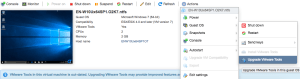
It would be much more intuitive if the blue bar just linked to that action.
–jeroen
Posted in ESXi6.5, Power User, Virtualization, VMware, VMware ESXi | Leave a Comment »
Posted by jpluimers on 2019/03/29
I had a 1.5 TB SATA disk with VMFS5 created on ESXi 5.1 that would not want to mount on ESXi 6.5 automatically, not even after a rescan, or fresh boot, so I did this:
[root@ESXi-X10SRH-CF:~] esxcfg-volume --help
esxcfg-volume
-l|--list                                List all volumes which have been
                                         detected as snapshots/replicas.
-m|--mount              Mount a snapshot/replica volume, if
                                         its original copy is not online.
-u|--umount             Umount a snapshot/replica volume.
-r|--resignature        Resignature a snapshot/replica volume.
-M|--persistent-mount   Mount a snapshot/replica volume
                                         persistently, if its original copy is
                                         not online.
-U|--upgrade            Upgrade a VMFS3 volume to VMFS5.
-h|--help                                Show this message.
[root@ESXi-X10SRH-CF:~] esxcfg-volume --list
Scanning for VMFS-3/VMFS-5 host activity (512 bytes/HB, 2048 HBs).
VMFS UUID/label: 59a5306c-a8793061-4a23-001f29022aed/ST1500LM0032D9YH148-backup
Can mount: Yes
Can resignature: Yes
Extent name: naa.5000c5002dba6642:1 range: 0 - 1430527 (MB)

Scanning for VMFS-3/VMFS-5 host activity (512 bytes/HB, 2048 HBs).
VMFS UUID/label: 532cd010-6e8c01d1-45be-001f29022aed/Raid6SATA
Can mount: Yes
Can resignature: Yes
Extent name: naa.600605b00aa054a0ff000021022683ae:1 range: 0 - 1830143 (MB)

[root@ESXi-X10SRH-CF:~] esxcfg-volume -m 532cd010-6e8c01d1-45be-001f29022aed/Raid6SATA
No matching volume 532cd010-6e8c01d1-45be-001f29022aed/Raid6SATA found!
[root@ESXi-X10SRH-CF:~] esxcfg-volume --mount 532cd010-6e8c01d1-45be-001f29022aed
Mounting volume 532cd010-6e8c01d1-45be-001f29022aed
Based on: [WayBack] Mount VMFS Datastore – via GUI or via CLI [Guide] – ESX Virtualization
–jeroen
Posted in ESXi5.1, ESXi6.5, Power User, Virtualization, VMware, VMware ESXi | Leave a Comment »


 The Wiert Corner - irregular stream of stuff