Archive for the ‘Windows’ Category
Posted by jpluimers on 2018/11/12
[WayBack ] xcopy | Microsoft Docs has this:
Exit code
Description
0
Files were copied without error.
1
No files were found to copy.
2
The user pressed CTRL+C to terminate xcopy .
4
Initialization error occurred. There is not enough memory or disk space, or you entered an invalid drive name or invalid syntax on the command line.
5
Disk write error occurred.
Empirically, errorlevel 4 is also returned when the source file or source directory does not exist.
--jeroen
Posted in Power User , Windows | Leave a Comment »
Posted by jpluimers on 2018/11/12
WayBack ] Windows Services Dependency Viewer – Home :
Windows Services Dependency Viewer is a simple tool that provides the following information:
Windows service dependent and antecedent services
Services grouped by process
Service details (from Win32_Service WMI class)
Service process details (from Win32_Process WMI class
This tremendously helps getting an overview of which Windows Services to monitor for running state: if for instance you need monitor SMTP, then you do not need to monitor Event Log as that is a requirement.
Related: [WayBack ] What is Windows 7 service dependency tree? – Super User
Download: [Archive.is ] https://download-codeplex.sec.s-msft.com/Download/Release?ProjectName=svcdependencyviewer&DownloadId=100584&FileTime=129075223089600000&Build=21050
–jeroen
Posted in Power User , Windows | Leave a Comment »
Posted by jpluimers on 2018/11/05
Both in %TEMP% and %Windir%\TEMP, a lot of log files named %COMPUTERNAME%-yyymmdd-hhnn.loghaving entries named Click-To-Run General Telemetry
Anyone who knows how to disable this logging?
I think they are related to Office 2016 installed through Office 365.
Disabling the Click-To-Run Monitor scheduled task is not a good solution, as it will also Office disable update notification: [WayBack ] MS Office 2016 – Click to run logs | MalwareTips Forums
–jeroen
Posted in Office , Office 2016 , Power User , Windows | Leave a Comment »
Posted by jpluimers on 2018/10/29
For my link archive: [WayBack ] Language Accessory Pack for Office – Office Support (short-link )
All supported languages for Office 2010, 2013 and 2066/newer versions.
–jeroen
Posted in Office , Office 2010 , Office 2013 , Office 2016 , Power User , Windows | Leave a Comment »
Posted by jpluimers on 2018/10/09
Netcat to the rescue waiting for a Windows 10 upgrade to finish (which can take hours):
while ! nc -z 172.22.0.67 3389; do echo "sleeping"; sleep 10; done; echo 'The server is up!'
Via: [WayBack ] tcp – How can I trigger a script when a certain port becomes available for requests? – Unix & Linux Stack Exchange , quoting from the answer:
nc is Netcat, “the Swiss-army knife for TCP/IP”,-z means: do not send any data, just check if the port is open,while ! nc -z …; do sleep 0.1; done: keep checking and sleeping for one tenth of a second until the port opens up, i.e. Netcat returns with a zero (success) status.
–jeroen
Posted in *nix , *nix-tools , Communications Development , Development , Internet protocol suite , Power User , TCP , Windows | Leave a Comment »
Posted by jpluimers on 2018/10/01
I write about this registry key before: Applications that scale badely on High-DPI Displays: How to Stop the Madness – via: SQLServerCentral « The Wiert Corner – irregular stream of stuff
It seems that there is a bad Windows habit: [WayBack ] I just love it when Windows decides to remove registry entries I’ve added and screws up something I fixed for them. – Roderick Gadellaa – Google+
–jeroen
Learn more about bidirectional Unicode characters
Windows Registry Editor Version 5.00
[HKEY_LOCAL_MACHINE\SOFTWARE\Microsoft\Windows\CurrentVersion\SideBySide]
"PreferExternalManifest"=dword:00000001
Posted in Power User , Windows , Windows 10 | Leave a Comment »
Posted by jpluimers on 2018/09/17
Steps to try first:
Check %windir%\Windowsupdate.log (on my system, it did not reveal anything special)
In an administrator command prompt, run sfc /scannow (which takes a few minutes to run)
Reboot
Run Clean Manager %windir%\System32\cleanmgr.exe (ensure to clean up update files: it can take tens of minutes to run)
Reboot
Download the SP1 files (I needed 32-bit x86)
Install SP1 manually
If it still hangs:
In Appwiz.cpl try a “Repair” of the Office 2013 installation
If it works: Reboot, otherwise:
Uninstall Office 2013
Disable the network adapter
Reboot
Check if KB3173424 is installed (check it with Appwiz.cpl)
if not: download on a different machine, transfer over USB, install, then reboot
Check ifKB3172614 is installed (which has a younger Windows Update Client)
if not: downloadon a different machine, transfer over USB, install, then reboot
Enable the network adapter
Let Windows scan for updates and install them
If you get an error 80070463 or 80070663: just reboot and retry the updates.
Reboot
Run Clean Manager
Install Office 2013
Reboot
Let Windows scan for updates and install them
Reboot
Run Clean Manager
Reboot
The KB3172614 should also alleviate long during (dozens of minutes) high CPU usage of svchost.exe and TiWorker.exe when searching for Windows updates.
Read the rest of this entry »
Posted in Office , Office 2013 , Power User , Windows , Windows 8.1 | Leave a Comment »
Posted by jpluimers on 2018/08/17
It seems there are a few, but only loading the binary is the sure method to know what the process will be using: [WayBack ] How to check if a binary is 32 or 64 bit on Windows? – Super User and [WayBack ] How do I determine if a .NET application is 32 or 64 bit? – Stack Overflow .
Details in the answers of these questions, here are a few highlights:
The first few characters in the binary header reveal what it was originally designed for.
A .NET executable might still have an x64 header for bootstrapping.
The Windows SDK has a tool dumpbin.exe with the /headers option.
You can use sigcheck.exe from SysInternals
The file utility (e.g. from cygwin, which comes with msysgit) will distinguish between 32- and 64-bit executables.
Use the command line 7z.exe on the PE file (Exe or DLL) in question which gives you a CPU line.
Virustotal File detail is a way to find out if a binary is 32 bit or 64 bit.Even an executable marked as 32-bit can run as 64-bit if, for example, it’s a .NET executable that can run as 32- or 64-bit. For more information see https://stackoverflow.com/questions/3782191/how-do-i-determine-if-a-net-application-is-32-or-64-bit , which has an answer that says that the CORFLAGS utility can be used to determine how a .NET application will run.
–jeroen
Search terms: win64, win32, x64, x86_64, x86
Posted in Assembly Language , Development , Power User , Windows , x64 , x86 | Leave a Comment »
Posted by jpluimers on 2018/08/17
If you are still on version 8, then note this version will be deprecated at 20180901, so it is time to upgrade to [Archive.is ] Microsoft Remote Desktop 10 on the Mac App Store
[Archive.is ] Microsoft Remote Desktop 8 on the Mac App Store is now at version 8.0.44, which changed one thing:
This update adds a dismissible banner to the app UI to message the fact that the client will be deprecated soon. You can start using the new version of Remote Desktop today by downloading Microsoft Remote Desktop 10 from the App Store.
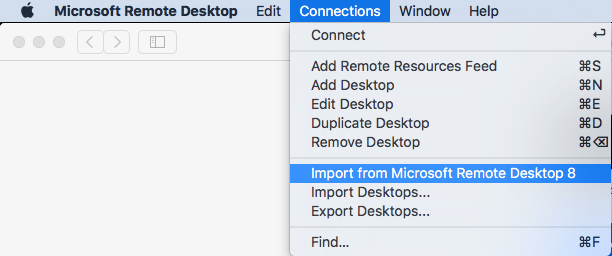
It is easy to import your RDP desktops from version 8 into version 18: in the menu, select Connections, then Import from Microsoft Remote Desktop 8, then enter your credentials so the saved logon passwords can be imported from the [WayBack ] KeyChain .
A few things to note:
importing the Microsoft Remote Desktop 8 fails to import the Local Resource bindings
in Microsoft Remote Desktop 10, editing Local Resource binding right after adding them will crash
Background reading:
The full version histories of both:
Read the rest of this entry »
Posted in Apple , Power User , Remote Desktop Protocol/MSTSC/Terminal Services , Windows | Leave a Comment »





 The Wiert Corner - irregular stream of stuff