Archive for the ‘Remote Desktop Protocol/MSTSC/Terminal Services’ Category
Posted by jpluimers on 2019/02/15
 Since I needed to maintain a Windows PC behind a VPN connection via the console (so not via RDP sessions) including installation of software, I needed a (preferably free or open source) solution supporting elevation through UAC (User Account Control).
For a good description of differences between RDP and VNC, see [WayBack] remote desktop – TightVNC while an RDP session is running – Super User by [WayBack] User Canadian Luke.
Of the many non functional search results, the one suggesting running UltraVNC as a service is the one that really worked: [WayBack] If you install UltraVNC as a service, you can see the UAC notifications and press the buttons… VNC on windows 7 with administrator rights – Super User.
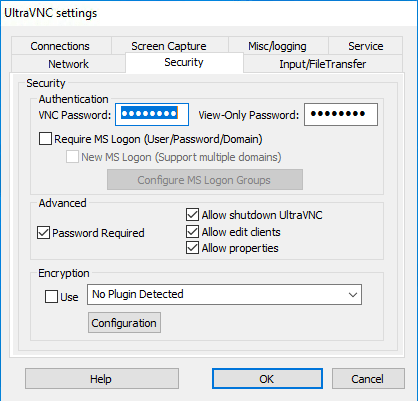
- I only needed the “Ultra VNC Server Silent” installation (see screenshot below).
- Run the UltraVNC settings (default location for the settings application is
C:\Program Files\uvnc bvba\UltraVNC\uvnc_settings.exe)
- In the
Security tab, be sure to set good passwords for read/write access (VNC Password) and read-settings (View-Only password)
- In the
Service tab, ensure the service is installed and if it is stop+start the service
- Optionally ensure a TLS or SSH tunnel (as by default ports 5900 and 5800 are unencrypted)
- I need to research this further, as there seems to be a plugin possibility.
Now I can use Screen Sharing on my Mac to access the machine via a VPN over the VNC protocol. Combined with a Wake On LAN feature in the remote network, this works splendid.
Read the rest of this entry »
Posted in Power User, Remote Desktop Protocol/MSTSC/Terminal Services, Windows | Leave a Comment »
Posted by jpluimers on 2019/02/01
For my memory:
What’s new in this update:
It’s time for the first update of the year! We appreciate all your comments sent to us through the App Store, in-app feedback and email; and continue focusing on making this app better with each release.
In this version we addressed the following issues:
- Added support for the AVC (420 and 444) codec, available when connecting to current versions of Windows 10.
- In “fit to window mode”, a window refresh now occurs immediately after a resize to ensure that content is rendered at the correct interpolation level.
- Fixed a layout bug that caused feed headers to overlap for some users.
- Cleaned up the Application Preferences UI.
- Polished the Add/Edit Desktop UI.
- Made lots of fit and finish adjustments to the Connection Center tile and list views for desktops and feeds.
Please continue to send us feedback. We read it all and factor it into our planning. If you encounter any errors, you can always contact us via Help > Report an Issue.
NOTE: There is a bug in macOS 10.14.0 and 10.14.1 that can cause the “.com.microsoft.rdc.application-data_SUPPORT/_EXTERNAL_DATA” folder (nested deep inside the ~/Library folder) to consume a large amount of disk space. To resolve this issue, delete the folder contents and upgrade to macOS 10.14.2. Note that a side-effect of deleting the folder contents is that snapshot images assigned to bookmarks will be deleted. These images will be regenerated when reconnecting to the remote PC.
Read the rest of this entry »
Posted in Apple, Mac OS X / OS X / MacOS, Power User, Remote Desktop Protocol/MSTSC/Terminal Services, Windows | Leave a Comment »
Posted by jpluimers on 2018/08/17
If you are still on version 8, then note this version will be deprecated at 20180901, so it is time to upgrade to [Archive.is] Microsoft Remote Desktop 10 on the Mac App Store
[Archive.is] Microsoft Remote Desktop 8 on the Mac App Store is now at version 8.0.44, which changed one thing:
This update adds a dismissible banner to the app UI to message the fact that the client will be deprecated soon. You can start using the new version of Remote Desktop today by downloading Microsoft Remote Desktop 10 from the App Store.
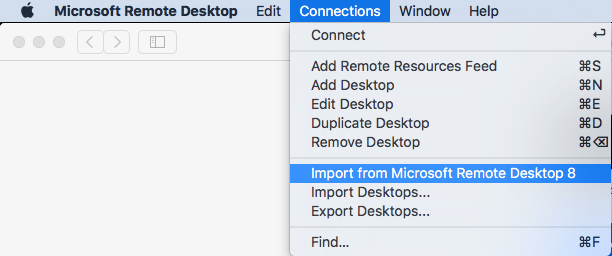
It is easy to import your RDP desktops from version 8 into version 18: in the menu, select Connections, then Import from Microsoft Remote Desktop 8, then enter your credentials so the saved logon passwords can be imported from the [WayBack] KeyChain.
A few things to note:
- importing the Microsoft Remote Desktop 8 fails to import the Local Resource bindings
- in Microsoft Remote Desktop 10, editing Local Resource binding right after adding them will crash
Background reading:
The full version histories of both:
Read the rest of this entry »
Posted in Apple, Power User, Remote Desktop Protocol/MSTSC/Terminal Services, Windows | Leave a Comment »
Posted by jpluimers on 2018/06/04
RDP Wrapper works as a layer between Service Control Manager and Terminal Services, so the original termsrv.dll file remains untouched. Also this method is very strong against Windows Update.
I’ve tested this on Windows 7 Home Premium and it works fine, see the log below. On Windows 10 Fall Creators Update and up, I had to get the rfxvmt.dll files (in %windir%\System32 and %windir%\SysWOW64) from a Windows Professional system, see Known Issues. You can download them from the repository as well.
- Download from github.com/stascorp/rdpwrap/releases
- Unzip
- Run the
install.bat:
C:\Users\jeroenp\Downloads\RDPWrap-v1.6.1>install.bat
RDP Wrapper Library v1.6
Installer v2.3
Copyright (C) Stas'M Corp. 2016

[*] Notice to user:
  - By using all or any portion of this software, you are agreeing
  to be bound by all the terms and conditions of the license agreement.
  - To read the license agreement, run the installer with -l parameter.
  - If you do not agree to any terms of the license agreement,
  do not use the software.
[*] Installing...
[*] Terminal Services version: 6.1.7600.16385
[+] This version of Terminal Services is fully supported.
[+] TermService found (pid 1168).
[*] Shared services found: CryptSvc, Dnscache, LanmanWorkstation, NlaSvc
[*] Extracting files...
[+] Folder created: C:\Program Files\RDP Wrapper\
[*] Downloading latest INI file...
[+] Latest INI file -> C:\Program Files\RDP Wrapper\rdpwrap.ini
[+] Extracted rdpw64 -> C:\Program Files\RDP Wrapper\rdpwrap.dll
[+] Extracted rdpclip6164 -> C:\Windows\System32\rdpclip.exe
[*] Configuring service library...
[*] Checking dependencies...
[*] Checking CertPropSvc...
[*] Checking SessionEnv...
[*] Terminating service...
[*] Starting CryptSvc...
[*] Starting Dnscache...
[*] Starting LanmanWorkstation...
[*] Starting NlaSvc...
[-] StartService error (code 1056).
[*] Starting TermService...
[*] Configuring registry...
[*] Configuring firewall...
OK.

[+] Successfully installed.
______________________________________________________________

You can check RDP functionality with RDPCheck program.
Also you can configure advanced settings with RDPConf program.

Druk op een toets om door te gaan. . .

C:\Users\jeroenp\Downloads\RDPWrap-v1.6.1>rdpcheck
Note that this “error” is normal: [-] StartService error (code 1056). as it means the service is already started: [WayBack] System Error Codes (1000-1299) (Windows)
ERROR_SERVICE_ALREADY_RUNNING
- 1056 (0x420)
- An instance of the service is already running.
–jeroen
Posted in Power User, Remote Desktop Protocol/MSTSC/Terminal Services, Windows | Leave a Comment »
Posted by jpluimers on 2017/03/15
One day I write some scripts based on:
Some starting materials are at:
A thing I learned is that the Microsoft Remote Desktop 8 is basically a rebranded iTap RDP (it looks like Microsoft bought iTap RDP for Mac, as iTap RDP for Mac is now discontinued)
–jeroen
Posted in Apple, Development, Mac OS X / OS X / MacOS, OS X 10.10 Yosemite, OS X 10.11 El Capitan, OS X 10.8 Mountain Lion, OS X 10.9 Mavericks, Power User, Remote Desktop Protocol/MSTSC/Terminal Services, Scripting, Software Development, Windows, XML, XML/XSD | Leave a Comment »
Posted by jpluimers on 2016/10/21
display – How can I move spaces between external monitors in Mavericks? – Ask Different [WayBack]
You can only move spaces which are non-active.
For example, lets say you have spaces 1 and 2. If space 1 is active, you can not move it. You first have to select space 2 then you can move space 1 to a different monitor.
This helped me work around version 8.35 of Microsoft Remote Desktop for OS X breaks second monitor usage [WayBack]:
- Double click a connection so it goes to a new space on the primary display
- Make the normal space active (by three finger swiping on the primary display)
- Go to mission control
- Move the non-active RDP space to the secondary monitor
Sometimes the primary monitor doesn’t have a non-active space any more so you have to create a new one in the top right of Mission Control [WayBack].
–jeroen
Posted in Apple, Mac, Mac OS X / OS X / MacOS, MacBook, MacBook Retina, MacBook-Pro, OS X 10.9 Mavericks, Power User, Remote Desktop Protocol/MSTSC/Terminal Services, Windows | Leave a Comment »
Posted by jpluimers on 2016/05/16

Sometimes I connecting to various Windows systems over RDP fails. On Windows the mstsc (Remote Desktop Connection) application recognises the server has a certificate, presents you with a login dialog, then just stops without any message.
Connecting from Mac OS X edition of Microsoft Remote Desktop does give you error message “The server denied the logon with reason: 3489661694”.
Read the rest of this entry »
Posted in Power User, Remote Desktop Protocol/MSTSC/Terminal Services, Windows, Windows 8.1 | 4 Comments »
Posted by jpluimers on 2016/01/01
Glad I found out about the string to add to a .RDP file to make it connect to the administrative console whenever your remote supports that:
connect to console:i:1
–jeroen
via: Hack the Remote Desktop .RDP file.
Posted in Power User, Remote Desktop Protocol/MSTSC/Terminal Services, Windows | 1 Comment »
Posted by jpluimers on 2015/12/04
Like MSTSC/RDP, I wanted VisionApp to pass Windows specific key combinations (like Alt-Tab, menu key, PrtSc, and of course Windows key combinations) to pass to the remote.
Though the web-search didn’t turn any good information in the high ranked results, this was remarkably easy:
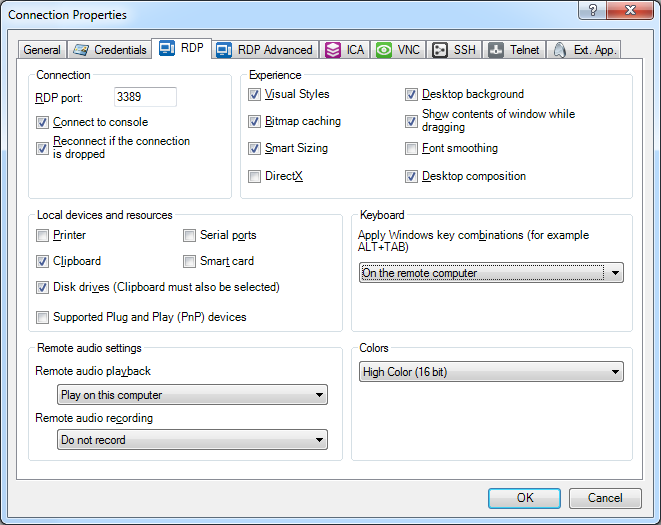
- Right click on your connection
- Choose “Properties”
- Switch to the “RDP” tab
- Set “Apply Windows key combinations” to “On the remote computer”
- Press “OK”
One catch:
this only work for new sessions. So you will have to re-connect existing sessions to apply this change.
Click on the image for a larger version.
Set “Apply Windows key combinations” to “On the remote computer”
–jeroen
Posted in Power User, Remote Desktop Protocol/MSTSC/Terminal Services, Windows | Leave a Comment »


 Since I needed to maintain a Windows PC behind a VPN connection via the console (so not via RDP sessions) including installation of software, I needed a (preferably free or open source) solution supporting elevation through UAC (User Account Control).



 The Wiert Corner - irregular stream of stuff