The Wiert Corner – irregular stream of stuff

Jeroen W. Pluimers on .NET, C#, Delphi, databases, and personal interests

  • My badges

  • Twitter Updates

  • My Flickr Stream

  • Pages

  • All categories

  • Enter your email address to subscribe to this blog and receive notifications of new posts by email.

    Join 1,860 other subscribers

Archive for the ‘Windows 10’ Category

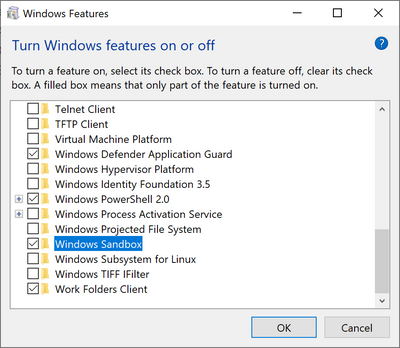
How to install Telnet with only one command

Posted by jpluimers on 2020/12/01

Source: [WayBackHow to install Telnet with only one command:

dism /online /Enable-Feature /FeatureName:TelnetClient

–jeroen

Posted in Microsoft Surface on Windows 7, Power User, Windows, Windows 10, Windows 7, Windows 8, Windows 8.1, Windows 9, Windows Server 2008, Windows Server 2008 R2, Windows Server 2012, Windows Server 2012 R2, Windows Server 2016, Windows Vista | Leave a Comment »

Compressing C:\Users\All Users\Microsoft\ClickToRun\ProductReleases

Posted by jpluimers on 2020/11/27

Microsoft keeps more and more under C:\Users\All Users\Microsoft\ClickToRun\ProductReleases (also accessible via C:\ProgramData\Microsoft\ClickToRun\ProductReleases or more precisely %AllUsersProfile%\Microsoft\ClickToRun\ProductReleases).

This can be huge, running into 10s of gigabytes, which – for todays cloud, VM and light-weight device based world – is huge.

Compressing seems to fail for me consistently, as I get “access denied” while compressing when elevating from Windows Explorer.

So this is a reminder to sort this out eventually.

These did not help yet:

I don’t dare deleting it:

Hopefully it is something explainable like the a virus scanner.

Later

Yup: it was the Avira Virus Scanner.

Somehow it has the Windows Explorer UI cause an “Access Denied” message to appear when elevating, but you can still compress files fine in a subdirectory with these steps:

Given a subdirectory named C:\SomeDir\A do this:

  1. pushd C:\SomeDir\A
  2. compact /c /s *.*
  3. cd ..
  4. compact /c A
  5. popd

It is not the first time I bump into Avira stuff (but I only blogged about it once, dumb me: VirusTotal: Avira marks a Delphi built executable als false positive), but the decision of using it was outside my control.

–jeroen

Posted in Power User, Windows, Windows 10 | Leave a Comment »

Exiting the Microsoft Narrator

Posted by jpluimers on 2020/11/24

The keyboard bindings for the Microsoft Narrator changed in Windows 10 from Windows 8.1 and earlier.

Since the below support pages refuse to save in the WayBack machine and Archive.is, I copy-pasted some bits of them.

Related:

Read the rest of this entry »

Posted in Power User, Windows, Windows 10, Windows 8, Windows 8.1 | Leave a Comment »

“net view” “System error 1231 has occurred.” “Windows 10”

Posted by jpluimers on 2020/11/09

On my research list: none of my Windows 10 PC’s in WORKGROUP can see that other machines exist, but they can connect to each other.

C:\>net view
System error 1231 has occurred.c

C:\>net view
System error 6118 has occurred.

On Windows 8.1 and 7 (I know: both beyond end-of-support) can see both Windows 8.1/7 machines and Windows 10 machines:

C:\>net view
Server Name          Remark
-------------------------------------------------------------------------------
\\...
The command completed successfully.

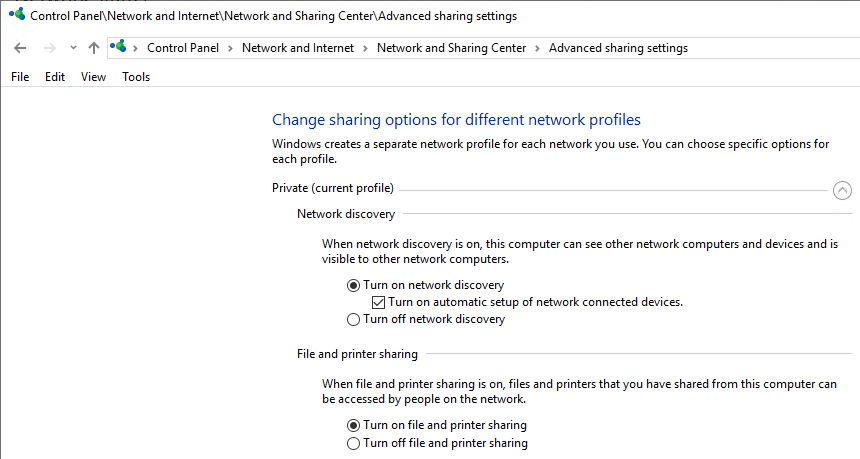
It is unclear on which Windows 10 release this started failing. I think it is around 1803 (April 2018 Update) or 1709 (Fall Creators Update). It fails despite all settings indicating sharing and discovery are enabled:

Things tried that failed:

Start service WebClient

Tried from an administrative command prompt, then waited a minute:

C:\net start WebClient
The WebClient service is starting.
The WebClient service was started successfully.

Failed.

Via: [WayBack] System error 1231 has occurred – Microsoft Community

Ensure system names are uppercase

The system names were already in uppercase.

Via: [WayBack] Win10 10586 – FOUND FIX for system error 1231 bug ( network shares – Microsoft Community

TODO

Note: do not re-enable SMBv1 as it is inherently insecure!

–jeroen

Posted in Power User, Windows, Windows 10 | Leave a Comment »

[Random] How to quickly view a binary’s embedded manifest? – MITHUN SHANBHAG’s blog

Posted by jpluimers on 2020/10/26

[WayBack] [Random] How to quickly view a binary’s embedded manifest? – MITHUN SHANBHAG’s blog

Cool! sigcheck -m dumps a manifest if there is one:

C:\>\\live.sysinternals.com\tools\sigcheck.exe -m C:\Windows\notepad.exe

Background information: [WayBack] Sigcheck – Windows Sysinternals | Microsoft Docs: Dump file version information and verify that images on your system are digitally signed.

[WayBack] License to Kill: Malware Hunting with the Sysinternals Tools | TechEd North America 2013 | Channel 9 This session provides an overview of several Sysinternals tools, including Process Monitor, Process Explorer, and Autoruns, focusing on the features useful for malware analysis and removal. These util

–jeroen

Posted in LifeHacker, Power User, Windows, Windows 10 | Leave a Comment »

RDP logon while other user is logged on: no way to automate automatic disconnect/logoff

Posted by jpluimers on 2020/10/21

One of the dreaded things when logging on using RDP is that if another user is logged on, you have to first indicate you want to indeed logon (if you don’t, the RDP connection will close after some 15-30 seconds), then wait for their approval time-out before you can logon.

As of writing there is no way around this.

Some links that helped me conclude this:

–jeroen

Posted in Development, Power User, Software Development, Windows, Windows 10, Windows 7, Windows 8, Windows 8.1, Windows Development | Leave a Comment »

Non-rectangle select in Windows command line – Super User

Posted by jpluimers on 2020/10/16

Just discovered this has been possible since Windows 10 by holding the shift key while dragging with the mouse. After like 20 years of waiting, why did nobody warn me (:

Is there any way I can disable the stupid rectangle selection mode thing in the Windows command line? I want to select line by line like normal. Currently it’s a giant pain when I need to copy things

So this is a thing from the past: [WayBack] Non-rectangle select in Windows command line – Super User

And this was already possible (but then you had to drag the full width): [WayBack] windows – Select text across lines in cmd.exe? – Super User

–jeroen

Posted in Development, Power User, Windows, Windows 10 | Leave a Comment »

Windows 7 Blue Screen Of Death with error 0x7B – twm’s blog

Posted by jpluimers on 2020/09/28

[WayBack] Windows 7 Blue Screen Of Death with error 0x7B – twm’s blog:

To allow Windows 7 to boot in IDE as well as AHCI mode, I had to enable the following drivers (by setting “Start” to “0” in the registry, there might be other options to do this):

HKLM\System\CurrentControlSet\services\intelide
HKLM\System\CurrentControlSet\services\pciide
HKLM\System\CurrentControlSet\services\msahci
HKLM\System\CurrentControlSet\services\iastorV

The first two allow Windows 7 to boot from SATA in IDE mode. The second two allow Windows 7 to boot from SATA in AHCI mode.

–jeroen

Posted in Development, Power User, Windows, Windows 10, Windows 7, Windows 8, Windows 8.1, Windows 9 | Leave a Comment »

WinHlp32 for Windows 10?

Posted by jpluimers on 2020/09/21

Reminder from [WayBackWinHlp32 for Windows 8.1 – twm’s blog to find a similar download for Windows 10.

–jeroen

Posted in Power User, Windows, Windows 10 | Leave a Comment »

Firewall whitelist for Windows Update

Posted by jpluimers on 2020/08/14

In the end, this list worked on a Fritz!Box, but I still do not know which other subdomains and protocols they silently let pass:

windowsupdate.microsoft.com
*.windowsupdate.microsoft.com
*.update.microsoft.com
*.windowsupdate.com
download.windowsupdate.com
download.microsoft.com
*.download.windowsupdate.com
test.stats.update.microsoft.com
ntservicepack.microsoft.com
update.microsoft.com
*.update.microsoft.com
*.download.microsoft.com
windowsupdate.com
wustat.windows.com
login.live.com
mp.microsoft.com
*.mp.microsoft.com
www.update.microsoft.com
support.microsoft.com
www.msftconnecttest.com

Some source materials:

–jeroen

Read the rest of this entry »

Posted in Fritz!, Fritz!Box, Internet, Power User, Windows, Windows 10, Windows 7 | Leave a Comment »