The Wiert Corner – irregular stream of stuff

Jeroen W. Pluimers on .NET, C#, Delphi, databases, and personal interests

  • My badges

  • Twitter Updates

  • My Flickr Stream

  • Pages

  • All categories

  • Enter your email address to subscribe to this blog and receive notifications of new posts by email.

    Join 1,854 other subscribers

Visual Studio direct download links

Posted by jpluimers on 2019/05/07

For my link archive:

–jeroen

Posted in .NET, Development, Software Development, Visual Studio and tools, vscode Visual Studio Code | Leave a Comment »

More Delphi debug visualizers

Posted by jpluimers on 2019/05/07

I hope that by now they are available for more Delphi versions:

Some other posts around the Debug Visualiser topic:

–jeroen

Posted in Conference Topics, Conferences, Delphi, Development, Event, Software Development | Leave a Comment »

ESXi: console commands to digging through your hba/disk/datastore configuration

Posted by jpluimers on 2019/05/07

Two posts with interesting commands to help digging through your hba/disk/datastore configurations from the console:

One day I will write a script that – per datastore – lists all the devices related to it including their HBA and LUN.

For that, I will likely need these references:

For now this works:

  • Get the list of data stores (note the Device Name column has the NAA_ID you need below):
    esxcli storage vmfs extent list
  • Get the path information to find HBA, Channel, Target and LUN:
    esxcli storage core path list --device NAA_ID
  • Get the list of HBAs:
    esxcli storage core adapter list
  • Get device details (including Model and Revision):
    esxcli storage core device list --device NAA_ID

The example below (with most important output bolded) shows a drive connected to a SAS3008 based controller which storcli cannot access (nor MegaCli), but MegaRAID Storage Manager (MSM) can.

MSM allowed me to find the serial number of the drive by the Target Transport Details value 4433221106000000 as being on Slot number 6 (which seems to indicate Target numbers are 1-based whereas LUN is 0-based).

# esxcli storage vmfs extent list
Volume Name                     VMFS UUID                            Extent Number  Device Name                                                                 Partition
------------------------------  -----------------------------------  -------------  --------------------------------------------------------------------------  ---------
...
ST6000VX0001-1SH                59a33f7b-66df7c00-11b0-0cc47aaa9742              0  naa.5000c50087762d1b                                                                1
# esxcli storage core path list -d naa.5000c50087762d1b 
sas.500304801ce1d700-sas.4433221106000000-naa.5000c50087762d1b
   UID: sas.500304801ce1d700-sas.4433221106000000-naa.5000c50087762d1b
   Runtime Name: vmhba0:C0:T7:L0
   Device: naa.5000c50087762d1b
   Device Display Name: Local ATA Disk (naa.5000c50087762d1b)
   Adapter: vmhba0
   Channel: 0
   Target: 7
   LUN: 0
   Plugin: NMP
   State: active
   Transport: sas
   Adapter Identifier: sas.500304801ce1d700
   Target Identifier: sas.4433221106000000
   Adapter Transport Details: 500304801ce1d700
   Target Transport Details: 4433221106000000
   Maximum IO Size: 4194304
# esxcli storage core adapter list
HBA Name  Driver        Link State  UID                   Capabilities  Description                                                           
--------  ------------  ----------  --------------------  ------------  ----------------------------------------------------------------------
vmhba0    lsi_msgpt3    link-n/a    sas.500304801ce1d700                (0000:01:00.0) Avago (LSI Logic) Fusion-MPT 12GSAS SAS3008 PCI-Express
...
vmhba32   vmkusb        link-n/a    usb.vmhba32                         () USB  
# esxcli storage core device list --device naa.5000c50087762d1b 
naa.5000c50087762d1b
   Display Name: Local ATA Disk (naa.5000c50087762d1b)
   Has Settable Display Name: true
   Size: 5723166
   Device Type: Direct-Access 
   Multipath Plugin: NMP
   Devfs Path: /vmfs/devices/disks/naa.5000c50087762d1b
   Vendor: ATA     
   Model: ST6000VX0001-1SH
   Revision: VN02
   SCSI Level: 6
   Is Pseudo: false
   Status: on
   Is RDM Capable: true
   Is Local: true
   Is Removable: false
   Is SSD: false
   Is VVOL PE: false
   Is Offline: false
   Is Perennially Reserved: false
   Queue Full Sample Size: 0
   Queue Full Threshold: 0
   Thin Provisioning Status: unknown
   Attached Filters: 
   VAAI Status: unsupported
   Other UIDs: vml.02000000005000c50087762d1b535436303030
   Is Shared Clusterwide: false
   Is Local SAS Device: true
   Is SAS: true
   Is USB: false
   Is Boot USB Device: false
   Is Boot Device: false
   Device Max Queue Depth: 32
   No of outstanding IOs with competing worlds: 32
   Drive Type: physical
   RAID Level: NA
   Number of Physical Drives: 1
   Protection Enabled: false
   PI Activated: false
   PI Type: 0
   PI Protection Mask: NO PROTECTION
   Supported Guard Types: NO GUARD SUPPORT
   DIX Enabled: false
   DIX Guard Type: NO GUARD SUPPORT
   Emulated DIX/DIF Enabled: false

–jeroen

Posted in ESXi5, ESXi5.1, ESXi5.5, ESXi6, ESXi6.5, Power User, Virtualization, VMware, VMware ESXi | Leave a Comment »

chrome://settings/clearBrowserData to clear Chrome browser cache

Posted by jpluimers on 2019/05/06

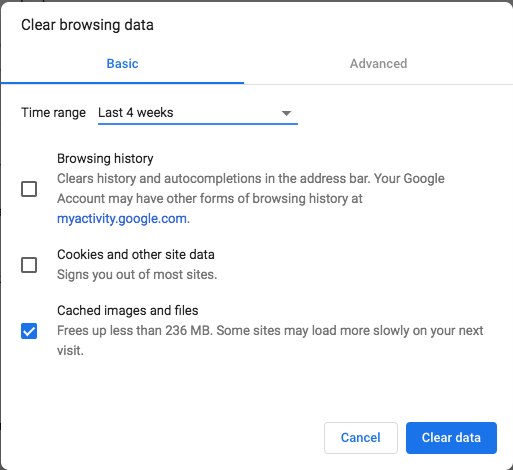
The quickest way for me to clear the Chrome browser cache is to:

  1. navigate to chrome://settings/clearBrowserData,
  2. tick “Cached images and files”
  3. click “Clear Data”

Done.

Much faster than [WayBack] Clear cache & cookies – Computer – Google Account Help:  When you use a browser, like Chrome, it saves some information from websites in its cache and cookies. Clearing them fixes certain problems, like loading or formatting issues on sites.In Chrome

–jeroen

Posted in Uncategorized | Leave a Comment »

BorgBackup – Deduplicating archiver with compression and authenticated encryption

Posted by jpluimers on 2019/05/06

On my research list:

Borg

Deduplicating archiver
with compression and encryption

BorgBackup (short: Borg) gives you:

  • Space efficient storage of backups.
  • Secure, authenticated encryption.
  • Compression: LZ4, zlib, LZMA.
  • Mountable backups with FUSE.
  • Easy installation on multiple platforms: Linux, macOS, BSD, …
  • Free software (BSD license).
  • Backed by a large and active open source community.

Source: [WayBackBorgBackup – Deduplicating archiver with compression and authenticated encryption

Repositories:

–jeroen

Posted in *nix, *nix-tools, Development, Power User, Software Development | Leave a Comment »

Trying to temporarily lower the ESXi acceptance level when installing VIBs

Posted by jpluimers on 2019/05/06

This is an interesting question at [WayBackHow can I lower the ESXI acceptance level when a forced install has been done? – Server Fault.

The default level on ESXi 6.5 is this:

# esxcli software acceptance get
PartnerSupported

Since I had ghettoVCB installed with the -f option, installing any PartnerSupported VIB would result in this error:

 [DependencyError]
 VIB virtuallyGhetto_bootbank_ghettoVCB_1.0.0-0.0.0 violates extensibility rule checks: ['(line 24: col 0) Element vib failed to validate content']
 VIB virtuallyGhetto_bootbank_ghettoVCB_1.0.0-0.0.0's acceptance level is community, which is not compliant with the ImageProfile acceptance level partner
 To change the host acceptance level, use the 'esxcli software acceptance set' command.
 Please refer to the log file for more details.

This fails:

# esxcli software acceptance set --level=CommunitySupported
[AcceptanceConfigError]
Unable to set acceptance level of community due to installed VIBs virtuallyGhetto_bootbank_ghettoVCB_1.0.0-0.0.0 having a lower acceptance level.
Please refer to the log file for more details.

The workaround is to uninstall virtuallyGhetto_bootbank_ghettoVCB_1.0.0-0.0.0, then install thePartnerSupportedVIB, then re-install ghettoVCB with the --force option or with lowered acceptance level:

  1. Remove the ghettoVCB installation: esxcli software vib remove -n ghettoVCB
  2. Perform the steps that ghettoVBC install prevented (install a non-community VIB, upgrade your ESXi system, etc)
  3. Reinstall the ghettoVCB by either:

–jeroen

Posted in ESXi6.5, Power User, Virtualization, VMware, VMware ESXi | Leave a Comment »

Flickr Free is limited to 1000 foto’s and will start deleting old photos in half a year…

Posted by jpluimers on 2019/05/04

A reminder to myself: about half a year ago, [WayBack] Flickr announces changes From http://flickr.com/lookingahead we note the following: Free accounts will soon be limited to 1,000 photos or videos. Flick… – Jeff Diver – Google+

Free members with more than 1,000 photos or videos uploaded to Flickr will no longer be able to upload new content after Tuesday, January 8, 2019 unless they upgrade to Pro. After February 5, 2019, free accounts that contain over 1,000 photos or videos will have content deleted — starting from oldest to newest date uploaded — to meet the new limit. Members may always choose to download content over the limit at any time prior to these dates.

I had been a Flickr Pro subscriber for a long time, but the social interactions where mweh, and I had far less storage than the free tier anyway, so I let the Pro expire.

With about 33k photos, I seem to have no other options than to:

  • download everything, and find a new place, including all meta-information
  • go pro

Time to make a decision in a month or so…

–jeroen

Posted in Flickr, Power User, SocialMedia | Leave a Comment »

Do not blur, but do randomly add noise or move pixels – Censoring image in GIMP – Graphic Design Stack Exchange

Posted by jpluimers on 2019/05/03

Blurring is like a hash function: it cannot be undone, but with enough plain text to blur examples, you can reconstruct the plain text: [WayBack] Why blurring sensitive information is a bad idea | dheera.net | Dheera Venkatraman’s web site

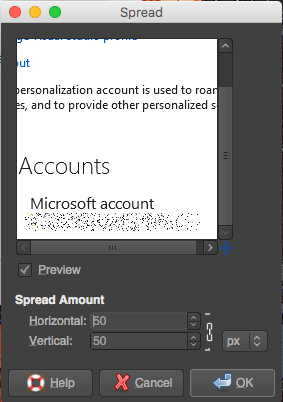
As an alternative, randomly add noise or move pixels. I used  [WayBack] Censoring image in GIMP – Graphic Design Stack Exchange. For the example on the right, I used “Filters → Noise → Spread” from the Stack Exchange answer.

With enough randomness, it is much harder to construct plain/hash combinations.

–jeroen

Posted in Image Editing, LifeHacker, Power User, Security, The Gimp | Leave a Comment »

Cleaning SILVER WITHOUT losing the Ag!

Posted by jpluimers on 2019/05/03

Interesting trick explained at [WayBackCleaning SILVER WITHOUT losing the Ag! which works very quickly as you can see in the below video.

What happens is that you transform Silver-Sulfide plus Aluminium into Silver plus Aluminium-Sulfide.

After that, the [WayBackAluminium-Sulfide reacts with water and transforms into Aluminium-Hydroxide and Hydrogen-Sulfide. The latter smells like rotten eggs, so better do this in a well ventilated area.

–jeroen

Posted in LifeHacker, Power User | Leave a Comment »

My LSI adapters and ESXi 6.5

Posted by jpluimers on 2019/05/03

So I won’t forget:

Direct download links in September 2017:

[WayBack] How to upgrade LSI MegaRaid SAS controller firmware using FreeDOS – Teksupport.in

Notes:

LSI provider install (SIM-S, SIMS, CIM, WEBM):

  1. Download the latest version (at the time of writing VMW-ESX-5.5.0-lsiprovider-500.04.V0.66-0002-5751577.zip)
  2. Unzip into /tmp
  3. esxcli software vib install -f -v /tmp/vmware-esx-provider-lsiprovider.vib
  4. wait for the VIB install to complete
  5. suspend or shutdown all VMs
  6. reboot the ESXi machine
  7. esxcli system wbem set --enable true
  8. Browse to https://192.168.71.91/ui/#/host/monitor/hardware/storage to see if SIM-S is working

MegaRAID Storage Manager (MSM) operation notes

A few tricky things to get right:

  • waiting: MSM is unbelievably slow (starting on SSD takes 10 seconds; discovery 30; connecting to host 60 – without any indication something is happening; fetching host data another 60;
  • old MSM versions are unstable (especially 14.x and lower), so keep current
  • ensure the hosts file on both the ESXi and Windows side match (otherwise it won’t discover anything, or discover as 0.0.0.0)
  • enable promiscuous mode on your vSwitch
  • if all else fails, disable any firewalls then enable bit by bit to see where it went wrong

Great installation steps:

MegaCLI installs

  1. Download the latest version that has VMware support (at the time of writing 8-07-07_MegaCLI.zip)
  2. Unzip into /tmp
  3. esxcli software vib install -f -v /tmp/VmwareMN/vmware-esx-MegaCli-8.07.07.vib
  4. wait for the VIB install to complete

Now you can the command /opt/lsi/MegaCLI/MegaCli (yes the casing of these two is different!) but you must to it in that directory, or ensure the LD_LIBARY_PATH contains /opt/lsi/MegaCLI.

StorCLI installs

Based on [WayBackStorCLI unter VMware vSphere installieren – Thomas-Krenn-Wiki

  1. Download the latest version that has VMware support (at the time of writing 1.23.02_StorCLI.zip)
  2. Recursively uncompress the ZIP file into /tmp**
  3. esxcli software vib install -f -v /tmp/storcli_All_OS/Vmware-OP/vmware-esx-storcli-1.23.02.vib
  4. wait for the VIB install to complete

Now you can the command /opt/lsi/storcli/storcli but you must to it in that directory, or ensure the LD_LIBARY_PATH contains /opt/lsi/storcli.

Example:

execute-storcli.sh /cALL show all | grep 'Controller = \|Model = \|Serial Number = \|Firmware'a

The vib file in "Vmware-NDS/" folder works with native driver.
The vib file in "Vmware-MN/" folder works with VMKlinux driver.

So I did a bit more searching based on the files in the VMware directories and came up with this list:

  • storcli_All_OS/Vmware/storcli.zip
    • Looks like it targets ESXi 3.x and older
  • storcli_All_OS/Vmware-MN/vmware-esx-storcli-1.23.02.vib wit  storcli_All_OS/Vmware-MN/VMWARE_MN_Readme.txt
    • Targets the vmklinux drivers that are being phased out with ESXi 5.5 and up
  • storcli_All_OS/Vmware-OP/vmware-esx-storcli-1.23.02.vib with storcli_All_OS/Vmware-OP/VMWARE_MN_NDS_Readme.txt
    • Targets the New Driver architecture introduced with ESXi 5.5 and used more and more since then

Background reading:

** unzip doesn’t work:

# unzip -d /tmp/ 1.23.02_StorCLI.zip
Archive: 1.23.02_StorCLI.zip
inflating: 1.23.02_StorCLI.txt
unzip: short read

But a combination of 7za and unzip does work:

# 7za x -o/tmp/ 1.23.02_StorCLI.zip
7-Zip (a) [32] 16.02 : Copyright (c) 1999-2016 Igor Pavlov : 2016-05-21
p7zip Version 16.02 (locale=en_US.UTF-8,Utf16=on,HugeFiles=on,32 bits,20 CPUs Intel(R) Xeon(R) CPU E5-2630L v4 @ 1.80GHz (406F1),ASM,AES-NI)

Scanning the drive for archives:
1 file, 48778476 bytes (47 MiB)

Extracting archive: 1.23.02_StorCLI.zip
--
Path = 1.23.02_StorCLI.zip
Type = zip
Physical Size = 48778476

Everything is Ok

Files: 2
Size: 48928561
Compressed: 48778476

# unzip -d /tmp/ /tmp/storcli_All_OS.zip 
Archive:  /tmp/storcli_All_OS.zip
   creating: storcli_All_OS/
   creating: storcli_All_OS/EFI/
  inflating: storcli_All_OS/EFI/license.txt
   creating: storcli_All_OS/EFI/UDK/
  inflating: storcli_All_OS/EFI/UDK/license.txt
  inflating: storcli_All_OS/EFI/UDK/storcli.efi
   creating: storcli_All_OS/FreeBSD/
  inflating: storcli_All_OS/FreeBSD/FreeBSD_readme.txt
  inflating: storcli_All_OS/FreeBSD/license.txt
  inflating: storcli_All_OS/FreeBSD/storcli.tar
  inflating: storcli_All_OS/FreeBSD/storcli64.tar
   creating: storcli_All_OS/Linux/
  inflating: storcli_All_OS/Linux/license.txt
  inflating: storcli_All_OS/Linux/LINUX_Readme.txt
  inflating: storcli_All_OS/Linux/storcli-1.23.02-1.noarch.rpm
   creating: storcli_All_OS/Linux-OEL-Sparc/
  inflating: storcli_All_OS/Linux-OEL-Sparc/license_OELSparc.txt
  inflating: storcli_All_OS/Linux-OEL-Sparc/storcli64-1.23.02-1.sparc64.rpm
   creating: storcli_All_OS/Linux-ppc/
   creating: storcli_All_OS/Linux-ppc/Big Endian/
  inflating: storcli_All_OS/Linux-ppc/Big Endian/license.txt
  inflating: storcli_All_OS/Linux-ppc/Big Endian/storcli.tar
   creating: storcli_All_OS/Linux-ppc/Little Endian/
  inflating: storcli_All_OS/Linux-ppc/Little Endian/license.txt
  inflating: storcli_All_OS/Linux-ppc/Little Endian/Readme.txt
  inflating: storcli_All_OS/Linux-ppc/Little Endian/storcli64_1.23.02_ppc64el.deb
   creating: storcli_All_OS/Solaris/
  inflating: storcli_All_OS/Solaris/license.txt
  inflating: storcli_All_OS/Solaris/SOLARIS_Readme.txt
  inflating: storcli_All_OS/Solaris/storcli.pkg
   creating: storcli_All_OS/Solaris Sparc/
  inflating: storcli_All_OS/Solaris Sparc/license.txt
  inflating: storcli_All_OS/Solaris Sparc/storcli.pkg
   creating: storcli_All_OS/Ubuntu/
  inflating: storcli_All_OS/Ubuntu/read_me.txt
  inflating: storcli_All_OS/Ubuntu/storcli_1.23.02_all.deb
   creating: storcli_All_OS/Vmware/
  inflating: storcli_All_OS/Vmware/license.txt
   creating: storcli_All_OS/Vmware/Linux/
  inflating: storcli_All_OS/Vmware/Linux/storcliKL-1.23.02-1.noarch.rpm
  inflating: storcli_All_OS/Vmware/Rel_read_me.txt.txt
  inflating: storcli_All_OS/Vmware/storcli.zip
   creating: storcli_All_OS/Vmware/Windows/
  inflating: storcli_All_OS/Vmware/Windows/StorCLIKL.zip
   creating: storcli_All_OS/Vmware-MN/
  inflating: storcli_All_OS/Vmware-MN/license.txt
  inflating: storcli_All_OS/Vmware-MN/vmware-esx-storcli-1.23.02.vib
  inflating: storcli_All_OS/Vmware-MN/VMWARE_MN_Readme.txt
   creating: storcli_All_OS/Vmware-OP/
  inflating: storcli_All_OS/Vmware-OP/license.txt
  inflating: storcli_All_OS/Vmware-OP/vmware-esx-storcli-1.23.02.vib
  inflating: storcli_All_OS/Vmware-OP/VMWARE_MN_NDS_Readme.txt
   creating: storcli_All_OS/Windows/
  inflating: storcli_All_OS/Windows/license.txt
  inflating: storcli_All_OS/Windows/storcli.exe
  inflating: storcli_All_OS/Windows/storcli64.exe
  inflating: storcli_All_OS/Windows/WIN_ReadMe.txt

9260-8i firmware update

  1. Download the latest firmware (at the time of writing 12.15.0-0239_MR_2108_SAS_FW_2.130.403-4660.zip) into /tmp
  2. unzip -d /tmp/ /tmp/12.15.0-0239_MR_2108_SAS_FW_2.130.403-4660.zip
  3. Find out the controller number
  4. Where 0 is the controller number, execute/opt/lsi/storcli/storcli /c0 download file=/tmp/mr2108fw.rom
  5. Wait for the firmware update to complete
  6. Suspend or shutdown all VMs
  7. Reboot

–jeroen

Posted in ESXi6.5, Power User, Virtualization, VMware, VMware ESXi | 2 Comments »