The Wiert Corner – irregular stream of stuff

Jeroen W. Pluimers on .NET, C#, Delphi, databases, and personal interests

  • My badges

  • Twitter Updates

  • My Flickr Stream

  • Pages

  • All categories

  • Enter your email address to subscribe to this blog and receive notifications of new posts by email.

    Join 1,854 other subscribers

Interesting ways to obtain MTU and MSS sizes – via Troubleshooting Bitbucket Cloud MTU/MSS issues – Atlassian Documentation

Posted by jpluimers on 2018/03/29

I will probably need the netstat/tcpdump/wireshark tricks here in the future: [WayBackTroubleshooting Bitbucket Cloud MTU/MSS issues – Atlassian Documentation

via: [WayBackAtlassian Bitbucket Status – Network maintenance; MTU/MSS changes coming

–jeroen

Posted in Communications Development, Development, Internet protocol suite, Network-and-equipment, Power User, TCP | Leave a Comment »

Privacy badger: blocks spying ads and invisible trackers. Not just for Facebook, but for every site.

Posted by jpluimers on 2018/03/29

[WayBackPrivacy Badger | Electronic Frontier Foundation: Privacy Badger blocks spying ads and invisible trackers.

Chrome first run settings are at

chrome-extension://pkehgijcmpdhfbdbbnkijodmdjhbjlgp/skin/firstRun.html

Via: [WayBack] Arjen Lentz on Twitter: “EFF’s Privacy Badger does this for any site. Also available for Chrome/Chromium.… “

There is a really interesting Y-combinator thread at [WayBack] Facebook Container Extension: Take control of how you’re being tracked | Hacker News which goes way deeper in how various browsers and extension combinations can help you getting more hold of your privacy.

A few links via that hacker news link:

–jeroen

Posted in Chrome, Firefox, Google, Power User, Privacy | Leave a Comment »

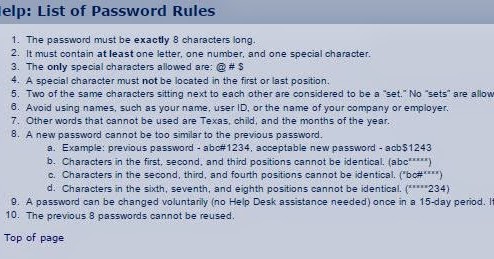
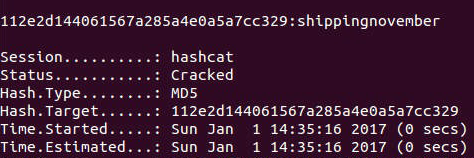
Cracking xkcd Passwords in little time, breaking 12 character passwords in more time… hashing algorithms…

Posted by jpluimers on 2018/03/29

via [WayBack] Cracking xkcd Passwords in 20 Seconds, breaking 12 character passwords and other cyber “I hope I’ve demonstrated that you need unique words, digits and … – Kristian Köhntopp – Google+

Some interesting reads:

–jeroen

Posted in Power User, Security | Leave a Comment »

terminate screen monitoring serial port – Unix & Linux Stack Exchange

Posted by jpluimers on 2018/03/28

  • Use the screen quit command (normally ctrl-A ctrl-\).
  • Use the command mode of screen (normally ctrl-A :) then type quit or help for more commands

This will quit screen and release the TTY serial port connection.

Related: hooking screen to a TTY serial port connection in [WayBackThe woods and trees of OpenSuSE on single-board computers – image abbreviations – and getting it installed using OS X

–jeroen

via:

Posted in *nix, *nix-tools, Linux, openSuSE, Power User, SuSE Linux | Leave a Comment »

Capturing from a Magewell XI100USB on a Mac using OS X

Posted by jpluimers on 2018/03/28

Some notes and links on http://www.magewell.com/usb-capture-hdmi with specs at http://www.magewell.com/usb-capture-hdmi/tech-specs

USBCaptureHDMI-Installation-Guide-en-2.0.pdf USB-Capture-HDMI-User-Guide-en.pdf USB-Capture-HDMI_Spec-sheet.pdf

http://www.magewell.com/files/CaptureStudio.zip

The video at https://www.youtube.com/watch?v=UbjIx1qhvpM uses Quickier

I used QCamera: the XI100USB shows up as a camera.

Note capturing takes a lot of CPU power, so ensure you’re not running on battery.

I didn’t need any of these downloads:

On a Mac any of these software tools should work as well:

  • Adobe Flash Media Live Encoder
  • Adobe Connect
  • CoGe VJ
  • Discover Video Streamsie
  • Gotomeeting
  • GrandVJ
  • MadMapper
  • mimoLive
  • OBS studio
  • Quicklaunch
  • QuickTime Broadcaster
  • QuickTime Player
  • Resolume
  • Skype
  • Streambox
  • Video Stitch
  • VirtualDub
  • VLC
  • Wirecast
  • Zoom.us


–jeroen

Read the rest of this entry »

Posted in Apple, Mac, Mac OS X / OS X / MacOS, MacBook, MacBook Retina, MacBook-Pro, macOS 10.12 Sierra, Power User | Leave a Comment »

Office 2011 for Mac update pesky Window pops up every 10 seconds

Posted by jpluimers on 2018/03/27

From the “I hate my users” department:

  • This dialog pops up every 10 seconds
  • The Office 2011 for Mac update requires non-Office apps to quit as well

–jeroen

Posted in Apple, Development, iMac, Mac, Mac OS X / OS X / MacOS, MacBook, MacBook Retina, MacBook-Air, MacBook-Pro, MacMini, Office, Office 2011 for Mac, Power User, Software Development, Usability, User Experience (ux) | Leave a Comment »

A Post-Mortem on the Recent Developer Story Information Leak – Meta Stack Overflow

Posted by jpluimers on 2018/03/27

I wish many other companies would disclose post mortem information like this: [WayBackA Post-Mortem on the Recent Developer Story Information Leak – Meta Stack Overflow

via: [WayBackInteresting and very appropriate top commenthttp://meta.stackoverflow.com/questions/340960/a-post-mortem-on-the-recent-developer-story-information-leak – This is why I Code – Google+

–jeroen


Posted in .NET, Delphi, Development, Pingback, Power User, Software Development, Stackoverflow | Leave a Comment »

This Is The First Detailed Footage of DNA Replication, And It Wasn’t What We Expected

Posted by jpluimers on 2018/03/26

Whoa: [WayBack] This Is The First Detailed Footage of DNA Replication, And It Wasn’t What We Expected

“It undermines a great deal of what’s in the textbooks.”

via:

–jeroen

Posted in LifeHacker, Power User, science | Leave a Comment »

Installing PowerShell Core on macOS and Linux | Microsoft Docs

Posted by jpluimers on 2018/03/26

I forgot to blog about this before, but 2 months ago PowerShell core came available: [WayBack] PowerShell Core 6.0: Generally Available (GA) and Supported! | PowerShell Team Blog.

[WayBack] Installing PowerShell Core on macOS and Linux | Microsoft Docs is easy (one way is through homebrew:

$ brew tap caskroom/cask
$ brew cask install powershell

If you already installed a beta, then the steps are these:

$ brew update
$ brew cask reinstall powershell

Note that after installation, it is known as pwsh (at least one of the betas named it powershell) to set PowerShell Core apart from PowerShell*:

$ pwsh --version
PowerShell v6.0.2

Via: [WayBack] PowerShell Core 6.0 is a new edition of PowerShell that is cross-platform (Windows, macOS, and Linux), open-source, and built for heterogeneous environm… – Lars Fosdal – Google+

*pwsh versus powershell

There has been quite a discussion on the PowerShell Core repository on the rename, but I think it is for a good reason.

Too bad that during part of the beta, the old name powershell was used, but beta-time means things break every now and then.

PowerShell Core is sufficiently different from prior PowerShell versions to warrant a name change. This also makes it a lot easier to use them side-by-side.

Many other names (like posh, pcsh or psh) were considered, usually because of naming conflicts with existing tools (like posh) or easy confusion with existing shells (like pcsh and csh). A benefit on Linux/macOS is that it now ends with sh like virtually all other shells.

More background information is at:

–jeroen

Posted in Apple, CommandLine, Development, Home brew / homebrew, Mac, Mac OS X / OS X / MacOS, MacBook, MacBook Retina, MacBook-Air, MacBook-Pro, MacMini, Power User, PowerShell, PowerShell, Scripting, Software Development | Leave a Comment »

Sometimes clouds vaporise: the Docker Cloud shuts down in ~8 weeks.

Posted by jpluimers on 2018/03/26

From [WayBackDocker – Docker Cloud Migration Notification and FAQs:

The services on Docker Cloud that provide application, node, and swarm cluster management will be shutting down on May 21.

If you do not migrate by May 21, your applications running on the Docker node cluster management service will cease to operate.

Swarms will continue to function; however, if you do not retrieve your SSH keys for the Swarms being managed by our swarm cluster management service, you will be unable to access your swarms using your Docker ID. For instructions on how to retrieve and access your Swarms with SSH keys, please refer to the Docker docs.

So soon, no more [WayBack] Docker Cloud – Build, Ship and Run any App, Anywhere.

Remember: still the cloud is other peoples computers, so be sure you can move when needed.

–jeroen

Posted in Cloud, Cloud Development, Containers, Development, Docker, Infrastructure, Power User | Leave a Comment »