


Setting up remote debugging is always a precarious thing, no matter what kind of development platform: the online documentation tells you the standard steps, but usually they don’t suffice.
This case is Visual Studio 2010 remote debugging, where the development environment is on a workstation running Windows 7, and the debug target is on Windows Server 2008 R2.
Both are x64 versions.
There is a remote desktop connection to the server, and the server can see the workstation files on the \\TSCLIENT\C share.
This is the error when running msvsmon.exe from \\tsclient\C\Program Files (x86)\Microsoft Visual Studio 10.0\Common7\IDE\Remote Debugger\x64:
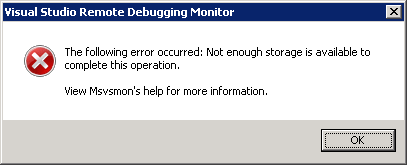
[Visual Studio Remote Debugging Monitor]
The following error occurred: Not enough storage is available to complete this operation.

View Msvsmon's help for more information.
[OK]
(Funny BTW that the x64 Remote Debugging Monitor is in fact in an x86 path).
The solution is simple: copy the x64 directory local, then start it from there.
The reason in that the user credentials on the server don’t have enough rights on the \\TSCLIENT\C directory tree, so Windows barfs on it.
This pointed me into the right direction when I started Process Monitor from the same \\TSCLIENT\C share: Read the rest of this entry »

 The Wiert Corner - irregular stream of stuff