


Brilliant post on using the Window-key for shortcuts with Windows 8 (all Windows 7 Windows-key shortcuts work, plus many more): Windows 8 productivity: Who moved my cheese? Oh, there it is. – Scott Hanselman.
–jeroen
Posted by jpluimers on 2012/08/27
Brilliant post on using the Window-key for shortcuts with Windows 8 (all Windows 7 Windows-key shortcuts work, plus many more): Windows 8 productivity: Who moved my cheese? Oh, there it is. – Scott Hanselman.
–jeroen

Posted in Keyboards and Keyboard Shortcuts, Power User, Windows, Windows 7, Windows 8 | Leave a Comment »
Posted by jpluimers on 2012/08/27
One of the Enterprise SKU of Windows 8 is that it allows side-loading of WinRT apps. It gives you the opportunity to load internally developed Metro-style applications that use WinRT on Windows 8 without a developers license installed on that Windows 8 machine.
This feature was described on many sources, including:
But since many apps (including Delphi written apps as they cannot link to the Visual C++ Run-Time DLL) don’t directly run on WinRT, there is a clear demand of enabling this side-loading feature for non-Enterprise SKUs of Windows 8:
The last link describes a way to circumvent this, and I think that is what Embarcadero is aiming at to enable Delphi XE3 Metropolis style applications to run on WinRT:
Note I updated my Delphi WinRT link clearance post with the last two links.
–jeroen
Posted in Delphi, Delphi XE3, Development, Software Development, WinRT-with-Delphi | 2 Comments »
Posted by jpluimers on 2012/08/27
If ever UPC has an outage like this again, and I need to fiddle with the Cisco EPC3000 cable modem…
From the manual (edited for typos and readability):
- Indien modem niet binnen enkele minuten vanzelf online komt: breng het modem online door via de browser van jouw laptop naar: http://192.168.100.1/gscan.asp te gaan.
Voer handmatig de frequentie 306750000 in en klik op ‘Click here restart your cable modem’. (Achter de RT hubs, Rotterdam gebied, is de frequentie 308000000)- Wanneer de modem online is controleer je de retoursignalen van de modem door op de modem in te loggen.
Dit doe je door de volgende link te gebruiken: http://192.168.100.1/signal.asp.
Controleer in dit scherm de waarde “Power Level”. Als dit level 55 dBmV of hoger is (55-58) moet je contact opnemen met UPC.
And yes,
Some links I might need then: Read the rest of this entry »
Posted in Power User | Leave a Comment »
Posted by jpluimers on 2012/08/25
Just for my own record, a link clearance of WinRT in relation to Delphi.
I amended this a couple of time already, will try to do so over time: Read the rest of this entry »
Posted in Delphi, Development, Software Development, WinRT-with-Delphi | Tagged: c runtime library, marc hoffman, nick hodges, software, stack overflow, technology | 3 Comments »
Posted by jpluimers on 2012/08/24
Now for some lighter Delphi XE3 related stuff:
These icons seem to go very well with the Metropolis UI Applications that you can create (and convert from VCL!) with Delphi XE3 (see the XE3 video at 0:30).
–jeroen
via:
Posted in Delphi, Delphi XE3, Development, Software Development, UI Design | 2 Comments »
Posted by jpluimers on 2012/08/24
Vorig weekeinde heb ik foto’s gemaakt van de KatwijkBinse Truckrun 2012 tijdens de doorkomst in Sassenheim.
De foto’s zijn genomen op de Wilhelminalaan vlakbij het gemeentehuis.
Helaas her en der wat onderbelicht – ik was uitgeput door de hitte en niet zo helder die dag.
Volgende keer moet ik met tegenlicht iets meer opletten (:
Oorspronkelijke route: www.oranjeverenigingkatwijk.nl/index.php?p=22&sub=36
–jeroen
via: 20120818 KatwijkBinse Truckrun 2012 tijdens doorkomst Sassenheim – a set on Flickr.
Posted in About, Event, Personal, Truckrun | Leave a Comment »
Posted by jpluimers on 2012/08/24

SSH tricks
Recommended reading: SSH tricks
Quote:
SSH is a protocol for authenticating and encrypting remote shell sessions.
But, using SSH for just remote shell sessions ignores 90% of what it can do.
$ ssh home -L 80:reddit.com:80This article covers less common SSH use cases, such as:
- using passwordless, key-based login;
- setting up local per-host configurations;
- exporting a local service through a firewall;
- accessing a remote service through a firewall;
- executing commands remotely from scripts;
- transfering files to/from remote machines;
- mounting a filesystem through SSH; and
- triggering admin scripts from a phone.
–jeroen
via: SSH tricks.

Posted in *nix, Apple, Cygwin, Endian, Internet, Mac OS X 10.5 Leopard, Mac OS X 10.6 Snow Leopard, Mac OS X 10.7 Lion, MacBook, MacBook-Air, MacBook-Pro, Power User | Leave a Comment »
Posted by jpluimers on 2012/08/23
I hope I read these mobile and iOS parts of the XE3 and beyond : A look at mobile post by John Ray “JT” Thomas correctly: Read the rest of this entry »
Posted in Delphi, Delphi XE2, Delphi XE3, Development, Software Development | 7 Comments »
Posted by jpluimers on 2012/08/23
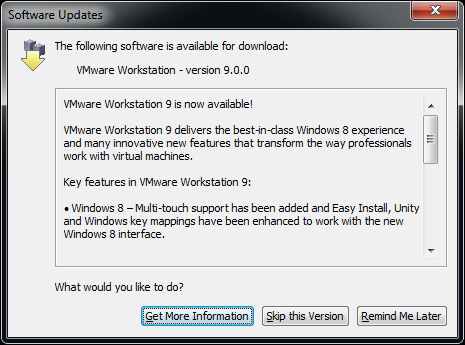 This morning, when starting VMware Workstation 8.0.4, it indicated that 9.0.0 was available.
No news on the VMware website (it still shows adverts for Workstation 8), nor on Wikipedia VMware Workstation page so is their auto-update system in an identity crisis or what?
Two links on VMware Workstation 9.0.0 Build 812388, but not sure if nsane is a good source of information. On the other hand, there is also news on the Bulgarian Kaldata about VMware Player 5.0.0 Build 812388.
Since VMware Player and Workstation share build numbers, and there has been a VMware Workstation Technology Preview 2012 for about 6 months, something could be in the midst of release in time zones where it is not yet 20120823.
VMware workstation checks https://softwareupdate.vmware.com/cds and https://ueip.vmware.com/, but I didn’t decrypt the traffic there yet.
Anyone with the latest official news on this?
Edit 20120823 0631UTC:
Two links I just found:
So yes, there was a temporary 2b || !2b crisis in the update service.
Edit 20120823 0711UTC:
Now it is 20120823 in California too, so now the VMware Workstation pages and VMware Workstation What”s new pages got updated and shows that VMware Workstation 9 is out.
This is the quote from the dialog on the right: Read the rest of this entry »

Posted in Power User, VMware, VMware Workstation | 1 Comment »
Posted by jpluimers on 2012/08/23
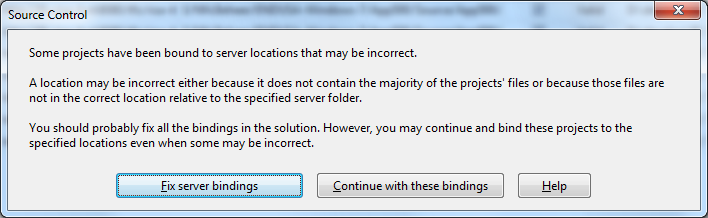 A while ago, I inherited a bunch of C# and VB.NET projects. One of them always generated the below error when including it in Team Foundation System (yes, the original projects were salvaged from Visual Source Shredder version 6.0c):
[Source Control]

Some projects have been bound to server locations that may be incorrect.

A location may be incorrect either because it does not contain the majority of the projects' files or because those files are not in the correct location relative to the specified server folder.

You should probably fix all the bindings in the solution. However, you may continue and bind these projects to the specified locations even when some may be incorrect.

[Fix server bindings] [Continue with these bindings] [Help]
First I tried the Help button: it links to a Help page on MSDN explaining the error can be cause with some statistics on projects not being in the source control system. Since all projects were, there, I looked for more information.
I tried finding a “Fix Server Bindings” or a 2010 “Some projects have been bound to server locations that may be incorrect” link that fitted my use case (getting projects from VSS into TFS), but the solutions I tried eventually all led to the same issue.
Fixing the server bindings would always fail: the solution (which itself is also a project) would get the status Invalid.
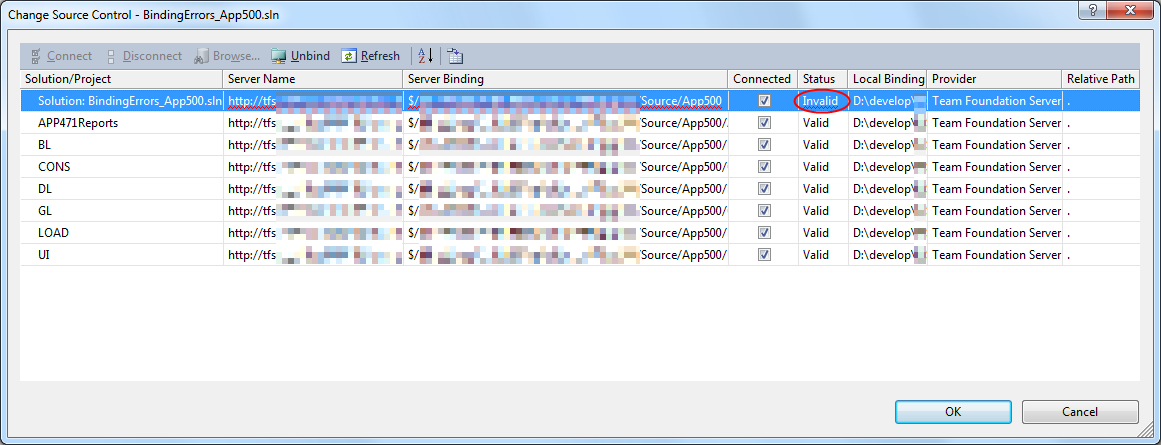
The next steps were these: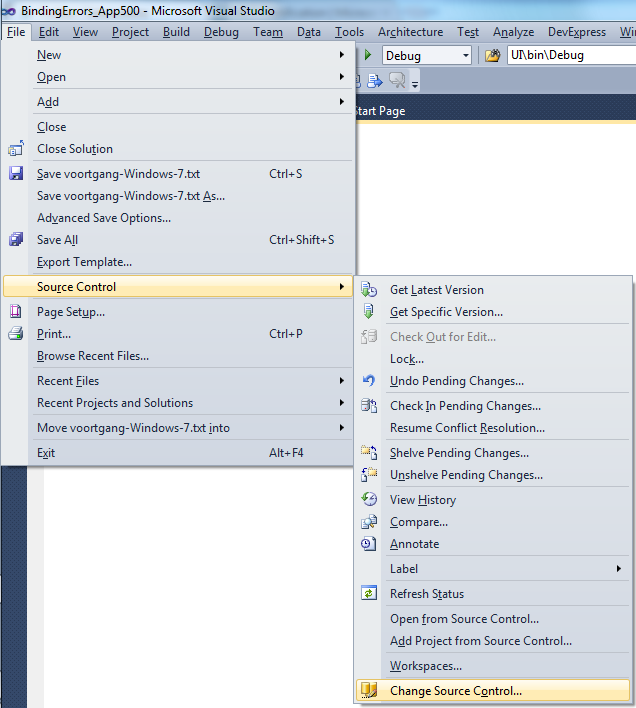
Project("{2150E333-8FDC-42A3-9474-1A3956D46DE8}") = "Solution Items", "Solution Items", "{8D9964D4-6129-4B8F-9238-F9161A02B968}"

ProjectSection(SolutionItems) = preProject

...

Framework\Config.dll = Framework\Config.dll

...

EndProjectSection

EndProjectReading the Help more carefully, with in the back of my mind keeping “Solution Items” all as projects, I finally got the cause:
When some percentage of Solution Items cannot be found locally, and are not in the version control system, Visual Studio marks the solution binding to the version control system as “Invalid”.
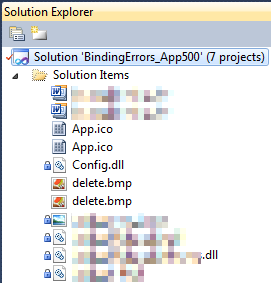 The temporary solution is to ignore the error, until I have found all the missing files (they are scattered around some network shares), or made sure they are not needed at all.
There are many of those (you recognize them from the missing padlock icon in the Solution Explorer).
Version control rot is just like link rot, that’s why one of the high priority action items is to introduce for build automation at this client, then deploy those as clean builds into the Develop and Test stages of the DTAP, then verify if the solutions still work).
–jeroen

Posted in .NET, C#, C# 1.0, C# 2.0, C# 3.0, C# 4.0, C# 5.0, Development, Internet, link rot, Power User, Software Development, Source Code Management, TFS (Team Foundation System), VB.NET, Visual Studio 2010, Visual Studio and tools, WWW - the World Wide Web of information | Leave a Comment »
 The Wiert Corner - irregular stream of stuff