


How to aggregate (count/sum/average) cells and ignore the #div/0! ‘s – via: list of functions by Excel version
Posted by jpluimers on 2015/11/19
I bumped into a #DIV/0! result for average functions when processing large sets of data.
It is actually very easy to spot the error in small results, sets, but hard in big ones, as you cannot see the #DIV/0!
So there are average functions that can ignore certain outcomes. COUNT already does that (there is no COUNTIF), the others have a *IF equivalent, but not in all Excel versions:
- COUNT – 2003+
- COUNTIF – 2003+
- COUNTIFS – 2007+
- SUM – 2003+
- SUMIF – 2003+
- SUMIFS – 2007+
- AVERAGE – 2003+
- AVERAGEIF – 2007+
- AVERAGEIFS – 2007+
- MAX – 2003+
- MIN – 2003+
Note there is a small SUMIF/SUMIFS/AVERAGEIF/AVERAGEIFS in Excel 2010 (not in 2007, and maybe not in 2013) glitch when the criteria are in a different sheet.
The seemingly easy workaround of summing columns A and B, then doing the division fails: it returns different results as it forgets to ignore faulty rows:
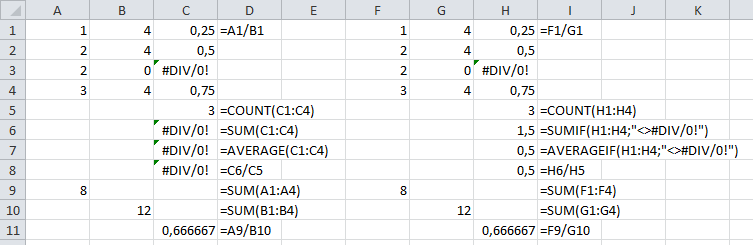
SUM/AVERAGE versus SUMIF/AVERAGEIF (click to enlarge)
Leermomentje (techable moment comes close)…
–jeroen
via:
- How to sum cells and ignore the #div/0! ‘s ? – Microsoft Community.
- List of all functions (by category).
- List of ALL Excel Functions by Version – Super User.

 The Wiert Corner - irregular stream of stuff
Alex Powers said
Any reason why you don’t use the =IFERROR to mask the Divide By Zero error?
jpluimers said
As I wanted to specifically catch the division by zero. IFERROR catches all. I want to know the causes of errors, so I can track it back to source data errors.