


How to I show the changes which have been (non)staged or are about to be commited? – via: Stack Overflow
Posted by jpluimers on 2016/12/27
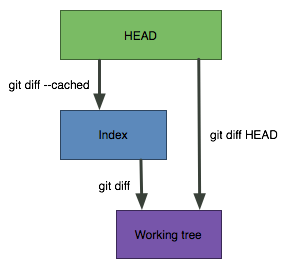 I love this StackOverflow answer by Abizern (who maintained a great 365git blog as well):
A simple graphic makes this clearer
git diffShows the changes between the working directory and the index. This shows what has been changed, but is not staged for a commit.
git diff --cachedShows the changes between the index and the HEAD(which is the last commit on this branch). This shows what has been added to the index and staged for a commit.
git diff HEADShows all the changes between the working directory and HEAD (which includes changes in the index). This shows all the changes since the last commit, whether or not they have been staged for commit or not.
–jeroen
Source: git – How do I show the changes which have been staged? – Stack Overflow

 The Wiert Corner - irregular stream of stuff
Leave a comment