The Wiert Corner – irregular stream of stuff

Jeroen W. Pluimers on .NET, C#, Delphi, databases, and personal interests

  • My badges

  • Twitter Updates

  • My Flickr Stream

  • Pages

  • All categories

  • Enter your email address to subscribe to this blog and receive notifications of new posts by email.

    Join 1,862 other subscribers

Archive for 2016

Analyzing website performance with the Windows Performance Toolkit | Microsoft Edge Dev Blog

Posted by jpluimers on 2016/09/27

On my research list:

Slow pages lose users: research from Bing and Google indicates that delays as small as half a second can impact business metrics. To build fast sites, developers need powerful tools to analyze the …

Source: Analyzing website performance with the Windows Performance Toolkit | Microsoft Edge Dev Blog

via:

If you’re developing on Windows.. a must read article on analyzing webperf with Windows Performance Toolkit. – Ilya Grigorik – Google+

–jeroen

Posted in .NET, Delphi, Development, Software Development | Leave a Comment »

Oracle Cross database queries: you need a “database link” for that

Posted by jpluimers on 2016/09/27

I recently learned that you can do cross database queries in Oracle using database links.

You need to prefix your objects with the right schema/owner (for instance dbo.) and suffix with an @ sign followed by the database link name.

This query finds all configured database links:

select * from all_db_links;

–jeroen

via: Ask Tom “database link”.

Posted in Database Development, Development, OracleDB | Leave a Comment »

discovering how Dropbox hacks your mac – now blocked by Mac OS X 10.12 Sierra

Posted by jpluimers on 2016/09/26

Interesting reads:

–jeroen

via  http://applehelpwriter.com/2016/08/29/discovering-how-dropbox-hacks-your-mac/ – Joe C. Hecht – Google+  [WayBack]

Posted in DropBox, SocialMedia | Leave a Comment »

Heittps enabled – a hardest part of https-ing a suite of sites is getting rid of “Mixed Content”

Posted by jpluimers on 2016/09/26

“Heittps enabled.” and working for most parts: Verschlüsselung: heise online und Heise-Onlinedienste per HTTPS erreichbar heise.de [WayBack]

A hard part in getting there is fixing “Mixed Content” errors. Report them at https://www.heise.de/newsticker/meldung/Verschluesselung-heise-online-und-Heise-Onlinedienste-per-HTTPS-erreichbar-3331421.html

Earlier this Dutch tech site did the same: Tweakers stapt over op https – Waarom https? – Achtergrond – Tweakers [WayBack] and faced similar “Mixed Content” fixing challenges [WayBack].

–jeroen

Source: Na endlich. – Kristian Köhntopp – Google+


Posted in https, Security | Leave a Comment »

How to Remove Duplicates & Customize the “Open With” Menu in Mac OS X « Mac Tips

Posted by jpluimers on 2016/09/26

Various steps showing How to Remove Duplicates & Customize the “Open With” Menu in Mac OS X « Mac Tips

–jeroen

Posted in Apple, Mac, Mac OS X / OS X / MacOS, MacBook, MacBook Retina, MacBook-Air, MacBook-Pro, MacMini, OS X 10.10 Yosemite, OS X 10.11 El Capitan, OS X 10.9 Mavericks, Power User | Leave a Comment »

Awesome vim cheat sheet for your consideration. Download #vimcheatsheet

Posted by jpluimers on 2016/09/26

Awesome vim cheat sheet for your consideration. Download http://vimcheatsheet.com

You can either

  1. buy the poster (which is now at version 2.0),
  2. buy the digital PDF downloads (at version 2.0 too),
  3. get the free small resolution PNG downloads at 1024 x 700 or 1979 x 1346.

–jeroen

via:

Read the rest of this entry »

Posted in *nix, *nix-tools, Linux, openSuSE, Power User, SuSE Linux | Leave a Comment »

Cool: HTTPSWatch tracks the HTTPS support of prominent websites.

Posted by jpluimers on 2016/09/23

HTTPSWatch tracks the HTTPS support of prominent websites.

Source: HTTPSWatch | Global

Like on the right side.

https isn’t everywhere yet, but growing.

–jeroen

Posted in https, Power User, Security | Leave a Comment »

How to disable your security questions at “Personal Info – Yahoo Account Settings”

Posted by jpluimers on 2016/09/23

Steps to disable the security questions in Yahoo:

  1. Logon at https://login.yahoo.com
  2. At the top right, click on your name, hover over your name and click “Account Info” to get to Personal Info – Yahoo Account Settings – https://login.yahoo.com/account/personalinfo
  3. On the left menu, click on “Account Security”.
  4. Click “Disable security questions”.

    Disable security questions - yahoo thinks they're a bad idea anyway

    Disable security questions – yahoo thinks they’re a bad idea anyway

  5. In the dialog, click “Yes, secure my account”
  6. In the next dialog, click “Close”
  7. Then verify your other security options (like phone/email recovery and two-factor logon) to enhance your security even more.

–jeroen

Posted in Power User, Security | Leave a Comment »

Mac OS X – Spotlight not finding many files: force a rescan solved it

Posted by jpluimers on 2016/09/23

I was looking for some PDF files that I knew for sure were on my SSD but Spotlight would not find them. Looking for more obvious files I noticed Spotlight was returning hardly any files at all: somehow the index was messed up.

Years ago I also had Spotlight issues; then it would find nothing (now it did find some files) which was solved by a reboot: Spotlight refuses to be enabled on Lion: reboot helped.
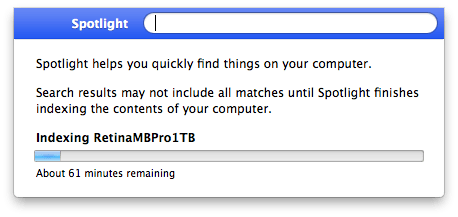
Screenshot 2016-06-29 12.57.34

Screenshot 2016-06-29 12.57.34

Now this was right after a reboot, and because Spotlight did find some files I know Spotlight was turned on (no need for mdutil tricks mentioned in After restoring fresh HDD from Time Machine Backup: No results from Spotlight).

So I dug a bit deeper and decided to try [WayBack] Rebuild the Spotlight index on your Mac – Apple Support with these steps:

  1. Search for something that returns few results (in my case Xyzzy)
  2. Click Spotlight Preferences...
  3. Go to the Privacy tab
  4. From the Finder, drag your disk(s) to the Prevent Spotlight from searching these locations list.
  5. Remove your disk(s) from that lists using the minus (-) button.
  6. Wait for re-indexing to complete

That worked like a charm to refresh the index: it started indexing again which took about one hour.

After a few minutes though, I found back the 32pfl7404h_12_dfu_nld.pdf I was looking for.

A second time, it had lost the index to iTunes, and found it back in about 2 hours (as the SSD was much more full).

A third time, this trick from [WayBack/Archive.is] Re-Index Spotlight from the Terminal, Re-Gain Valuable Time for Life [OS X Tips] | Cult of Mac worked:

sudo mdutil -E /

This basically re-indexes from the root (/) folder.

I find it easier than the above 6 steps (which are also on [WayBack/Archive.is] Make Spotlight Work Again [OS X Tips] | Cult of Mac).

–jeroen

Posted in Apple, Mac, Mac OS X / OS X / MacOS, MacBook, MacBook Retina, MacBook-Pro, OS X 10.10 Yosemite, OS X 10.11 El Capitan, OS X 10.9 Mavericks, Power User, SpotLight | Leave a Comment »

Nick Hodges Joins Embarcadero as Product Management Lead

Posted by jpluimers on 2016/09/23

And the other bomb-shell: Nick Hodges Joins Embarcadero as Product Management Lead

Interesting times in the Delphi community…

And I really wonder if this affects Delphi Developer Days 2016, Nick Hodges & Cary Jensen.

–jeroen

Posted in Delphi, Development, Software Development | 4 Comments »