The Wiert Corner – irregular stream of stuff

Jeroen W. Pluimers on .NET, C#, Delphi, databases, and personal interests

  • My badges

  • Twitter Updates

  • My Flickr Stream

  • Pages

  • All categories

  • Enter your email address to subscribe to this blog and receive notifications of new posts by email.

    Join 1,862 other subscribers

Archive for 2016

winforms – Where is the Tab Order Assignment dialog in Visual Studio 2012+? – via: Stack Overflow

Posted by jpluimers on 2016/01/27

Duh: same for VS2013

It is still available, you just need to add it back to the View menu. Tools + Customize, Commands tab, Menu bar = View. Select the menu item in Controls where you want to insert it, say the bottom one. Then Add Command, Category = View, Commands = Tab Order.

Source: winforms – Where is the Tab Order Assignment dialog in Visual Studio 2012? – Stack Overflow

–jeroen

Posted in .NET, .NET 4.0, .NET 4.5, C#, C# 3.0, C# 4.0, C# 5.0, Development, Software Development, Visual Studio 2012, Visual Studio 2013, Visual Studio 2014, Visual Studio 2015, Visual Studio and tools | Leave a Comment »

Building and running upc_keys.c on Mac OS X

Posted by jpluimers on 2016/01/27

Even after the SpeedTouch password algorithms were disclosed 2008, ISPs keep using weak algorithms to generate their default WPA/WPA2 passwords in their routers:

A short while ago, blasty published code to generate the WPA2 passwords for UPC routers. Even though Ziggo now owns UPC, a lot of  this UPC equipment is still in use. I guess it won’t be for long that similar code for Ziggo routers will be published too.

The code at https://haxx.in/upc_keys.c is easy to download, build and run on a Mac OS X machine even when you don’t have Xcode installed (use the “xcode-select –install” trick):

wget https://haxx.in/upc_keys.c
gcc -O2 -o upc_keys upc_keys.c -lcrypto
./upc_keys UPC0053284 5
./upc_keys UPC0053284 24

–jeroen

Posted in *nix, *nix-tools, Apple, C, Development, gcc, Mac, Mac OS X / OS X / MacOS, MacBook, MacBook Retina, MacBook-Air, MacBook-Pro, MacMini, OS X 10.10 Yosemite, Power User, Software Development | Leave a Comment »

c# – How can I create a temp file with a specific extension with .net? – Stack Overflow

Posted by jpluimers on 2016/01/27

You’d think this is a simple question.

Be amazed by the many ways leading into to creating a temporary file with a specific extension.

This list doesn’t even cover all of them:

  • Create a file name based on GetTempPath, a Guid and an extension.
  • Use the TempFileCollection from the Compiler in System.CodeDom.
  • Get a random file name, then change the extension. Loop until it is unique.
  • Use a timestamp to generate unique file names.

All via: c# – How can I create a temp file with a specific extension with .net? – Stack Overflow.

Which one would you choose?

–jeroen

Posted in .NET, .NET 1.x, .NET 2.0, .NET 3.0, .NET 3.5, .NET 4.0, .NET 4.5, C#, C# 1.0, C# 2.0, C# 3.0, C# 4.0, C# 5.0, C# 6 (Roslyn), Development, RemObjects C#, Software Development | Leave a Comment »

.NET Regex Tester – Regex Storm

Posted by jpluimers on 2016/01/26

Greate stuff:

Online .NET regular expression tester with real-time highlighting and detailed results output.

Allowed me to quickly verify the pattern PWWWC\d\dFE\d\d_\d\d\d\d-\d\d-\d\d\.zip matches only one of these filenames:

PWWWC07RI01_2016-01-10.zip
PWWWC08FE03_2016-01-04.zip
PAPPC00BT01_2016-01-04.zip

–jeroen

Source: .NET Regex Tester – Regex Storm

Posted in .NET, Development, RegEx, Software Development | Leave a Comment »

VLAN with multiple AP’s on Tomato? | LinksysInfo.org

Posted by jpluimers on 2016/01/26

Interesting: VLAN with multiple AP’s on Tomato? | LinksysInfo.org

Some additional links for back-ground info:

–jeroen

Posted in Internet, Power User, routers, TomatoUSB | Leave a Comment »

Reverse engineering using other tools.

Posted by jpluimers on 2016/01/26

Interesting read: [Interesting post] Part 3 – Reverse engineering using other tools. ….

It’s about doing the reverse of obfuscating. Not only convenient to look how certain software was constructed, but also about learning what could me malicious code.

–jeroen

Posted in Development, Software Development | Leave a Comment »

LSI MegaRAID 9361-4i, 9361-8i or 9380-8e: cables and BBUs

Posted by jpluimers on 2016/01/25

A few links just in case you want to get a BBU or SFF cables with SAS or SATA connectors for your LSI MegaRAID adapters 9361-4i, 9361-8i9380-4i4e or 9380-8e.

If you do hardware RAID over software RAID, use a BBWC or better: FBWC.

  • RAID adapters (HBAs):
    • LSI00406 or LSI00419: LSI MegaRAID Entry 9341-4i (1 internal connector)
    • LSI00407 orLSI00408: LSI MegaRAID Entry 9341-8i (2 internal connectors)
    • LSI00414 or LSI00415: LSI MegaRAID SAS 9361-4i (1 internal connector)
    • LSI00416 or LSI00417: LSI MegaRAID SAS 9361-8i (2 internal connectors)
    • LSI00438: LSI MegaRAID SAS 9380-8e (2 external connectors)
    • LSI00438: LSI MegaRAID SAS 9380-4i4e (1 external, 1 internal connector)
  • BBU (which is actually a flash based CacheVault. So it’s FBWC, not just a BBWC):
    • LSI00418 (LSICVM02)
  • Internal cable: SFF-8643 Mini-SAS HD to …
    • LSI00400: 0.6m straight SFF-8643 to straight SFF-8087
    • LSI00401: 0.8m straight SFF-8643 to straight SFF-8087
    • LSI00402: 1.0m straight SFF-8643 to straight SFF-8087
    • LSI00403: 0.6m straight SFF-8643 to straight SFF-8643
    • LSI00404: 0.6m straight SFF-8643 to straight SFF-8643
    • LSI00405: 0.6m straight SFF-8643 to straight SFF-8643
    • LSI00409: 0.5m straight SFF-8643 to4x straight SA​TA-SB
    • LSI00410: 0.6m straight SFF-8643 to4x straight SA​TA-SB
    • LSI00411: 1.0m straight SFF-8643 to 4x straight SA​TA-SB
    • LSI00412: 0.6m straight SFF-8643 to 4x straight SATA/SAS-8482 with power
    • LSI00413: 0.4m right-angled SFF-8643 to straight SFF-8643
  • External cable: SFF-8644 Mini-SAS HD to …
    • LSI00336: 1.0m straight SFF-8644 to straight SFF-8088
    • LSI00337: 2.0m straight SFF-8644 to straight SFF-8088
    • LSI00338: 6.0m straight SFF-8644 to straight SFF-8088
    • LSI00339: 1.0m straight SFF-8644 to straight SFF-8644
    • LSI00340: 2.0m straight SFF-8644 to straight SFF-8644
    • LSI00341: 6.0m straight SFF-8644 to straight SFF-8644

–jeroen

via: Which BBU should I use with my LSI RAID controller or Supermicro RAID controller based on LSI technology?  What do I include if I need to RMA my LSI BBU?

Video on the LSI00417:

Posted in LSI/3ware, Power User, RAID | Leave a Comment »

dig show only the answer section: specify both +noall and +answer – via: Server Fault

Posted by jpluimers on 2016/01/25

The solution: add both the +noall and +answer flags before the query.

dig +noall +answer google.de

–jeroen

via dig show only answer – Server Fault.

Posted in *nix, *nix-tools, Apple, Linux, Mac, Mac OS X / OS X / MacOS, Mac OS X 10.4 Tiger, Mac OS X 10.6 Snow Leopard, Mac OS X 10.7 Lion, OS X 10.10 Yosemite, OS X 10.8 Mountain Lion, Power User, SuSE Linux | Leave a Comment »

Hooking up a Sunny Boy 2500TL to the net

Posted by jpluimers on 2016/01/22

Out of the box, the BlueTooth equipped Sunny Boy models (the non network connected ones) can be monitored from your PC using the SUNNY EXPLORER software. But that has quite a few drawbacks:

  • The software is Windows-only.
  • It is not network connected.
  • The Sunny Boy aggregates historical data, so after a short while you loose the details it aggregated from.

There are scripts and apps that to download data via Sunny Explorer or directly over bluetooth and even export it to PVOutput.org a site that collects and publishes PV statistics. They even have a nice region donut about world wide performance.

Some ways to do this:

Note: PV BeanCounter understands the Currentcost EnviR power meter, and the Currentcost Optismart works with Landis+Gyr ZME120ACd (and many other power meters too). Which means I can use PV Beancounter to watch my power consumption as well.

Cloud based Sunny Portal

There are two ways to connect to the cloud based SMA Sunny Portal. There are is an Android app and an iOS app connecting to the portal

Easy way:

  1. Get a SMA Speedwire network interface Webconnect module (Europe: model SWDM-10, USA: model SWDM-US-10)
  2. Connect to the Sunny Portal.
  3. Register your Sunny Boy using the PIC and RID identifiers on your network interface module.

The cool thing: all Sunny Boy equipment produced from October 2014 up come with Webconnect; too bad by SB 2500TL ST-21 was just a few months too old. If you live in the USA, the even younger and one model bigger models 3000TL and up have now have Secure Power Supply.

Slightly more difficult way: more expensive, superseded by the easy way.

  1. Get an RS-485 interface (for Europe: model DM-485CB-10, for USA: model DM-485CB-US-10).
  2. Get an SMA WebBox module (for Europe: model SWebBox-BA, for USA: model SWebBox-BA-US).
  3. Connect the SMA WebBox to the Sunny Portal using the Sunny WebBox Assistant (now called SMA Connection Assist).

Note: WebBox should be able to do ModBus too.

Do it all yourself without the cloud

Then there is the do it yourself way that gives you more insight (not just multi-string aggregates).

It’s also the hard way using the built-in BlueTooth and a stack of software to do it yourself.

There are a couple of choices to get started software wise:

I got most of the above from Best way to monitor SMA SunnyBoy inverters? – Solar Panels – Solar Panels Forum.

For instance you can use SBFSpot for connecting to PVOutput.org on PV generated power:

PVOutput.org – share, compare and monitor live solar photovoltaic output data

Source: PVOutput

PVOutput.org supports WebBox out of the box, but for WebConnect you will have to do a bit more work.

SMASpot Monitoring in Domoticz – Domoticz explains how to use SBFSpot with Domoticz.com

Domoticz is a lightweight Home Automation System

Source: Domoticz

–jeroen
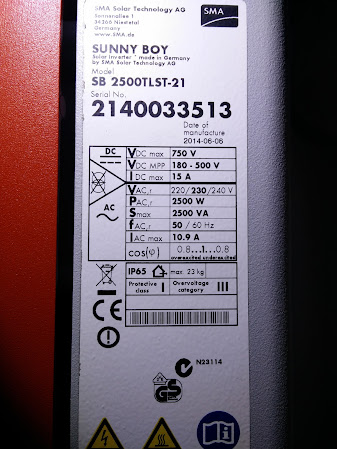
Sunny Boy 2500TL that's just 4 months tool old to include WebConnect Sunny Boy 2500TL that’s just 4 months tool old to include WebConnect

Posted in LifeHacker, Power User, Solar Power | 1 Comment »

Getting Fritz!Box LAN-LAN VPN to work for @xs4all connections despite lack of @AVM_DE support

Posted by jpluimers on 2016/01/22

This is a follow-up of my post Fritz!Box VPN error messages.

I had been failing to get a LAN-LAN connection between two xs4all Fritz!Box internet connections working, despite the description in [WayBackAdapting a VPN connection from FRITZ!Box to FRITZ!Box (LAN-LAN) | AVM International.

I was keeping the 0x1C error, and eventually contacted the customer support. At first they redirected me again to the documentation, so I replied with detailed PDFs for both Fritz!Box devices containing detailed information about:

  • both their internet connectivity
  • both their internal network settings
  • both their error logs
  • both their VPN configuration (including LAN-LAN and personal entries)

I got a reply back that – paraphrased – went like “We cannot provide network-administration-support, but VPN support of Fritz!Box in general works fine, so please read these pages”:

Given that they knew both connections were xs4all (which out-of-the-box doesn’t firewall), the PDFs didn’t indicate any firewall configuration and support not asking if the individual VPN connections worked (they do) but just blaming me or the Firewall is blatant, especially since they did not explain what the error codes meant.

Besides I already had read those pages and tried all the suggested solutions (more than a day work, as there are many suggested steps, Fritz!Box devices tend to reboot on many configuration change types and their DSL training is slow at best).

After the email, I went back to the drawing board based in this one twitter conversation that was partially useful (but failed to indicate more error codes and also pointed me to their email helpdesk which failed miserably).

The IKE-error 0x1C can mean that the remote IP doesn’t match the expected IP.

So I tried this:

Read the rest of this entry »

Posted in Fritz!, Fritz!Box, Hardware, Network-and-equipment, Power User | 1 Comment »