


How to prevent Google Hangouts Chrome extension from popping up for other users of the same Chrome installation? – Web Applications Stack Exchange
Posted by jpluimers on 2017/01/06
Sign out of your Hangout session on your laptop.
- Open Hangouts from the Hangouts Chrome extension
-
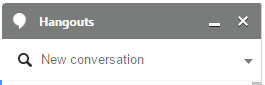
The small downward pointing triangle on the right side.
Click the dropdown menu (the small triangle on the right, just below of the X that close the Hangouts Conversation List window).
- Click Sign out of Hangouts
–jeroen

 The Wiert Corner - irregular stream of stuff
Leave a comment