The Wiert Corner – irregular stream of stuff

Jeroen W. Pluimers on .NET, C#, Delphi, databases, and personal interests

  • My badges

  • Twitter Updates

  • My Flickr Stream

  • Pages

  • All categories

  • Enter your email address to subscribe to this blog and receive notifications of new posts by email.

    Join 1,861 other subscribers

Archive for February, 2019

keyman/DevDelphiStarterCompileWrapper.pas at master · keymanapp/keyman

Posted by jpluimers on 2019/02/05

Cool: bds.exe -ns -b projectname.dproj will build a project from the command-line.

Should work in Starter Edition (and the now defunct AppMethod).

[WayBackkeyman/DevDelphiStarterCompileWrapper.pas at master · keymanapp/keyman.

Via: [WayBack] Question: is there any chance Embarcadero would reconsider and stop blocking the use of the command line compilers for Starter Edition?I run an open s… – Marc Durdin – Google+

–jeroen

Posted in Delphi, Development, Software Development | Leave a Comment »

Some commands and links from “Praktijk | Windows PE”; Softlink 1807114 – c’t magazine

Posted by jpluimers on 2019/02/04

Downloads: [WayBack] Softlink 1807114 – c’t magazine

Commands (only execute them from within a Windows PE session!):

  1. Sometimes the network does not start, so you can use the wpeutil command to start it: wpeutil initializenetwork; with wpeutil disablefirewall and wpeutil enablefirewall you can manage the firewall.Background information:
  2. Like regular Windows, net use can map shares to drive letters over a wired network connection. There is a small thing with anonymous logon, see the below links for more, and you might need a network driver that is not automatically loaded, see the next section.
    1. [WayBack] samba – Windows 10 PE Unable to map network drive anonymously – Server Fault
    2. [WayBack] WinPE Network Drivers: Initializing and adding drivers | Microsoft Docs
  3. Windows PE can load most drivers through the drvload command; ensure you have unpacked your drivers and the driver directory contains the appropriate  .inf file, then run drvload E:\driver\drivername.inf where E:\driver is where your driver files are.Background information:
  4. The manage-bde -unlock command can unlock a Bitlocker volume. There are various parameters, but the most used combination is manage-bde -unlock C: -password where C: is the drive you want to unlock and -password (or -pw) causes it to prompt for a password.Background information:
  5. To get information which kind of boot was performed (BIOS or UEFI):

    wpeutil updatebootinfo
    regedit

    Then browse toHKEY_LOCAL_MACHINE\System\CurrentControlSet\Control and check the value for PEFirmwareType: when 1, it is BIOS, when 2, it is UEFI.

    or check out

    [WayBack] Boot to UEFI Mode or Legacy BIOS mode | Microsoft Docs and run this small script:

    wpeutil UpdateBootInfo for /f "tokens=2* delims= " %%A in ('reg query HKLM\System\CurrentControlSet\Control /v PEFirmwareType') DO SET Firmware=%%B
    :: Note: delims is a TAB followed by a space.
    if %Firmware%==0x1 echo The PC is booted in BIOS mode.
    if %Firmware%==0x2 echo The PC is booted in UEFI mode.

You can execute compact.exe with the /compactos parameter from both a regular Windows installation as well as from Windows PE. From Windows PE, you need to provide an extra parameter: the drive to check.

Regular Windows:

  • compact.exe /compactos queries if it is enabled
  • compact.exe /compactos:always enables compactOS

Windows PE:

  • Compact.exe /CompactOS:Query /WinDir:E:\Windows

Background information:

–jeroen

Posted in Power User, Windows | Leave a Comment »

If the downloading PDF reports (like bank statements) from the new ABN AMRO on-line banking environment fails: try the old environment

Posted by jpluimers on 2019/02/04

Great set of steps from ABN AMRO to get into the old on-line banking environment that usually works if the new one fails downloading PDF reports:

Note that outages like these are not reported at [Archive.is] Storingen – ABN AMRO – beschikbaarheid.

Related:

–jeroen

Read the rest of this entry »

Posted in LifeHacker, Power User | Leave a Comment »

RawGit is going away: redirect your content before October 2019 (it does disappear after that)

Posted by jpluimers on 2019/02/04

[WayBack] RawGit: RawGit served raw files directly from GitHub with proper Content-Type headers.

This means you have to redirect your existing RawGit links before October 2019, and you cannot add new links on RawGit.

You might want to try alternatives, for instance this one I mentioned in 2017: raw.githack.com – like rawgit.com but supports bitbucket as well and runs on plain nginx.

[WayBack] raw.githack.com:

raw.githack.com serves raw files directly from GitHub, Bitbucket or GitLab with proper Content-Type headers.

There are some other options that RawGit itself mentions:

What you should use instead

The following free services offer fantastic alternatives to some or all of RawGit’s functionality. You may like them even more than RawGit.

RawGit source is still at [WayBack] GitHub – rgrove/rawgit: Served files from raw.githubusercontent.com, but with the correct content types., so if you want to host your own alternative you can.

It means I need to change these pages:

–jeroen


Posted in Development, DVCS - Distributed Version Control, gist, GitHub, Power User, rawgit, Source Code Management | Leave a Comment »

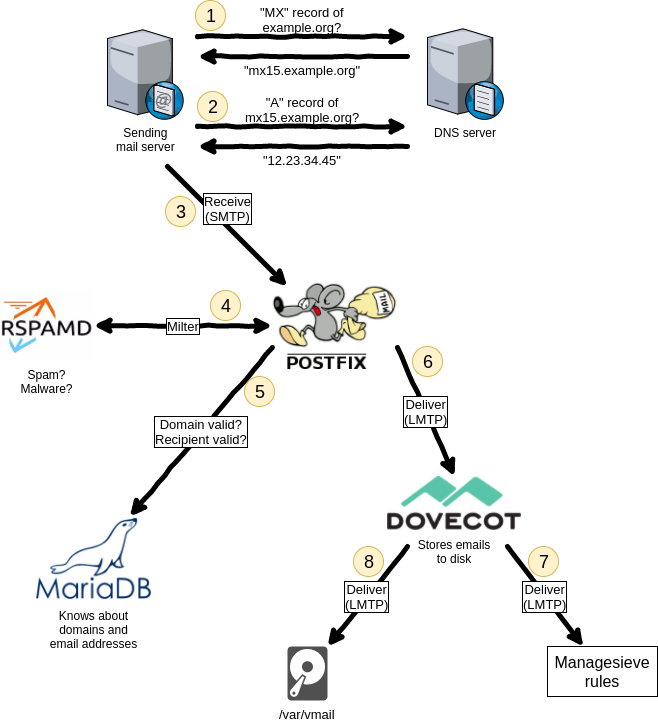
‪Dear #lazyweb, can anyone point me to a modern email server setup (just emai…

Posted by jpluimers on 2019/02/01

Summary from [WayBack]‪ Dear #lazyweb, can anyone point me to a modern email server setup (just email) with letsencrypt, some spam filter, multi domain preferably on RHEL/Cent… – Jan Wildeboer – Google+

  • many SMTP servers on the interwebs do not have proper TLS setups, so do not require remote SMTP servers to deliver email with a proper certificate
  • delivering mail via SMTP using STARTTLS with a proper certificate yourself is a good step forward
  • postfix
  • dovecot
  • greylisting (although in practice it does not make much of a difference any more)
  • fail2ban
  • dnsbl (often called rbl)
  • spamassasin
  • rspamd (supports SPF, DKIM and many others)
  • letsencrypt automation can be tough, so here is a small wrapper: [WayBack] GitHub – DrGlitchMX/update-letsencrypt: Tiny script for updating “Let’s Encrypt!” certificates from cron
  • it helps having letsencrypt and the mail server to be on one machine:
    • multidomain let’s encrypt cert that has my webserver name and the mailserver in the Subject Alternative Names field. As both are on the same machine certbot can automatically update it and I just point Postfix and Dovecot to the LE files.
  • Hans-Martin Mosner SMTP as-is is just not suitable for the kind of decentralized mail that you would prefer. You need some mechanism to determine which mail senders to trust and which not. Cryptography is suitable at the MUA level and should be used much more, but at the MTA level, TLS for privacy and SPF(bleh) or DKIM(meh) for sender domain authentication are basically your only weapons -much too weak. The PGP web of trust must be considered a failed experiment – who of your mail contacts uses PGP properly or at all? Ironically the only secure messaging solutions for the masses are centralized.

Things to do:

  • find a proper multi-MX fallback setup guide for postfix

–jeroen

Read the rest of this entry »

Posted in *nix, *nix-tools, Communications Development, Development, Internet protocol suite, postfix, Power User, SMTP | Leave a Comment »

Local Guides Connect – Help Desk – Local Guides Connect

Posted by jpluimers on 2019/02/01

Reminder to self: Local Guides Nederland moved their [WayBack] G+ community over to [WayBackLocal Guides Connect – Help Desk – Local Guides Connect which is part of [WayBack] Local Guides Connect and powered by [WayBack] Powered by Lithium | Lithium.

Since that is not part of any other social media platform I subscribe to, I will likely only see new stuff when I actively go to that place: hopefully that is more than once a year.

–jeroen

Posted in G+: GooglePlus, Google, GoogleMaps, LifeHacker, Local Guides, Power User | Leave a Comment »

Kristian Köhntopp – Pluspora

Posted by jpluimers on 2019/02/01

Reminder to self:

I was https://plus.google.com/+KristianKöhntopp/ and it was fun while it lasted.This is an active profile, and not a reshare target.

[WayBack] Kristian Köhntopp

And:

I still need to find a good Android app that handles sharing (I think that is called intent handling in Android land), OS based notifications and easier small screen navigation than the mobile web-site.

–jeroen

Read the rest of this entry »

Posted in Pluspora, SocialMedia | Leave a Comment »

Posted by jpluimers on 2019/02/01

For my memory:

What’s new in this update:

It’s time for the first update of the year! We appreciate all your comments sent to us through the App Store, in-app feedback and email; and continue focusing on making this app better with each release.

In this version we addressed the following issues:

  • Added support for the AVC (420 and 444) codec, available when connecting to current versions of Windows 10.
  • In “fit to window mode”, a window refresh now occurs immediately after a resize to ensure that content is rendered at the correct interpolation level.
  • Fixed a layout bug that caused feed headers to overlap for some users.
  • Cleaned up the Application Preferences UI.
  • Polished the Add/Edit Desktop UI.
  • Made lots of fit and finish adjustments to the Connection Center tile and list views for desktops and feeds.

Please continue to send us feedback. We read it all and factor it into our planning. If you encounter any errors, you can always contact us via Help > Report an Issue.

NOTE: There is a bug in macOS 10.14.0 and 10.14.1 that can cause the “.com.microsoft.rdc.application-data_SUPPORT/_EXTERNAL_DATA” folder (nested deep inside the ~/Library folder) to consume a large amount of disk space. To resolve this issue, delete the folder contents and upgrade to macOS 10.14.2. Note that a side-effect of deleting the folder contents is that snapshot images assigned to bookmarks will be deleted. These images will be regenerated when reconnecting to the remote PC.

Read the rest of this entry »

Posted in Apple, Mac OS X / OS X / MacOS, Power User, Remote Desktop Protocol/MSTSC/Terminal Services, Windows | Leave a Comment »