Posted by jpluimers on 2019/03/29
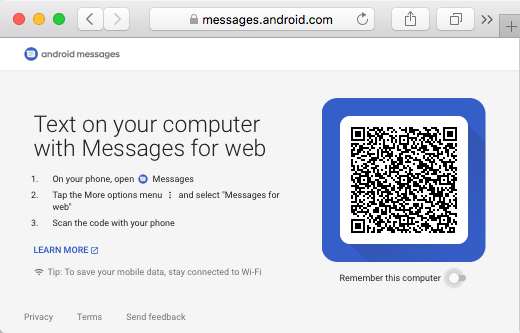
I have been a long-time PushBullet user, but I bumped into an alternative if you just want to send SMS from a PC using a web browser through your Android Phone.
You will miss out all the other neat PushBullet features (like clipboard support), but it does work:
There is even a Mac warpper for it:
–jeroen
Posted in Android Devices, Power User | Leave a Comment »
Posted by jpluimers on 2019/03/29
I had a 1.5 TB SATA disk with VMFS5 created on ESXi 5.1 that would not want to mount on ESXi 6.5 automatically, not even after a rescan, or fresh boot, so I did this:
[root@ESXi-X10SRH-CF:~] esxcfg-volume --help
esxcfg-volume
-l|--list List all volumes which have been
detected as snapshots/replicas.
-m|--mount Mount a snapshot/replica volume, if
its original copy is not online.
-u|--umount Umount a snapshot/replica volume.
-r|--resignature Resignature a snapshot/replica volume.
-M|--persistent-mount Mount a snapshot/replica volume
persistently, if its original copy is
not online.
-U|--upgrade Upgrade a VMFS3 volume to VMFS5.
-h|--help Show this message.
[root@ESXi-X10SRH-CF:~] esxcfg-volume --list
Scanning for VMFS-3/VMFS-5 host activity (512 bytes/HB, 2048 HBs).
VMFS UUID/label: 59a5306c-a8793061-4a23-001f29022aed/ST1500LM0032D9YH148-backup
Can mount: Yes
Can resignature: Yes
Extent name: naa.5000c5002dba6642:1 range: 0 - 1430527 (MB)
Scanning for VMFS-3/VMFS-5 host activity (512 bytes/HB, 2048 HBs).
VMFS UUID/label: 532cd010-6e8c01d1-45be-001f29022aed/Raid6SATA
Can mount: Yes
Can resignature: Yes
Extent name: naa.600605b00aa054a0ff000021022683ae:1 range: 0 - 1830143 (MB)
[root@ESXi-X10SRH-CF:~] esxcfg-volume -m 532cd010-6e8c01d1-45be-001f29022aed/Raid6SATA
No matching volume 532cd010-6e8c01d1-45be-001f29022aed/Raid6SATA found!
[root@ESXi-X10SRH-CF:~] esxcfg-volume --mount 532cd010-6e8c01d1-45be-001f29022aed
Mounting volume 532cd010-6e8c01d1-45be-001f29022aed
Based on: [WayBack] Mount VMFS Datastore – via GUI or via CLI [Guide] – ESX Virtualization
–jeroen
Posted in ESXi5.1, ESXi6.5, Power User, Virtualization, VMware, VMware ESXi | Leave a Comment »
Posted by jpluimers on 2019/03/29
When connecting from my Mac to my ESXi rig, some commands (especially less) show this output:
WARNING: terminal is not fully functional
So I created this alias to connect from my Mac to the internal address of my ESXi rig:
alias ssh-esxi-X10SRH-CF-internal='TERM=xterm ssh -p 22 root@192.168.71.91'
The trick is the bold part: TERM=xterm (which you can also replace by export TERM=xterm; if you want future ssh sessions to use the same [wayback] TERM setting).
The reason is that the Mac defines the TERM variable as containing xterm-256 which is defined on the Mac itself, but ESXi has a hard time coping with it.
Some Mac OS and Xcode combinations had a problem with xterm-256 not being present ([WayBack] macos – Terminal strangeness after installing Xcode on Lion – Super User), but this isn’t the case on my system:
$ ls -alh `find /usr/share/terminfo | grep 'xterm-256color'`
-rw-r--r-- 1 root wheel 3.2K Jul 30 2016 /usr/share/terminfo/78/xterm-256color
On the Mac you really want to use xterm-256color as it looks way better than xterm-color or xterm: [WayBack] linux – What is the difference between xterm-color & xterm-256color? – Stack Overflow (thanks [WayBack] Chris Page!)
It seems I already did something similar on ESXi itself to get esxtop working: ESXi: when esxtop shows garbage. That was on the ESXi side and works as well for this problem too.
However, it is a bit harder to have a script run during ESXi boot time that sets this, so it is easier to fix this on the Mac side.
It works for all OS X and ESXi versions I’ve tested so far.
–jeroen
Posted in *nix, Apple, ESXi5.1, ESXi5.5, ESXi6, ESXi6.5, iMac, Mac, Mac OS X / OS X / MacOS, Mac OS X 10.4 Tiger, Mac OS X 10.5 Leopard, Mac OS X 10.6 Snow Leopard, Mac OS X 10.7 Lion, MacBook, MacBook Retina, MacBook-Air, MacBook-Pro, MacMini, macOS 10.12 Sierra, OS X 10.10 Yosemite, OS X 10.11 El Capitan, OS X 10.8 Mountain Lion, OS X 10.9 Mavericks, Power User, Virtualization, VMware, VMware ESXi | Leave a Comment »