


how to install OS remotly using Supermicro IPMI? – Server Fault
Posted by jpluimers on 2019/05/31
I wasn’t aware that IPMI more recent than 3.3 also supports virtual media, but in retrospect it’s very logical it does. When managing remote machines, you don’t walk up to it to switch physical media (:
Worked splendid on my X10SRH-CF based server, and even supports SMB based network shares.
The how-to is very simple, steps are for instance at these links:
- [WayBack] centos – how to install OS remotly using Supermicro IPMI? – Server Fault
- [WayBack] How to map a network share to boot from ISO, moving Supermicro Java iKVM to browser-only HTML5 iKVM | TinkerTry IT @ Home
- [WayBack] Mounting IPMI virtual media – Help Center (Java based, which you don’t really need, but has better keyboard support).
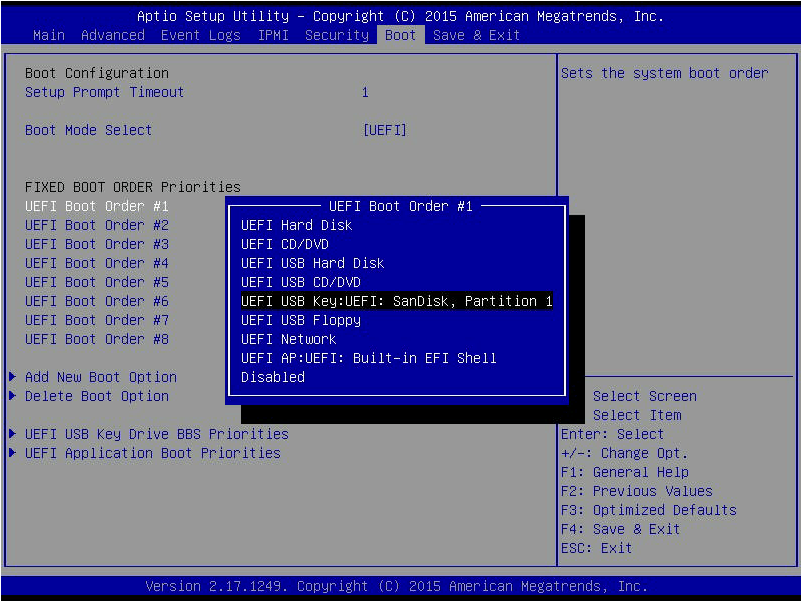
Note: the for IPMI mounted ISO images, I found out that they will not work in UEFI mode and that you have to switch your BIOS back to LEGACY boot mode:
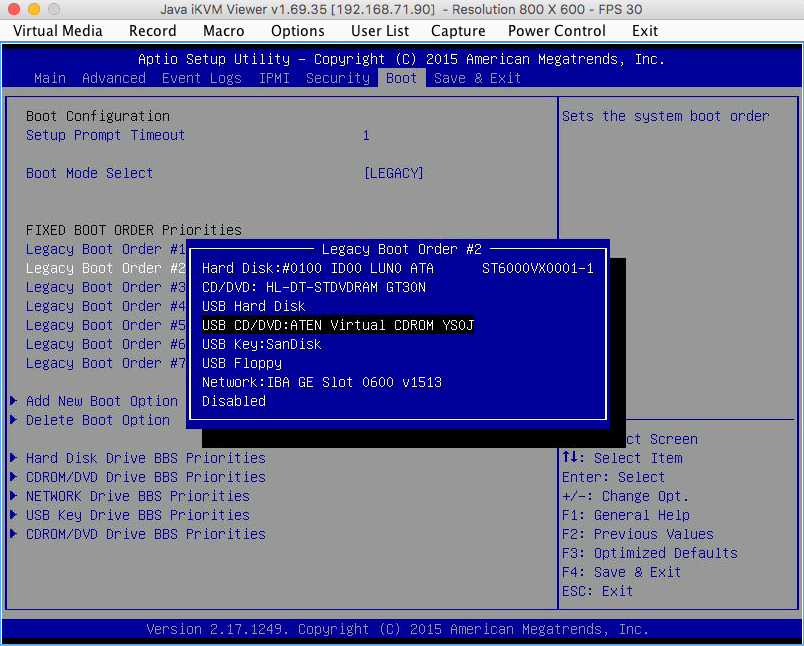
In EUFI mode, it fails to recognise the mounted ISO image:
–jeroen
Video by TinkerTry:

 The Wiert Corner - irregular stream of stuff
Leave a comment