


Some PlantUML links I needed for complex component diagram editing
Posted by jpluimers on 2020/08/18
A while ago, I had to create a bit more complex component diagrams than the simple ones I used to create in PlantUML.
Some links that helped me:
- Linking between packages:
- a
- Note I still do not understand why I cannot name a package like
cloud [Back Office] as BO { .... }
- Note I still do not understand why I cannot name a package like
- a
- Class diagrams have [WayBack]
packagestyles (Node,Rectangle,Folder,Frame,Cloud,Database); component diagrams have various grouping keywords (package,node,folder,frame,cloud,database) which you can nest.- Note you can perform
[Component Description] as ComponentName, but notdatabase [Database Description] as DatabaseName.
- Note you can perform
- For a tool that does automatic lay-out, influencing the lay-out is always a bit of pain, see for instance:
- [WayBack] General and common command to handle graphic layout in diagrams.
- Comments (
'),header/footer,scale(for zooming),title,caption,legend - via [WayBack] Restricting the width of diagrams – PlantUML Q&A
- Comments (
- [WayBack] PlantUml define relative position of components – Stack Overflow
- [WayBack] class diagram layout
togetherandhidden(only for left to right and top to bottom relations)
- [WayBack] class diagram layout
- [WayBack] PlantUML Pleasantness: Layout Elements With Hidden Lines – Messages from mrhaki:
' Layout Logging under BackendClient

BackendClient -[hidden]- Logging
- You can even
hidecomponents: [WayBack] Hide function in components diagrams – PlantUML Q&A - Lots of visual settings can be configured using
skinparamas explained in [WayBack] Changing colors and fonts. - Even more advanced are
- [WayBack] templates/plantuml/class-diagram-tips.md – mark.george/templates: Controlling Class Lay-out as part of [WayBack] templates/plantuml at master – mark.george/templates and – next to many other tips – shows
NodeSepandRankSeplike in [WayBack] It is possible to decrease gab between elements – PlantUML Q&A - [WayBack] PlantUML Pleasantness: Align Elements With Line Length – Messages from mrhaki (not 2 but 3 hyphens: –> into —> to push one level down); it has a few other nice more generic tips; see below.
- Some [WayBack] Class Diagram syntax and features can also be applied in [WayBack] Component Diagram syntax and features
- [WayBack] templates/plantuml/class-diagram-tips.md – mark.george/templates: Controlling Class Lay-out as part of [WayBack] templates/plantuml at master – mark.george/templates and – next to many other tips – shows
- Not sure I’m ready for this, as I have been living include file and macro nightmares in other environments: [WayBack] Use the preprocessor
- [WayBack] PlantUML in a nutshell: Open-source tool that uses simple textual descriptions to draw UML diagrams.
You can add notes:
- to elements at a certain position (using
note left of elementName,note right of ..., etc) - the position is only applied when the note is within the same group as the element (otherwise the position is not taken into account)
- you cannot add notes to groups, but the first added
note(not bound to any element) is usually close to the group name: [WayBack] Note at package not class – PlantUML Q&A [Archive.is]
- to elements at a certain position (using
- [WayBack] Grouping and Positioning of Packages/Components: Having Issues – PlantUML Q&A: it is possible to link to/from packages, but their names need to be globally unique.
package PPP { [AAA] [BBB] }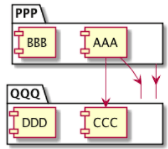 package QQQ {
[CCC]
[DDD]
}
' Linking between packages
PPP --> QQQ
'Linking a component to a package
AAA --> QQQ
'Linking a component to another component
AAA --> CCC
package QQQ {
[CCC]
[DDD]
}
' Linking between packages
PPP --> QQQ
'Linking a component to a package
AAA --> QQQ
'Linking a component to another component
AAA --> CCC - You can use UML2 style ([WayBack] Component Diagram syntax and features: components and interfaces look different),
but many people still like UML1 better:
UML2 style examples for skinparam that are equivalent:
skinparam component {
  Style uml2
}
skinparam { componentStyle uml2 }
Styling
- [WayBack] Choosing colors has become easier using
@startuml

colors

@enduml skinparamare implemented in [WayBack] plantuml/SkinParam.java at master · plantuml/plantuml · GitHub where you can find these interesting parts:- the function
getPossibleValuereturns the set of global setting names - The
Defaultprefix out of the ones below leads to loads of permutations
(later I found out it is way easier to find them usingjava -jar plantuml.jar -language):result.add("DefaultFontName");
result.add("DefaultFontStyle");
result.add("DefaultFontSize");
result.add("DefaultFontColor");
result.add("DefaultTextAlignment");
result.add("DefaultMonospacedFontName");- replace
Defaultwith any of these to get the permutations (the ones with * also have a...StereoTypeequivalent):ActivityActivityArrowActivityDiamondActor*Agent*Artifact*Boundary*CircledCharacterClassAttributeClass*Cloud*Component*Control*Database*Entity*Folder*Footer*Frame*GenericArrowHeaderInterface*LegendNode*NoteObjectAttributeObject*PackageParticipantRectangle*Sequence[Arrow|Box|Delay|Divider|Group|GroupHeader|LifeLine|Reference|Title]StateAttributeStateStorage*Title*Usecase
- The end of that function has a few interesting tidbits as well:
-
       for (FontParam p : EnumSet.allOf(FontParam.class)) {
            final String h = humanName(p.name());
            result.add(h + "FontStyle");
            result.add(h + "FontName");
            result.add(h + "FontSize");
            result.add(h + "FontColor");
        }
        for (ColorParam p : EnumSet.allOf(ColorParam.class)) {
            final String h = capitalize(p.name());
            result.add(h + "Color");
        }
        for (LineParam p : EnumSet.allOf(LineParam.class)) {
            final String h = capitalize(p.name());
            result.add(h + "Thickness");
        }
-
- the function
mrhaki: PlantUML Pleasantness
More PlantUML Pleasantness from [WayBack] Messages from mrhaki -` PlantUML:Pleasantness:
- [WayBack] PlantUML Pleasantness: Get PlantUML Definition From PNG – Messages from mrhaki reveals the hidden meta-data of a
pngfile has the original plantUML source - [WayBack] PlantUML Pleasantness: Change Line Style And Color – Messages from mrhaki with in-line styling (as opposed to
skinparamstyling) - [WayBack] PlantUML Pleasantness: Using Current Date – Messages from mrhaki indicates the
%date%macro can take a parameter formatting both date and time. - [WayBack] PlantUML Pleasantness: Check If PlantUML Is Up To Date – Messages from mrhaki demonstrates
checkversionwhich you can run from both the command-line and inside a diagram - [WayBack] PlantUML Pleasantness: Generate Graphical Version Information – Messages from mrhaki uses
versionwhich is a kind of easter egg, but is also used when plantUML cannot render something properly and wants to throw a bug report - [WayBack] PlantUML Pleasantness: Create A Sudoku :) – Messages from mrhaki with the
sudokueaster egg - [WayBack] PlantUML Pleasantness: Include Partial Content From Files – Messages from mrhaki shows each
startuml(id=Name)can be referenced by name and number - [WayBack] PlantUML Pleasantness: Customize Stereotype Styling – Messages from mrhaki
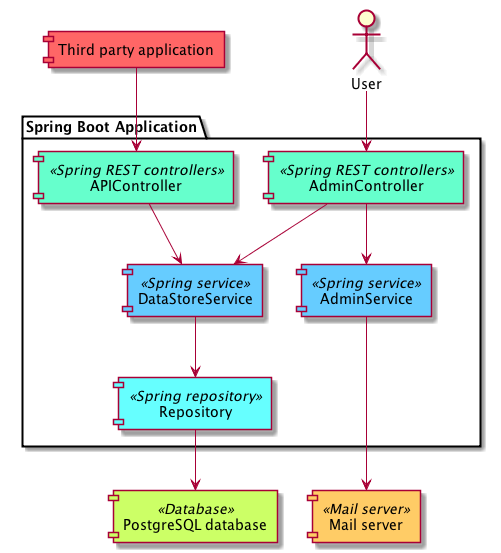 [WayBack] PlantUML Pleasantness: Keeping Elements Together – Messages from mrhaki using a
 together { ... }block which works for both class and component diagrams. - [WayBack] PlantUML Pleasantness: No Shadows In Diagrams – Messages from mrhaki:
skinparam shadowing false - [WayBack] PlantUML Pleasantness: Diagrams In Black And White – Messages from mrhaki:
skinparam monochrome truefor black/grey/white (often rendered better than a black and white printer does) - [WayBack] PlantUML Pleasantness: Align Elements With Line Length – Messages from mrhaki
mrhaki: PlantUML
More PlantUML from [Archive.is] Messages from mrhaki: PlantUML:
- [WayBack] PlantUML Pleasantness: Using The Built-in Icons – Messages from mrhaki besides creating your own iconic sprites (see below), you can use the built-in open source ones from [WayBack] Open Iconic, a free and open icon set.
- [WayBack] PlantUML Pleasantness: Creating Our Own Sprites – Messages from mrhaki: if you want to go fancy with
hexor (compressed)base64encoded monochrome sprites, you can generate the code from apngfile with a specific number of grey levels (4,8or16for hex,4z,8z,16zfor base64) usingplantuml -encodesprite 16 HexagonSprite.png - [WayBack] PlantUML Pleasantness: Use Gradients In Diagrams – Messages from mrhaki: like a single colour, but with two where the separator indicates the gradient direction:
/: top left to bottom right\: bottom left to top right|: left to right-: top to bottom
- [WayBack] PlantUML Pleasantness: Align Multi-line Label Text – Messages from mrhaki: since PlantUML uses GraphViz for generating the graphics, you can use these alighments:
\lfor left\nfor center\rfor right
–jeroen

 The Wiert Corner - irregular stream of stuff
Leave a comment