


When Microsoft download URLs time out: check if it other IP addresses for the same host do work fine (it might be a regional Microsoft CDN issue)
Posted by jpluimers on 2024/03/28
A while back, early in the Wednesday morning after Patch Tuesday I performed regular updates of all the systems noticing some updates failed because timeouts on the Microsoft download servers.
Note I perform the manual steps on Wednesday as Patch Tuesday as it starts at 10:00 AM PST which is in the evening in Amsterdam. The automated steps are automated and kick in when Microsoft tells the Windows machines to update themselves.
See [Wayback/Archive] Security Update Guide FAQs
Microsoft schedules the release of security updates on “Patch Tuesday,” the second Tuesday of each month at 10:00 AM PST.
Depending on time zone(s) in which the organization operates, IT pros should plan their deployment schedules accordingly. Please note that there are some products that do not follow the Patch Tuesday schedule.
I posted a gist and a Tweet, but didn’t immediately thought of a good resolution so I postponed that until Thursday and found it:
[Wayback/Archive] Jeroen Wiert Pluimers on Twitter: “It was an unfortunate coincidence where the Microsoft CDN had issues right after Patch Tuesday: … It is resolved now, but in the future you can edit your hosts file (requires Windows admin rights) then choose the IP address of another download server.”
These comments by [Wayback/Archive] Jeffrey van der Stad pinpointed the actual problem and provided a nice workaround [Wayback/Archive] Visual Studio Installer “Checking for updates” endlessly – Visual Studio Feedback:
The Visual Studio blob storage is timing out. @microsoft Have you tried turning it off and on again?Region: Multiple locations in The Netherlands/Western Europe.GET https://download.visualstudio.microsoft.com/download/pr/dc2793e9-7b80-4f11-9e33-85833e8921a6/dd85adbebd32c2659167c4959b057620824f255683aa4a37ba4634d94ea4cbfd/VisualStudio.17.Release.chman HTTP/1.1
Accept-Encoding: gzip,deflate
User-Agent: VS-Platform-Installer/1.0.0.0(Microsoft Windows NT 10.0.22000.0)
Host: download.visualstudio.microsoft.com
Cache-Control: no-store,no-cache
Pragma: no-cache…
It appears that the European blob storage is down.To fix this you temporary can use a different region for download.visualstudio.microsoft.com by adding a different host in you host file
- Find an IP for a different region on https://dnschecker.org/#A/download.visualstudio.microsoft.com [Wayback/Wayback]
- Edit
c:\Windows\System32\drivers\etc\hostswith admin rights- Add entry for different region. For example I have used:
93.184.215.210 download.visualstudio.microsoft.com- Save
- Retry
Don’t forget to remove this entry when you are done.
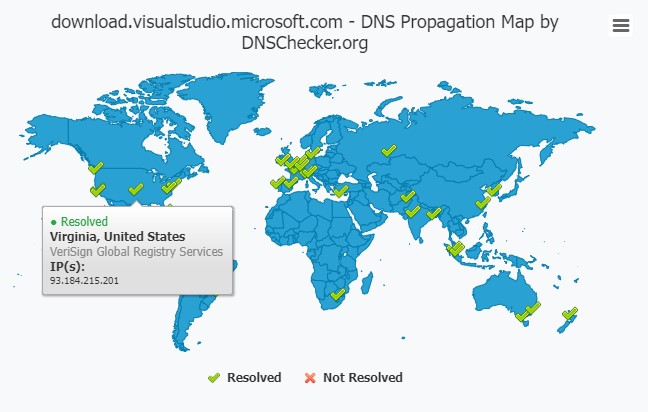
By Thursday that workaround was not needed any more since Microsoft had resolved the CDN issue.
Related
- [Wayback/Archive] Jeroen Wiert Pluimers on Twitter: “Anybody else getting time-out errors on files under … (like …)? Is it because yesterday was Patch Tuesday?”
- [Wayback/Archive] Chocolatey Software | Microsoft Visual C++ Redistributable for Visual Studio 2015-2022 14.32.31326
This isn’t a Chocolatey issue. See https://discord.com/channel… (which points to https://developercommunity…. [Wayback/Archive]
–jeroen

 The Wiert Corner - irregular stream of stuff
Leave a comment