


Generating random strings for passwords and uuids/guids on both Windows and Linux using base64 and hex encoding, plus: “Hive Systems: Are Your Passwords in the Green?”
Posted by jpluimers on 2026/02/25
Often I need to generate passwords or uuids (on some systems called guids). I usually try to do that in a relatively platform agnostic way as I use MacOS, Windows and Linux in various mixes for many reasons (for instance that I have had developed quite hefty RSI in the early 1990s of the and the best keyboard/pointing-device combination for is the MacBook built in keyboard/touchpad combination so basically MacBooks are my window to all other operating systems).
Generating randomly with a good random number generator them makes sense as for most usage, it is important that both passwords and uuids are hard to guess which means having an entropy that is as high as possible.
A cool thing about OpenSSL is that:
- most of not all systems have it installed (it was no coincidence I published Installing OpenSSL on Windows a few days ago)
- it has a very good pseudo-random number generator and as of [Wayback/Archive] OpenSSL version 1.1.1 first released in 2018 has solved the problem around [Wayback/Archive] Random fork-safety – OpenSSLWiki, see [Wayback/Archive] Our Review of the OpenSSL 1.1.1 Random Number Generation Update – OSTIF.org.
- it supports various useful output formats
hex(hexadecimal) andbase64(next to the default of octet – or by today’s naming convention byte – output)
The easiest to generate are passwords. Yes I know that password managers can do this too, but there are some systems I cannot use them on or sync between them (don’t you love the corporate world) so my aim is to use a random password generator in a platform agnostic way which usage is easy to remember.
Random base64 passwords
Most systems needing passwords have relatively simple password strength requirement like at least one of each:
- uppercase letter
- lowercase letter
- numerical digit
- symbols (usually a limited selection of the ASCII printable characters outside of the above groups)
In addition there often is a minimum length to enforce at least some form of password entropy.
Maximum password lengths are slowly but steadily disappearing and if still there they usually 30 or higher but should be reported to [Wayback/Archive] passwordistoostrong (@PWTooStrong) anyways as upper length limitations are evil.
There is a good [Wayback/Archive] Password Entropy Calculator for random passwords where you can click “Advanced mode” and specify how many symbols your set has (base64 has 64). The results there match with what I will describe below.
Why base64?
The cool thing is that the base64 encoding symbol table consists of 64 characters (actually 65 if you include padding: the symbols are A-Z,a-z,0-9,+,/ and = as output padding).
With 6 bits per character, it encodes exactly multiples 3 bytes into multiples 4 symbols (three 8 bit words and four 6 bit words are both 24 bits in size). If your input length is a multiple of 3 bytes plus 1, you get 2 padding equals signs. With a multiple of 3 bytes plus 2 you get 1 padding equals sign, see this table from the above output padding link:
Input Output Padding Text Length Text Length light work.11 bGlnaHQgd29yay4=16 1 light work10 bGlnaHQgd29yaw==16 2 light wor9 bGlnaHQgd29y12 0 light wo8 bGlnaHQgd28=12 1 light w7 bGlnaHQgdw==12 2
This means you can aim at having exactly 1 equals sign satisfying the “symbol” requirement mentioned above.
Minimum random password length
Minimum random password length has to do with the total entropy of passwords which for dictionary or word based passwords is a lot less than for random ones.
The NIST guidelines I mentioned in past blog entries (full list below, [Wayback/Archive] NIST Special Publication 800-63B is most important) give a sort of OK indication of minimum password length, but these two links give even better indication how fast CPU/GPU capacity is growing causing password strength to degrade over time:
- [Wayback/Archive] What Is a Brute Force Attack and How Long to Crack My Password (in 2021)
Now In 10 years In 20 years password 0.19 milliseconds 0.0059375 milliseconds instantly Password123 41 years 1 year 3 month 10 days 20 days Password123/ 63 millennia 1 millennium 970 years 61 years 6 month 20 days - [Wayback/Archive] TechRepublic: How an 8-character password could be cracked in less than an hour
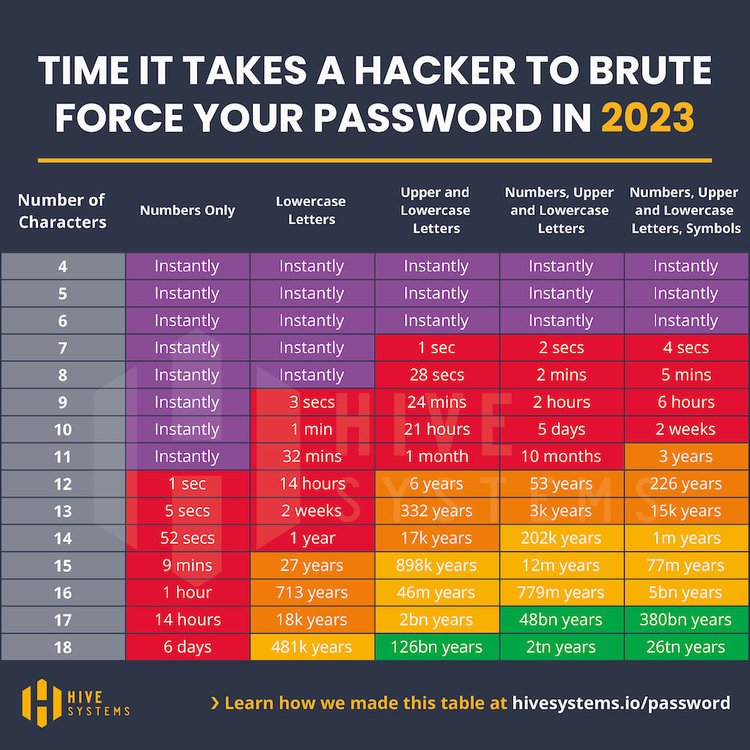
- 2023-04[Wayback/Archive] Are Your Passwords in the Green? (via [Wayback/Archive] Hive Systems on Twitter: “@jpluimers Good morning, Jeroen! Guess what? 2023 is ready!”)
It’s here! The 2023 update to the Hive Systems Password Table
…
As a result, the 2023 Hive Systems Password Table is based on the power of the RTX 4090 with 12 GPUs against MD5. We hope in future years we stop seeing the use of MD5 and push the purple back to the top!
…
-
ast time we included all QWERTY keyboard symbols but this year we stuck with the set commonly accepted on most websites and generated by most password generators ^*%$!&@# . That choice only impacts the last column of our tables.
Encoding Alias Character Range Characters ASCII Lowercase a-z 26 ASCII Uppercase A-Z 26 ASCII Numbers 0-9 10 ASCII Symbols A -!@£#$%^&*()=+_ 15 ASCIISymbols B\s?/.>,<`~|;:]}[{‘\”< /td>19 -
- 2022-03 [Wayback/Archive] Hive Systems: Are Your Passwords in the Green?
- 2020-08: [Wayback/Archive] Are Your Passwords in the Green? (2020) (formerly [Wayback/Archive] Are Your Passwords in the Green?)
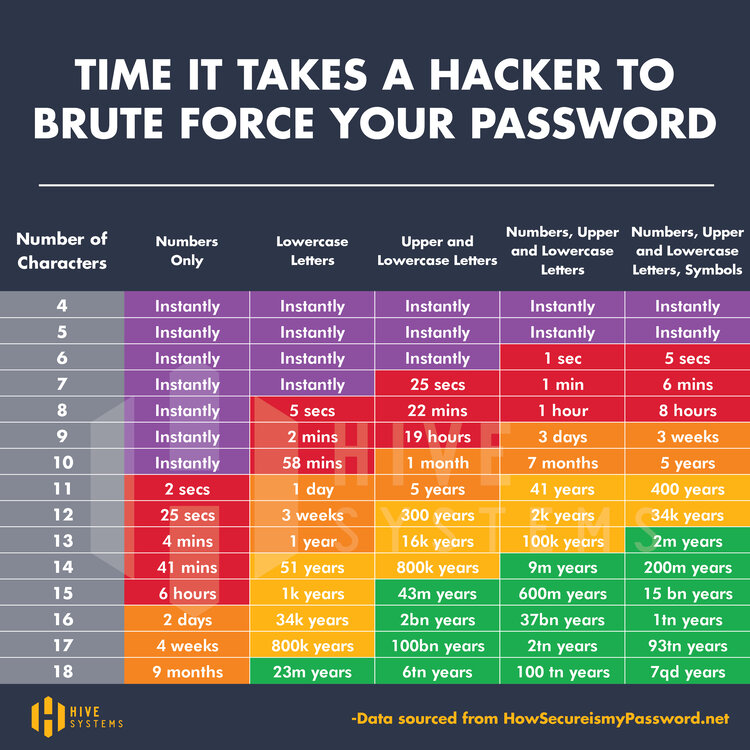 [Wayback/Archive] Hive+Systems+-+Password+Table.jpg (750×750)
based on [Wayback/Archive] How Secure Is My Password? which since then has moved to [Wayback/Archive] How Secure Is My Password? | Password Strength Checker.
- 2023-04[Wayback/Archive] Are Your Passwords in the Green? (via [Wayback/Archive] Hive Systems on Twitter: “@jpluimers Good morning, Jeroen! Guess what? 2023 is ready!”)
 [
[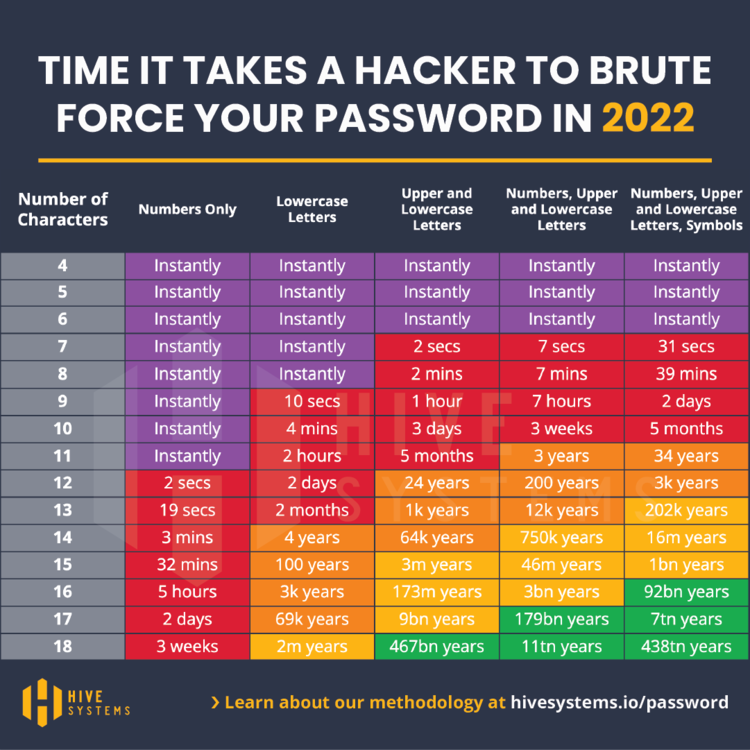 [
[In some 20 months apart, the cracking speed increased by a factor 100 which is faster than Moore’s Law (which is a doubling of transistors every 2 years)
In short, every 18-24 months (1.5 to 2 years) it will take half the time to crack the same size password.
In 2022, the 62 symbol set, which close to the 6 bits per symbol set of 64 in base64, implied a minimum required password length of 17 symbols to be in the “green” zone. By now (2026 with cracking times slashed by 4 to 8 times) you should use at least 18 base64 symbols which is 18*6 or 108 bits which is 108/8 rounded up to 14 bytes which results in 20 symbols of output.
Those 20 symbols (see examples below) are more than enough to almost always generate uppercase, lowercase and digit characters plus of course the trailing equals sign. This satisfies the above mentioned password criteria.
How much entropy is enough for which situation?
Of course the zone colours green/yellow/orange/red/purple in the graph above are not fixed in size. The exact boundaries between them vary by how critical the system is for which you are going to use the password. This is well explained in the answer to [Wayback/Archive] What’s the best length for randomly generated passwords? (Security vs. compatibility) – Information Security Stack Exchange (thanks [Wayback/Archive] Prototype700 and [Wayback/Archive] Luis Casillas):
Q
…
Is there any specific number of characters that will probably work on most sites/backend programs and that is still considered relatively safe for randomly generated passwords, so that I can just use one password generator length setting for as many sites as possible?
A
If your passwords are n characters randomly drawn, with equal probability, from a set of 95 characters (which is about all the ASCII printable characters minus space), then each character gives you about 6.6 bits of entropy, so the strength of a random password with n characters is 6.6 × n. So:
- A 10 character password gives you about 66-bit strength;
- A 12 character password gives you about 79-bit strength;
- A 14 character password gives you about 92-bit strength;
- A 20 character password gives you about 132-bit strength.
In my judgment, you could sensibly choose any of these lengths depending on the application. For example, if you use a 66-bit password for a low-value online service, your password will still be loads stronger than nearly everybody who uses that service. But if we’re talking about a password that’s used to derive an encryption key on software that you run on your own hardware, you should certainly consider something stronger.
…
Furthermore there is a difference between entropy of random symbol based passwords and wordlist based ones which is explained in [Wayback/Archive] entropy – XKCD #936: Short complex password, or long dictionary passphrase? – Information Security Stack Exchange (thanks [Wayback/Archive] Nick Chammas, [Wayback/Archive] Michael and [Wayback/Archive] Thomas Pornin)
Q
How accurate is this XKCD comic from August 10, 2011?
I’ve always been an advocate of long rather than complex passwords, but most security people (at least the ones that I’ve talked to) are against me on that one. However, XKCD’s analysis seems spot on to me.
Am I missing something or is this armchair analysis sound?
C
I think commentors here have brought up all of these points already but, for the record, here’s some elaboration by the comic’s author, Randall Munroe: ask.metafilter.com/193052/…
[Wayback/Archive] Oh Randall, you do confound me so. – computers security passwords | Ask MetaFilter
A
…
The little boxes in the comic represent entropy in a logarithmic scale, i.e. “bits”. Each box means one extra bit of entropy. Entropy is a measure of the average cost of hitting the right password in a brute force attack. We assume that the attacker knows the exact password generation method, including probability distributions for random choices in the method. An entropy of n bits means that, on average, the attacker will try 2n-1 passwords before finding the right one. When the random choices are equiprobable, you have n bits of entropy when there are 2n possible passwords, which means that the attacker will, on average, try half of them. The definition with the average cost is more generic, in that it captures the cases where random choices taken during the password generation process (the one which usually occurs in the head of the human user) are not uniform. We’ll see an example below.
The point of using “bits” is that they add up. If you have two password halves that you generate independently of each other, one with 10 bits of entropy and the other with 12 bits, then the total entropy is 22 bits. If we were to use a non-logarithmic scale, we would have to multiply: 210 uniform choices for the first half and 212 uniform choices for the other half make up for 210·212 = 222 uniform choices. Additions are easier to convey graphically with little boxes, hence our using bits.
That being said, let’s see the two methods described in the comic. We’ll begin with the second one, which is easier to analyze.
…

This last answer ware referred to from the below Q/A which also shows a still common password re-use pitfall: [Wayback/Archive] How many bits of entropy should I aim at for my password? – Information Security Stack Exchange (thanks [Wayback/Archive] Nzall for being so honest and [Wayback/Archive] Tom Leek for the answer)
Q
I mainly use 2 passwords: 1 is a 4 word full lowercase passphrase of 18 letters long which I use wherever possible. The other is basically 3 words and a digit with the first word in full uppercase and only 14 digits long. I use this whenever the first passphrase is not valid due to length or character set constraints. the words are fairly common (top 5000 words on popular TV shows).
I’ve calculated the entropy for both passwords using http://rumkin.com/tools/password/passchk.php. the entropy for both passwords is about equal at 68 bits, give or take half a bit.
…
A
Password meters are no good. Well, that’s a bit simplistic, so let me say it in more details: a “password meter” application like the one you used is mindless and generic; what it measures is the effort of breaking your password, using the mindless and generic strategy that the password meter author thought of. In particular, that password meter system has no idea that your passwords have been generated by assembling words taken randomly from a short list. However, an attacker who is intent on breaking your password will know that, and adapt: you just wrote it on a public forum, so it has become public information.
A correct entropy computation does not work over the actual password value, but over the process by which the password was generated. We simply assume that the attacker is aware of the process, and knows all of it except the actual random choices. With 4 words from a list of 5000, you get one password in a set of 50004 with uniform selection probability (that’s an important assumption), so the entropy here is 49.15 bits (because 249.15 is approximately equal to 50004). With 3 words, you get 36.86 bits. For more on entropy calculation, see this answer.
…
The “magic” openssl rand password generation command
The cool thing about 14 bytes is that it is 3*4+2 bytes leading into a single equals sign for padding:
C:\temp>openssl rand -base64 14
41C1gD+wOQlzERHqlqo=
IT works equaliy well on inux and MacOS:
[me@RMBPro1TB:~] $ openssl rand -base64 14
EO3GRdwQgLndjjvlfpg=
and Linux:
me@lnxvm:~> openssl rand -base64 14
8yDlgNRYr6g7uYf5DjM=
For longer passwords, there is one little artefact that you have to take into account: OpenSSL limits itself to 64 characters output of base64 encoded text per line: longer base64 output gets split to a new-line after each 64 characters which is 64*8 or 384 bits or 48 bytes.
To get at least one equals sign you have to go for 47 (315+2 getting one equals sign) or 46 (315+1 getting two equals signs):
C:\temp>openssl rand -base64 46
29oEKRn0ifDPlGn1LpzvwIuLA8Dlxga34qq8X8Cd4svWNRG9f7Mm+TmjdQ4oEQ==

C:\temp>openssl rand -base64 47
T+T8JvBfJgEHfQNUoLzUCX+lmBSCLC4IvkPw/T06PMTzZd9as1errBa4NNMPchU=

C:\temp>openssl rand -base64 48
rk+5DVb9c4lWgcwLWDKZlXd17566gIxRYRJSxAesoVzYwxsbCB3d6tqODOfU2xUe

C:\temp>openssl rand -base64 49
2FxKSSQT85iIUu8At2ravxACe6erueS9UylDEddaJJ5C2JMPhziljgfSTwsyRUuO
og==
This likely means that OpenSSL uses the 1993 [Wayback/Archive] RFC 1421 – Privacy Enhancement for Internet Electronic Mail: Part I: Message Encryption and Authentication Procedures variety of base64 instead of the more recent 2006 [Wayback/Archive] RFC 4648 – The Base16, Base32, and Base64 Data Encodings variety (see the Base64: variants summary table). My guess is that OpenSSL (which started in 1998 and is a fork of the 1995 based SSLeay) does this for backward compatibility as OpenSSL is very strong in that.
When you need really long passwords, you can workaround this limitation by piping the output of openssl rand 49 or larger through an openssl enc like this:
C:\Users\jeroenp\AppData\Local\Temp>openssl rand 49 | openssl enc -base64 -A
blCK0Okfoez+Jei3toDnS9MoEHot8EGbO7bnNEP5ynZLDIKfNBDtPHBLB+OVCuqrPA==
The trick here is the -A option which puts all base64 output on one line.
This Q/A helped me getting the above solution started: [Wayback/Archive] password – How to generate a random string? – Unix & Linux Stack Exchange (thanks [Wayback/Archive] landroni, [Wayback/Archive] 400 the Cat, [Wayback/Archive] zentechinc, [Wayback/Archive] ZoFreX and [Wayback/Archive] asynts)
Q
I would like to generate a random string (e.g. passwords, user names, etc.). It should be possible to specify the needed length (e.g. 13 chars).What tools can I use?A
I am using theopensslcommand, the swiss army knife of cryptography.openssl rand -base64 12oropenssl rand -hex 12C
This answer deserves more upvotes. urandom, pwgen, gpw, etc may or may not be available on your system; also in different environments, a policy that works on one may not work on another. It would be a pretty dysfunctional setup to not have openssl.
C
Note that the manual says
openssl randis a cryptographically secure pseudo random number generator (CSPRNG).C
You probably want to use
openssl rand 64 | openssl enc -A -base64for longer strings, otherwise it will cut of at 80 characters because of backward compatibility with old terminals.
Another interesting approach is to seed OpenSSL with some words to generate a master password. I need to think about this, as I am not sure how safe this seeding is. See [Wayback/Archive] security – How to create strong passwords in Linux? – Unix & Linux Stack Exchange (thanks [Wayback/Archive] Gasuma and [Wayback/Archive] xenoterracide)
Q
I wonder how I can create strong passwords on Linux (for both normal and admin users) and if there are specific programs to do that.
A
I use a non random, but is varied enough for all attack purposes… master password, and last pass to generate other passwords. Here’s how I generate the master password.echo -n "some seed" | openssl dgst -binary -sha1 | base64 | sed -e 's/.\{4\}/& /g'and the outputH1sI Wpbj JE2P CdVJ A1qb 9B/e u7M=now just pick a few of the sections and make a password, rearrange them, leave some out, add a character or 2 to make it as good as random. As long as you can remember your seed you can regenerate this, and recover your password (so long as you don’t make too many modifications)
Random hex uuids
I marked the above password generation as simple because the OpenSLL commands are relatively easy.
uuids have less requirements, but are harder to generate, so let’ss start with these two parts from the Wikipedia uuid page:
A universally unique identifier (UUID) is a 128-bit label used for information in computer systems. The term globally unique identifier (GUID) is also used.
In its canonical textual representation, the 16 octets of a UUID are represented as 32 hexadecimal (base-16) digits, displayed in five groups separated by hyphens, in the form 8-4-4-4-12 for a total of 36 characters (32 hexadecimal characters and 4 hyphens). For example:
123e4567-e89b-12d3-a456-426614174000xxxxxxxx-xxxx-Mxxx-Nxxx-xxxxxxxxxxxxThe four-bit M and the 1- to 3-bit N fields code the format of the UUID itself.
Generating the 16 octets in 32 hex symbols is easy using OpenSSL:
C:\temp>openssl rand -hex 16
ae3f65ff4f9a60708b3bd1d796cd54ef
Splitting the hex into uuid/guid format
Now the generated string needs to be split into these parts of 8, 4, 4, 4, and 12 symbols to be like
ae3f65ff-4f9a-6070-8b3b-d1d796cd54ef
An ubiquitous text search/replace tool on MacOS and Linux is sed. It is also relatively easy to install on Windows (that’s why I wrote Chocolatey Software | GNU sed recently).
I saved two examples of sed compatible regular expressions to convert the hexadecimal output to:
- uuid format
ae3f65ff-4f9a-6070-8b3b-d1d796cd54ef: [Wayback/Archive] regex101: build, test, and debug regex: areUJl/1
s/(........)(....)(....)(....)(............)/\1-\2-\3-\4-\5/g - guid format
{ae3f65ff-4f9a-6070-8b3b-d1d796cd54ef}: [Wayback/Archive] regex101: build, test, and debug regex: 9NmFU1/1
s/(........)(....)(....)(....)(............)/{\1-\2-\3-\4-\5}/g
Note on the regex language here:
- The default regex101 “PCRE2 (PHP >=7.3)” format uses the
sed -r(extended expression) incompatible$prefix for substitution - The default regex101 “PCRE (PHP <7.3)” format uses the
sed -r(extended expression) compatible/prefix for substitution - The default regex101 “Python” format uses the
sed -r(extended expression) compatible/prefix for substitution
The hex numbers in the above sed examples come from the [Wayback/Archive] Random Hex Number Generator – Create Random Hex Digits – Online – Browserling Web Developer Tools.
The sed solution is based on [Wayback/Archive] bash – Split large string into substrings – Stack Overflow (thanks [Wayback/Archive] Zack, [Wayback/Archive] Kent and [Wayback/Archive] holygeek):
Q
I have a huge string likeABCDEFGHIJKLM...and I would like to split it into substrings of length 5 in this way:>1 ABCDE >2 BCDEF >3 CDEFG [...]A
sed can do it in one shot:$ echo "abcdefghijklmnopqr"|sed -r 's/(.{5})/\1 /g' abcde fghij klmno pqr…A
Would sed do it?:$ sed 's/\(.....\)/\1\n/g' < filecontaininghugestring
Combining generation and splitting
Like the password solution, this uuid generation works on Windows
C:\temp>openssl rand -hex 16 | sed -E "s/(........)(....)(....)(....)(............)/\1-\2-\3-\4-\5/g"
c2aa0a81-bc67-7374-b7d7-af6aaf9aa1b9
MacOS
[me@RMBPro1TB:~] $ openssl rand -hex 16 | sed -E "s/(........)(....)(....)(....)(............)/\1-\2-\3-\4-\5/g"
ef78a93c-3407-b4b4-b302-f7a54867776f
and Linux
me@lnxvm:~> openssl rand -hex 16 | sed -E "s/(........)(....)(....)(....)(............)/\1-\2-\3-\4-\5/g"
2d418318-05b4-684c-5083-d2eceebb3ff4
The bold portions are all the same (:
OpenSSL random links
(pun intended: these are of course not random)
- [Wayback/Archive] Command Line Utilities – OpenSSLWiki
- [Wayback/Archive] Command Line Utilities: Standard Commands – OpenSSLWiki
rand Generate pseudo-random bytes — see Random Numbers - [Wayback/Archive] /docs/manmaster/man1/openssl-rand.html
- [Wayback/Archive] /docs/man1.1.1/man1/rand.html
openssl-rand, rand – generate pseudo-random bytesSYNOPSIS
openssl rand [-help] [-out file] [-rand file...] [-writerand file] [-base64] [-hex] numDESCRIPTION
This command generates num random bytes using a cryptographically secure pseudo random number generator (CSPRNG).…OPTIONS
…
- -base64
-
Perform base64 encoding on the output.
- -hex
-
Show the output as a hex string.
…
- [Wayback/Archive] /docs/man1.1.1/man1/rand.html
- [Wayback/Archive] Command Line Utilities: Standard Commands – OpenSSLWiki
- [Wayback/Archive] /docs/manmaster/man1/openssl-enc.html
- [Wayback/Archive] /docs/man1.1.1/man1/enc.html
openssl-enc, enc – symmetric cipher routinesSYNOPSIS
openssl enc –cipher [-help] [-list] [-ciphers] [-in filename] [-out filename] [-pass arg] [-e] [-d] [-a] [-base64] [-A] [-k password] [-kfile filename] [-K key] [-iv IV] [-S salt] [-salt] [-nosalt] [-z] [-md digest] [-iter count] [-pbkdf2] [-p] [-P] [-bufsize number] [-nopad] [-debug] [-none] [-rand file…] [-writerand file] [-engine id]openssl [cipher] […]DESCRIPTION
The symmetric cipher commands allow data to be encrypted or decrypted using various block and stream ciphers using keys based on passwords or explicitly provided. Base64 encoding or decoding can also be performed either by itself or in addition to the encryption or decryption.OPTIONS
…
- -a
-
Base64 process the data. This means that if encryption is taking place the data is base64 encoded after encryption. If decryption is set then the input data is base64 decoded before being decrypted.
- -base64
-
Same as -a
- -A
-
If the -a option is set then base64 process the data on one line.
- [Wayback/Archive] /docs/man1.1.1/man1/enc.html
- [Wayback/Archive] Random fork-safety – OpenSSLWiki
- [Wayback/Archive] Random Numbers – OpenSSLWiki
- [Wayback/Archive] /docs/man3.0/man3/RAND_seed.html
- Random number generator attack – Wikipedia
- [Wayback/Archive] Base64 – OpenSSLWiki
Queries
- [Wayback/Archive] linux bash generate random string – Google Search
- [Wayback/Archive] linux bash generate password – Recherche Google
- [Wayback/Archive] linux bash generate password “seed” “openssl” – Google Search
- [Wayback/Archive] “openssl rand” – Google Search
- [Wayback/Archive] openssl prng – Google Search
- [Wayback/Archive] what password sizes can be cracked in which time – Google Search
- [Wayback/Archive] linux bash generate guid – Google Search
- [Wayback/Archive] sed split hex string into “uuid” – Recherche Google
- [Wayback/Archive] sed split hex string into “guid” – Google Search
- [Wayback/Archive] “sed” split string at position – Google Search
Large HiveSystems pictures
- 2023-04 Summary [Wayback/Archive] 2023+Password+Table-low_Square.jpg (1000×1000)
- 2022-03 Summary [Wayback/Archive] Hive+Systems+Password+Table (1081×1081)
- 2020-08 Summary [Wayback/Archive] Hive+Systems+-+Password+Table.jpg (2500×2500)
Related blog posts
I wrote about NIST password guidelines before in:
- {Updated} Linux server security checklist. #sysadmin
- Password hashing on client side is insecure · Issue #44 · meteor/meteor-feature-requests · GitHub and some bcrypt notes
You can find these guidelines at:
- [Wayback/Archive] NIST Special Publication 800-63-3
- [Wayback/Archive] NIST Special Publication 800-63A
- [Wayback/Archive] NIST Special Publication 800-63B
- [Wayback/Archive] NIST Special Publication 800-63C
–jeroen

 The Wiert Corner - irregular stream of stuff
Leave a comment