I really like non-descriptive product names. In this case it is Wombat from which its name it is hard to deduct what it does. In this case it’s Wombat from [Wayback Webrecorder (digipres.club/@webrecorder) (@webrecorder_io) / Twitter which is used by the Wayback Machine given the error messages displayed in for instance the Chrome Developer tools when displaying an archived page.
In fact, it is the key library when you look at the repository description [Wayback/Archive] webrecorder/wombat: Wombat.js client-side rewriting library.
When looking at all the [Wayback/Archive] Webrecorder repositories of the [Wayback/Archive] Webrecorder organisation, luckily only a few of them have a non-descriptive name. Too bad Wombat is one of them.
In order to function, Wombat replaces many methods that pages can use to navigate. It does that in a way that is virtually impossible to work around and this bit me a while ago when writing a Bookmarklet that would navigate out of an archived Wayback Machine and would navigate to the wrong URL:
[Wayback/Archive] Jeroen Wiert Pluimers @wiert@mastodon.social on Twitter: “I need some help with JavaScript when writing Bookmarklets: Changing location navigates to the correct URLs, but window.open goes to the wrong one (after first logging the correct one) Anyone with insights on this? … I likely miss something obvious (:”
And indeed I was missing something, the error that the Chrome Developer tools threw when opening the page:
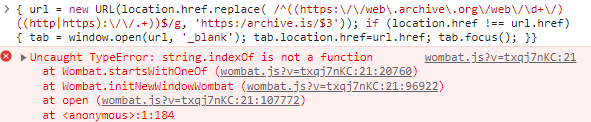
> { url = new URL(location.href.replace( /^((https:\/\/web\.archive\.org\/web\/\d+\/)((http|https):\/\/.+))$/g, 'https:/archive.is/$3')); if (location.href !== url.href) { tab = window.open(url, '_blank'); tab.location.href=url.href; tab.focus(); }}
X> wombat.js?v=txqj7nKC:21 Uncaught TypeError: string.indexOf is not a function
    at Wombat.startsWithOneOf (wombat.js?v=txqj7nKC:21:20760)
    at Wombat.initNewWindowWombat (wombat.js?v=txqj7nKC:21:96922)
    at open (wombat.js?v=txqj7nKC:21:107772)
    at <anonymous>:1:184
It should have made me curious but given the non-descriptive name I thought this wat yet another harmless small JavaScript library. Boy I was wrong!
Many thanks [Wayback/Archive] sjmulder’s gists/ [Wayback/Archive] sjmulder (Sijmen J. Mulder) who commented on my [Wayback/Archive] Bookmarklets that navigate from Wayback Machine to Archive Today: I wonder why changing location works, but open fails (it opens on the wrong address) with a series with sharp remarks on my “Could it be that the Wayback Machine overwrites window.open? If so: how can I detect that, and more importantly: how I can I work around it?.“:
-
window.open() does also not work for me and indeed Wayback Machine seems suspect. If I run window.open('https://example.com', '_blank') in dev tools on a Wayback Machine page it opens:
https://web.archive.org/web/20230612163437/http://www.example.com/
…but doing so form another website works as expected.
-
It looks like Wombat is powering this: https://github.com/webrecorder/wombat
Edit: here: https://github.com/webrecorder/wombat/blob/main/src/wombat.js#L4953
-
Wow bypassing that was a pain. All the normal URL-handling places are overwritten (as by design) and the originals are only captured in closures. But this did work!
javascript:{ window.open().location = location.href.replace(/^https?:\/\/web\.archive\.org\/web\/\d+\//, 'https://archive.is/') }
To the last one, I commented this:
Part of the initial comment to your solution lost was me quoting this bit of https://developer.mozilla.org/en-US/docs/Web/API/Window/open
Same-origin policy
If the newly opened browsing context does not share the same origin, the opening script will not be able to interact (reading or writing) with the browsing context’s content.
// Script from example.com
const otherOriginContext = window.open("https://example.org");
// example.com and example.org are not the same origin

console.log(otherOriginContext.origin);
// DOMException: Permission denied to access property "origin" on cross-origin object
// Script from example.com
const sameOriginContext = window.open("https://example.com");
// This time, the new browsing context has the same origin

console.log(sameOriginContext.origin);
// https://example.com
I refrained from trying solutions based on the window.open(...) result because of that, but now I understand when you use an empty window.open() it starts the tab at about:blank which in turn does not have any Same-origin policy restrictions. Clever!
Links from the gist comments:
Social media related:
More Webrecorder related links, as indeed the tool with it’s libraries is very powerful:
Related blog post: Bookmarklets for going from the Wayback Machine to Archive Today.
Hopefully I will find energy to extend this solution into a tool that makes my blogging life a lot easier: a kind of WordPress “Press This” which is way faster.
–jeroen
Goal:
This regular expression matches all the “From” URLs:
^((https:\/\/web\.archive\.org\/web\/\d+\/)((http|https):\/\/.+))$
Since I used groups, I can use group references in the regular expression replacement: $1 for the full “From” URL and $3 for the trailing URL within it.
These Bookmarklets prompt me the correct replacements:
javascript:{ prompt("URL", location.href.replace( ^((https:\/\/web\.archive\.org\/web\/\d+\/)((http|https):\/\/.+))$/g, 'https:/archive.is/$1') ); }javascript:{ prompt("URL", location.href.replace( /^((https:\/\/web\.archive\.org\/web\/\d+\/)((http|https):\/\/.+))$/g, 'https:/archive.is/$3') ); }
These succesfully change the location of the current tab in Chrome:
javascript:{ url = new URL(location.href.replace( /^((https:\/\/web\.archive\.org\/web\/\d+\/)((http|https):\/\/.+))$/g, 'https:/archive.is/$1')); console.log(location.href); console.log(url.href); if (location.href !== url.href) { location=url }}javascript:{ url = new URL(location.href.replace( /^((https:\/\/web\.archive\.org\/web\/\d+\/)((http|https):\/\/.+))$/g, 'https:/archive.is/$3')); console.log(location.href); console.log(url.href); if (location.href !== url.href) { location=url }}
Or without logging:
javascript:{ url = new URL(location.href.replace( /^((https:\/\/web.archive.org\/web\/\d+\/)((http|https):\/\/.+))$/g, 'https:/archive.is/$1')); if (location.href !== url.href) { location=url }}javascript:{ url = new URL(location.href.replace( /^((https:\/\/web.archive.org\/web\/\d+\/)((http|https):\/\/.+))$/g, 'https:/archive.is/$3')); if (location.href !== url.href) { location=url }}
But these, after correctly opening a new tab, navigate to the wrong URL (but log the correct URL):
javascript:{ url = new URL(location.href.replace( /^((https:\/\/web.archive.org\/web\/\d+\/)((http|https):\/\/.+))$/g, 'https:/archive.is/$1')); console.log(location.href); console.log(url.href); if (location.href !== url.href) { window.open(url, '_blank').focus(); }}javascript:{ url = new URL(location.href.replace( /^((https:\/\/web.archive.org\/web\/\d+\/)((http|https):\/\/.+))$/g, 'https:/archive.is/$3')); console.log(location.href); console.log(url.href); if (location.href !== url.href) { window.open(url, '_blank').focus(); }}
The first one, starting from https://web.archive.org/web/20230613073639/https://example.org/ wrongly opens a tab at https://web.archive.org/web/20230613073639/https://archive.is/https://web.archive.org/web/20230613073639/https://example.org/ instead of https://archive.is/https://web.archive.org/web/20230613073639/https://example.org/
Similarly the first one starts from https://web.archive.org/web/20230613090050/http://example.org/ and wrongly opens a tab at https://web.archive.org/web/20230613090050/https://archive.is/https://web.archive.org/web/20230613090050/http://example.org/ instead of https://archive.is/https://web.archive.org/web/20230613090050/http://example.org/
The second one, starting from https://web.archive.org/web/20230613073639/https://example.org/ wrongly opens a tab at https://web.archive.org/web/20230613073639/https://archive.is/https://example.org/ instead of https://archive.is/https://example.org/
Similarly the second one starts from https://web.archive.org/web/20230613090050/http://example.org/ and wrongly opens a tab at https://web.archive.org/web/20230613090050/https://archive.is/http://example.org/ instead of https://archive.is/http://example.org/
Apparently I am missing something important here, but I have no idea what (:


 The Wiert Corner - irregular stream of stuff
Leave a comment