A 2D barcode on PostNL delivered packages can contain too much recipient information (via Security.NL and Tweakers.net): is this in the documented Data Matrix and who should fix this?
Yesterday, an important question appeared at almost the same time on Tweakers.net and Security.nl. It is about 2D barcodes on some packages delivered by PostNL. Some of these – I call them Data Matrix, as that is what they are – seem to include the e-mail address of the recipient.
The posts caused some uproar, and in order for myself to understand what is going on and what questions should be asked to PostNL, I wrote this blog post.
In any case: always remove parcel labels before disposing of the parcels, then destroy the labels. This has always been good privacy practice and will stay that way forever.
Luckily, part of the information that started the discussions is also available on a Dutch Security.nl site. Here are – in order of publication – three links for reference so you can see which ones cannot be archived:
The first is a very bold claim translating to “PostNL parcels have a barcode containing your e-mail address in unencrypted form”.
The second and third are less bold. In English, they translate to that the e-mail address of the recipient can be in a Data Matrix which is presents on some parcels delivered by PostNL.
The reports do not correlate with Data Matrix picture that Tweakers.net published in their article. That picture (quoted below) originates from [Wayback/Archive] Wat doet een 2D-matrixcode? | PostNL, which in turn points to documentation that I analysed below. To summarise: the documented Data Matrix can contain up to 8, 15 or 35 characters for sender defined data. The documentation nowhere coerces senders to put an e-mail address in it, and if senders to, only relatively short e-mail addresses can fit.
Having an e-mail in a Data Matrix in a parcel for various reasons can violate GDPR, especially when the recipient is unaware of it.
Apart from some other questions I will formulate further below, the report and the comments on them raise at least two questions:
Is the reported Data Matrix the same as the officially documented one? (If so, then the sender is at fault)
If not so: who prints this additional Data Matrix and why are they on some parcels?
Before digging into more details, some important things to realise:
There is much more information in the documented Data Matrix than the 1D KIX barcode you sometimes can find on letters sent through PostNL which only contains postal code and house/po-box number plus any suffix
The documented Data Matrix codes are only used for packages sent through large volume contracts so you might not see them on packages you receive
The sender (for instance a large webshop) provides the information of the documented Data Matrix code, however poster of the original poster assumes they send it via a PostNL API¹
Part of that API information can be in the documented Data Matrix as part of the field “Available for sender” (Dutch below: “Beschikbaar voor gebruik klant”)²
PostNL mandatory keeps an on-line connections to the delivery people, so PostNL could easily retrieve the “Available for sender” information on-line
From the research below, I am starting to wonder if the Data Matrix reported in the above articles is different from the Data Matrix specified below. If so, I would love to be able to analyse a Data Matrix containing an e-mail address and asked for a sample at E-mailadres van ontvanger kan in PostNL barcode staan – Privacy en beveiliging – GoT
Want ik begin me serieus af te vragen of de Data Matrix uit de startpost wel hetzelfde is als die volgens de PostNL specificaties.
Contact type Contact type has the elements Email, SMSNr and TelNr. These fields have a dependency with each other. At least one of these three fields must be filled mandatory for certain products/ product codes (e.g. Evening/Sameday delivery, Pickup at PostNL location). Two or three can be filled as well.
Code
Description
01
Receiver
02
Sender
Remark: Please add the e-mail address of the receiver to improve the Mijn PostNL experience of your customer.
Contact type has the elements Email, SMSNr and TelNr. These fields have a dependency with each other. At least one of these three fields must be filled mandatory for certain products/ product codes (e.g. Evening/Sameday delivery, Pickup at PostNL location). Two or three can be filled as well.
Code
Description
01
Receiver
02
Sender
Remark: Please add the e-mail address of the receiver to improve the Mijn PostNL experience of your customer.
              "required": [
                "ContactType"
              ],
              "type": "object",
              "properties": {
                "ContactType": {
                  "pattern": "^\\d{2}$",
                  "type": "string",
                  "description": "Type of the contact. This is a code. Please refer to the available [Contact types](https://developer.postnl.nl/docs/#/http/reference-data/reference-codes/contact-types) for the possible values.",
                  "example": "01"
                },
                "Email": {
                  "minLength": 0,
                  "maxLength": 50,
                  "type": "string",
                  "description": "Email address of the contact. Mandatory in some cases. Either the Email or Telnr needs to be filled in for Non EU destinations. Please see [Guidelines](https://developer.postnl.nl/docs/#/http/api-endpoints/send-track/confirming/guidelines).",
                  "example": "receiver@email.com"
                },
                "SMSNr": {
                  "minLength": 10,
                  "maxLength": 17,
                  "type": "string",
                  "description": "Mobile phone number of the contact. Mandatory in some cases. Please see [Guidelines](https://developer.postnl.nl/docs/#/http/api-endpoints/send-track/confirming/guidelines).",
                  "example": "+31612345678"
                },
                "TelNr": {
                  "minLength": 10,
                  "maxLength": 17,
                  "type": "string",
                  "description": "Phone number of the contact. Either the Email or Telnr needs to be filled in for Non EU destinations. Preferably prefixed with “+” and the international dialling code.",
                  "example": "+31301234567"
                }
² PostNL 2D barcode documentation
I find the information a bit confusing, as it is spread over a few documents and the example bar codes do not match the specifications.
The data inside the Data Matrix ECC 200 uses C40 text mode containing base64 data that is deflate compressed; this might be how ECC 200 works as the barcode decoder I used worked without extra post processing
The encoded data is provided by the sender (nowadays often webshops)
De briefcode is een ééndimensionale streepjescode met een 9-cijferige unieke code aan het eind. In de code staat informatie over de aanbieder van de post. Een briefcode gebruik je als je een partij ongesorteerd aanlevert en print je altijd in combinatie met de codeerregel (bij voorkeur wordt dit onder de NAW geplaatst).
Codeerregel
Een codeerregel is een sorteercode met een unieke code per adres en afgiftepunt. Je gebruikt de codeerregel altijd in combinatie met een 2D-matrixcode of een Briefcode (bij voorkeur wordt de codeerregel onder de NAW geplaatst..
Printregel (ook wel Sorteerregel genoemd)
Je gebruikt een printregel wanneer je je partij gesorteerd aanlevert. Een printregel is uniek voor ieder poststuk en bevat informatie over de partij en de plek van het poststuk in de partij, bijvoorbeeld in welke bundel het poststuk wordt aangeleverd. De printregel eindigt altijd op de codeerregel. De codeerregel is dus onderdeel van de printregel. De printregel bij voorkeur onder de NAW plaatsen.
2D-matrixcode
Een 2D-matrixcode is een tweedimensionale barcode met daarin unieke informatie over je poststuk. Deze code is gemaakt van zwarte en witte cellen in een vierkant patroon. De informatie in dit patroon bestaat onder meer uit het identificatienummer
van je poststuk en de bestemming. Dat kunnen onze sorteermachines vervolgens gemakkelijk herkennen en lezen.
Ook wanneer een deel van je sorteercode beschadigd is. Een 2D-matrixcode print je altijd in combinatie met de codeerregel.
De 2D-matrixcode kan voor zowel gesorteerd als ongesorteerd gebruikt worden. Plaats de 2D-matrixcode bij voorkeur in de buurt van de Adreszone rekening houdend met de overige specificaties.
2D types
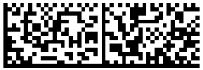
2D Type 29 (voorkeur)*
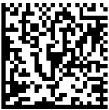
2D Type 8
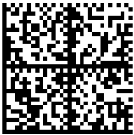
2D Type 9
Aantal modules
16 x48
26×26
32×32
Grootte module
0,5mm-0,7mm
0,5mm-0,7mm
0,5mm-0,7mm
Totale minimale grootte
8 mm x 24 mm (bij modules van 0,5 mm)
13 mm x 13 mm (bij modules van 0,5 mm)
16 mm x 16 mm (bij modules van 0,5 mm)
Totale maximale grootte
11,2 mm x 33,6 mm (bij modules van 0,7 mm)
18,2 mm x 18,2 mm (bij modules van 0,7 mm)
22,4 mm x 22,4 mm (bij modules van 0,7 mm)
Totaal aantal karakters
66 karakters
59 karakters
86 karakters
Aantal karakters voor klant
51 karakters nodig voor PostNL info zoals codeergegevens, 3S, etc. Overige aantal karakters is beschikbaar voor gebruik klant
Voorbeeld
2D Type 29
2D Type 8
2D Type 9
* Best leesbare en verwerkbare variant voor onze machines
2D-matrixcode
De barcode is een 2D-matrixcode (zie bijlage 2) welke voldoet aan de specificaties van Datamatrix type ECC200, conform ISO/IEC 16022 versie 2006. Deze datamatrix bevat Reed Solomon Error Correctie.
Tekenset: er wordt gebruik gemaakt van de C40-tekenset.
De klant kan kiezen uit 3 formaten/types van Data Matrix Type ECC200:
• Type 8 (26 x 26 modules)
• Type 9 (32 x 32 modules)
• Type 29 (16 x 48 modules)
De modulegrootte van de 2D-matrixcode dient minimaal 0,5 en maximaal 0,7 mm te zijn.
• De printkwaliteit moet overeenkomen met ISO 15415 grade 4/A of 3/B.
• Voor de modulegrootte wordt 0,5 mm geadviseerd (komt overeen met 6 dots bij 300 dpi).
De module kan vergroot worden tot maximaal 0,7 mm om aan de printkwaliteit te voldoen.
• Rondom de barcode moet een witzone worden vrijgehouden van minimaal 4x de modulegrootte.
• … Klik op ‘instellen met kolomvoorbeelden’ en stel geef per kolom aan welke gegevens in de kolom staan (naam, straatnaam, huisnummer, toevoeging etc.). Bovenaan elke rij kun je kiezen en aangeven wat er in elke rij staat.
Stap 8. Plaatsen van codeerinformatie
Vertaal nu de inhoud van de 2D-matrixcode uit je gecontroleerde adressenbestand naar een 2D-matrixcode. Dit doe je met behulp van een barcodegenerator.
Plaats de codeerregel en de 2D-matrixcode vervolgens duidelijk leesbaar en los van elkaar op het adreslabel.
…
Translated to English, these steps mean:
…
Step 7. Check and/or sort address file
1 Check settings
2 Upload address file
3 Specify the address file structure
• … specify per column which kind of information it contains (full name, street name, house number, house number addition, etc)
Stap 8. Placing the coding information
Now translate the contents of the 2D-matrixcode in the checked address file into a 2D-matrixcode using the barcode generator.
Place the coding line and the 2D-matrixcode in clear places and separately on the address label.
…
The last step implies the sender prints the Data Matrix.
[Wayback/Archive] Archive [Wayback PDF View/PDF View] is an interactive PDF file where you can navigate through the various choices to improve delivery (KIX code, 2 forms of textual encoded information, 2D-barcode information). It stays at overview level, so adds no technical information like already shared above.
Decoding the example Data Matrix codes
I have decoded all three Data Matrix codes shown above after extracting them using [Wayback/Archive] Extract PDF images – quick, online, free – PDF24 (the PDFs are public, so it is no problem to put their content in an online service; for sensitive data I would have used a locally installed pdfimages), and found there are some surprises as the Data Matrix example images do not fully adhere to the PostNL specifications:
The preferred 2D Type 29 image contains more data than allowed
The intermediate 2D Type 8 and largest 2D Type 9 images contain 1 character less than allowed
None of the “Zending ID” adhere to the track and trace code format allowed by PostNL (not even close to for example 3SKLNT123456789)
Of the right most example the “Codeerregel” field in the Data Matrix does not correspond to the “Codeerregel” line under the address
Decoded barcodes
2D Type 29 (voorkeur)*
2D Type 8
2D Type 9
2D Type 29 (voorkeur)*
Barcode
2D Type 29
2D Type 8
2D Type 9
Koninklijke PostNL B.V.
Waldorpstraat 3
2521 CA ‘S GRAVENHAGE#X331P3B#30#1302#
We support the following barcode symbologies: 1D Point of sale: UPC-A, UPC-E, EAN-8, EAN-13, GS1 DataBar (a.k.a. RSS) 1D Industrial Symbols: Code 39, Code 93, Code 128, GS1-128, Codabar, ITF-14 2D Symbols: QR Code, Data Matrix, Aztec, PDF 417
Is the report really about the documented Data Matrix used?
The Tweakers.net article implies the e-mail address can be present in the officially documented PostNL Data Matrix, but I am starting to doubt this is the same kind of Data Matrix as reported about.
These messages in the Tweakers.net thread by the original poster got me thinking:
“Dank voor uw bericht. In reactie hierop kan ik u het volgende berichten.
Verzending van pakketten wordt standaard gedaan met een 3S-barcode (streepjescode). In een erg klein gedeelte van de pakketten wordt er een 2D-barcode toegevoegd.
PostNL beoordeelt continu welke gegevens noodzakelijk zijn voor onze dienstverlening en hoe wij deze zo zorgvuldig mogelijk kunnen verwerken en beveiligen.
Op het pakket staan gegevens die noodzakelijk zijn voor een correcte bezorging en om ontvangers proactief te informeren over hun zending.
Mede naar aanleiding van uw signaal onderzoekt PostNL of aanpassingen nodig zijn gelet op de AVG -verplichtingen en zullen er indien nodig passende maatregelen worden getroffen.
Vertrouwende u hiermee te hebben geïnformeerd.
Met vriendelijke groet,
Functionaris voor de Gegevensbescherming (FG)
PostNL Holding B.V.”
Though it is against privacy rules to quote e-mail correspondence in full, it is already publicly available, so I quote it here as well. The quoted e-mail from PostNL is is nicely worded and can be summarised as “thanks for the report, we will look into it but no alarm bells for us right now”.
What is missing, is the information sent to the DPO. That could have cleared up at least a few of the questions that are now open.
Ik heb de barcodedata verder geanalyseerd en de structuur kunnen mappen op PostNL’s eigen Shipping API-documentatie (developer.postnl.nl).
Bijvoorbeeld de strings “006”, “118” en “015” in de data zijn geen sorteer- of routeringscodes, maar ProductOption-codes die PostNL zelf documenteert:characteristic 118, option 006 = avondlevering
characteristic 118, option 015 = sameday deliveryDe barcode blijkt een geserialiseerd Shipment-object te bevatten van 315 bytes, met onder andere boolean flags voor verzendopties, een 16-byte interne identifier, productopties, NAW-gegevens, en als laatste veld: het e-mailadres.
Wat hieruit blijkt is dat PostNL het volledige Shipment API-object in de barcode serialiseert — inclusief velden die duidelijk bedoeld zijn voor server-side verwerking, zoals bezorgtype en interne identifiers. Het e-mailadres zit erin als onderdeel van het Contacts-object uit de API, niet omdat het een functie heeft op het fysieke label, maar omdat het gehele object zonder filtering wordt weggeschreven.
…
This states that the reported Data Matrix has a different structure than the documented Data Matrix of which a picture was used as an example in the Tweakers.net article. The strange thing is that I cannot find any public message from the original poster to correct the picture. Indeed, the values match PostNL Shipping API, but the post does not prove causal cause (“using the Shipping API causes PostNL to print and attach to the parcel a Data Matrix containing some Shipping API fields” is implied but not proven).
Gebruik maximaal 35 karakters in een veld, tenzij hieronder anders is aangegeven. Gebruik het teken ; nooit als tekst in een veld.
YourReference
Vul een eigen referentie in van maximaal 35 karakters (optioneel)
CompanyName*
‘Bedrijfsnaam’ is enkel verplicht indien er geen ‘Achternaam’ is ingevuld
Surname*
‘Achternaam’ is enkel verplicht indien er geen ‘Bedrijfsnaam’ is ingevuld
FirstName
Vul de voornaam van de ontvanger in (optioneel)
Countrycode*
Vul het land in conform de twee letterige ISO landcode.
Ga voor een complete lijst met actuele ISO- landcodes naar http://www.iso.org
Street*
Vul de straatnaam van het ontvangstadres in
HouseNo
Vul het huisnummer van het ontvangstadres in
HouseNoSuffix
Vul de huisnummertoevoeging van het ontvangstadres in (optioneel)
Postcode*
Vul de postcode van het ontvangstadres in zonder spaties
City*
Vul de plaatsnaam (stad) van het ontvangstadres in (maximaal 255 karakters)
Email
Vul het e-mailadres van de ontvanger in. Vul je het e-mailadres in en hebt je e-mailnotificaties geactiveerd in de module notificaties, dan ontvangt deze ontvanger notificaties over de verzendstatus van zijn zending. Deze optie is alleen te gebruiken voor binnenlandse zendingen. Raadpleeg voor meer informatie de gebruikershandleiding Notificaties
MobileNumber
Vul het mobiele telefoonnummer van de ontvanger in conform
een van de volgende formaten:
‘+ Landnummer’, gevolgd door de overige cijfers
’00 landnummer’ gevolgd door de overige cijfers
Geadviseerd, dit kan de bezorging van uw Buitenlandse zendingen bespoedigen
ProductCode*
Vul de viercijferige productcode in
Delivery to PostNL
Aanbieddatum, vul je hier niks in wordt automatisch de eerstvolgende werkdag aangehouden. Notatie: dd-mm-jjjj of jjjj-mm-dd
Barcode
Vul dit veld alleen in wanneer je zelf een barcodelabel maakt en niet uit Mijn PostNL wilt ontvangen. Vul alleen de volgnummers van de barcode (niet 3S en klantcode). Begint je volgnummer met een 0? Let op dat deze dan zichtbaar is in het veld
(via celeigenschappen, selecteer keuze tekst). Dit kan alleen voor zendingen binnen Nederland. 2S-formaat en 3S-formaat : min 9 en max 11 cijfers
CODAmount
Vul indien van toepassing het gewenste remboursbedrag in.
Centen moeten in twee decimalen achter een punt of komma worden ingevuld
CODReference
Vul indien van toepassing een rembourskenmerk in van maximaal 35 karakters
InsuredValue
Vul indien van toepassing de gewenste verzekerde waarde in Euro’s in
ProductOptions
Vul indien van toepassing op het product de ‘ProductOptions’ in.
Gebruik een koppelteken – als scheidingsteken.
Een aantal voorbeelden van producten waarbij dit van toepassing is:
1430 Brief verzekerservice NL 004/002
1440 Pakket verzekerservice NL 004/002
1430 Brief met legitimatie NL 002/007
3085 Avondbezorging NL 118/006
4907 Pakket EU 2C T&T 005/025-101/012
4907 Pakket EU 2C T&T Verzekerd 004/015-101/012
4907 Pakket EU 2C T&T Verzekerd Plus 004/016-101/012
An odd thing: ProductOptions is specified to use - as separator, but the examples use /`.
What I find disturbing is that the original poster makes a quite bold claim, especially at Security.NL, but does not really substantiate that claim: causality is implied but not proven, and detailed documentation links are absent – hence the list I dug up above. This gives the audience, especially PostNL and parcel senders, little to work with, which – no matter if the issue is with PostNL or with parcel senders – stalls fixing the issue.
Een postnl doosje dat ik toevallig nog had staan heeft zowel een barcode met alleen het track-trace nummer (3Sxxx) , maar ook een heel dichte QR code met beduidend meer informatie .
QR codes kun je als “2D barcodes” zien.
En TS heeft gelijk – in de gedecodeerde data zit de bezorginformatie (ook “gewoon” leesbaar) plus mailadres.
…
This confirms there can be a dense QR code (not Data Matrix!) on a PostNL delivered package that contains encoded information on the recipient:
delivery information
e-mail address
Note that the comment does not imply this information was attached to the parcel by PostNL.
The questions
The article and posts leave a quite a few questions open.
Is the reported 2D barcode the same as the officially documented one? (If so, then the sender is at fault), and is this 2D barcode Data Matrix or QR code?
If not so: who prints this additional 2D barcode and why are they on some parcels?
Does PostNL anywhere encourage the documented Data Matrix or extra 2D barcode to contain contact information other than the delivery address (i.e. e-mail address, phone number or SMS number)?
How are the PostNL sender API and the Data Matrix related?
If the sender API causes the reported 2d barcode (be it Data Matrix, QR code or other) to be printed, how can leaking of information be prevented?
E-mailadres van ontvanger kan in PostNL barcode staan
Ik kwam er onlangs achter dat de 2D-barcode op PostNL-pakketlabels meer informatie bevat dan je zou verwachten — je e-mailadres. De data is alleen gecomprimeerd (deflate), niet versleuteld. Iedereen met basiskennis kan dit uitlezen.
WAT ZIT ER IN DE BARCODE?
De code op een PostNL-label begint met een herkenbare prefix (bijv. PNL3STUNM…) gevolgd door een blok base64-gecodeerde data. Als je die base64 decodeert en vervolgens deflate-decompressie toepast (vanaf offset 1), krijg je een binaire structuur met daarin in plain text:
Achternaam\
Voornaam\
Straatnaam + huisnummer\
Postcode\
Woonplaats\
Datum\
E-mailadres
HOE REPRODUCEER JE DIT?
Neem de lange code van een PostNL-label (de string die begint met PNL3S…). Knip het prefix eraf tot aan het base64-gedeelte (herkenbaar aan de + en = tekens en alfanumerieke karakters). Decode vervolgens:
code:
importbase64, zlibb64_data="<plak hier het base64 gedeelte>"raw=base64.b64decode(b64_data)
decompressed=zlib.decompress(raw[1:], -15)
forlineindecompressed.split(b'\x00'):
text=line.decode('utf-8', errors='ignore').strip()
iflen(text) >2:
print(text)
Je ziet dan je volledige NAW-gegevens en e-mailadres voorbijkomen.
WAAR KOMT DAT E-MAILADRES VANDAAN?
PostNL vraagt webshops actief om het e-mailadres van de ontvanger mee te sturen bij het aanmaken van een verzendlabel. In hun officiele Labelling API documentatie (https://developer.postnl.nl) staat bij het Contact type:
“Please add the e-mail address of the receiver to improve the
Mijn PostNL experience of your customer.”
Dit e-mailadres wordt vervolgens opgenomen in de gecomprimeerde data die in de barcode op het fysieke label terechtkomt. Voor bepaalde producten (avondlevering, ophalen bij PostNL-punt) is het zelfs verplicht om minstens e-mail, SMS-nummer of telefoonnummer mee te sturen.
WAAROM IS DIT EEN PROBLEEM?
1. Geen encryptie
De data is alleen gecomprimeerd, niet versleuteld. Decompressie is triviaal.
2. Meer data dan zichtbaar
Op het label zelf zie je naam en adres in leesbare tekst. Maar het e-mailadres is alleen zichtbaar als je de barcode decodeert. Een consument verwacht niet dat zijn e-mailadres fysiek op een pakketlabel staat.
3. Dataminimalisatie (AVG art. 5 lid 1c)
Het e-mailadres is niet nodig voor de fysieke bezorging. Waarom zit het dan in een barcode die iedereen kan scannen?
4. Transparantie (AVG art. 13/14)
PostNL informeert consumenten niet dat hun e-mailadres in de barcode op het pakket zit. De privacyverklaring noemt het verwerken van e-mailadressen, maar niet dat deze fysiek uitleesbaar op het pakket staan.
5. Praktisch risico
Iedereen die een foto maakt van je pakketlabel — een buurman, iemand in een sorteercentrum, een voorbijganger bij een stapel retouren — kan met een simpel script je naam, adres en e-mailadres achterhalen. Dat is een combinatie die bruikbaar is voor gerichte phishing.
WAT IK NIET HEB GEVONDEN
Ik heb uitgebreid gezocht op Tweakers, Radar-forum, Security.nl en in internationale bronnen. Er zijn wel discussies over PostNL en privacy (QR-code scannen bij pakketpunten, metadata van brieven, clipboard-uitlezing door de app), maar het feit dat het e-mailadres onversleuteld in de barcode op het pakketlabel staat lijkt nog nergens publiek beschreven te zijn.
ADVIES
Scheur altijd het label van je pakket voordat je de doos weggooit\
Overweeg bij webshops een apart e-mailadres te gebruiken voor bestellingen\
PostNL zou de data in de barcode moeten versleutelen, of op z’n minst het e-mailadres eruit moeten halen — het is niet nodig voor de bezorging
Ik ben benieuwd of anderen dit kunnen bevestigen met hun eigen pakketlabels.


 .
.

 The Wiert Corner - irregular stream of stuff

Leave a comment