The Wiert Corner – irregular stream of stuff

Jeroen W. Pluimers on .NET, C#, Delphi, databases, and personal interests

  • My badges

  • Twitter Updates

  • My Flickr Stream

  • Pages

  • All categories

  • Enter your email address to subscribe to this blog and receive notifications of new posts by email.

    Join 1,854 other subscribers

Archive for the ‘Delphi’ Category

Delphi WSDL importer compiler defines

Posted by jpluimers on 2018/05/22

As a follow-up on Delphi WSDL default importer settings, you can use these compiler defines to increase output.

Output that the built-in Wizard will never show you (that is also the reason you will not see any errors like access violations in the IDE).

TL;DR

Always use the command-line WSDL importer WSDLImp as it has the same default options as the IDE.

The command-line WSDL importer called WSDLImp does show error messages, but in case of an error still continues writing the wrong .pas file.

Syntax:

"C:\Program Files (x86)\Embarcadero\Studio\19.0\bin\WSDLImp.exe" -DD:\Playground\iECK_ImportWSDL "D:\Playground\iECK DT2.0 services v2.1.1\wsdl\ECK-DT2-CatalogService-v2.1.1.wsdl"

When debugging the code, I found out there are many conditional defines you can enable so it shows more output. Output that greatly helps to pin-point issues while importing more complex WSDL, especially when the WSDL has include or import elements.

These are the defines:

  • TRACK_MEMORY this requires the FastMM4 unit in the path
  • SHOW_XML_INFO
  • LOG_TYPES_DUMP
  • LOG_TYPES_LOOKUP
  • LOG_TYPES_READING
  • LOG_TYPES_SORTING
  • LOG_TYPES_UNWIND
  • LOG_TYPES_WRITING

The really odd thing is that there is a hidden command-line option -debug which does not automatically enable these, but does use SHOW_XML_INFO which seems enabled by default and writes an output file with extension .xml in addition to .pas, where the XML has an overview of the parsed data types.

I am going to fiddle around to see if I can enable all of the LOG_ entries from the command-line in a simple way.

When you debug the WSDLImp tool, ensure these two directories are on the unit search path:

  • $(BDS)\source\soap
  • $(BDS)\source\xml

The first is needed so the compiler can find CompVer.inc, the second so you can step through the XML handling code.

Also make sure you change the output path from $(BDS)\bin (which only works under UAC and overwrites the stock output) with something like .\$(Platform)\$(Config) (which  puts it along the .DCU files).

–jeroen

Posted in Conference Topics, Conferences, Delphi, Development, Event, Software Development | 1 Comment »

Delphi Are you familiar with “forgotten” hints? Here is a very rough example how to get rid of them…

Posted by jpluimers on 2018/05/22

Thanks for [WayBack] Are you familiar with “forgotten” hints? Here is a very rough example how to make them disappear without restarting the IDE… – Attila Kovacs – Google+

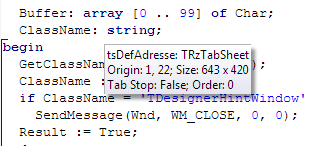
The code is centered around enumerating all windows of class TDesignerHintWindow and closing them.

These Windows happen to me a lot more in Galileo based IDEs than the classic Delphi < 8 ones.

–jeroen

Read the rest of this entry »

Posted in Delphi, Development, Software Development | Leave a Comment »

Is there any way to record a keyboard macro in the IDE?

Posted by jpluimers on 2018/05/22

Yes there is, but it only does code editor commands. It’s been there since at least 1998 (read Delphi 4), probably all 32-bit versions and maybe even the 16-bit Delphi 1 version.

via:

–jeroen

PS: the G+ thread at … had these comments:

Ondrej Kelle
Reminds me of my keyboard macro manager, later adopted by GExperts: [WayBack] 19145 Keyboard macro manager

Thomas Mueller (dummzeuch)
… which I recently extended to actually display and edit those macros.

[WayBack] Edit keyboard macros with the Macro Library expert – twm’s blog

Posted in Delphi, Development, Software Development | 1 Comment »

Expand your Collections collection – Part 2: a generic ring buffer – grijjy blog

Posted by jpluimers on 2018/05/17

For my Delphi link archive: [WayBackExpand your Collections collection – Part 2: a generic ring buffer – grijjy blog.

–jeroen

Posted in Delphi, Development, Software Development | Leave a Comment »

Delphi Mqtt Clients

Posted by jpluimers on 2018/05/16

For my link archive via: [WayBackDelphi Mqtt Client (Use Indy)https://github.com/wizinfantry/delphi-mqtt-client – 오대우 – Google+

Background reading:

–jeroen

Posted in Delphi, Development, Software Development | 10 Comments »

Delphi: a pattern for a generic factory, this one for components, but can be uses for anything having a base class like a TThread descendant.

Posted by jpluimers on 2018/05/16

Generics and constraints in Delphi is still a bit of pain.

A while ago, I needed a factory for threads. It was more convoluted than I meant it to be, so I had a short chat with Stefan Glienke.

He came up with an example similar to the one below. I tore it apart so you can on each line see what the compiler dislikes.

This fails, but was kind of how I wanted it to be:

type
   TFactory = record
     class function Manufacture<T: TBaseClass, constructor>(parameter definitions): T;
   end;

class function Manufacture<T: TBaseClass, constructor>(parameter definitions): T;
begin
  Result := T.Create(parameter values);
end;

Which means I need to update Delphi Constraints in Generics – RAD Studio XE documentation wiki

The factory:

type
  TComponentFactory = class
    class function CreateComponent<T: TComponent>(AOwner: TComponent): T; static;
  end;

class function TComponentFactory.CreateComponent<T>(AOwner: TComponent): T;
var
  ComponentClass: TComponentClass;
  Component: TComponent;
begin
  ComponentClass := T;
  Component := ComponentClass.Create(AOwner); // you can't do `T.Create(AOwner)`
  Result := T(Component); // you can't do `Result := ComponentClass.Create(AOwner);`
end;

The usage:

var
  Component: TButton;
  Owner: TComponent;
begin
  Owner := Application.MainForm;
  Component := TComponentFactory<TButton>.CreateComponent(Owner);
  Component.Parent := Owner;
end;

Full source example is at: After a discussion with Stefan Glienke: a pattern for a factory, this one for components, but can be uses for anything having a base class like a TThread descendant.

In the mean time, Spring4D has added the [Archive.is] Spring4D: TActivator record with many CreateInstance methods that allow you to create instances of classes for which you just have type information.

–jeroen

This fails:

type
   TFactory = record
     class function Manufacture<T: TBaseClass, constructor>(parameter definitions): T;
   end;

class function Manufacture<T: TBaseClass, constructor>(parameter definitions): T;
begin
  Result := T.Create(parameter values);
end;

view raw

readme.md

hosted with ❤ by GitHub


type
TComponentFactory = class
class function CreateComponent<T: TComponent>(AOwner: TComponent): T; static;
end;
class function TComponentFactory.CreateComponent<T>(AOwner: TComponent): T;
var
ComponentClass: TComponentClass;
Component: TComponent;
begin
ComponentClass := T;
Component := ComponentClass.Create(AOwner); // you can't do `T.Create(AOwner)`
Result := T(Component); // you can't do `Result := ComponentClass.Create(AOwner);`
end;


var
Component: TButton;
Owner: TComponent;
begin
Owner := Application.MainForm;
Component := TComponentFactory<TButton>.CreateComponent(Owner);
Component.Parent := Owner;
end;

Posted in Conference Topics, Conferences, Delphi, Development, Event, Software Development | Leave a Comment »

Delphi WSDL default importer settings

Posted by jpluimers on 2018/05/15

Note to self (as the WSDL importer has trouble with WSDL files that include XSD files having xsd:group definitions), the default settings of the importer in the UI:

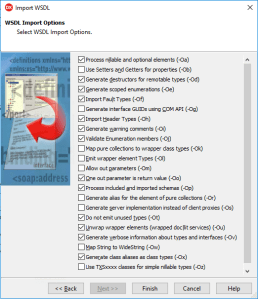
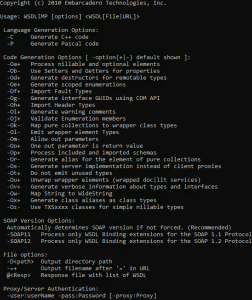
-Oa -Od -Oe -Of -Oh -Oi -Oj -Oo -Op -Ot -Ou -Ov -Ox

This matches the output from the WSDLImp.exe default settings as well (larger screenshots below):

I suspect the reason is that the command-line importer does, but the wizard does not, show an exception during processing:

*Error*: D:\Playground\iECK DT2.0 services v2.1.1\xsd\ECK-DT2-CatalogServiceSchema-v2.1.1.xsd
> Access violation at address 0059DBA4 in module 'WSDLImp.exe'. Read of address 00000000
Done : D:\Playground\iECK DT2.0 services v2.1.1\wsdl\ECK-DT2-CatalogService-v2.1.1.wsdl>0
Writing: D:\Playground\iECK_ImportWSDL\ECK_DT2_CatalogService_v2.pas

Hopefully more on that later.

Both the IDE expert and console based WSDLimp will write the output .pas file and the output file of both tools has the same content.

–jeroen

Read the rest of this entry »

Posted in Conference Topics, Conferences, Delphi, Development, Event, Software Development | Leave a Comment »

Delphi – finding published event handlers that have lost their binding from the DFM

Posted by jpluimers on 2018/05/15

The scripts in these links didn’t work well enough for me:

So I’ve been working on a GExperts based solution (because that gave me a nice starting point). It’s not fully done yet, so here are a few things I’ve used:

(Reminder to self: contact David Hoyle who knows a lot about the OTA).

–jeroen

Read the rest of this entry »

Posted in Delphi, Development, Software Development | Leave a Comment »

Delphi .dproj file changed or not changed? Normalize it! | The Art of Delphi Programming

Posted by jpluimers on 2018/05/02

Cool tool that integrates into the Delphi IDE: [WayBackDproj changed or not changed? Normalize it! | The Art of Delphi Programming

Via: [WayBack] Introducing DprojNormalizer: http://www.uweraabe.de/Blog/2017/01/18/dproj-changed-or-not-changed/ – Uwe Raabe – Google+

Note there is also RadCLI that requires Python and does it via the command-line:[WayBackjoshkel/RadCli: Command-line utilities for RAD Studio / Delphi / C++Builder

DprojNormalizer supports Delphi XE7 and up.

Updates at [WayBack] Downloads | The Art of Delphi Programming: DprojNormalizer

Note that it requires an elevation to Administrator for installing. If you run Delphi as a normal user, then afterwards you need to register the package yourself, for instance with a batch file like this:

reg add "HKEY_CURRENT_USER\Software\Embarcadero\BDS\18.0\Known Packages" /v "C:\Program Files (x86)\DprojNormalizer\DprojNormalizer240.bpl" /t REG_SZ /d "Dproj Normalizer" /f
reg add "HKEY_CURRENT_USER\Software\Embarcadero\BDS\19.0\Known Packages" /v "C:\Program Files (x86)\DprojNormalizer\DprojNormalizer250.bpl" /t REG_SZ /d "Dproj Normalizer" /f

Adjust your BDS and DllSuffix in the BPL file names using the table at Delphi version info table: C# Builder, Delphi 8 through 10.2 Tokyo and Appbuilder.

If you want to temporarily disable it:

reg add "HKEY_CURRENT_USER\Software\Embarcadero\BDS\18.0\Disabled Packages" /v "C:\Program Files (x86)\DprojNormalizer\DprojNormalizer240.bpl" /t REG_SZ /d "Dproj Normalizer" /f
reg add "HKEY_CURRENT_USER\Software\Embarcadero\BDS\19.0\Disabled Packages" /v "C:\Program Files (x86)\DprojNormalizer\DprojNormalizer250.bpl" /t REG_SZ /d "Dproj Normalizer" /f

If you want to re-enable it: remove the values under Disabled Packages.

–jeroen


Posted in Conference Topics, Conferences, Delphi, Development, Event, Software Development | 1 Comment »

delphi – How to get rid of exception 80000003? – Stack Overflow

Posted by jpluimers on 2018/05/02

The [WayBackdelphi – How to get rid of exception 80000003? – Stack Overflow got me on the right track:

When I run my program (admittedly, it was built in debug mode), I get an error “External exception 80000003”.

According to Win32 Exception/Access Violation Errors it means 0x80000003 EXCEPTION_BREAKPOINT A breakpoint was encountered.

What happened was that during debugging a multi-threaded application doing quite a bit of Windows API stuff and CPU debugger Windows stuff by single-stepping through it.

Single-stepping involves the debugger putting a lot of temporary breakpoints similar to how other debuggers do this:

when stepping at the source level, the debugger uses temporary breakpoints to stop execution at the specified location

Source: [WayBackARM Information Center – ARM DS-5 Using the Debugger – Stepping through an application

On Intel platforms, temporary breakpoints are usually done using an INT 3 instruction as that encodes in the single-byte 0xCC opcode. which is very simple for the debugger to patch and remove: just keep a list of addresses and the original byte content.

Note that some debuggers even allow you to manually set temporary breakpoints that disappear after 1-time use; see [WayBackTemporary Breakpoint – Now You See It, Now You Don’t – mohit.io:

Have you faced the problem of breakpoint clutter where breakpoints keep piling up only to hinder the debugging session?  It is then that one realizes that there are some breakpoints that can be deleted and others disabled. A useful feature in a debugger is a temporary breakpoint that automagically gets deleted when hit thereby reducing the clutter of unnecessary breakpoints.

Somehow this doesn’t work well all the time in the Delphi debugger when using multi-threading, but not in a reproducible way: you get a 0x80000003 exception at irregular moments, but more often when you use more threads.

The solution:

  • do not single step
  • configure the IDE to save the desktop (as that contains your breakpoint settings)
  • put regular breakpoints but configure them to be
    • non-breaking
    • log expressions you are interested in
    • put them in a breakpoint group organised by areas you are interested in
    • turn off/on breakpoint groups when certain breakpoints are hit

The above is far more painstaking than using single-stepping but suffers from far less problems.

–jeroen

PS: Thanks David Heffernan for indicating “Websearch for NTSTATUS. Knowledge of that macro name is the key.”

Posted in Delphi, Delphi XE8, Development, Software Development | 1 Comment »